Einführung
This manual provides essential instructions for the installation, operation, and maintenance of your Fermax Sup Milo Digital Intercom System. Please read this manual thoroughly before installation and use to ensure proper function and safety. Keep this manual for future reference.
The Fermax Sup Milo Digital Intercom System is designed to provide clear communication and enhanced security for residential and commercial premises. It integrates advanced technology with a robust design to offer reliable access control and communication solutions.
Sicherheitshinweise
Always follow basic safety precautions to reduce the risk of fire, electric shock, and injury to persons. This product should only be installed and serviced by qualified personnel.
- Trennen Sie vor der Installation oder Wartung die Stromversorgung.
- Setzen Sie das Gerät weder Regen noch Feuchtigkeit aus.
- Stellen Sie sicher, dass alle Kabelverbindungen sicher sind und den örtlichen Elektrovorschriften entsprechen.
- Versuchen Sie nicht, das Gerät selbst zu reparieren. Überlassen Sie alle Wartungsarbeiten qualifiziertem Fachpersonal.
Packungsinhalt
Vergewissern Sie sich vor Beginn der Installation, dass alle Komponenten vorhanden sind. Das Paket enthält üblicherweise Folgendes:
- Fermax Sup Milo Digital Intercom Unit (Aluminum Plate)
- Montagezubehör
- Connection cables (may vary by kit)
- Benutzerhandbuch (dieses Dokument)
Note: Specific components may vary based on the purchased kit.
Setup und Installation
This section outlines the general steps for installing the Fermax Sup Milo Digital Intercom System. Professional installation is recommended.
1. Standortvorbereitung
- Choose a suitable mounting location, typically near an entrance, at an accessible height.
- Stellen Sie sicher, dass die Oberfläche eben und stabil ist.
- Verify access to necessary power and communication wiring.
2. Montage der Einheit
- Carefully remove the front panel of the intercom unit to access mounting holes.
- Position the unit and mark the drilling points on the wall.
- Bohren Sie gegebenenfalls Löcher und setzen Sie geeignete Wandanker ein.
- Secure the intercom unit to the wall using the provided mounting screws.
3. Kabelverbindungen
Refer to the wiring diagram specific to your system configuration. General connections include:
- Stromversorgung: Connect to a stable 100V power source. Ensure correct polarity.
- Communication Bus: Connect the digital bus lines to the indoor units and central control unit.
- Türöffner: Connect the door release mechanism (e.g., electric strike) to the designated terminals.
- Zusätzliche Ein-/Ausgänge: Connect any additional devices such as external cameras or sensors as required.
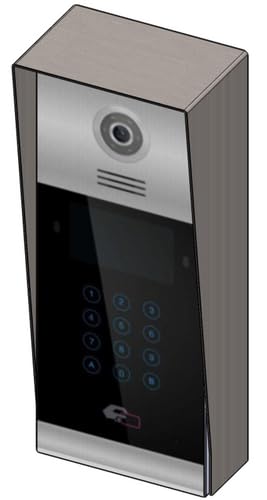 Bild 1: Vorderseite view of the Fermax Sup Milo Digital Intercom System, showing the aluminum plate and digital keypad. This image illustrates the exterior design of the main unit.
4. Erste Inbetriebnahme und Konfiguration
- Sobald die gesamte Verkabelung abgeschlossen und sicher angebracht ist, schalten Sie die Stromversorgung des Systems wieder ein.
- The unit will perform a self-test. Observe any indicator lights or sounds.
- Follow the system's programming guide (usually provided separately or accessible via a master unit) to configure apartment numbers, access codes, and other settings.
Bedienungsanleitung
Making a Call from the Outdoor Panel
- To call an apartment: Enter the apartment number using the digital keypad.
- Press the "Call" button (often represented by a bell icon or similar).
- The indoor unit will ring. Once answered, communication can begin.
Receiving a Call and Opening the Door (Indoor Unit)
- When the indoor unit rings, press the "Answer" button to establish communication with the visitor.
- To open the door, press the "Door Release" button on your indoor unit.
- The door will unlock for a short period.
Using Access Codes
If configured, authorized users can enter a pre-programmed access code on the outdoor digital keypad to unlock the door without needing to call an indoor unit.
- Enter your personal access code using the digital keypad.
- Press the "Enter" or "Door Release" button.
- Die Tür wird entriegelt.
Wartung
Regular maintenance ensures the longevity and optimal performance of your Fermax intercom system.
Reinigung
- Reinigen Sie das Äußere des Geräts mit einem weichen, damp Tuch.
- Do not use abrasive cleaners, solvents, or chemical sprays, as these can damage the finish and electronic components.
- Stellen Sie sicher, dass keine Flüssigkeit in die Öffnungen des Geräts eindringt.
Inspektionen
- Periodically check for any visible damage to the unit or wiring.
- Stellen Sie sicher, dass alle Befestigungsschrauben fest angezogen sind.
- Test the communication and door release functions regularly.
Software-Updates
If applicable, consult your installer or Fermax support for information on firmware updates that may improve performance or add new features.
Fehlerbehebung
Dieser Abschnitt behandelt häufig auftretende Probleme. Bei komplexeren Problemen wenden Sie sich bitte an den technischen Support.
| Problem | Mögliche Ursache | Lösung |
|---|---|---|
| No communication with indoor unit. |
|
|
| Türöffner funktioniert nicht. |
|
|
| Tastatur reagiert nicht. |
|
|
Technische Daten
Technical specifications for the Fermax Sup Milo Digital Intercom System (Model: 8424299951713).
- Modell: Fermax Sup Milo Digital Intercom System
- Teilenummer: 8424299951713
- Hersteller: Fermax
- Abmessungen (Paket): ca. 0.1 x 0.1 x 0.1 cm
- Weight (Unit): 108 Gramm
- Material: Metal, Plastic, Polycarbonate (Aluminum Plate)
- Energiequelle: External Power Supply (100V)
- Bandtage: 100 V
- Wastage: 100 W
- Erforderliche Batterien: NEIN
- Farbe: Multicolored (referring to internal components or subtle design elements, main plate is aluminum)
Garantieinformationen
Fermax products are manufactured to high-quality standards. For specific warranty terms and conditions, please refer to the warranty card included with your product or visit the official Fermax webBewahren Sie Ihren Kaufbeleg für Garantieansprüche auf.
Typically, warranty covers manufacturing defects for a specified period from the date of purchase. Damage due to improper installation, misuse, or unauthorized repairs is generally not covered.
Kundenservice
If you require technical assistance, have questions about your product, or need to report a problem, please contact your local Fermax distributor or visit the official Fermax webSite für Supportressourcen.
WebWebsite: www.fermax.com
Bitte halten Sie Ihre Modellnummer (8424299951713) und die Kaufdetails bereit, wenn Sie sich an den Support wenden.


