1. Einleitung
Thank you for choosing AMAFACE C01-purple Bluetooth Headphones. These wireless earbuds are designed for comfort and performance, featuring an open-back design, long battery life, and intuitive controls, making them ideal for sports and daily use. This manual provides detailed instructions to help you get the most out of your new headphones.
2. Lieferumfang
- AMAFACE C01-purple Bluetooth Headphones (Left and Right Earbuds)
- Ladeetui
- USB-C-Ladekabel
- Bedienungsanleitung

Image: The AMAFACE C01-purple Bluetooth Headphones, including both earbuds and their transparent charging case, as they appear when unboxed.
3. Einrichtung
3.1 Aufladen der Kopfhörer
Before first use, fully charge the headphones and charging case. Place the earbuds into the charging case. Connect the USB-C cable to the charging port on the case and the other end to a USB power source. The smart LED indicators on the charging case will illuminate to show charging status and battery level.
- Ohrhörer-Spielzeit: Bis zu 5 Stunden mit einer einzigen Ladung.
- Gesamtspielzeit mit Ladekoffer: Bis zu 25 Stunden.
- Ladezeit: Ungefähr 2 Stunden für eine vollständige Aufladung.

Image: The earbuds and charging case, highlighting the 25-hour total battery life and 5-hour single charge playtime.

Image: A visual representation of the charging case and earbuds, illustrating the 25 hours of total battery life and 5 hours of single charge playtime.
3.2 Bluetooth-Kopplung
The headphones feature automatic connection for seamless pairing.
- Stellen Sie sicher, dass sich die Ohrhörer im Ladecase befinden und dass das Case geöffnet ist.
- Gehen Sie auf Ihrem Gerät (Smartphone, Tablet usw.) zu den Bluetooth-Einstellungen.
- Suchen nach new devices and select "C01" from the list.
- Once connected, the earbuds are ready for use. They will automatically reconnect to the last paired device when removed from the case.

Image: A visual guide demonstrating the one-step auto-pairing process with a smartphone's Bluetooth settings, showing "C01" as a connected device.
3.3 Tragen der Kopfhörer
The AMAFACE C01-purple headphones are designed with an earhook for a secure and comfortable fit, especially during physical activity. They rest gently on top of your ears, providing an open-back listening experience.

Image: A woman wearing the AMAFACE C01-purple headphones, illustrating their ergonomic earhook design suitable for sports and active use.

Image: A diagram illustrating the correct placement of the left and right earbuds, and demonstrating correct and incorrect wearing methods for optimal fit and sound.
4. Bedienungsanleitung
4.1 Berührungssteuerung
The AMAFACE C01-purple headphones feature intuitive touch controls on each earbud for easy management of audio playback and calls.
| Aktion | Funktion |
|---|---|
| 1x Tippen Sie auf | Wiedergabe/Pause, Anruf annehmen |
| 2x Tap (Left Earbud) | Lautstärke verringern |
| 2x Tap (Right Earbud) | Lautstärke erhöhen |
| 3x Tippen Sie auf | Previous/Next Track (depending on earbud) |
| 2s lang drücken | Anruf ablehnen, Sprachassistent aktivieren |
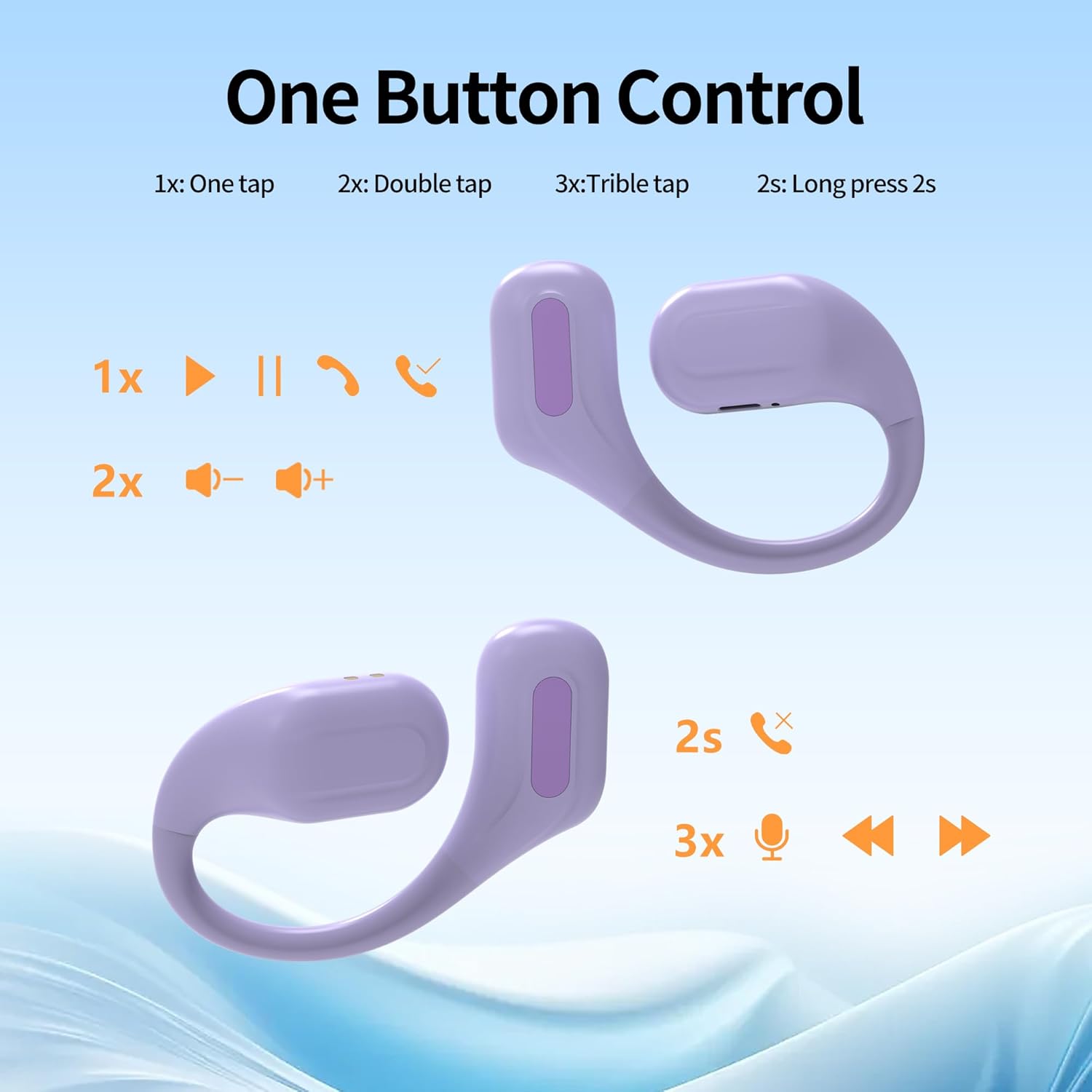
Image: A diagram illustrating the various touch control functions for the earbuds, including single tap, double tap, triple tap, and long press actions.

Bild: Ein überview of the simple touch controls, highlighting features like Bluetooth 5.3, intelligent chips, binaural/single ear use, IPX5 waterproof rating, automatic pairing, call answering, and up to 22 hours of battery life.
4.2 Hauptmerkmale
- Offenes Design: Allows you to remain aware of your surroundings while enjoying audio, enhancing safety during outdoor activities.
- HiFi-Stereoklang: Equipped with 10mm composite membrane speaker drivers for pure, balanced audio and deep, resonant bass.
- IPX6 Sweat-Resistant: Designed to withstand sweat and rain, making them suitable for intense workouts and outdoor use.
- Built-in Cool Lights: The charging case features smart LED lights that flash in multiple colors when turned on, adding a unique visual element.
- Bluetooth 5.3-Technologie: Bietet eine stabile und schnelle drahtlose Verbindung.

Image: The charging case showcasing its built-in cool lights, which offer 5 types of light switching and indicate the battery status for the earbuds.

Image: A visual representation emphasizing the deep and powerful bass capabilities of the AMAFACE C01-purple headphones, with miniature figures enjoying music.

Image: A woman wearing the open-ear design headphones, highlighting the "Open-Ear Design" and "Born for Sports!" slogans, indicating a new way of hearing.

Image: The earbuds being splashed with water, illustrating their IPX5 sweat-resistant feature which protects internal components from damage.

Image: A close-up of the earbud's internal components, emphasizing the "Latest Bluetooth 5.3 Technology" for lightning-fast connectivity and seamless streaming.

Image: Four panels showing individuals using the headphones in different settings, illustrating benefits such as game mode support, not missing important notices, awareness of surroundings during exercise, and ability to talk while listening to music.
4.3 Offizielles Produktvideo
Video: An official product video demonstrating the unboxing, features, and usage of the AMAFACE C01 Sport Earbuds, including the changing LED lights of the charging case.
5. Wartung
To ensure the longevity and optimal performance of your AMAFACE C01-purple headphones, follow these maintenance guidelines:
- Reinigung: Wischen Sie die Ohrhörer und das Ladecase vorsichtig mit einem weichen, trockenen und fusselfreien Tuch ab. Verwenden Sie keine scharfen Chemikalien oder Scheuermittel.
- Wassereinwirkung: While the headphones are IPX6 sweat-resistant, avoid submerging them in water or exposing them to strong jets of water. Dry them thoroughly if they get wet.
- Lagerung: Bewahren Sie die Kopfhörer bei Nichtgebrauch im Ladecase auf, um sie vor Staub und Beschädigungen zu schützen. Lagern Sie sie an einem kühlen, trockenen Ort und vermeiden Sie extreme Temperaturen.
- Laden: Verwenden Sie zum Aufladen ausschließlich das mitgelieferte USB-C-Kabel oder ein zertifiziertes gleichwertiges Kabel.
6. Fehlerbehebung
Sollten Sie Probleme mit Ihren Kopfhörern haben, versuchen Sie folgende Lösungen:
| Problem | Lösung |
|---|---|
| Kopfhörer lassen sich nicht koppeln | Ensure Bluetooth is enabled on your device. Place earbuds back in the case, close, then open to re-enter pairing mode. Forget "C01" from your device's Bluetooth list and try pairing again. Ensure earbuds are charged. |
| Kein Ton von einem Ohrhörer | Check if both earbuds are charged. Place both earbuds back in the charging case, close the lid, wait a few seconds, then open the lid and try again. |
| Ladeetui lädt nicht | Ensure the USB-C cable is securely connected to both the case and the power source. Try a different USB port or power adapter. |
| Geringe Lautstärke oder schlechte Klangqualität | Adjust the volume on both your device and the earbuds. Ensure earbuds are clean and free of debris. Check for any obstructions on the speaker grilles. |
| Intermittierende Verbindung | Ensure your device is within the Bluetooth range (approximately 10 meters). Avoid obstacles between your device and the headphones. Reduce interference from other wireless devices. |
7. Spezifikationen
| Besonderheit | Detail |
|---|---|
| Modellname | C01-purple |
| Marke | AMAFACE |
| Konnektivitätstechnologie | Kabellos (Bluetooth 5.3) |
| Platzierung des Ohrs | On Ear (Earhook) |
| Wasserbeständigkeit | IPX6 Wasserbeständig |
| Akkulaufzeit (Ohrhörer) | Bis zu 5 Stunden |
| Gesamtspielzeit (mit Hülle) | Bis zu 25 Stunden |
| Ladezeit | Ca. 2 Stunden |
| Steuerungstyp | Touch-Steuerung |
| Audiotreibertyp | Dynamischer Treiber (10 mm) |
| Artikelgewicht | 6 Gramm (pro Ohrhörer) |
| Frequenzbereich | 20 Hz – 20,000 Hz |
| Impedanz | 32 Ohm |
8. Garantie und Support
AMAFACE products are manufactured to the highest quality standards. For any questions, technical support, or warranty claims, please refer to the contact information provided with your purchase or visit the official AMAFACE store on Amazon: AMAFACE Amazon Store.


