Model: Fairy 10
Thank you for choosing the TAB Fairy10 Robot Vacuum and Mop Combo. This advanced cleaning device is designed to provide a comprehensive and hands-free cleaning experience for your home. Featuring powerful suction, intelligent navigation, and a multifunctional docking station, the Fairy10 simplifies floor maintenance. This manual provides essential information for setup, operation, and maintenance to ensure optimal performance and longevity of your device.
Bitte lesen Sie vor der Benutzung des Geräts alle Sicherheitshinweise sorgfältig durch. Bewahren Sie diese Bedienungsanleitung zum späteren Nachschlagen auf.
Überprüfen Sie, ob alle Komponenten im Paket vorhanden sind:
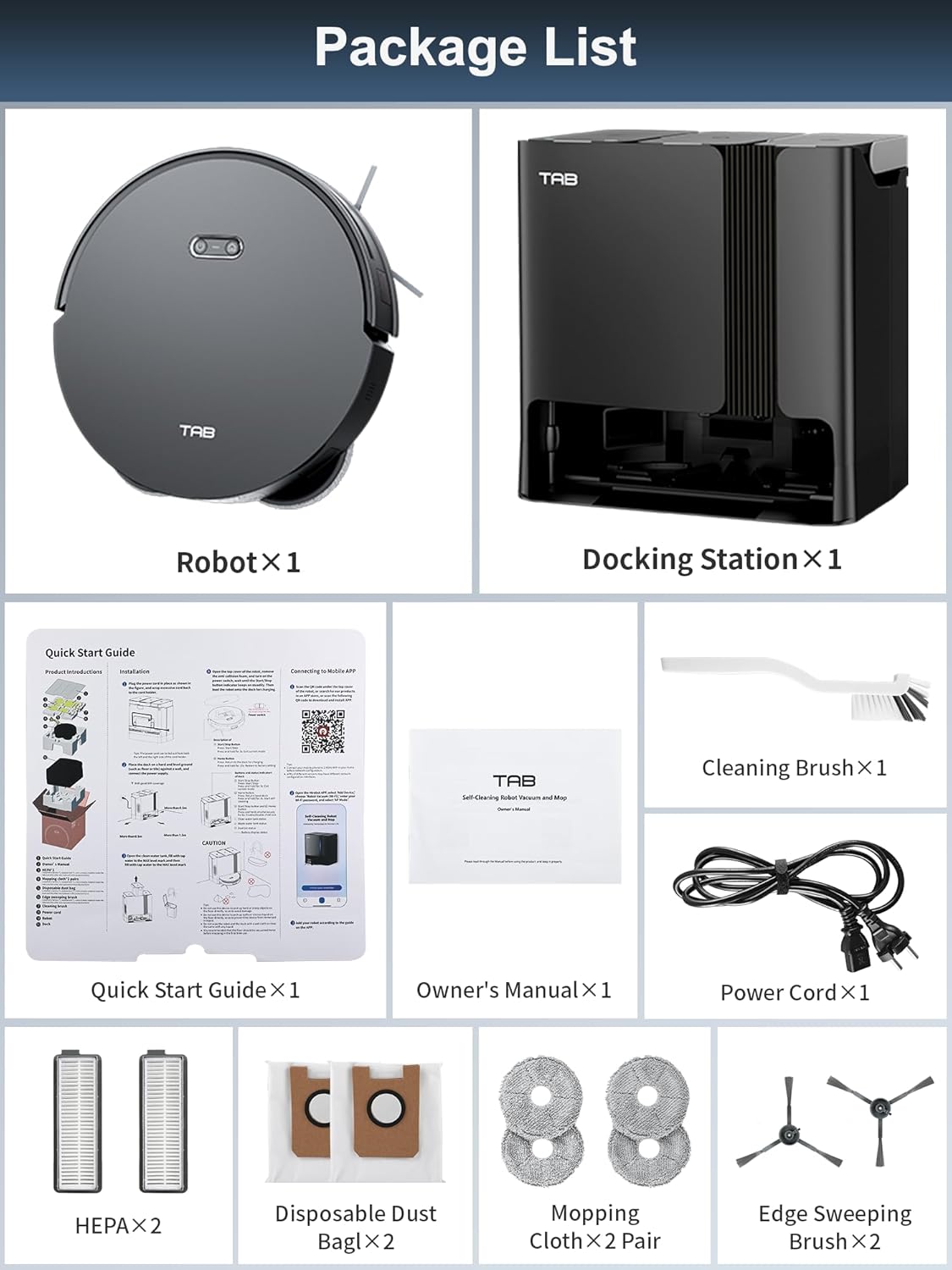
Image: All components included in the TAB Fairy10 package, neatly laid out.
The TAB Fairy10 consists of the robot vacuum and a multifunctional docking station.

Image: The TAB Fairy10 robot vacuum positioned in front of its docking station, with a smartphone showing the companion app.
The robot features a compact design with hidden LiDAR navigation, allowing it to access tighter spaces. It is equipped with a multi-directional floating brush and dual rotary mops for effective cleaning.
The docking station serves as an all-in-one hub for the robot, providing self-draining, self-washing, self-drying, self-cleaning, and self-refilling capabilities.

Image: A visual representation of the docking station's capabilities, including self-mop cleaning, self-dust emptying, self-mop drying, and self-refilling.
Alle Komponenten vorsichtig aus der Verpackung entnehmen. Verpackungsmaterialien für späteren Transport oder Lagerung aufbewahren.
Place the docking station on a hard, level surface against a wall. Ensure there is at least 0.5 meters (1.6 feet) of clear space on both sides and 1.5 meters (4.9 feet) in front of the station for the robot to dock properly. Connect the power adapter to the docking station and plug it into a wall outlet.
Install the side brushes by pressing them into their slots until they click. Ensure the mop pads are securely attached to the mop module.
Place the robot onto the docking station. Ensure the charging contacts align. The robot will begin charging automatically. For first use, fully charge the robot before operation.
Download the official TAB app from your smartphone's app store. Follow the in-app instructions to connect your Fairy10 robot. This typically involves creating an account, adding the device, and connecting it to your home Wi-Fi network.
Once connected, initiate a mapping run through the app. The hidden LiDAR navigation system will efficiently scan and map your home, creating a detailed floor plan for optimized cleaning routes.

Image: The robot vacuum actively mapping a room using its LiDAR system, with a visual representation of the map being created on a smartphone screen.
You can start or stop a cleaning cycle using the button on the robot or through the TAB app. The robot will automatically return to the docking station upon completion or when its battery is low.
The Fairy10 offers versatile cleaning modes to suit your needs:

Bild: Visuelles Beispielamples of the four available cleaning modes: sweep only, mop only, sweep then mop, and mop while sweeping.

Image: The robot vacuum demonstrating its powerful 6000Pa suction on a carpeted surface.

Image: The robot vacuum actively mopping a hard floor, showcasing its dual rotating mops and key specifications like rotation speed, lift, and pressure.
Set specific cleaning times via the app to automate your cleaning routine. The robot will start and return to the dock as scheduled.

Image: The robot vacuum returning to its base, indicating a successful scheduled cleaning setup.
Use the app to define specific areas for cleaning, such as the kitchen, living room, or bedroom, allowing for customized cleaning preferences.

Image: The app interface displaying targeted cleaning zones, with corresponding images of the robot cleaning different rooms.
Set virtual boundaries or no-go zones in the app to prevent the robot from entering specific areas, protecting delicate items or preventing access to certain rooms.

Image: The robot vacuum avoiding a designated 'No-Go Zone' in a home environment.
Activate the child lock feature in the app to prevent unintended operation by children or pets, ensuring safety.

Image: The robot vacuum with a child lock icon, illustrating its safety feature when children or pets are present.
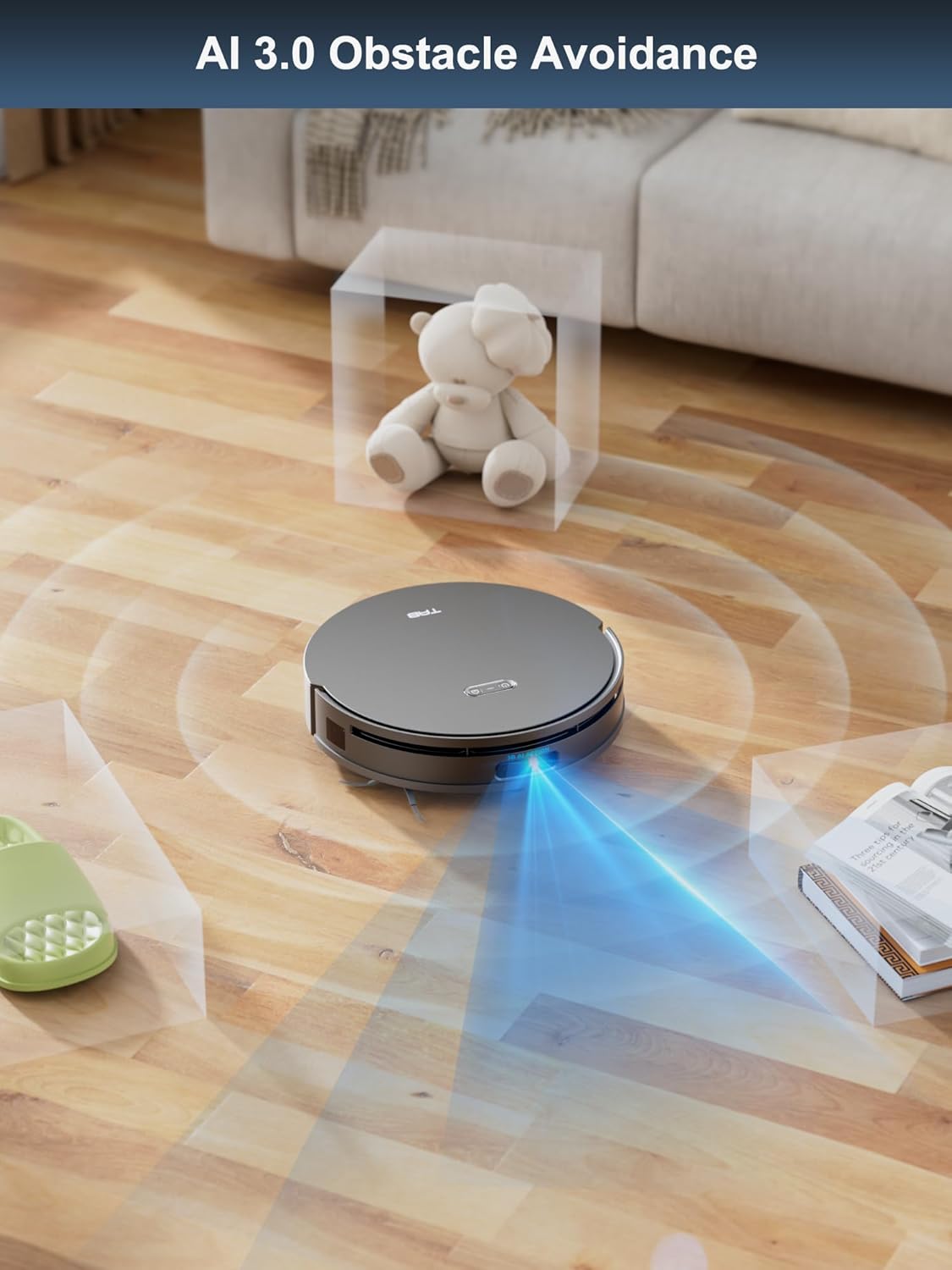
The hidden LiDAR navigation system allows the robot to create precise maps and navigate efficiently, even in tight spaces. AI 3.0 Obstacle Avoidance helps the robot detect and avoid objects on the floor, reducing the need for pre-cleaning.

Image: The robot vacuum demonstrating its hidden LiDAR navigation by cleaning under a sofa, highlighting its ability to access tight spaces.

Image: The robot vacuum employing AI 3.0 obstacle avoidance to detect and navigate around various items on the floor.
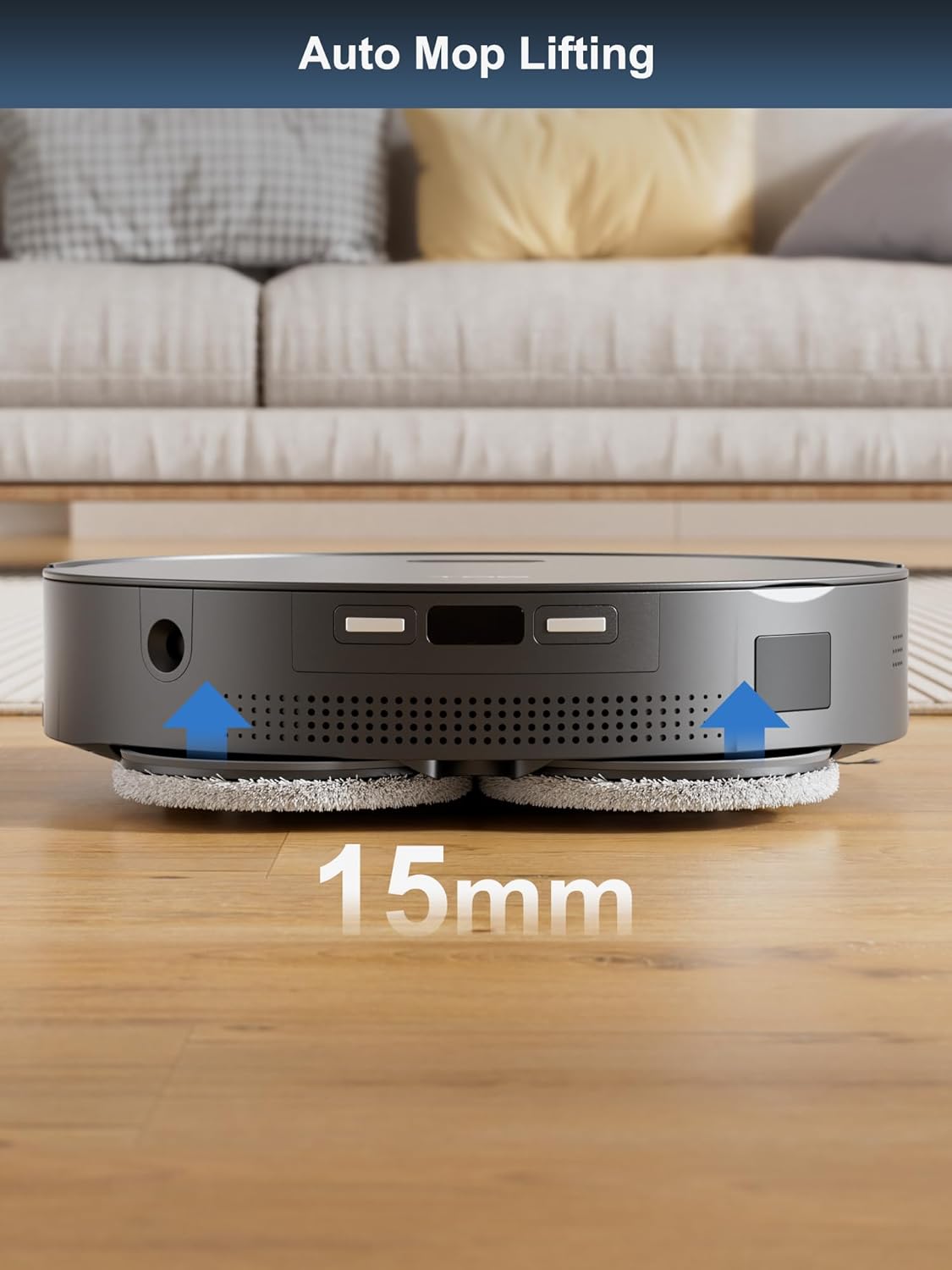
The robot automatically lifts its mops by 15mm when it detects carpets, preventing them from getting wet during vacuuming cycles.

Image: The robot vacuum demonstrating its auto mop lifting feature, raising its mops by 15mm as it approaches a carpet.
Regular maintenance ensures the optimal performance and longevity of your TAB Fairy10.
The docking station automates several maintenance tasks:

Image: The self-cleaning and hot air drying processes for the mop pads within the docking station.

Bild: Ein transparentes view of the docking station illustrating the automatic dust emptying process.
Replace consumables according to usage or as indicated by the app:
If you encounter issues with your TAB Fairy10, refer to the following common solutions:
| Problem | Mögliche Ursache | Lösung |
|---|---|---|
| Roboter lässt sich nicht einschalten | Schwache Batterie; Netzschalter ausgeschaltet | Laden Sie den Roboter auf; Stellen Sie sicher, dass der Netzschalter eingeschaltet ist. |
| Roboter kann nicht andocken | Docking station obstructed; Incorrect placement | Clear obstacles around the dock; Ensure proper placement as per setup instructions |
| Schlechte Reinigungsleistung | Full dustbin; Clogged brushes/filters; Worn mop pads | Empty dustbin/replace dust bag; Clean brushes/filters; Replace mop pads |
| Probleme mit der App-Konnektivität | Falsches WLAN-Passwort; Roboter zu weit vom Router entfernt; App veraltet | Verify Wi-Fi credentials; Move robot closer to router; Update app to latest version |
| Mops not drying | Air vents blocked; Drying cycle not initiated | Check for obstructions in air vents; Ensure drying function is enabled in app |
For further assistance, please refer to the support section of the TAB app or visit the official TAB webWebsite.
| Besonderheit | Spezifikation |
|---|---|
| Marke | TAB |
| Modellname | Fairy 10 |
| Besonderheit | Auto Mop Washing, Auto-Docking, Automatic Dust Collection |
| Farbe | Schwarz |
| Technische Daten | 18.8 Zoll L x 18.8 Zoll B x 19.2 Zoll H |
| Filtertyp | Patrone |
| Akkulaufzeit | 120 Мinuten |
| Stromquelle | Batteriebetrieben |
| Kontrollmethode | App |
| Kompatible Geräte | Smartphones |
| Artikelgewicht | 42.1 Pfund |
For warranty information and customer support, please refer to the official TAB website or contact their customer service directly. Details can typically be found in the TAB app under the 'Support' or 'About Us' sections.
Online-Ressourcen:
![]() |
TAB T6-Pro Smart Akku-Nass-Trocken-Staubsauger und Mopp – Bedienungsanleitung Ausführliche Bedienungsanleitung für den kabellosen Nass-Trocken-Staubsauger und Wischmopp TAB T6-Pro Smart, die Sicherheitshinweise, Montage, Bedienung, Wartung und Fehlerbehebung umfasst. |
![]() |
Bedienungsanleitung für die Teppichreinigungsmaschine TAB R6 Ausführliches Benutzerhandbuch für die Teppichreinigungsmaschine TAB R6, einschließlich Sicherheitshinweisen, Produkteinführung, Vorbereitung, Bedienungsanleitung, Wartung und Fehlerbehebung. |
![]() |
Produktinformationen und Leitfaden für generalüberholte Artikel der Serien EG200/EG300. Informationen zu den Produkten der Serien EG200 und EG300, einschließlich Hinweisen zu Zubehör, Modellvarianten und Richtlinien für generalüberholte Geräte. Dieses Dokument dient als Anleitung und Support-Leitfaden. |
![]() |
Produktinformationen und Hinweise zur TAB EG200/EG300-Serie Überview Dieses Dokument enthält allgemeine Informationen und wichtige Hinweise zu Zubehör, Abbildungen und dem Umgang mit generalüberholten Geräten der TAB EG200- und EG300-Serie, einschließlich der Modelle EG201, EG351 und EG351A. |
![]() |
Bedienungsanleitung für die Teppichreinigungsmaschine TAB R6 Benutzerhandbuch für die Teppichreinigungsmaschine TAB R6 mit umfassenden Anweisungen für sicheren Betrieb, Wartung und Fehlerbehebung. |
![]() |
TAB e.module L5.1 Lithium-Ionen-Energiespeichersystem – Bedienungsanleitung Dieses Handbuch enthält umfassende Anweisungen zur Installation, zum Betrieb und zu den Sicherheitsvorkehrungen für das Lithium-Ionen-Energiespeichersystem TAB e.module L5.1. Erfahren Sie mehr über seine Funktionen, Spezifikationen, Bedienelemente an der Vorderseite und die korrekte Handhabung. |