1. Einleitung
This manual provides detailed instructions for the installation, operation, and maintenance of the LINOVISION Industrial 8-Port Full Gigabit POE++ Switch (Model: POE-SW508G) and the BT90W Outdoor PoE Extender (Model: POE-EXT6002GP). Please read this manual thoroughly before using the product to ensure proper functionality and safety.
2. Produktüberschreitungview
2.1 Industrial 8-Port Full Gigabit POE++ Switch (POE-SW508G)
The LINOVISION POE-SW508G is an industrial-grade PoE switch designed for robust network applications. It features 8 Gigabit Ethernet PoE ports and 2 Gigabit SFP ports for fiber optic connections.

Bild 2.1: Vorne und seitlich view of the LINOVISION Industrial 8-Port Full Gigabit POE++ Switch. The front panel includes 4 x 90W Gigabit PoE ports (ports 1-4), 4 x 30W Gigabit PoE ports (ports 5-8), and 2 x Gigabit SFP ports. Green LEDs indicate power activity, and yellow LEDs indicate network activity. The side view shows grounding terminals and dual power inputs (PWR1, PWR2).
2.2 BT90W Outdoor PoE Extender (POE-EXT6002GP)
The BT90W Outdoor PoE Extender is designed to extend PoE power and data over long distances in harsh outdoor environments. It can split a single BT90W PoE input into two PoE outputs.

Bild 2.2: The LINOVISION BT90W Outdoor PoE Extender, featuring an aluminum housing and IP67 waterproof standard. It has a PoE In port, and two PoE Out ports (60W and 30W) for connecting devices.
3. Einrichtung und Verbindung
3.1 Connecting the PoE Switch
- Connect your network devices (e.g., IP cameras, wireless access points) to the PoE ports (1-8) of the POE-SW508G switch using standard Ethernet cables. Ports 1-4 support up to 90W (PoE++), and ports 5-8 support up to 30W (PoE+).
- Connect your uplink network device (e.g., router, NVR) to one of the Gigabit SFP ports using appropriate SFP modules and fiber optic cables, or to a standard Ethernet port if available.
- Connect the power adapter to the switch's power input. Ensure the power source matches the required voltage.
3.2 Connecting to the PoE Extender
The PoE Extender (POE-EXT6002GP) can be used to extend the reach of PoE devices or to split a single PoE input into two outputs for multiple devices.
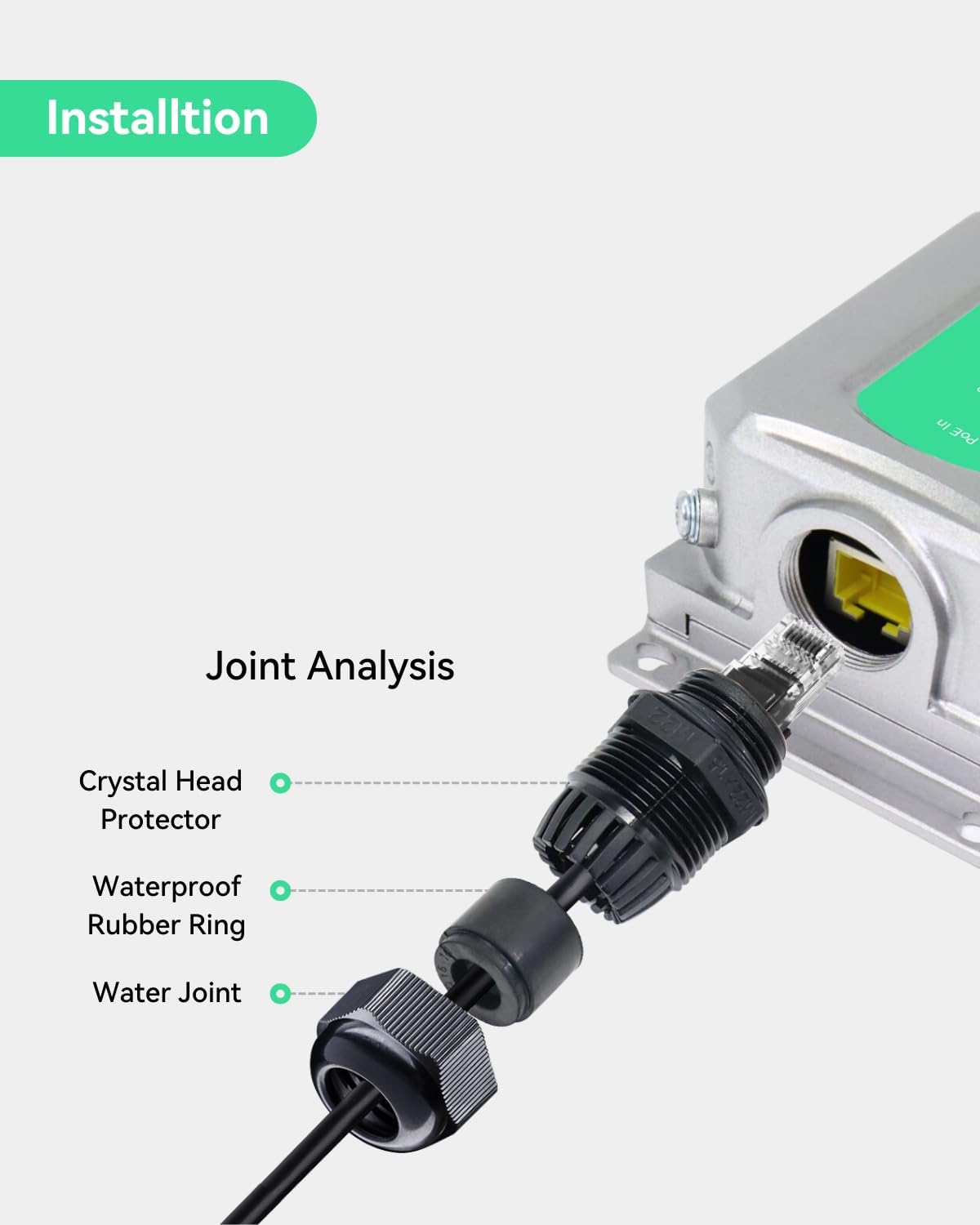
Bild 3.1: Connection diagram illustrating how the POE-SW508G switch connects to the POE-EXT6002GP extender. The extender then provides power and data to a PTZ camera (up to 60W) and a non-PoE/PoE IP camera (up to 30W), extending the total reach up to 330ft per segment.
- Connect an Ethernet cable from a PoE port on the POE-SW508G switch to the 'PoE In' port of the POE-EXT6002GP extender. This cable provides both power and data to the extender.
- Connect your PoE-powered devices (e.g., PTZ camera, IP camera) to the 'PoE Out' ports of the extender. The extender provides one 60W output and one 30W output.
- Ensure all connections are secure and waterproof, especially for outdoor installations.
3.3 Netzteil
The product includes a default 120W power supply. An optional Mean Well 240W Din rail Power Supply (ASIN: B015C9ITSS) can be used to increase the total PoE budget to 240W.
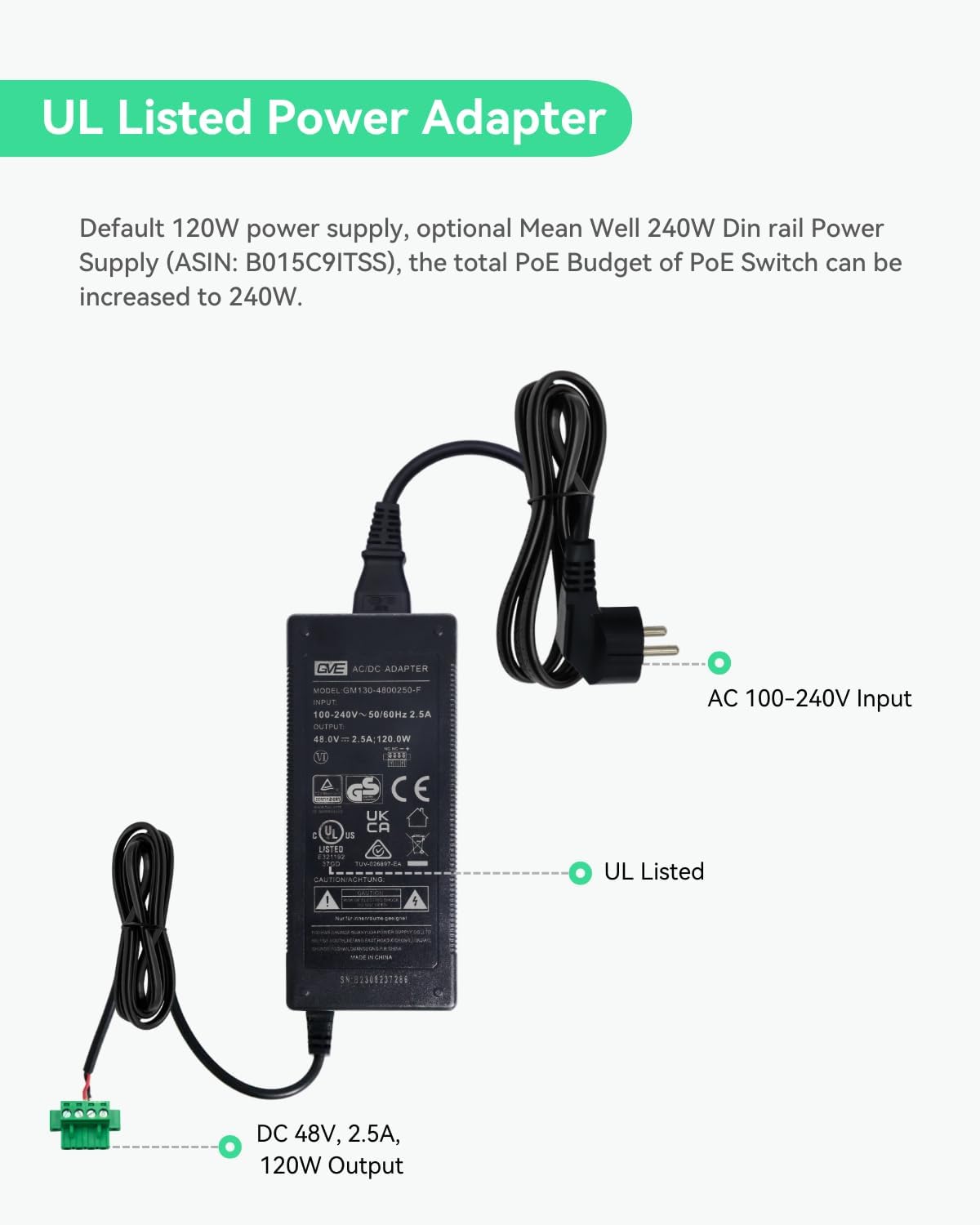
Bild 3.2: The UL Listed 120W AC/DC power adapter. It accepts AC 100-240V input and provides DC 48V, 2.5A, 120W output. This adapter is used to power the PoE switch.
4. Bedienung
Once properly connected and powered, the LINOVISION PoE Switch and Extender operate automatically. The switch detects PoE-compatible devices and supplies power accordingly. The extender transparently passes data and extends PoE power.
- Betriebsanzeigen: Green LEDs on the switch indicate power activity for each port.
- Netzwerkindikatoren: Yellow LEDs on the switch indicate network activity (data transmission) for each port.
- PoE-Budget: The POE-SW508G has a total PoE budget of 120W with the default power supply. Ensure the total power consumption of connected PoE devices does not exceed this limit.
5. Installation
5.1 Outdoor Extender Installation
The BT90W Outdoor PoE Extender is designed for outdoor use and requires proper installation to maintain its IP67 rating and lightning protection.

Bild 5.1: Joint analysis for the waterproof installation of the PoE Extender. This image highlights the components for ensuring a waterproof connection: a crystal head protector, a waterproof rubber ring, and a water joint. Proper assembly of these components is crucial for outdoor durability.
- Mount the extender securely to a wall or pole using appropriate mounting hardware.
- For all cable connections, use the provided waterproof connectors. Ensure the crystal head protector, waterproof rubber ring, and water joint are correctly assembled and tightened to prevent water ingress.
- Connect the grounding wire from the extender to a reliable ground source to ensure 4KV lightning protection.
6. Konfiguration
6.1 Camera Configuration on Site
When deploying cameras with the PoE extender, consider the power requirements and network path.

Bild 6.1: On-site camera configuration diagram. A network cable provides data and power from the PoE In port to the extender. The extender then supplies data and power to a PTZ camera. A separate network cable connects to a laptop for configuration, demonstrating the extended reach for both power and data.
The extender allows for flexible deployment of cameras, even at significant distances from the main switch. Ensure that the total cable length (switch to extender, and extender to camera) does not exceed the recommended limits for reliable data and power transmission.
6.2 Splitting BT90W PoE Outputs
The BT90W PoE Extender can effectively split a single high-power PoE input into two separate PoE outputs, enabling connection of multiple devices from a single cable run.
Bild 6.2: This diagram shows how the BT90W PoE Extender splits a single incoming PoE cable to provide power and network to two separate cameras. One output can deliver up to 60W, and the other up to 30W, allowing for efficient deployment of multiple PoE or non-PoE devices.
This feature is particularly useful for installations where running multiple cables is impractical or costly. Ensure the combined power requirements of the two connected devices do not exceed the extender's output capabilities (60W + 30W).
7. Spezifikationen
Detailed specifications for the LINOVISION Industrial 8-Port Full Gigabit POE++ Switch and BT90W Outdoor PoE Extender are provided below:
| Besonderheit | Spezifikation |
|---|---|
| Marke | LINOVISION |
| Schnittstellentyp | PoE, SFP |
| Datenübertragungsrate | 1 Gigabit pro Sekunde |
| Anzahl der Ports | 8 (PoE Switch) |
| PoE Standards (Switch) | IEEE802.3af/at/bt (Ports 1-4), IEEE802.3af/at (Ports 5-8) |
| Max Power Per Port (Switch) | 90W (Ports 1-4), 30W (Ports 5-8) |
| Total PoE Budget (Switch) | 120W (default), 240W (with optional PSU) |
| PoE Extender Output | 1 x 60 W, 1 x 30 W |
| Kompatible Geräte | Camera, Lighting system, Monitor, Wireless access point |
| Gehäusematerial | Aluminium |
| Obere Temperaturbewertung | 131 Grad Fahrenheit (55 Grad Celsius) |
| IP Rating (Extender) | IP67 |
| Lightning Protection (Extender) | 4 kV |
7.1 Dimensions and Weight (Extender)

Bild 7.1: Dimensions of the LINOVISION BT90W Outdoor PoE Extender. The extender measures approximately 150mm (5.9") in length, 73mm (2.9") in width, and 44mm (1.7") in height. Its weight is approximately 0.4kg (0.88 lb).
8. Fehlerbehebung
- Gerät wird nicht mit Strom versorgt:
- Prüfen Sie, ob das Netzteil fest mit dem Schalter und einer funktionierenden Steckdose verbunden ist.
- Verify that the connected device is PoE compatible and its power requirements do not exceed the port's or total PoE budget.
- Inspect Ethernet cables for damage and ensure they are properly seated.
- Keine Netzwerkverbindung:
- Check the network activity (yellow) LEDs on the switch and the connected device.
- Ensure all Ethernet cables are correctly connected and not damaged.
- Verify the uplink connection to your router or NVR.
- Extender Not Working:
- Ensure the 'PoE In' port on the extender is receiving power from the switch.
- Check the power requirements of devices connected to the extender's 'PoE Out' ports.
- Verify waterproof seals are intact for outdoor units.
9. Wartung
- Reinigung: Reinigen Sie die Außenseite der Geräte mit einem weichen, trockenen Tuch. Verwenden Sie keine flüssigen Reiniger oder Sprays.
- Kabelinspektion: Periodically inspect all network and power cables for signs of wear or damage, especially in outdoor installations.
- Umgebungsbedingungen: Ensure the devices are operated within their specified temperature and humidity ranges. For outdoor extenders, regularly check the integrity of waterproof seals.
- Firmware-Updates: Check the LINOVISION official webWebsite für alle verfügbaren Firmware-Updates zur Verbesserung von Leistung und Sicherheit.
10. Garantie und Support
LINOVISION products are covered by a limited warranty. For specific warranty terms and conditions, please refer to the warranty card included with your product or visit the official LINOVISION website. For technical support, product inquiries, or service requests, please contact LINOVISION customer support through their official channels.
Kontaktinformationen: Please refer to the LINOVISION official website or product packaging for the most current support contact details.


