Einführung
This manual provides essential information for the proper use and maintenance of your FOREVER Smartwatch SW-800. Please read it thoroughly before operating the device to ensure optimal performance and longevity. The SW-800 features a 1.3-inch AMOLED display, Bluetooth connectivity, and various fitness tracking capabilities.

Image: The FOREVER Smartwatch SW-800, showcasing its versatile design with both metal and silicone strap options, and various digital watch faces.
Aufstellen
1. Aufladen der Smartwatch
Before first use, fully charge your smartwatch. Connect the charging cable to the charging port on the back of the watch and plug the USB end into a power adapter (not included) or a computer's USB port. The watch display will indicate charging status.

Abbildung: Die Rückseite view of the smartwatch, highlighting the magnetic charging pins and the optical heart rate sensors.
2. Ein-/Ausschalten
- To power on: Press and hold the side button until the FOREVER logo appears.
- To power off: Press and hold the side button, then select "Power Off" on the screen.
3. Koppeln mit Ihrem Smartphone
- Download the companion application from the App Store (for iOS) or Google Play Store (for Android). Suchen nach "FOREVER Smartwatch" or refer to the QR code in the watch's settings.
- Stellen Sie sicher, dass Bluetooth auf Ihrem Smartphone aktiviert ist.
- Öffnen Sie die Anwendung und folgen Sie den Anweisungen auf dem Bildschirm, um ein Konto zu erstellen oder sich anzumelden.
- Wählen Sie in der App „Gerät hinzufügen“ oder „Gerät koppeln“.
- Select "SW-800" from the list of available devices.
- Bestätigen Sie die Kopplungsanfrage sowohl auf Ihrem Smartphone als auch auf der Smartwatch.

Image: A smartphone displaying the FOREVER companion app interface, with the smartwatch screen prompting the user to "Connect APP" via Bluetooth.
Bedienung der Smartwatch
1. Grundlegende Navigation
- Touch-Screen: Swipe left, right, up, or down to navigate through menus and notifications. Tap to select an item.
- Seitentaste: Drücken Sie diese Taste, um zum Startbildschirm zurückzukehren oder das Display zu aktivieren. Halten Sie die Taste gedrückt, um die Ein-/Ausschaltoptionen anzuzeigen.
2. Hauptmerkmale
- Herzfrequenz-Überwachung: The smartwatch continuously monitors your heart rate. Access the heart rate widget or app on the watch to view Echtzeitdaten und historische Trends.
- Schrittzähler: Erfasst Ihre täglichen Schritte, die zurückgelegte Strecke und den Kalorienverbrauch.
- Sportmodi: The SW-800 supports 14 different sports modes, including running, cycling, and walking. Select a mode before starting an activity to track specific metrics.
- Schlaf-Tracking: Überwacht Ihre Schlafmuster, einschließlich Tiefschlaf, Leichtschlaf und Wachzeiten.
- Überwachung des Blutsauerstoffs (SpO2): Messen Sie Ihre Blutsauerstoffsättigung.
- Temperaturüberwachung: Liefert Messwerte der Körpertemperatur.
- Musiksteuerung: Steuern Sie die Musikwiedergabe auf Ihrem verbundenen Smartphone direkt von der Uhr aus.
- Benachrichtigungen: Receive call, message, and app notifications from your smartphone.

Image: A collage of watch faces illustrating the various health and fitness tracking features, including heart rate, step count, calorie burn, sleep analysis, body temperature, and blood oxygen levels.

Image: The smartwatch displaying a graph of body temperature measurements over time, indicating current and historical readings.

Image: The smartwatch screen showing a blood oxygen saturation (SpO2) reading of 97%, along with a trend graph.

Image: The smartwatch worn by a runner, actively tracking fitness metrics during an outdoor exercise session.
Wartung
1. Reinigung
Reinigen Sie Ihre Smartwatch und das Armband regelmäßig, um Hautirritationen vorzubeugen und die Funktionalität des Geräts zu erhalten. Verwenden Sie dazu ein weiches, fusselfreies Tuch. Falls nötig, wischen Sie die Oberfläche leicht ab.ampBefeuchten Sie das Tuch mit Wasser. Vermeiden Sie die Verwendung von scharfen Chemikalien oder scheuernden Materialien.
2. Wasserdichtigkeit (IP68)
The SW-800 is rated IP68, meaning it is resistant to dust and can withstand immersion in water up to 1.5 meters for up to 30 minutes. It is suitable for daily use, such as hand washing or light rain. However, it is not recommended for swimming, diving, or high-pressure water activities.
3. Batteriepflege
- Vermeiden Sie häufiges vollständiges Entladen des Akkus.
- Setzen Sie das Gerät keinen extremen Temperaturen aus.
- Verwenden Sie ausschließlich das mitgelieferte Ladekabel.
Fehlerbehebung
1. Uhr lässt sich nicht einschalten
- Stellen Sie sicher, dass die Uhr vollständig aufgeladen ist. Schließen Sie sie für mindestens 30 Minuten an das Ladegerät an.
- Versuchen Sie, die Seitentaste 10-15 Sekunden lang gedrückt zu halten, um einen Neustart zu erzwingen.
2. Verbindungsprobleme (Bluetooth)
- Stellen Sie sicher, dass Bluetooth sowohl auf Ihrer Smartwatch als auch auf Ihrem Smartphone aktiviert ist.
- Stellen Sie sicher, dass sich die Smartwatch in Bluetooth-Reichweite Ihres Telefons befindet.
- Starten Sie sowohl Ihre Smartwatch als auch Ihr Smartphone neu.
- Unpair the device from your phone's Bluetooth settings and re-pair it through the companion app.
3. Ungenaue Gesundheitswerte
- Achten Sie darauf, dass die Uhr eng am Handgelenk sitzt, aber nicht zu eng.
- Reinigen Sie die Sensoren auf der Rückseite der Uhr.
- Vermeiden Sie übermäßige Bewegungen während der Messungen.
- Note that these devices are not medical instruments and readings are for reference only.
4. App Not Syncing Data
- Überprüfen Sie Ihre Internetverbindung auf Ihrem Smartphone.
- Ensure the companion app has all necessary permissions enabled in your phone's settings.
- Schließen Sie die App und öffnen Sie sie erneut oder starten Sie Ihr Telefon neu.
Technische Daten
| Modellname | SW-800 (GSM169761) |
| Anzeige | 1.3-inch AMOLED, 360 x 360 pixels |
| Konnektivität | Bluetooth |
| Wasserbeständigkeit | IP68 |
| Sensoren | Heart Rate Monitor, Pedometer, SpO2, Temperature |
| Akku-Typ | Lithium-Ionen |
| Kompatible Geräte | Smartphone |
| Eingabe der menschlichen Schnittstelle | Tasten, Touchscreen |
| Abmessungen (Paket) | 11.2 x 9.2 x 7.1 cm |
| Gewicht (Paket) | 240 g |
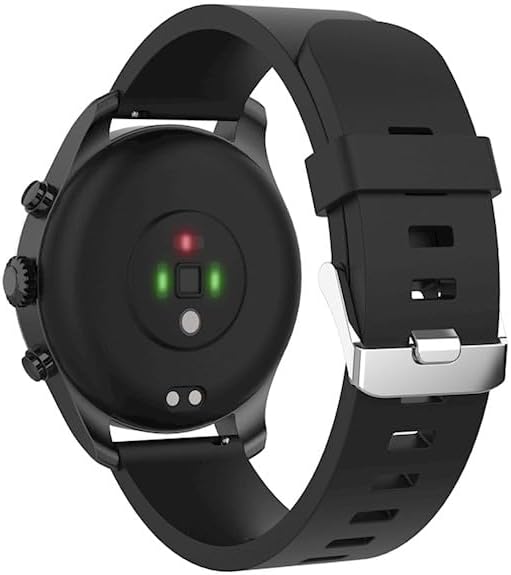
Bild: Eine detaillierte view of the smartwatch, emphasizing its 1.3-inch display with 360x360 pixel resolution, and the sleek design of the metal band.
Garantie und Support
Your FOREVER Smartwatch SW-800 comes with a standard manufacturer's warranty. Please refer to the warranty card included in your product packaging for specific terms and conditions, including the warranty period and coverage details.
For technical support, troubleshooting assistance, or warranty claims, please contact FOREVER customer service. Contact information can typically be found on the official FOREVER webauf der Website oder auf der Produktverpackung.


