1. Einleitung
Thank you for choosing the iJoy Disney Lilo & Stitch Expressions Bluetooth Over-Ear Headphones. These wireless headphones are designed to provide a comfortable audio experience with the added charm of Lilo & Stitch designs. This manual will guide you through the setup, operation, and maintenance of your new headphones.

Image: iJoy Disney Lilo & Stitch Bluetooth Over-Ear Headphones.
2. Produktüberschreitungview
Hauptmerkmale:
- Drahtlose Bluetooth-Verbindung: Enjoy audio without tangled cords.
- Eingebautes Mikrofon: Für eine klare Kommunikation während der Telefonate.
- LED-Anzeigen: Provide battery and connection status.
- Faltbares Design: Für einfachen Transport und platzsparende Lagerung.
- Micro SD Card Plug-in: Play music directly from a Micro SD card.
- Built-in Radio Receiver: Schalten Sie Ihre Lieblingsradiosender ein.
- Aux Cable Included: Option for wired listening when battery is low or Bluetooth is not available.
Was ist in der Box:
- iJoy Disney Lilo & Stitch Expressions Bluetooth Over-Ear Headphones
- Schutzhülle
- Ladekabel (USB)
- Auxiliary Audio Cable with Microphone
3. Einrichtung
3.1 Aufladen der Kopfhörer
Before initial use, fully charge your headphones. Connect the provided USB charging cable to the charging port on the headphones and to a compatible USB power source. The LED indicator will show charging status and turn off or change color when fully charged. A full charge provides approximately 15 hours of playtime.

Image: Headphones highlighting 15 hours of playtime.
3.2 Bluetooth-Kopplung
- Stellen Sie sicher, dass die Kopfhörer ausgeschaltet sind.
- Halten Sie die Ein-/Aus-Taste gedrückt, bis die LED-Anzeige blau und rot blinkt. Dies signalisiert den Kopplungsmodus.
- Aktivieren Sie auf Ihrem Gerät (Smartphone, Tablet usw.) Bluetooth und suchen Sie nach verfügbaren Geräten.
- Select "iJoy Stitch Headphones" (or similar name) from the list.
- Nach dem Anschließen leuchtet die LED-Anzeige normalerweise durchgehend blau oder blinkt langsam blau.

Image: Headphones demonstrating universal compatibility with Apple and Android devices.
4. Bedienungsanleitung
4.1 Kontrollen überview
The headphone controls are located on the ear cup. Refer to the diagram below for button functions:
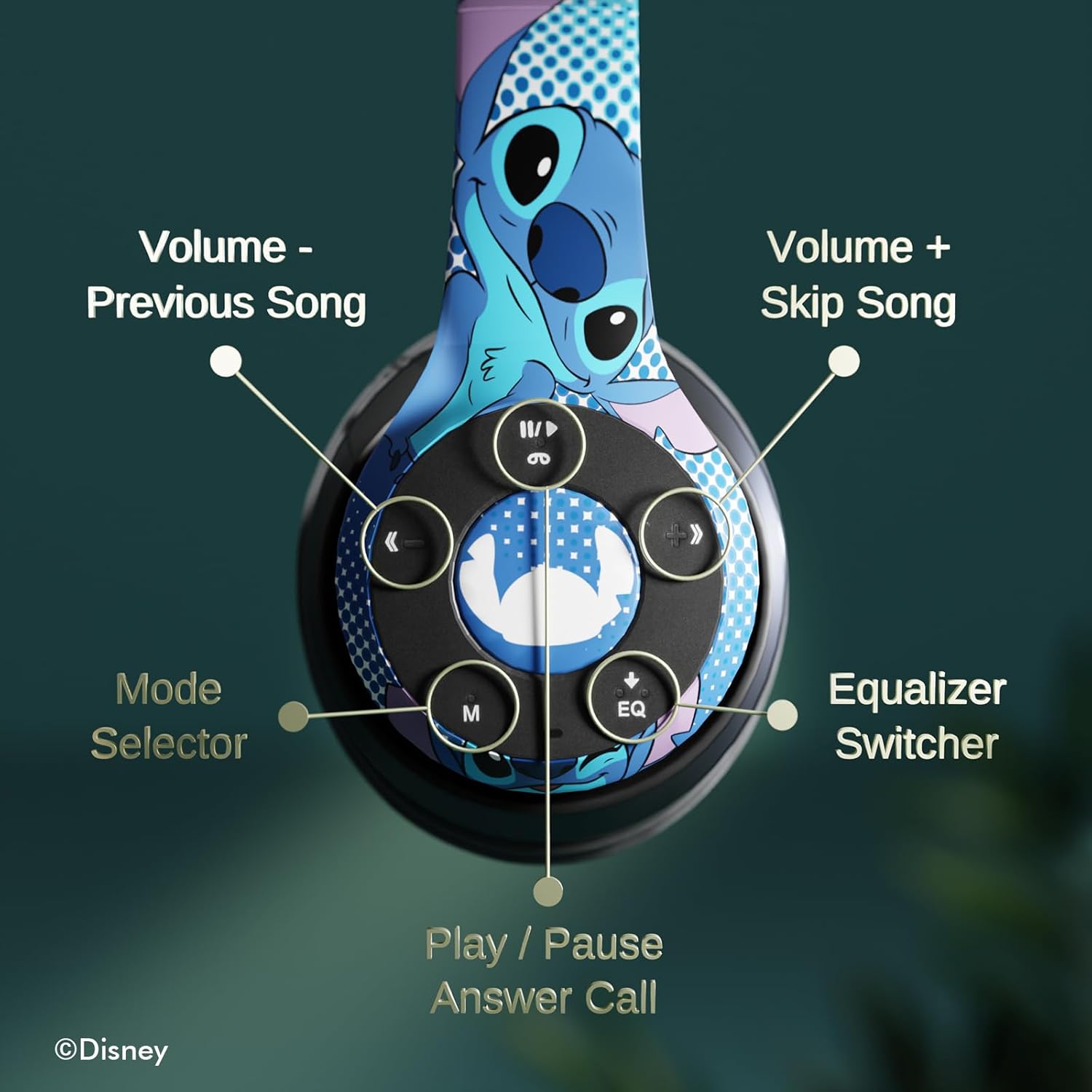
Bild: Detailliert view of the headphone controls, including Volume -, Previous Song, Volume +, Skip Song, Mode Selector, Equalizer Switcher, and Play/Pause/Answer Call buttons.
- Play/Pause/Answer Call Button: Press once to play/pause music or answer/end a call. Press and hold to reject a call.
- Volume + / Skip Song Button: Press once for Volume Up. Press and hold to skip to the next song.
- Lautstärke - / Vorheriges Lied: Press once for Volume Down. Press and hold to go to the previous song.
- Moduswahlschalter (M): Press to switch between Bluetooth, Micro SD card, and FM Radio modes.
- Equalizer Switcher (EQ): Press to cycle through different equalizer presets.
4.2 Anrufe tätigen und entgegennehmen
Mit dem eingebauten Mikrofon können Sie Anrufe tätigen und entgegennehmen, wenn Sie über Bluetooth verbunden sind:
- Anruf annehmen/beenden: Press the Play/Pause/Answer Call button once.
- Anruf ablehnen: Press and hold the Play/Pause/Answer Call button.
4.3 Musikwiedergabe
- Bluetooth-Modus: After pairing, music from your connected device will play through the headphones. Use the controls to manage playback.
- Micro-SD-Kartenmodus: Insert a Micro SD card with MP3 files into the designated slot. Press the 'M' button to switch to Micro SD card mode. The headphones will automatically begin playing music from the card.
4.4 FM-Radio-Modus
Press the 'M' button to switch to FM Radio mode. Use the Volume +/- buttons to scan for stations or adjust volume.
5. Wartung
- Reinigung: Reinigen Sie die Kopfhörer mit einem weichen, trockenen Tuch. Verwenden Sie keine scharfen Chemikalien oder Scheuermittel.
- Lagerung: When not in use, store the headphones in the provided protective case. The foldable design allows for compact storage.
- Feuchtigkeit vermeiden: Halten Sie die Kopfhörer von Wasser und übermäßiger Luftfeuchtigkeit fern.
- Temperatur: Vermeiden Sie es, die Kopfhörer extremen Temperaturen auszusetzen.

Image: Headphones demonstrating their foldable design for easy storage.
6. Fehlerbehebung
| Problem | Mögliche Lösung |
|---|---|
| Die Kopfhörer lassen sich nicht einschalten. | Stellen Sie sicher, dass die Kopfhörer vollständig aufgeladen sind. |
| Kopplung mit dem Gerät nicht möglich. | Stellen Sie sicher, dass sich die Kopfhörer im Kopplungsmodus befinden (blinkende blaue/rote LED). Schalten Sie Bluetooth auf Ihrem Gerät aus und wieder ein. Gehen Sie näher an das Gerät heran. |
| Kein Ton. | Check volume levels on both headphones and connected device. Ensure headphones are correctly paired. Try using the auxiliary cable. |
| Schlechte Tonqualität. | Move closer to the connected device to avoid interference. Check audio source quality. |
| Mikrofon funktioniert nicht. | Ensure headphones are properly connected. Check microphone settings on your device. |
7. Spezifikationen
| Besonderheit | Detail |
|---|---|
| Modellname | Disney Lilo & Stitch Expressions |
| Modellnummer | DS20137 |
| Konnektivitätstechnologie | Kabellos (Bluetooth) |
| Drahtlose Kommunikationstechnologie | Bluetooth |
| Bluetooth-Version | 4.0 |
| Bluetooth-Reichweite | 10 Meter |
| Platzierung des Ohrs | Über dem Ohr |
| Formfaktor | Über dem Ohr |
| Lärmschutz | Schallisolierung |
| Steuerungstyp | Lautstärkeregelung, Touch |
| Besondere Merkmale | Built-in Radio Receiver, Foldable and Adjustable headband, Micro SD Card Plug-in, Microphone Included |
| Kompatible Geräte | Bluetooth-enabled devices (e.g. smartphones, tablets, laptops) |
| Material | Memory Foam, Plastic |
| Artikelgewicht | 0.29 Kilogramm (10.2 Unzen) |
| Batterien | 1 Lithium-Polymer-Akku (im Lieferumfang enthalten) |
| Verpackungsabmessungen | 8.78 x 6.26 x 3.62 Zoll |
| UPC | 810116712489 |
8. Offizielles Produktvideo
Video: Ein offizielles Produktvideo präsentiertasing the Disney Lilo & Stitch Bluetooth Headphones, highlighting their features and design.
9. Garantie und Support
For warranty information and customer support, please refer to the documentation included with your product or visit the official iJoy webWebsite. Bewahren Sie Ihren Kaufbeleg für Garantieansprüche auf.


