Einführung
Thank you for choosing the WORKPRO Cordless Rotary Tool Kit. This manual provides essential information for the safe and effective operation, maintenance, and troubleshooting of your new rotary tool. Please read this manual thoroughly before first use and keep it for future reference.
Packungsinhalt
Upon opening the package, please verify that all items listed below are present and in good condition. If any items are missing or damaged, contact customer support.

Image: The WORKPRO Cordless Rotary Tool, its carrying case, Type-C charging cables, and a wide array of 117 accessories including various grinding, polishing, cutting, sanding, carving, and drilling bits.
- WORKPRO Cordless Rotary Tool (Pink)
- 117 Accessories (various grinding, carving, polishing, milling, cutting, sanding, collet, and drilling attachments)
- Typ C Ladekabel
- Tool Bag/Carrying Case
- Benutzerhandbuch (dieses Dokument)

Image: A visual guide detailing the 117 accessories, categorized by function such as grinding/sharpening, carving, polishing, milling, cutting, sanding, collet, and drilling, showing quantities for each type.
Aufstellen
Aufladen des Rotationswerkzeugs
The WORKPRO Cordless Rotary Tool is equipped with a Type-C charging port and built-in rechargeable batteries. Before first use, fully charge the tool.
- Connect the provided Type-C charging cable to the tool's charging port.
- Verbinden Sie das andere Ende des Kabels mit einem kompatiblen USB-Netzteil (nicht im Lieferumfang enthalten).
- Charging typically takes 1.5 to 2 hours. The five indicator lights will turn white when fully charged.
- A full charge provides up to 200 minutes of continuous operation.
- Wichtig: For safety, do not operate the tool while it is charging.
Installieren von Zubehör
The tool features an automatic shaft locking design for easy and secure accessory replacement.

Image: A visual comparison highlighting the WORKPRO tool's automatic shaft locking design, which eliminates the need to press a button during accessory changes, contrasting it with other tools that require a button press.

Image: A detailed three-step guide demonstrating how to install accessories: 1. Unscrew the collet nut. 2. Choose the suitable collet and insert the accessory. 3. Tighten the collet nut. It also shows specific instructions for fitting sanding bands and cutting discs/sanding paper.
- Unscrew the collet nut at the tip of the rotary tool.
- Select the appropriate collet size for your desired accessory (two collet sizes are included: 0.235mm and 0.32mm).
- Setzen Sie den Zubehörschaft in die Spannzange ein.
- Tighten the collet nut securely to hold the accessory in place.
- To replace accessories, simply unscrew the collet nut. The automatic locking mechanism will engage, allowing for easy removal and insertion.

Bild: Eine Nahaufnahme view of the two different collet sizes (0.235mm and 0.32mm) provided with the WORKPRO rotary tool, along with various compatible accessory shanks.
Bedienungsanleitung
Werkzeug vorbeiview
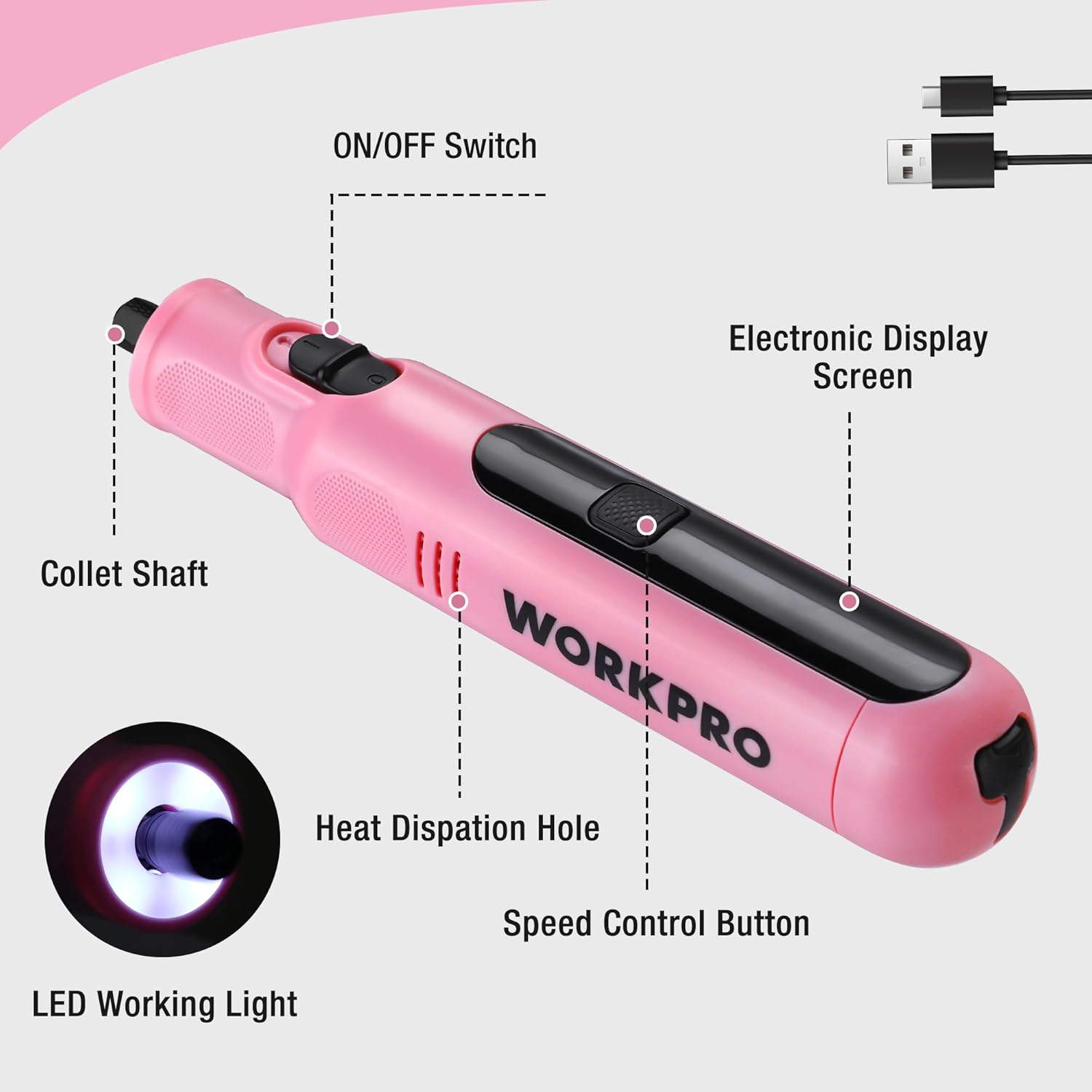
Image: An annotated diagram of the WORKPRO rotary tool, pointing out key features such as the ON/OFF switch, electronic display screen, collet shaft, heat dissipation hole, speed control button, and LED working light.
- Ein / Aus Schalter: Located on the side, controls power to the tool.
- Electronic Display Screen: Zeigt die aktuelle Geschwindigkeitseinstellung an.
- Geschwindigkeitskontrolltaste: Regelt die Drehzahl.
- LED-Arbeitsleuchte: Sorgt für Beleuchtung für präzises Arbeiten.
- Collet Shaft: Where accessories are inserted and secured.
- Wärmeableitungsloch: Hilft dabei, die optimale Betriebstemperatur aufrechtzuerhalten.
Ein-/Ausschalten und Geschwindigkeitseinstellung
The tool features 6 variable speed settings for diverse applications.
- To turn on the tool, slide the ON/OFF switch to the "ON" position. The LED work light will illuminate.
- Press the Speed Control Button to cycle through the 6 available speed settings: 5000 RPM, 10000 RPM, 15000 RPM, 20000 RPM, 25000 RPM, and 30000 RPM. The electronic display will show the current speed.
- Select the appropriate speed for your task. Lower speeds are suitable for delicate work, while higher speeds are for more robust applications.
- To turn off the tool, slide the ON/OFF switch to the "OFF" position.
- Notiz: When turned off, the product automatically locks the shaft, which may cause a slight clicking sound. This is normal and indicates the safety locking mechanism is engaged.

Abbildung: Eine Schnittzeichnung view of the WORKPRO rotary tool highlighting its powerful motor and variable speed capabilities, indicating a maximum speed of 30000 RPM.

Image: A close-up of the rotary tool's electronic display, clearly showing the selectable speed settings: 5000RPM, 10000RPM, 15000RPM, 20000RPM, 25000RPM, and 30000RPM.
Anwendungen
The WORKPRO Cordless Rotary Tool is versatile and suitable for a wide range of home projects and crafts, including but not limited to:
- Schleifen/Schärfen: For shaping and sharpening various materials.
- Gravur: Creating intricate designs on surfaces like wood, metal, or plastic.
- Schneiden: Precision cutting of light materials.
- Bohren: Creating small holes.
- Schleifen: Smoothing rough surfaces.
- Polieren: Bringing a shine to finished pieces.

Image: A collage demonstrating the versatility of the 8V Cordless Rotary Tool, showing it in use for cutting, carving, polishing, sanding, and drilling various materials.

Image: A person using the WORKPRO rotary tool with a carving bit to engrave a design onto a clear acrylic sheet, demonstrating its precision for detailed work.
Wartung
Reinigung
Regelmäßige Reinigung gewährleistet optimale Leistung und verlängert die Lebensdauer Ihres Werkzeugs.
- Vor der Reinigung muss das Gerät immer von der Stromversorgung getrennt werden.
- Verwenden Sie ein weiches, trockenes Tuch, um die Außenseite des Werkzeugs abzuwischen.
- Remove any dust or debris from the heat dissipation holes using a soft brush or compressed air.
- Clean accessories after each use to prevent buildup that could affect performance.
Pflege und Lagerung der Batterie
Proper battery care is crucial for maintaining battery health and longevity.
- It is recommended to charge the battery periodically, even if the tool is not used for a long time, to protect the battery's lifespan.
- Store the rotary tool and its accessories in the provided tool bag in a cool, dry place, away from direct sunlight and extreme temperatures.

Image: A hand placing the compact WORKPRO rotary tool carrying case onto a shelf, demonstrating its portability and ease of storage.
Fehlerbehebung
| Problem | Mögliche Ursache | Lösung |
|---|---|---|
| Das Gerät lässt sich nicht einschalten. | Batterie ist leer. | Charge the tool fully using the Type-C cable. |
| Tool makes a clicking sound when turned off. | Normal operation of the automatic shaft locking mechanism. | No action required; this is a normal function for safety. |
| Accessory is loose or wobbles. | Collet nut not tightened sufficiently or incorrect collet size. | Ensure the collet nut is securely tightened. Verify that the correct collet size is used for the accessory shank. |
| Verminderte Leistung oder Geschwindigkeit. | Niedriger Batteriestand oder falsche Geschwindigkeitseinstellung. | Recharge the battery. Adjust the speed setting to a higher RPM if needed for the task. |
Technische Daten
| Besonderheit | Detail |
|---|---|
| Marke | ARBEITSPRO |
| Modellnummer | 1 |
| Farbe | Rosa |
| Stil | Bleistift |
| Stromquelle | Batteriebetrieben |
| Bandtage | 8 Volt |
| Akku-Typ | Lithium-Ionen-Akku (1 enthalten) |
| Ladezeit | Ca. 1.5 - 2 Stunden (Typ-C) |
| Betriebsdauer | Bis zu 200 Minuten |
| Variable Geschwindigkeitseinstellungen | 6 (5000/10000/15000/20000/25000/30000 RPM) |
| Maximale Drehzahl | 30000 U/min |
| Gewicht | 227 g (0.5 Pfund) |
| Maße | 19 x 3.61 x 3.61 cm (7.48 inches length) |
| Besondere Merkmale | Lightweight, Cordless, Rechargeable, LED Work Light, Auto-Locking Protection |
| Im Lieferumfang enthaltene Komponenten | Rotary Tool, 117 Accessories, Type-C Cable, Tool Bag |
| Ursprungsland | China |

Image: A visual representation of the WORKPRO rotary tool's compact size (7.48 inches in length) and lightweight design (0.5 lbs), shown resting in a hand.
Garantieinformationen
This WORKPRO Cordless Rotary Tool comes with a 2 Jahr Garantie ab Kaufdatum, mit Abdeckung von Herstellungsfehlern. Zusätzlich ein 30-tägiges Rückgaberecht is available for refunds or replacements through the retailer.
Bitte bewahren Sie Ihren Kaufbeleg für eventuelle Garantieansprüche auf.
Kundenservice
For any questions, concerns, or technical assistance regarding your WORKPRO Cordless Rotary Tool, please contact the manufacturer or your point of purchase. Refer to the product packaging or the retailer's webFür detaillierte Kontaktdaten besuchen Sie bitte die Webseite.
You can also visit the official WORKPRO store on Amazon for more product information and support resources: WORKPRO Store


