AquilaPro Laser Measuring Tool
Bedienungsanleitung
Modell: KL02060
1. Einleitung
This manual provides comprehensive instructions for the safe and effective use of your AquilaPro Laser Measuring Tool. Designed for precision and ease of use, this compact device offers various measurement modes for both professional and home applications. Please read this manual thoroughly before operation and retain it for future reference.

Figure 1: AquilaPro Laser Measuring Tool
2. Sicherheitshinweise
WARNUNG: Laserstrahlung
- Blicken Sie nicht direkt in den Laserstrahl.
- Vermeiden Sie den direkten Augenkontakt mit dem Laserstrahl.
- Richten Sie den Laser nicht auf Menschen oder Tiere.
- Nur wie in diesem Handbuch beschrieben verwenden.
- Außerhalb der Reichweite von Kindern aufbewahren.
- Versuchen Sie nicht, das Gerät zu zerlegen oder zu modifizieren.
This device emits Class 2 laser radiation. Maximum output power is less than 1mW at 635nm.
3. Produktüberschreitungview
The AquilaPro Laser Measuring Tool features a compact metal fuselage with an HD display for clear readings. Familiarize yourself with the device's components and controls:

Abbildung 2: Gerätekomponenten und Bedienelemente
- Bildschirm: Displays measurements, modes, and battery status.
- UNIT/Laser Button: Activates laser for measurement, short press for single measurement, long press to switch units.
- +/- Taste: For addition and subtraction measurements.
- PRESET/History Button: Accesses measurement history and preset values.
- FUNC/Reference Button: Cycles through measurement functions (Area, Volume, Pythagorean, etc.) and switches front/rear reference point.
- Ein-/Ausschalter/Hintergrundbeleuchtungstaste: Long press to power on/off, short press to toggle backlight.
4. Einrichtung
4.1 Aufladen des Geräts
The device is equipped with a rechargeable lithium-ion battery. Before first use, fully charge the device using the provided USB-C cable.
- Verbinden Sie das USB-C-Kabel mit dem Ladeanschluss an der Unterseite des Geräts.
- Verbinden Sie das andere Ende des Kabels mit einem USB-Netzteil (nicht im Lieferumfang enthalten) oder einem USB-Anschluss eines Computers.
- Die Akkuanzeige auf dem Bildschirm zeigt den Ladestatus an.
- A full charge provides approximately 10,000 single measurements.

Abbildung 3: USB-C-Ladeanschluss
4.2 Ein-/Ausschalten
- Einschalten: Drücken Sie lange die Leistung Taste () 2 Sekunden lang.
- Ausschalten: Drücken Sie lange die Leistung button for 2 seconds. The device will also automatically power off after 45 seconds of inactivity to conserve battery.
5. Grundlegende Bedienung
5.1 Einzelmessung
- Schalten Sie das Gerät ein.
- Richten Sie den Laserstrahl auf die Zieloberfläche.
- Drücken Sie kurz die UNIT/Laser Knopf drücken. Der Messwert wird auf dem Bildschirm angezeigt.

Figure 4: Taking a Field Measurement
5.2 Einheitenumschaltung
The device supports switching between meters (m), inches (in), and feet (ft).
- Drücken Sie lange die UNIT/Laser button to cycle through the units.
- Release the button when your desired unit is displayed.

Figure 5: Unit Conversion Display
5.3 Reference Point Switching (Datum)
You can set the measurement reference point to either the front or rear of the device.
- Drücken Sie kurz die FUNC/Reference button to toggle between front and rear datum.
- The display will indicate the active reference point.

Figure 6: Front or Rear Measuring Reference
6. Erweiterte Messmodi
The AquilaPro Laser Measuring Tool offers several advanced modes for complex measurements:

Abbildung 7: Mehrere Messmodi
- Kontinuierliche Messung: Provides real-time distance updates as you move the device. Useful for scanning and finding minimum/maximum distances.
- Flächenmessung: Measures length and width to calculate the area of a surface.
- Volumenmessung: Measures length, width, and height to calculate the volume of a space.
- Pythagoräische Messung: Berechnet indirekte Entfernungen mithilfe des Satzes des Pythagoras (z. B. die Höhe eines Gebäudes).
- Addition/Subtraktion: Allows you to add or subtract measurements.
To select an advanced mode, short press the FUNC/Reference button repeatedly until the desired mode icon appears on the display. Follow the on-screen prompts to perform the measurements for each mode.
6.1 Addition/Subtraction Function
Mit dieser Funktion können Sie aufeinanderfolgende Messwerte addieren oder subtrahieren.
- Nach der Messung drücken Sie die Taste +/- button to enter addition or subtraction mode.
- Take the next measurement. The device will automatically add or subtract it from the previous value.
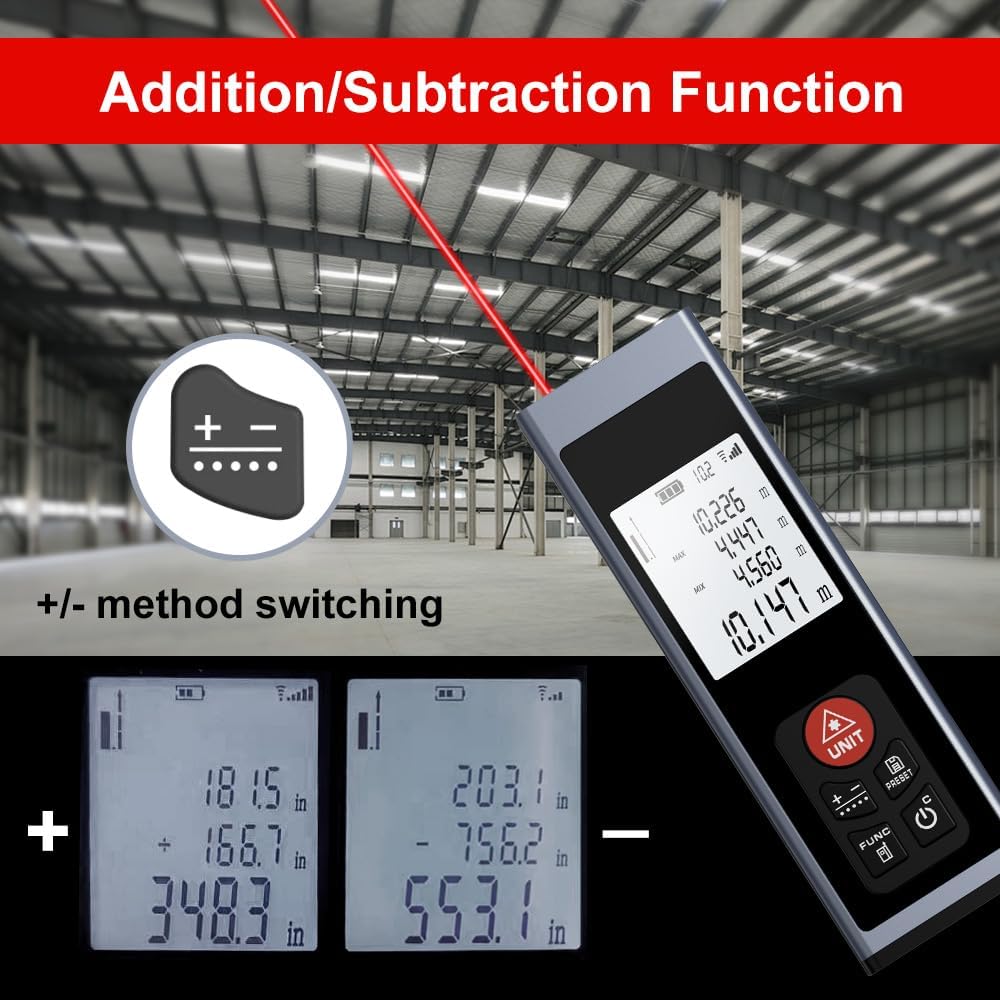
Figure 8: Addition/Subtraction Function
6.2 Memory Storage Function
Das Gerät kann bis zu 28 Messdatensätze speichern.
- Zu view stored data, short press the PRESET/History Taste.
- Use the arrow buttons (if available, or cycle through with PRESET) to navigate through the stored measurements.

Figure 9: Memory Storage Display
7. Offizielles Produktvideo
Watch this official video from the seller for a quick introduction to the AquilaPro Laser Measuring Tool.
Video 1: AquilaPro Laser Measuring Tool Introduction (Source: AQUILA OPTICS)
8. Wartung
- Reinigung: Verwenden Sie ein weiches,amp Reinigen Sie das Gerät mit einem Tuch. Verwenden Sie keine Scheuermittel oder Lösungsmittel.
- Lagerung: Bewahren Sie das Gerät an einem kühlen, trockenen Ort auf, schützen Sie es vor direkter Sonneneinstrahlung und extremen Temperaturen.
- Batteriepflege: If storing for extended periods, charge the battery every 3 months to prolong its lifespan.
- Wasserbeständigkeit: The device is rated IP54, meaning it is protected against dust and splashing water. Do not immerse in water.
9. Fehlerbehebung
| Problem | Mögliche Ursache | Lösung |
|---|---|---|
| Gerät lässt sich nicht einschalten. | Niedriger Batteriestand; Gerät ist ausgeschaltet. | Charge the battery; Long press the Power button. |
| Ungenaue Messwerte. | Unstable surface; Obstruction in laser path; Incorrect reference point. | Ensure stable surface; Clear laser path; Check and adjust reference point (front/rear datum). |
| Das Display ist dunkel oder unleserlich. | Backlight off; Low battery. | Short press Power button to toggle backlight; Charge the battery. |
| Laser nicht sichtbar. | Helles Umgebungslicht; Laser nicht aktiviert. | Use in lower light conditions; Short press UNIT/Laser button. |
10. Spezifikationen
| Besonderheit | Detail |
|---|---|
| Marke | AquilaPro |
| Modellname | KL02060 |
| Messbereich | 197 Fuß (60 m) |
| Genauigkeit | ±0.078 inch (2mm) |
| Material | Aluminium |
| Farbe | Schwarz |
| Produktabmessungen (L x B x H) | 1.1 Zoll L x 0.6 Zoll B x 3.4 Zoll H |
| Akku-Typ | Wiederaufladbare Lithium-Ionen |
| Internationale Schutzbewertung | IP54 (Staub- und spritzwassergeschützt) |
| Im Lieferumfang enthaltene Komponenten | Schlüsselband |
11. Garantie und Support
This AquilaPro Laser Measuring Tool comes with a 1 Jahr Herstellergarantie ab Kaufdatum. Bitte bewahren Sie Ihren Kaufbeleg für Garantieansprüche auf.
For technical support or warranty inquiries, please contact AquilaPro customer service through the retailer's platform or visit the official AquilaPro store on Amazon: AquilaPro Amazon Store.