1. Einleitung
This manual provides detailed instructions for the safe and effective operation of your AquilaPro KL02100 Laser Measuring Tool. Please read this manual thoroughly before using the device to ensure proper functionality and to prevent potential hazards. This device is designed for accurate distance measurement in various applications.
2. Sicherheitshinweise
WARNING: Laser Radiation. Do not stare into beam. Class II Laser Product.
- The AquilaPro KL02100 emits a visible laser beam with a power output of less than 1mW.
- Avoid direct eye exposure to the laser beam. Never point the laser at people or animals.
- Das Gerät darf nicht zerlegt oder verändert werden. Nicht autorisierte Änderungen können zu gefährlicher Laserstrahlung führen.
- Bewahren Sie das Gerät außerhalb der Reichweite von Kindern auf.
- Nur wie in diesem Handbuch beschrieben verwenden.
3. Produktüberschreitungview
The AquilaPro KL02100 is a compact and versatile laser distance meter. Familiarize yourself with its components and display.
3.1 Gerätekomponenten
The device features a durable aluminium casing, an HD display, and intuitive buttons for various functions.

Bild: Vorderseite view of the AquilaPro KL02100 Laser Measuring Tool.
3.2 Display- und Tastenlayout
The device's display provides measurement readings and status indicators. The buttons control power, measurement functions, unit switching, and reference point selection.

Bild: Detailliert view of the AquilaPro KL02100 display and button functions. Labels indicate 'screen', 'Single measurement / Unit switch', 'Addition / subtraction measurement', 'Funtion / Front/rear reference', 'History / Preset value setting', and 'Power / Backlight button'.
4. Einrichtung
4.1 Aufladen des Geräts
The AquilaPro KL02100 features a built-in Lithium-Ion battery and is USB rechargeable. Connect the device to a standard USB power source using the provided cable. The battery indicator on the display will show charging status.
4.2 Ein-/Ausschalten
- Zum Einschalten: Drücken Sie die Taste Power/Backlight-Taste (
 ) briefly.
 - Zum Ausschalten: Die Taste gedrückt halten Power/Backlight-Taste for approximately 3 seconds. The device will also automatically power off after a period of inactivity to conserve battery.
5. Bedienungsanleitung
5.1 Grundlegende Messung (Einzelmessung)
- Schalten Sie das Gerät ein.
- Richten Sie den Laserstrahl auf die Zieloberfläche.
- Drücken Sie die Single measurement / Unit switch button () once. The measurement will be displayed instantly.
5.2 Kontinuierliche Messung
- Halten Sie die Single measurement / Unit switch button (
 ) for approximately 2 seconds. The device will enter continuous measurement mode, displaying real-time distance updates as you move.
 - Drücken Sie die Single measurement / Unit switch button again to exit continuous measurement.
5.3 Einheitenumschaltung
To change the measurement unit (meters, inches, feet), briefly press the Single measurement / Unit switch button () while the device is idle (not actively measuring). The unit will cycle through m, in, ft.
5.4 Benchmark Switching (Front/Rear Datum)
The device allows you to select the measurement reference point: either from the front edge of the device or the rear edge. This is crucial for accurate measurements depending on your placement of the tool.

Image: Illustration of front and rear datum points for measurement. The device can measure from its front edge or its rear edge.
To switch the benchmark, press the Function / Front/rear reference button () briefly. An icon on the display will indicate the currently selected reference point.
5.5 Mehrere Messmodi
The AquilaPro KL02100 supports various measurement functions for different applications.

Image: Visual representation of the different measurement modes available on the device, including single, continuous, area, volume, Pythagorean, and addition/subtraction.
To cycle through measurement modes, press the Function / Front/rear reference button () repeatedly until the desired mode icon appears on the display.
- Längenmessung: Standardmäßige Einzel- oder kontinuierliche Messung.
- Flächenmessung: Um die Fläche zu berechnen, misst man zwei Seiten (Länge und Breite).
- Volumenmessung: Um das Volumen zu berechnen, misst man drei Seiten (Länge, Breite, Höhe).
- Pythagoreische Messung (indirekte Messung): Used to calculate inaccessible distances (e.g., height of a building) by measuring two or three other distances. Follow the on-screen prompts for each segment measurement.
- Addition/Subtraktion: Add or subtract measurements.
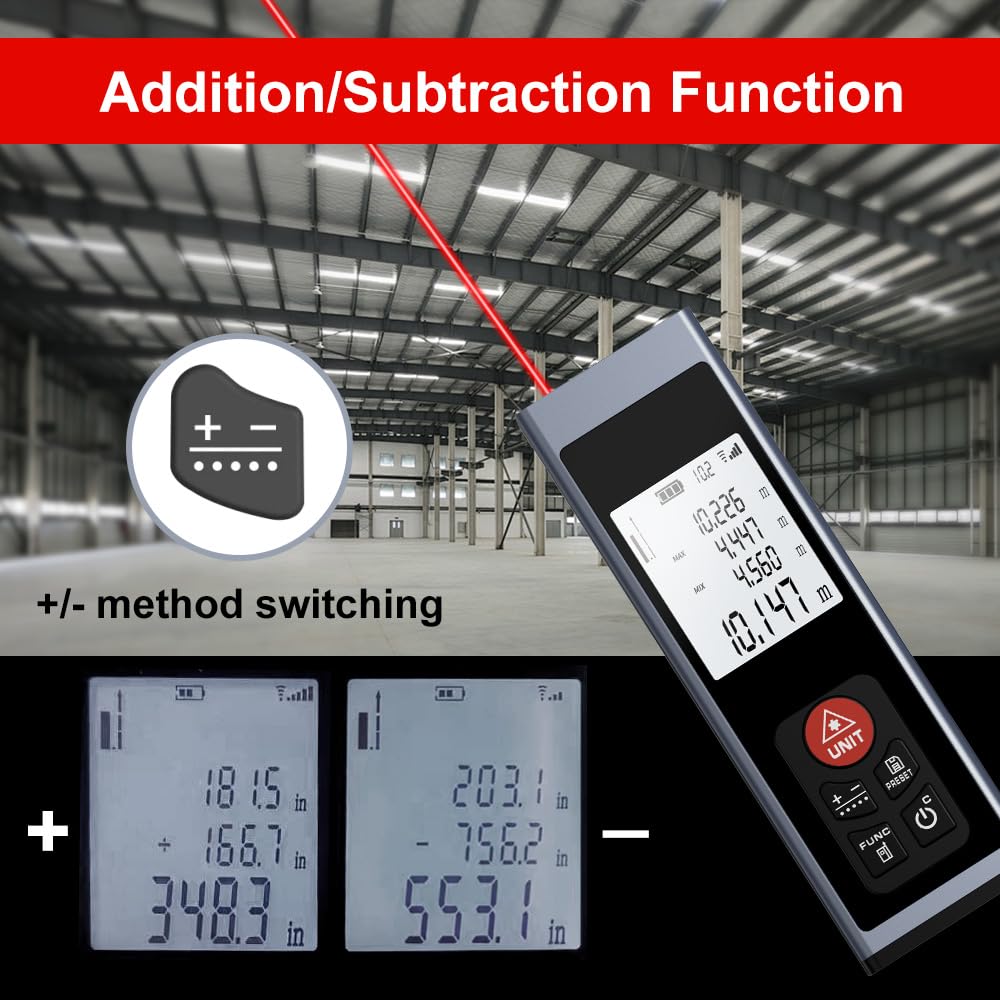
Image: The device display illustrating the addition and subtraction functions, showing how multiple measurements are combined or differentiated.
5.6 Field Measurement
The real-time measurement mode allows for on-the-go calculations from walls and various surfaces as you move, providing dynamic distance updates.

Image: A hand holding the AquilaPro KL02100, demonstrating its use for field measurements with the laser beam active.
6. Wartung
- Reinigung: Verwenden Sie ein weiches,amp Reinigen Sie das Gerät mit einem Tuch. Verwenden Sie keine Scheuermittel oder Lösungsmittel. Achten Sie besonders darauf, die Laserlinse sauber zu halten, um genaue Messungen zu gewährleisten.
- Lagerung: Bewahren Sie das Gerät an einem kühlen, trockenen Ort auf, schützen Sie es vor direkter Sonneneinstrahlung und extremen Temperaturen.
- Batterie: Um die Batterieleistung zu erhalten, laden Sie den Akku regelmäßig auf, auch wenn das Gerät nicht häufig benutzt wird.
7. Fehlerbehebung
| Problem | Mögliche Ursache | Lösung |
|---|---|---|
| Gerät lässt sich nicht einschalten | Niedriger Batteriestand; Gerätefehlfunktion | Charge the battery; Contact support if issue persists |
| Ungenaue Messungen | Dirty laser lens; Incorrect benchmark setting; Unstable surface | Clean the laser lens; Verify benchmark (front/rear); Ensure stable measurement surface |
| Laserstrahl nicht sichtbar | Bright ambient light; Device malfunction | Use in lower light conditions; Contact support |
8. Spezifikationen
- Marke: AquilaPro
- Modellnummer: KL02100
- Messbereich: 328 Fuß (100 m)
- Genauigkeit: ±0.078 inch (2mm)
- Einheit: Meters (m), Inches (in), Feet (ft)
- Laserklasse: Klasse II, <1 mW
- Akku-Typ: Lithium-Ion (Rechargeable via USB)
- Material: Aluminium
- Artikelgewicht: 25 Gramm
- Produktabmessungen: 28 mm (L) x 15 mm (B) x 86 mm (H)
- Wasserbeständigkeit: IP54
- Enthaltene Komponenten: Schlüsselband
9. Garantie und Support
For warranty information and technical support, please refer to the documentation provided at the point of purchase or contact AquilaPro customer service. Keep your purchase receipt as proof of purchase.