1. Einleitung
Thank you for choosing the WORKPRO 7.2V Cordless Rotary Tool. This manual provides essential information for the safe and effective operation, maintenance, and troubleshooting of your tool. Please read it thoroughly before use and retain it for future reference.
The WORKPRO 7.2V Cordless Rotary Tool is a versatile and compact device designed for various DIY and craft projects. Its lightweight design and variable speed settings make it suitable for tasks such as sanding, engraving, cutting, drilling, grinding, and polishing.

Figure 1: WORKPRO 7.2V Cordless Rotary Tool with included accessories and storage bag.
2. Sicherheitshinweise
Beachten Sie beim Bedienen von Elektrowerkzeugen stets die grundlegenden Sicherheitsvorkehrungen, um das Risiko von Bränden, Stromschlägen und Verletzungen zu verringern.
- Lies alle Anweisungen: Machen Sie sich mit der Bedienung und den Sicherheitsrichtlinien des Werkzeugs vertraut.
- Augenschutz tragen: Tragen Sie immer eine Schutzbrille oder eine Schutzbrille mit Seitenschutz.
- Werkstück sichern: Immer clamp oder das Werkstück auf andere Weise so zu sichern, dass es sich während des Betriebs nicht bewegen kann.
- Halten Sie Ihren Arbeitsbereich sauber: Überladene Bereiche laden zu Unfällen ein.
- Vermeiden Sie gefährliche Umgebungen: Benutzen Sie keine Elektrowerkzeuge in damp oder nassen Orten oder Regen aussetzen. Halten Sie den Arbeitsbereich gut beleuchtet.
- Kinder fernhalten: Alle Besucher sollten in sicherem Abstand zum Arbeitsbereich gehalten werden.
- Kleiden Sie sich angemessen: Do not wear loose clothing or jewelry. They can be caught in moving parts. Non-skid footwear is recommended. Wear protective hair covering to contain long hair.
- Verwenden Sie das richtige Werkzeug: Zwingen Sie das Werkzeug oder das Anbaugerät nicht zu einer Arbeit, für die es nicht ausgelegt ist.
- Stromversorgung trennen: Disconnect the tool from its power source before making adjustments, changing accessories, or storing it.
- Übernehmen Sie sich nicht: Sorgen Sie jederzeit für einen guten Stand und das Gleichgewicht.
- Pflegen Sie Werkzeuge sorgfältig: Halten Sie Werkzeuge scharf und sauber für eine bessere und sicherere Leistung. Befolgen Sie die Anweisungen zum Schmieren und Wechseln von Zubehör.
- Auf beschädigte Teile prüfen: Vor der weiteren Verwendung des Werkzeugs sollte eine beschädigte Schutzvorrichtung oder ein anderes Teil sorgfältig überprüft werden, um sicherzustellen, dass es ordnungsgemäß funktioniert und seine beabsichtigte Funktion erfüllt.
- Do Not Operate While Charging: For safety reasons, do not use the tool while it is being charged.
3. Produktüberschreitungview
The WORKPRO 7.2V Cordless Rotary Tool is designed for precision work. Understanding its components is key to effective operation.
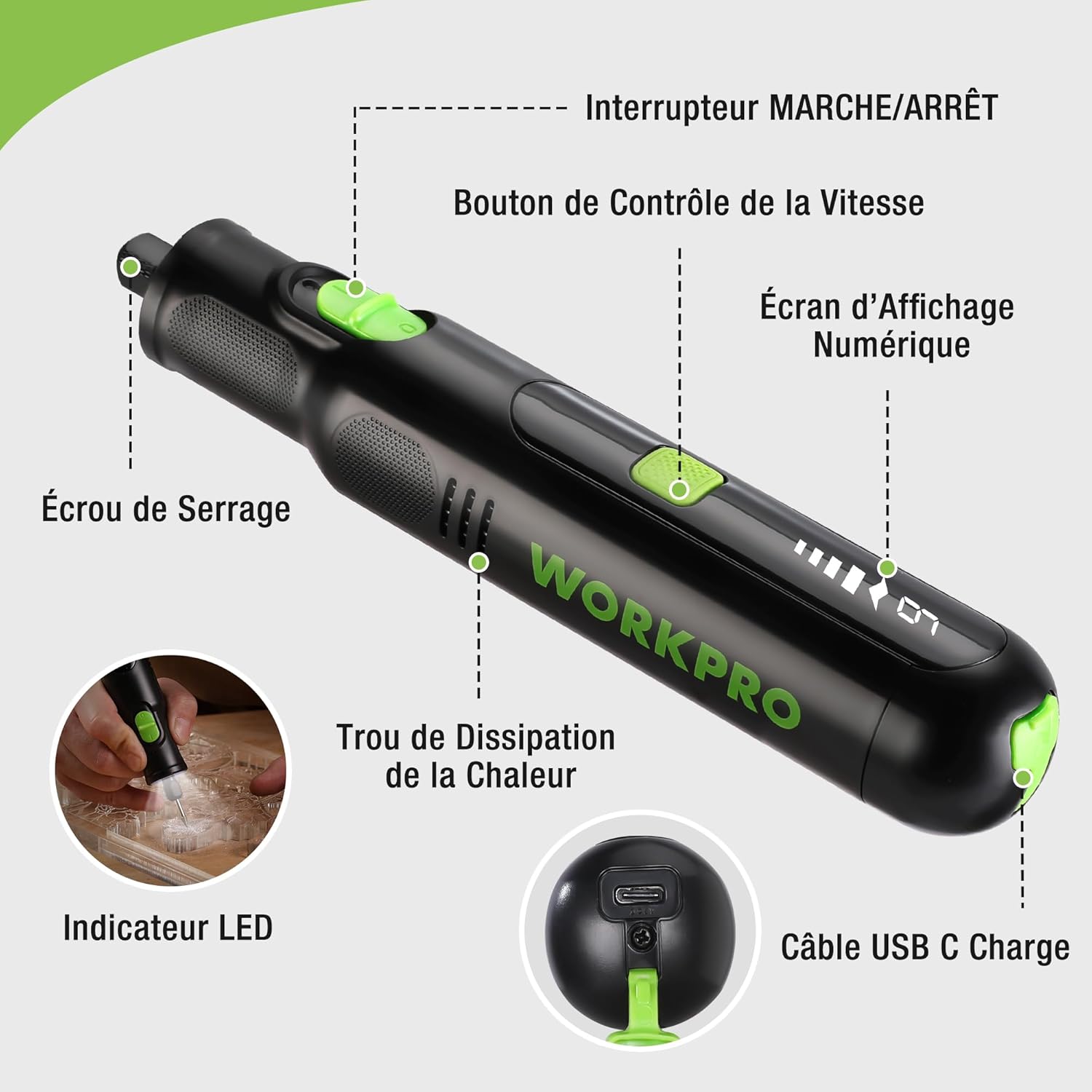
Figure 2: Key components of the rotary tool.
Komponenten:
- Ein / Aus Schalter: Aktiviert und deaktiviert das Tool.
- Geschwindigkeitskontrolltaste: Passt die Drehzahl des Werkzeugs an.
- Digitaler Anzeigebildschirm: Shows the current speed setting.
- Spannmutter: Secures the accessory bits in place.
- Wärmeableitungsloch: Ensures proper cooling of the motor during operation.
- LED-Anzeige: Sorgt für Beleuchtung des Arbeitsbereichs.
- USB-C-Ladeanschluss: Zum Aufladen des internen Akkus.
Mitgeliefertes Zubehör:
Your WORKPRO rotary tool comes with 117 diverse accessories, enabling a wide range of applications. These include:

Abbildung 3: Überview von den 117 mitgelieferten Zubehörteilen.
- Schleifen/Schärfen: Grinding stones and wheels for material shaping and sharpening.
- Carving: Diamond bits for detailed carving and engraving.
- Polieren: Wool felt wheels, felt wheels, screw mandrels, and metal brushes for achieving smooth, shiny finishes.
- Mahlen: Milling bits for precise material removal.
- Schneiden: Cutting discs and saw blades for various cutting tasks, along with a cutting disc holder.
- Schleifen: Sandpaper, rubber sanding drums, and sanding bands for surface preparation and finishing.
- Spannzangen: 2.35mm and 3.2mm collets to accommodate different shank sizes.
- Bohren: 2.35mm and 3.2mm drill bits for small-scale drilling.
- Schlüssel: For securing and loosening collet nuts.
4. Einrichtung
4.1 Aufladen des Werkzeugs
The tool is equipped with a 7.2V 1100mAh Lithium-ion rechargeable battery. Before first use, fully charge the tool.
- Connect the provided USB-C charging cable to the tool's USB-C charging port.
- Verbinden Sie das andere Ende des USB-Kabels mit einer kompatiblen USB-Stromquelle (z. B. Computer, USB-Netzteil).
- Das digitale Display zeigt den Ladestatus an. Eine vollständige Ladung dauert in der Regel etwa 2 Stunden.
- Sobald das Gerät vollständig aufgeladen ist, trennen Sie das Ladekabel.
Note: For optimal battery life, it is recommended to store the tool with the battery charged between 50% and 75%. Recharge the tool at least once every 3 to 6 months if not used regularly.

Figure 4: Charging the rotary tool via USB-C.
4.2 Zubehör installieren
The WORKPRO rotary tool features an automatic spindle lock design for easy and secure accessory changes.
- Stellen Sie sicher, dass das Gerät ausgeschaltet ist.
- Die Spannmutter an der Vorderseite des Werkzeugs abschrauben.
- Select the appropriate collet size for your desired accessory (2.35mm or 3.2mm). Insert the collet into the tool if not already present.
- Insert the shank of the accessory bit into the center of the collet nut. Ensure the bit is fully seated.
- Hand-tighten the collet nut. For a secure fit, use the included wrench to tighten the collet nut firmly. Do not overtighten.

Figure 5: Two-step accessory replacement process.

Figure 6: Detailed installation steps for various accessories.
Note: The automatic spindle lock engages when the tool is off, allowing for accessory changes without needing to press a separate button. A slight clicking sound when the tool stops is normal due to this mechanism.
5. Bedienungsanleitung
5.1 Ein-/Ausschalten
To turn the tool ON, slide the ON/OFF switch to the 'ON' position. To turn it OFF, slide the switch to the 'OFF' position.
5.2 Geschwindigkeit anpassen
The tool features 6 variable speed settings, ranging from 5000 RPM to 30000 RPM. Press the Speed Control Button to cycle through the speeds. The current speed setting will be displayed on the digital screen.
- Speed I: 5000 RPM
- Speed II: 10000 RPM
- Speed III: 15000 RPM
- Speed IV: 20000 RPM
- Speed V: 25000 RPM
- Speed VI: 30000 RPM
Choose the appropriate speed for your task and material. Lower speeds are generally suitable for polishing, delicate work, and softer materials, while higher speeds are for cutting, grinding, and harder materials.

Figure 7: Variable speed settings and powerful motor.
5.3 Integrierte LED-Beleuchtung
The tool includes an integrated LED light that illuminates the work area, improving visibility in dimly lit spaces and for detailed tasks.

Figure 8: Using the LED light for precision engraving.
5.4 Anwendungen
The WORKPRO rotary tool is highly versatile and can be used for:
- Schneiden: Use appropriate cutting discs for various materials.
- Schnitzen/Gravieren: Utilize diamond bits for intricate designs on wood, plastic, or soft metals.
- Polieren: Apply felt wheels and polishing compounds to restore shine to surfaces.
- Schleifen: Use sanding bands and drums for smoothing rough edges or preparing surfaces.
- Bohren: Employ small drill bits for precision holes.

Abbildung 9: Bspamples of versatile applications.
6. Wartung
6.1 Reinigung
- Vor der Reinigung muss das Gerät immer von der Stromversorgung getrennt werden.
- Verwenden Sie ein weiches,amp Verwenden Sie ein Tuch, um die Außenseite des Werkzeugs abzuwischen. Verwenden Sie keine scharfen Chemikalien oder Scheuermittel.
- Use a small brush or compressed air to clear dust and debris from the heat dissipation holes and around the collet area.
6.2 Pflege und Lagerung der Batterie
- To prolong battery life, avoid completely discharging the battery regularly.
- For long-term storage, ensure the battery is charged to approximately 50-75%. Recharge the tool every 3 to 6 months to prevent deep discharge and maintain battery health.
- Bewahren Sie das Werkzeug an einem kühlen, trockenen Ort auf, fern von direkter Sonneneinstrahlung und extremen Temperaturen.
6.3 Zubehöraufbewahrung
Keep all accessories organized in the provided storage bag or a suitable container to prevent loss and damage.
7. Fehlerbehebung
This section addresses common issues you might encounter with your WORKPRO rotary tool.
| Problem | Mögliche Ursache | Lösung |
|---|---|---|
| Das Gerät lässt sich nicht einschalten. | Batterie ist entladen. | Laden Sie das Gerät mit dem USB-C-Kabel vollständig auf. |
| Das Werkzeug schaltet sich während des Gebrauchs unerwartet ab. | Der Akku ist schwach oder das Gerät ist überlastet. | Recharge the battery. Reduce pressure on the tool or use a lower speed setting for the task. |
| Clicking sound when turning off. | Normal operation of the automatic spindle lock. | This is a normal function and does not indicate a fault. |
| Accessory bit is loose or wobbles. | Collet nut not tightened sufficiently or incorrect collet size. | Ensure the correct collet size is used for the accessory. Tighten the collet nut firmly with the included wrench. |
| Reduced performance or short runtime. | Battery degradation or improper charging/storage. | Ensure proper charging and storage practices are followed (refer to Section 6.2). If the issue persists, the battery may need replacement. |
8. Spezifikationen
Below are the technical specifications for the WORKPRO 7.2V Cordless Rotary Tool (Model W123024A).
| Besonderheit | Spezifikation |
|---|---|
| Marke | ARBEITSPRO |
| Modellnummer | W123024A |
| Bandtage | 7.2 Volt |
| Akku-Typ | Lithium-Ionen (1 im Lieferumfang enthalten) |
| Batteriekapazität | 1100 mAh |
| Maximale Drehzahl | 30000 U/min |
| Variable Geschwindigkeiten | 6 (5000-30000 U/min) |
| Ladezeit | Ca. 2 Stunden |
| Runtime (Max Speed) | Ca. 45 Minuten |
| Gewicht | 227 Gramm |
| Abmessungen (L x B x H) | 25.2 x 16.8 x 5.5 cm |
| Besonderheit | Cordless, Integrated LED Light, Automatic Spindle Lock |
| Im Lieferumfang enthaltene Komponenten | 117 Zubehör |
| Hersteller | Hang Zhou Great Star Industrial Co.,LTD |
9. Garantie und Support
For warranty information, please refer to the documentation provided at the time of purchase or contact your retailer. WORKPRO is committed to providing quality products and customer satisfaction.
If you encounter any issues or have questions regarding your WORKPRO 7.2V Cordless Rotary Tool, please contact the seller or WORKPRO customer support through their official website or contact channels. Please have your model number (W123024A) and purchase details ready when seeking support.


