1. Einleitung
The XIAOMI Redmi Note 13 Pro 5G is a feature-rich smartphone designed for global use, offering advanced camera capabilities, a vibrant display, and robust performance. This manual provides essential information to help you set up, operate, and maintain your device effectively.
Key features include a flagship-level 200MP OIS anti-shake main camera, a 1.5K 120Hz AMOLED display, and support for 5G and 4G LTE global bands. The device is powered by the Snapdragon 7s Gen 2 Mobile Platform, ensuring smooth and efficient operation for various tasks.

Figure 1: Xiaomi Redmi Note 13 Pro 5G in various color options, showcasing its front display.
2. Lieferumfang
Upon unboxing your XIAOMI Redmi Note 13 Pro 5G, you should find the following items:
- XIAOMI Redmi Note 13 Pro 5G Smartphone
- Schnellladegerät für Autos
- SIM-Fach-Auswerfer
- USB-Kabel
- Wand-Adapter
3. Körperliche Übergriffeview
The Redmi Note 13 Pro 5G features a sleek design with a comfortable grip. Its dimensions are approximately 3.58 x 7.32 x 2.36 inches, and it weighs about 1.19 pounds (0.54 kilograms).
3.1 Anzeige
The device is equipped with a 6.67-inch AMOLED display, offering a refresh rate of up to 120Hz and a peak brightness of 1800 nits. The resolution is 2712x1220 pixels (446PPI), providing sharp and vibrant visuals. It features 12-bit color depth, a 5,000,000:1 contrast ratio, and 100% DCI-P3 color gamut. The screen is protected by Corning Gorilla Glass Victus and supports Dolby Vision.
3.2 Kameramodul
The rear camera system includes a triple camera setup:
- 200MP Hauptkamera: Features OIS (Optical Image Stabilization), f/1.65 aperture, 1/1.4” sensor size, and 7P lens for high-resolution photos and improved low-light performance.
- 8MP Ultraweitwinkelkamera: With f/2.2 aperture for capturing broader scenes.
- 2-Megapixel-Makrokamera: With f/2.4 aperture for detailed close-up shots.
The front camera is designed for selfies and video calls.
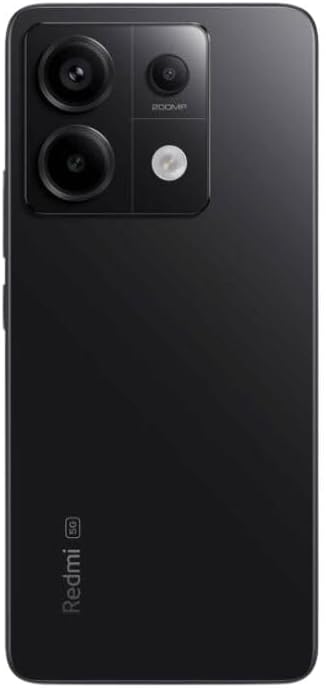
Abbildung 2: Rückseite view of the Xiaomi Redmi Note 13 Pro 5G, showing the 200MP triple camera setup.
3.3 Ports and Sensors
The device includes a USB-C port for charging and data transfer, and a 3.5mm headphone jack. Integrated sensors include an in-screen fingerprint sensor, AI Face Unlock, ambient light sensor, accelerometer, electronic compass, IR blaster, and gyroscope.
4. Einrichtung
4.1 Installation der SIM-Karte
- Suchen Sie den SIM-Karten-Einschub an der Seite Ihres Geräts.
- Führen Sie das SIM-Karten-Auswurfwerkzeug in die kleine Öffnung neben dem Fach ein und drücken Sie fest, bis das Fach herausspringt.
- Place your nano-SIM card(s) into the designated slots on the tray. Ensure the gold contacts are facing down. The device supports Dual SIM (nano SIM + nano SIM or nano SIM + eSIM).
- Schieben Sie den SIM-Kartenhalter vorsichtig wieder in das Telefon ein, bis er einrastet.
4.2 Ersteinrichtungs- und Installationsassistent
- Halten Sie den Ein-/Ausschalter (normalerweise auf der rechten Seite) gedrückt, bis das Xiaomi-Logo erscheint.
- Follow the on-screen instructions to select your language, region, and agree to the terms and conditions.
- Stellen Sie eine WLAN-Verbindung her, um den Einrichtungsprozess abzuschließen und notwendige Updates herunterzuladen.
- Sign in with your Google account and/or Xiaomi account to access services and restore backups.
- Set up your preferred security methods, such as PIN, pattern, password, fingerprint, or AI Face Unlock.
5. Bedienung des Geräts
5.1 Displaynavigation
Navigate your device using intuitive touch gestures. Swipe, tap, pinch, and zoom to interact with apps and content. The 120Hz refresh rate ensures a smooth and fluid user experience. Unlock your device quickly and securely using the in-screen fingerprint sensor or AI Face Unlock.
5.2 Kameranutzung
Open the Camera app to capture photos and videos. Utilize the 200MP main camera for highly detailed images, the ultra-wide lens for expansive landscapes, and the macro lens for close-up photography. The camera supports 4K video recording at 30fps, 1080p at 30/60fps, and 720p at 30fps. Slow motion video is available at 1080p (120fps) and 720p (120/240fps).
5.3 Leistung
The Redmi Note 13 Pro 5G is powered by the Snapdragon 7s Gen 2 Mobile Platform, built on 4nm process technology with an octa-core CPU up to 2.4GHz and Adreno GPU. This configuration, combined with 8GB of RAM and 256GB of internal storage, provides strong performance for multitasking, gaming, and demanding applications.
5.4 Audio
Enjoy immersive audio with dual speakers and Dolby Atmos support. The device also retains a 3.5mm headphone jack for wired audio connections.
6. Wartung
6.1 Softwareaktualisierungen
Prüfen Sie regelmäßig, ob Software-Updates verfügbar sind, und installieren Sie diese, um sicherzustellen, dass Ihr Gerät über die neuesten Funktionen, Sicherheitspatches und Leistungsverbesserungen verfügt. Gehen Sie zu Einstellungen > Über das Telefon > MIUI-Version um nach Updates zu suchen.
6.2 Batteriepflege
The 5000 mAh battery provides extended usage. To prolong battery life, avoid extreme temperatures, use the provided 67W fast charger, and manage background app usage. Avoid fully discharging the battery frequently.
6.3 Reinigung
Use a soft, lint-free cloth to clean your device. Avoid harsh chemicals or abrasive materials that could damage the screen or finish. Do not expose the device to excessive moisture.
6.4 Speicherverwaltung
Mit 256 GB internem Speicher haben Sie ample space for apps and media. Regularly review dein files and uninstall unused applications to optimize performance and free up space.
7. Fehlerbehebung
Sollten Sie Probleme mit Ihrem Gerät haben, versuchen Sie die folgenden grundlegenden Schritte zur Fehlerbehebung:
- Gerät reagiert nicht: Um einen Neustart zu erzwingen, halten Sie den Netzschalter etwa 10-15 Sekunden lang gedrückt.
- Netzwerkverbindungsprobleme: Check if your SIM card is properly inserted. Toggle Airplane Mode on and off. Restart your device. Verify Wi-Fi settings and router connection.
- App stürzt ab/friert ein: Close the app and reopen it. Clear the app's cache and data (Settings > Apps > Manage apps > [App Name] > Clear data). Update the app to its latest version.
- Batterieverbrauch: Überprüfen Sie den Akkuverbrauch in den Einstellungen, um stromfressende Apps zu identifizieren. Reduzieren Sie die Bildschirmhelligkeit und deaktivieren Sie unnötige Funktionen wie GPS oder Bluetooth, wenn Sie diese nicht benötigen.
- Langsame Leistung: Leeren Sie den Cache, deinstallieren Sie nicht verwendete Apps und stellen Sie sicher, dass ausreichend freier Speicherplatz vorhanden ist.
- Werkseinstellungen zurückgesetzt: Sollten die Probleme weiterhin bestehen, können Sie als letzten Ausweg einen Werksreset durchführen. Warnung: Dadurch werden alle Daten auf Ihrem Gerät gelöscht. Sichern Sie wichtige Daten, bevor Sie fortfahren. Gehe zu Einstellungen > Über das Telefon > Zurücksetzen auf Werkseinstellungen.
8. Spezifikationen
| Besonderheit | Spezifikation |
|---|---|
| Modellname | Redmi Note 13 Pro 5G |
| Artikelmodellnummer | 2312DRA50G |
| Marke | XIAOMI |
| Betriebssystem | Android 13.0 |
| CPU Modell | Snapdragon 7s Gen 2 Mobile Plattform |
| CPU-Geschwindigkeit | Bis zu 2.4 GHz |
| Größe des installierten RAM-Speichers | 8 GB |
| Speicherkapazität | 256 GB |
| Anzeigegröße des Standbildschirms | 6.67 Zoll AMOLED |
| Auflösung | 2712x1220 (446PPI) |
| Bildwiederholrate | Bis zu 120Hz |
| Spitzenhelligkeit | 1800 Nits |
| Hauptkamera | 200 MP OIS |
| Ultraweitwinkelkamera | 8 Megapixel |
| Makrokamera | 2 Megapixel |
| Batterieleistung | 5000 Milliamp Std |
| Laden | 67 W Schnellladung |
| Audio-Buchse | 3.5 mm |
| Mobilfunkanbieter | Unlocked (USA Market: T-Mobile, Mint, Tello or any under T-Mobile network) |
| Technische Daten | 3.58 x 7.32 x 2.36 Zoll |
| Artikelgewicht | 1.19 Pfund (0.54 Kilogramm) |
9. Garantie und Support
Your XIAOMI Redmi Note 13 Pro 5G is covered by a manufacturer's warranty. For detailed information regarding warranty terms, conditions, and duration, please refer to the warranty card included in your product packaging or visit the official XIAOMI support webWebsite.
For technical support, service requests, or further assistance, please visit the official XIAOMI webBesuchen Sie die Website oder kontaktieren Sie den Kundenservice. Bewahren Sie Ihren Kaufbeleg für eventuelle Garantieansprüche auf.