1. Einleitung
Thank you for choosing the RESTMO 2-Zone Programmable Watering Timer. This device is designed to automate your garden irrigation, providing convenience and efficiency. Featuring durable brass inlet and outlet threads, independent dual zones, and multiple programming options, it ensures reliable and precise watering for your lawn, garden, or greenhouse.
Please read this manual thoroughly before installation and operation to ensure proper use and longevity of your watering timer.
2. Hauptmerkmale
- Reliable and Leak-Proof Design: Equipped with pure brass inlet and outlet threads for enhanced durability and resistance to high working pressure (up to 120 psi). The robust, weather-resistant, and UV-resistant casing is ideal for outdoor use.
- Dual Independent Zones: Features two separate outlets, allowing you to manage watering for two distinct areas simultaneously or independently.
- Multiple Programming Options: Each zone supports up to 3 distinct watering programs (P1, P2, P3), providing a total of 6 customizable schedules.
- Flexible Watering Frequency and Duration: Set watering frequency from 1 to 23 hours or 1 to 30 days, and duration from 1 minute to 299 minutes.
- Benutzerfreundliche Oberfläche: Large 3.2-inch LCD screen for easy readability and an oversized dial for intuitive setting adjustments.
- Manuelle Bewässerungsfunktion: Allows for immediate, temporary watering without interrupting preset programs.
- Rain Delay Feature: Conserve water by pausing scheduled watering for 24, 48, or 72 hours during rainy periods.
- Batteriebetrieben: Operates on 2 AA alkaline batteries (not included), providing approximately one year of battery life.
3. Installationsanleitung
3.1. Einlegen der Batterie
- Suchen Sie das Batteriefach auf der Rückseite des Timers.
- Öffnen Sie die Batterieabdeckung.
- Legen Sie 2 neue AA-Alkalibatterien ein und achten Sie dabei auf die richtige Polarität (+/-).
- Close the battery cover securely. The LCD screen will light up.
3.2. Anschließen des Timers
The RESTMO watering timer features a 3/4" NH Female brass inlet and 3/4" NH Male brass outlets.

Image: The RESTMO watering timer connected to a faucet, illustrating the durable pure brass inlet and outlet threads for leak-proof performance.
- Screw the timer's brass inlet directly onto your outdoor faucet (3/4" NH standard). Ensure a tight, leak-free connection.
- Attach your garden hoses to the two brass outlets at the bottom of the timer. Hand-tighten for a secure fit.
3.3. Erste Uhrzeiteinstellung

Bild: Vorderseite view of the RESTMO watering timer, showing the large LCD display, control dial, and buttons for easy operation.
- Turn the main dial to UHR EINSTELLEN.
- Verwenden Sie die + Und - Tasten zum Einstellen der aktuellen Uhrzeit.
- Drücken OK um zu bestätigen und zur nächsten Einstellung zu wechseln (z. B. AM/PM).
- Once the clock is set, turn the dial to the next desired function or to ON zum Aktivieren.
4. Bedienungsanleitung
4.1. Programming Watering Schedules (P1, P2, P3)
The timer allows you to set up to three independent programs (P1, P2, P3) for each of the two zones (Left and Right).

Image: Visual guide for setting up three distinct watering programs (P1, P2, P3), demonstrating options for start time, duration, and frequency.
- Zone auswählen: Drücken Sie kurz die ZN/P button to toggle between Zone Left (L) and Zone Right (R). The selected zone will be indicated on the LCD.
- Programm auswählen: Drücken Sie lange die ZN/P button to cycle through P1, P2, and P3 for the selected zone. Release the button when your desired program (e.g., P1) is displayed.
- Startzeit einstellen: Turn the main dial to STARTZEIT. Verwenden + Und - um die Startzeit anzupassen. Drücken Sie OK zur Bestätigung.
- Einstellen der Dauer: Turn the main dial to WIE LANGE. Verwenden + Und - to set the watering duration (1 min to 299 min). Press OK zur Bestätigung.
- Einstellen der Häufigkeit (Frequenz): Turn the main dial to WIE OFT. Verwenden + Und - to set the watering frequency (1-23 hours or 1-30 days). Press OK zur Bestätigung.
- Repeat steps 1-5 for P2 and P3 if needed for the current zone, and then for the other zone.
- Once all programs are set, turn the main dial to ON to activate the schedules.
4.2. Manuelle Bewässerung
The manual watering function allows you to water immediately without affecting your programmed schedules.
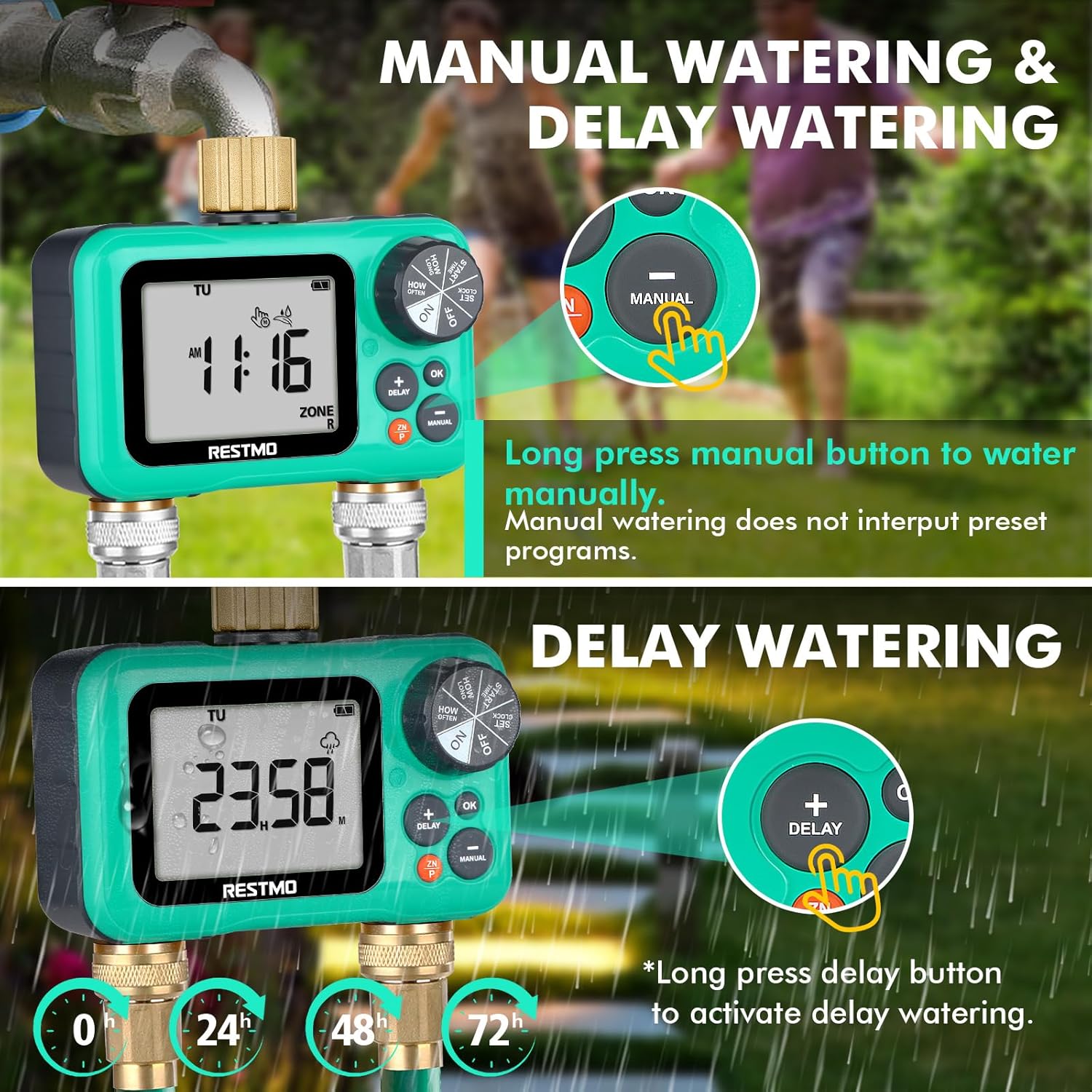
Bild: Detailliert view of the timer's buttons, illustrating how to activate manual watering and rain delay functions.
- Ensure the main dial is set to ON.
- Drücken Sie lange die HANDBUCH button. The display will show the manual watering duration.
- Verwenden Sie die + Und - buttons to adjust the desired manual watering duration.
- Drücken OK to start manual watering. The timer will automatically revert to its programmed schedule after the manual watering is complete.
4.3. Regenverzögerungsfunktion
Pause your watering schedule for a set period to conserve water during rainfall.
- Ensure the main dial is set to ON.
- Drücken Sie lange die VERZÖGERUNG button. The display will show the delay options (24H, 48H, 72H).
- Verwenden Sie die + Und - buttons to select the desired delay duration.
- Drücken OK to activate the rain delay. The timer will resume its programmed schedule after the delay period ends.
4.4. Zonenauswahl
Easily switch between the left and right zones for programming or manual control.
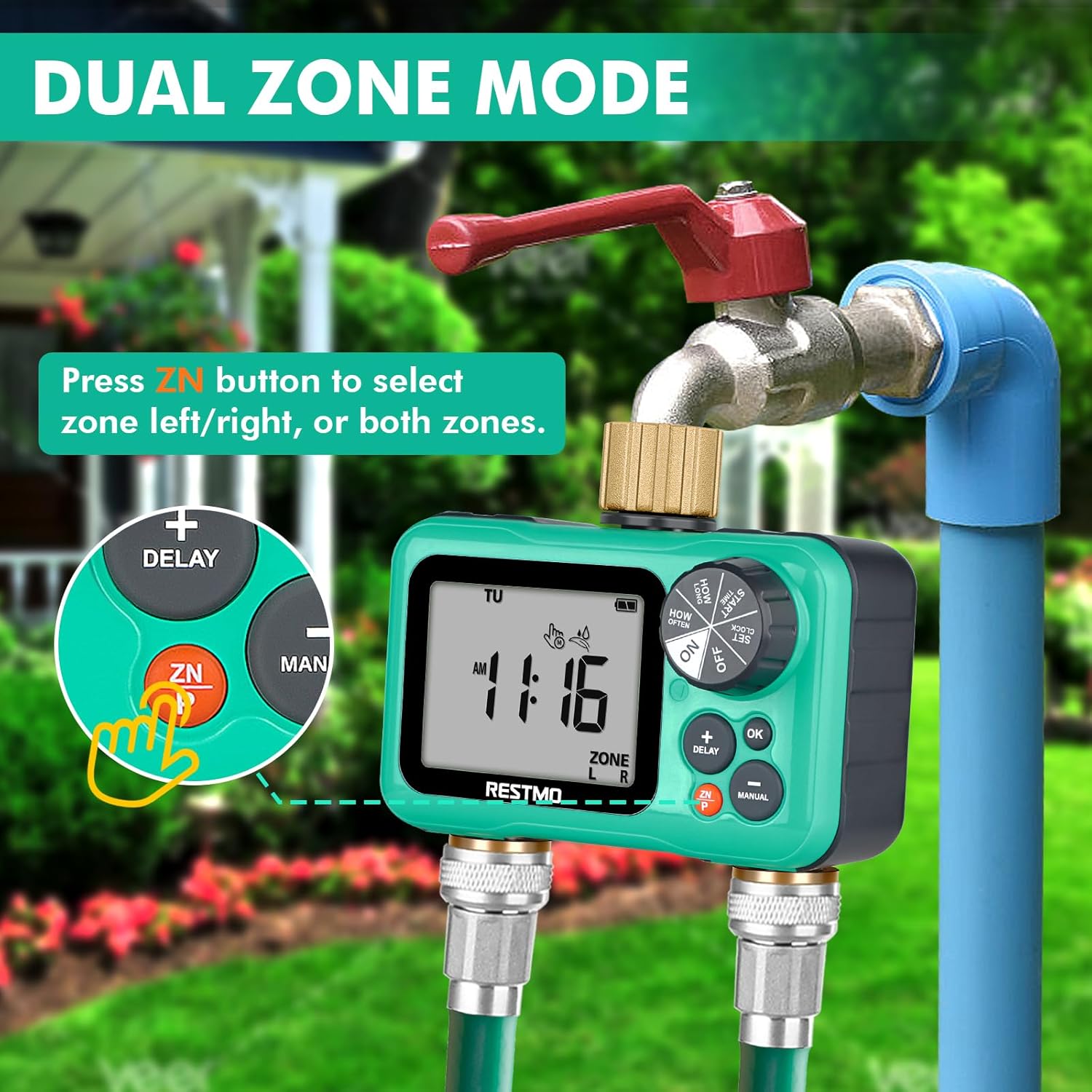
Image: The timer connected to a faucet and hoses, with an emphasis on the 'ZN' button used for selecting between the left and right watering zones.
- Drücken Sie kurz die ZN/P button to switch between Zone Left (L), Zone Right (R), or Both Zones (L+R). The active zone(s) will be displayed on the LCD.
5. Wartung
- Batteriewechsel: Replace batteries annually or when the low battery indicator appears on the LCD. Always use new AA alkaline batteries.
- Filterreinigung: Periodically check the filter washer located in the inlet connection. If debris is present, remove and rinse it under running water. This prevents clogging and ensures proper water flow.
- Überwinterung: Before the first frost, disconnect the timer from the faucet and hoses. Drain any remaining water from the unit. Store the timer indoors in a dry, frost-free location to prevent damage from freezing water.
- Allgemeine Reinigung: Löschen Sie den Timer mit Anzeigeamp cloth to remove dirt. Do not use abrasive cleaners or immerse the unit in water.
6. Fehlerbehebung
| Problem | Mögliche Ursache | Lösung |
|---|---|---|
| Timer not turning on / LCD blank | Defekte oder falsch eingesetzte Batterien. | Ersetzen Sie die Batterien durch neue AA-Alkalibatterien und achten Sie dabei auf die richtige Polarität. |
| Kein Wasserfluss | Faucet is off; low water pressure; clogged filter; program not set correctly; manual override active. | Ensure faucet is fully open. Check water pressure (min 8 psi). Clean inlet filter. Verify program settings (start time, duration, frequency). Check if manual watering is active. |
| Wasser tritt aus den Anschlüssen aus | Lose Verbindungen; verschlissene Unterlegscheibe; beschädigtes Gewinde. | Ensure all connections are hand-tight. Check rubber washers for wear and replace if necessary. Inspect brass threads for damage. |
| Program not running at scheduled time | Timer dial not set to ON; incorrect clock time; rain delay active; program OFF. | Turn dial to ON. Verify current time is accurate. Check if rain delay is active. Ensure program (P1/P2/P3) is not set to OFF. |
| One zone not working | Zone not selected; program for that zone is OFF or incorrectly set. | Press ZN/P button to ensure the correct zone (L or R) is selected. Verify the program settings for the affected zone. |
7. Spezifikationen

Image: Technical diagram of the RESTMO watering timer, showing its dimensions, components, and key operational specifications.
| Besonderheit | Detail |
|---|---|
| Modellnummer | O-HT-2B-GN |
| Einlauffaden | 3/4" NH Female (Pure Brass) |
| Auslassfaden | 3/4" NH Male (Pure Brass) |
| Independent Zones | 2 |
| Distinct Programs per Zone | Bis zu 3 |
| Bewässerungshäufigkeit | 1-23 hours, 1-30 days |
| Bewässerungsdauer | 1 minute to 299 minutes (4 hours 59 minutes) |
| Arbeitsdruck | 8 - 120 PSI (0.5 - 8 Bar) |
| Maximaler Durchfluss | 35 l/min (ca. 10 GPM) |
| Arbeitstemperatur | 3 - 50 °C (38 - 120 °F) |
| Stromquelle | 2 x AA-Alkalibatterien (nicht im Lieferumfang enthalten) |
| Akkulaufzeit | Ungefähr 1 Jahr |
| Abmessungen (L x B x H) | 7.62 x 12.7 x 7.62 cm (3 x 5 x 3 Zoll) |
| Gewicht | 472 g (1.04 Pfund) |
| LCD Bildschirmgröße | 3.2 Zoll |
8. Garantie und Support
RESTMO stands behind the quality of its products. Your watering timer comes with the following:
- 45 Tage Geld-zurück-Garantie: If you are not completely satisfied with your purchase, you may return it within 45 days for a full refund.
- 18-Month Worry-Free Replacement Service: In the event of a defect or malfunction within 18 months of purchase, RESTMO offers a free replacement.
For technical support, warranty claims, or any questions regarding your RESTMO watering timer, please contact our customer service team. (Contact information not provided in original data, please refer to product packaging or seller's webWebsite für Einzelheiten).


