1. Einleitung
Vielen Dank für Ihren Einkauf.asing the Salange HY350 Smart Projector. This manual provides essential information for setting up, operating, and maintaining your projector. Please read it thoroughly before use to ensure optimal performance and safety.

Abbildung 1.1: Front view of the Salange HY350 Projector, showcasing dank seiner kompakten Bauweise und Linse.
2. Packungsinhalt
Stellen Sie sicher, dass alle Artikel im Paket vorhanden sind:
- Salange HY350 Projector (without built-in battery)
- HDMI-Kabel
- Netzkabel (US-Stecker)
- Bluetooth Sprachfernbedienung
- Bedienungsanleitung
3. Produktüberschreitungview
3.1. Hauptmerkmale
- Integrated Android 11.0 System: 2GB RAM + 32GB ROM for app downloads and streaming.
- Native 1080P-Auflösung mit 4K-Dekodierungsunterstützung: High brightness (15000LM) and 10000:1 contrast ratio for clear images.
- Dual-band WiFi 6 & Bluetooth 5.2: Supports 5G/2.4G WiFi for smooth streaming and Bluetooth for external audio devices.
- Automatic Keystone Correction & Electronic Focus: Front projection auto-correction and 4-point keystone adjustment (±50°). Focus controlled via remote.
- Mehrere Konnektivitätsoptionen: HDMI, USB, 3.5mm audio port for various devices.
- Built-in HI-FI Stereo Speakers: 5W speakers for immersive audio.
3.2. Schnittstellen und Bedienelemente
Familiarize yourself with the projector's ports and buttons.

Abbildung 3.1: Hinten und seitlich view of the Salange HY350 Projector, showing HDMI, USB, and audio ports.
- HDMI-Anschluss: Connect to laptops, gaming consoles, TV sticks.
- USB-Anschluss: Connect USB flash drives for media playback or office documents.
- 3.5-mm-Audiobuchse: Schließen Sie externe Kopfhörer oder Lautsprecher an.
- Leistungsaufnahme: Schließen Sie das Netzkabel an.
4. Installationsanleitung
4.1. Platzierung
Choose a suitable location for your projector. The HY350 supports various mounting options:
- Stativmontage
- Wandhalterung
- Bodenhalterung
- Deckenmontage
- Tischplatzierung
For optimal image quality, ensure the projector is placed on a stable, flat surface or securely mounted.

Abbildung 4.1: Illustration of different projection sizes (50", 100", 250") achievable with the Salange HY350 Projector, demonstrating its versatility in various room sizes.
4.2. Stromanschluss
- Schließen Sie das Netzkabel an den Stromeingang des Projektors an.
- Stecken Sie das andere Ende des Netzkabels in eine Steckdose.
- Drücken Sie den Netzschalter am Projektor oder an der Fernbedienung, um ihn einzuschalten.
4.3. Ersteinrichtung
Beim ersten Einschalten führt Sie der Projektor durch die ersten Einrichtungsschritte, einschließlich der Sprachauswahl und der Netzwerkverbindung.
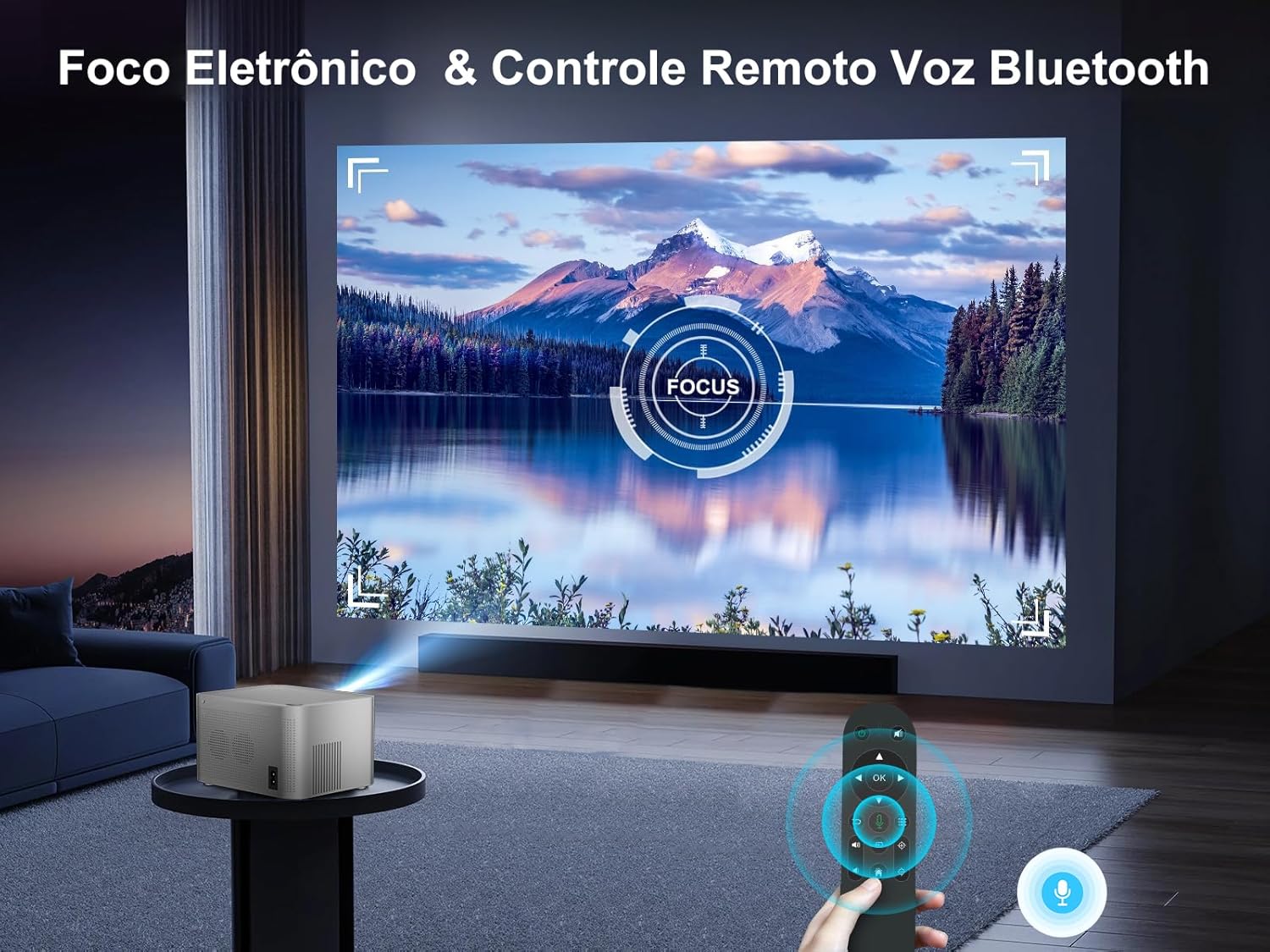
Abbildung 4.2: The Android TV interface of the Salange HY350 Projector, showing various streaming app icons like Netflix, YouTube, Disney+, and Prime Video, indicating its smart capabilities.
- Netzwerkverbindung: Navigate to Settings > Network & Internet to connect to your Wi-Fi network (supports 5G/2.4G WiFi 6).
- Bluetooth-Pairing: To connect the Bluetooth voice remote control or external Bluetooth speakers/headphones, go to Settings > Connected Devices > Pair new device.
5. Bedienungsanleitung
5.1. Bildanpassung
The HY350 features automatic keystone correction and electronic focus for a clear image.

Abbildung 5.1: A hand holding the remote control, adjusting the electronic focus on the Salange HY350 Projector, with a clear image projected onto a screen.
- Automatische Trapezkorrektur: For front projection, the image will automatically correct its shape.
- Manual Keystone Adjustment (4-point): If needed, you can fine-tune the image corners by navigating to Settings > Projection Settings > Keystone Correction. This allows individual adjustment of the four corners up to ±50°.
- Elektronischer Fokus: Verwenden Sie die Fernbedienung, um den Fokus für ein scharfes Bild einzustellen.

Abbildung 5.2: Visual representation of the Salange HY350 Projector's automatic keystone correction, showing how distorted images are automatically squared and corrected for optimal viewing.
5.2. Anschließen externer Geräte
Der Projektor unterstützt verschiedene Eingangsquellen:
- HDMI: Connect your laptop, game console (e.g., Switch), or TV stick to the HDMI port. Select the HDMI input source from the main menu.
- USB: Insert a USB flash drive into the USB port to play videos, view photos, or present office documents (Word, PPT, PDF, Excel).
- Drahtlose Bildschirmspiegelung: Supports iOS and Android wireless display. Navigate to the screen mirroring app on the projector and follow the on-screen instructions to connect your smartphone or tablet.

Abbildung 5.3: An illustration highlighting the advanced WiFi 6 and Bluetooth 5.2 technology of the Salange HY350 Projector, showing seamless connectivity for gaming and audio.
5.3. Using Smart Features (Android 11.0)
The integrated Android 11.0 system allows you to access a wide range of applications.
- App Store: Download over 8,000 applications from the integrated APP Store.
- Streaming-Dienste: Access popular streaming platforms like Prime Video, Netflix, YouTube, Disney+, etc.
- Sprachsteuerung: Use the Bluetooth voice remote control for convenient navigation and search.

Abbildung 5.4: The Salange HY350 Projector's smart interface, showcasing a variety of pre-installed and downloadable streaming applications, emphasizing its entertainment capabilities.
6. Wartung
6.1. Reinigung
- Linse: Verwenden Sie ein weiches, fusselfreies Tuch, das speziell für optische Linsen entwickelt wurde. Verwenden Sie keine Scheuermittel oder Lösungsmittel.
- Exterieur: Wischen Sie die Außenseite des Projektors mit einem weichen, trockenen Tuch ab. Bei hartnäckigen Flecken kann ein leicht klopfender Reflektor helfen.amp Man kann ein Tuch verwenden und anschließend mit einem trockenen Tuch nachwischen.
- Belüftungsöffnungen: Ensure ventilation ports are clear of dust and debris to prevent overheating. Use a soft brush or compressed air to gently clean them.
6.2. Speicherung
Bei längerer Nichtbenutzung sollte der Projektor an einem kühlen, trockenen Ort, geschützt vor direkter Sonneneinstrahlung und extremen Temperaturen, aufbewahrt werden. Verwenden Sie die Originalverpackung oder eine Schutzhülle, um Staubansammlungen und Beschädigungen zu vermeiden.
7. Fehlerbehebung
| Problem | Mögliche Ursache | Lösung |
|---|---|---|
| Kein Bild projiziert | Power cable not connected; Projector not turned on; Incorrect input source selected. | Check power connection; Press power button; Select correct HDMI/USB input. |
| Verschwommenes Bild | Focus not adjusted; Projector too close/far from screen; Keystone not corrected. | Adjust electronic focus via remote; Adjust projection distance; Use auto or manual keystone correction. |
| Kein Ton | Lautstärke zu niedrig; Stummgeschaltet; Externes Audiogerät nicht ordnungsgemäß angeschlossen; Bluetooth nicht gekoppelt. | Lautstärke erhöhen; Stummschaltung aufheben; Externe Audioverbindungen prüfen; Bluetooth-Gerät erneut koppeln. |
| Probleme mit der Wi-Fi-Verbindung | Falsches Passwort; Router zu weit entfernt; Netzwerkstörungen. | Verify password; Move projector closer to router; Try connecting to 2.4Ghz band if 5Ghz is unstable. |
| Fernbedienung funktioniert nicht | Batteries low/dead; Not paired (for Bluetooth remote); Obstruction between remote and projector. | Replace batteries; Re-pair Bluetooth remote; Ensure clear line of sight. |
8. Spezifikationen
| Besonderheit | Spezifikation |
|---|---|
| Modell | HY350-US |
| Betriebssystem | Android 11.0 |
| RAM + ROM | 2 GB RAM + 32 GB ROM |
| Native Auflösung | 1920 x 1080P |
| Unterstützte Auflösung | Up to 4K decoding |
| Helligkeit | 15000 Lumen |
| Kontrastverhältnis | 10000:1 |
| Seitenverhältnis | 16:9 |
| W-lan | Dual-band 5G / 2.4G WiFi 6 |
| Bluetooth | BT 5.2 (bidirectional) |
| Keystone-Korrektur | Automatic (front projection), 4-point (±50°) |
| Fokus | Electronic Focus (via remote) |
| Lautsprecher | 5W HI-FI Stereo |
| Schnittstellen | HDMI, USB, 3.5-mm-Audioanschluss |
| Technische Daten | 16 x 12 x 19 cm |
| Produktgewicht | 1.32 kg |
| Energieaufnahme | 5 watts (speaker power) |
| Bildwiederholrate | 60 Hz |
9. Garantie und Support
Salange provides comprehensive support for your HY350 Projector:
- Garantie: 2 Jahre Herstellergarantie.
- Wartung: 3 years of maintenance support.
- Technische Unterstützung: Lebenslanger technischer Support.
- Kontakt: For any issues or inquiries, please feel free to contact Salange customer service.


Abbildung 9.1: Salange customer support commitments, including 24-hour response, 7-day return, 24-month warranty, and lifetime technical support.


