1. Einleitung
The TRIGKEY Key Mini N150 is a compact and efficient mini PC designed for various computing tasks, including office work, 4K video playback, web browsing, and educational use. It features an Intel Alder Lake N150 processor, DDR5 memory, and SSD storage, offering stable performance in a small form factor.
2. Lieferumfang
Überprüfen Sie, ob alle Artikel im Paket vorhanden sind:
- 1 x TRIGKEY Mini-PC
- 1 x Netzteil
- 1 x HDMI-Kabel
- 1 x Benutzerhandbuch

This image displays the contents of the TRIGKEY Key Mini N150 package, including the mini PC unit, power adapter, HDMI cable, and the user manual.
3. Produktüberschreitungview
3.1. External Features and Ports
The Key Mini N150 features a sleek and compact design, making it suitable for various environments. The front and rear panels provide essential connectivity options.

This image illustrates the front and rear interfaces of the mini PC. The front includes a power button, USB-C (data), and USB 3.2 ports. The rear panel features DC IN, two HDMI ports, multiple USB 3.2 ports, a 3.5mm audio jack, a CLR CMOS button, and a 2.5G LAN port.
3.2. Interne Komponenten
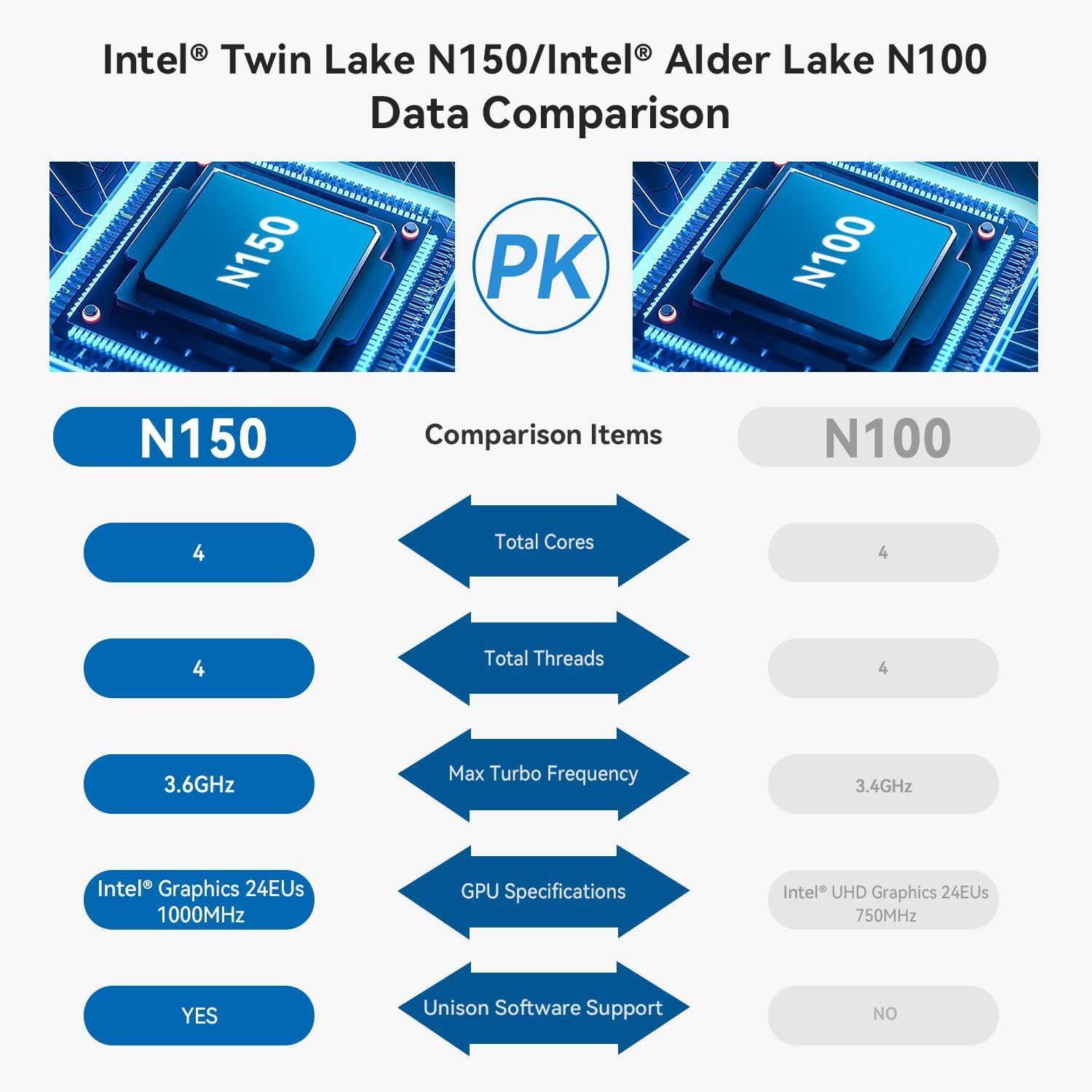
The mini PC is equipped with an Intel Twin Lake N150 Processor, 16GB DDR5 4800MHz RAM, and a 500GB SSD. It supports dual M.2 PCIe 3.0 SSDs for expanded storage.

Dieses Bild bietet einen internen Überblick view of the mini PC, highlighting the DDR5 SODIMM memory module and the two M.2 SSD slots, one M.2 PCIe 3.0 x4 and one M.2 PCIe 3.0 x1.
3.3. Kühlsystem
An innovative airflow design with a dust filter ensures stable operation and quiet performance by efficiently dissipating heat.

This image shows the underside of the mini PC, illustrating the new airflow design with a visible cooling fan and dust filter, designed for stable and quiet operation.
3.4. Produktvideo beendetview
This official TRIGKEY video provides a visual overview of the Key Mini N150, showcasing its compact design, internal components, and key features like the Intel Twin Lake N150 processor and DDR5 memory.
4. Einrichtungsanweisungen
4.1. Peripheriegeräte anschließen
- Monitor(e) anschließen: Use the provided HDMI cable to connect your monitor(s) to the HDMI ports on the rear of the mini PC. The device supports dual 4K@60Hz displays.
- Tastatur und Maus anschließen: Plug your USB keyboard and mouse into any available USB 3.2 ports.
- Netzwerkverbindung herstellen (optional): Für eine kabelgebundene Verbindung stecken Sie ein Ethernet-Kabel in den 2.5-Gbit/s-LAN-Anschluss. Stellen Sie bei einer drahtlosen Verbindung sicher, dass Ihr WLAN-Netzwerk während der Ersteinrichtung verfügbar ist.
4.2. Einschalten
- Netzteil anschließen: Plug the power adapter into the DC IN port on the rear of the mini PC, then connect it to a power outlet.
- Einschalten: Press the power button located on the front panel of the mini PC. The power indicator light will illuminate.
4.3. Erste Einrichtung des Betriebssystems
Upon first boot, the operating system (WOS) will guide you through the initial setup process. Follow the on-screen instructions to configure language, region, network, and user accounts.
5. Bedienungsanleitung
5.1. Grundlegende Bedienung
- Ein-/Ausschalten: Press the power button to turn on the PC. To turn off, use the operating system's shutdown function. A short press of the power button can put the PC to sleep.
- Neustart: Nutzen Sie die Neustartfunktion des Betriebssystems.
5.2. Dual-Display-Konfiguration
The Key Mini N150 supports connecting two monitors simultaneously via its two HDMI ports for extended desktop or mirrored display modes. Configure display settings within your operating system.
5.3. Netzwerkkonnektivität
- Kabelgebunden (2.5-Gbit/s-LAN): Connect an Ethernet cable to the LAN port for high-speed internet access.
- Drahtlos (Wi-Fi 6): The integrated Intel AX101 Wi-Fi 6 module provides fast and stable wireless connectivity. Access Wi-Fi settings in your operating system to connect to available networks.
5.4. Bluetooth-Geräte
The mini PC includes Bluetooth 5.2 for connecting wireless peripherals such as keyboards, mice, headphones, and speakers. Pair devices through the Bluetooth settings in your operating system.
5.5. Intel Unison App Integration
Utilize the Intel Unison App to seamlessly connect your PC with mobile devices. This allows for features such as viewFotogalerien erstellen, übertragen files, extending your PC screen to a tablet, making/receiving phone calls, and managing notifications.
This image illustrates the capabilities of the Intel Unison App, enabling users to connect their PC and mobile devices for features like photo viewtion, file transfer, screen extension, calls, and notifications.
6. Spezifikationen
| Besonderheit | Spezifikation |
|---|---|
| Prozessor | Intel Alder Lake N150 (4 Kerne/4 Threads, bis zu 3.6 GHz) |
| Grafik-Coprozessor | Intel Grafikprozessor 24 EUs 1000 MHz |
| RAM | 16 GB DDR5 4800 MHz |
| Lagerung | 500GB SSD (supports dual M.2 PCIe 3.0 SSDs) |
| Maximale Bildschirmauflösung | 3840 x 2160 Pixel (4K) |
| Anzeigeausgabe | 2 x HDMI (Max. 4K 60Hz) |
| Kabellose Konnektivität | WiFi 6 (Intel AX101), Bluetooth 5.2 |
| LAN | 2.5 Gbit/s Ethernet |
| USB-Anschlüsse | 4 x USB 3.2 (10 Gbit/s), 1 x USB-C (Datenübertragung 10 Gbit/s) |
| Audio-Buchse | 1 x 3.5 mm Audiobuchse |
| Betriebssystem | WOS |
| Artikelgewicht | 1.81 Pfund |
| Maße | 6.06 x 5.98 x 3.03 Zoll |
| Farbe | Schwarz |
7. Wartung
7.1. Reinigung
To maintain optimal performance and longevity, regularly clean the exterior of the mini PC with a soft, dry cloth. Ensure the ventilation openings are free from dust and obstructions. Do not use liquid cleaners directly on the device.
7.2. Speichererweiterung
The Key Mini N150 supports dual M.2 PCIe 3.0 SSDs. To expand storage, you can install an additional M.2 2280 SSD in the available slot. Refer to the detailed instructions for opening the chassis and installing components if you are comfortable with hardware modifications. It is recommended to back up data before any hardware changes.
7.3. Software-Updates
Regularly update your operating system and drivers to ensure system stability, security, and optimal performance. Check for updates through your operating system's settings.
8. Fehlerbehebung
8.1. Kein Strom
- Stellen Sie sicher, dass das Netzteil sowohl mit dem Mini-PC als auch mit einer funktionierenden Steckdose fest verbunden ist.
- Überprüfen Sie die Funktionsfähigkeit der Steckdose, indem Sie ein anderes Gerät anschließen.
- Versuchen Sie es gegebenenfalls mit einem anderen, kompatiblen Netzteil.
8.2. Keine Displayausgabe
- Check that the HDMI cable is securely connected to both the mini PC and the monitor.
- Stellen Sie sicher, dass der Monitor eingeschaltet und auf die richtige Eingangsquelle (HDMI 1, HDMI 2 usw.) eingestellt ist.
- Testen Sie es nach Möglichkeit mit einem anderen HDMI-Kabel oder Monitor.
8.3. Probleme mit der Netzwerkverbindung
- Verdrahtet: Überprüfen Sie die Ethernet-Kabelverbindung. Stellen Sie sicher, dass Ihr Router/Modem ordnungsgemäß funktioniert.
- Kabellos: Stellen Sie sicher, dass WLAN im Betriebssystem aktiviert ist. Prüfen Sie, ob das richtige WLAN-Netzwerk ausgewählt und das Passwort korrekt eingegeben wurde. Starten Sie Ihren Router/Ihr Modem neu.
8.4. System Unresponsive / Boot Issues
- Perform a hard shutdown by pressing and holding the power button for 5-10 seconds. Then restart the PC.
- CLR CMOS: If experiencing persistent boot issues or BIOS configuration problems, locate the CLR CMOS button on the rear panel. With the PC powered off and disconnected from power, press this button (often requires a paperclip) to reset BIOS settings to default. Reconnect power and attempt to boot.
9. Garantie und Support
TRIGKEY bietet umfassenden Support für seine Produkte:
- Garantie: 1 Jahr sorgenfreie Garantie.
- Technische Unterstützung: Lebenslanger technischer Support.
- Kundendienst: 24-Stunden-Kundenservice.
For any questions or assistance, please contact TRIGKEY customer service. Refer to the official TRIGKEY webDie aktuellsten Kontaktinformationen finden Sie auf dieser Website.


