1. Einleitung
Thank you for choosing the DELTACO GAMING RGB Gaming Chair PCH90. This manual provides detailed instructions for assembly, operation, maintenance, and troubleshooting to ensure you get the most out of your new gaming chair. Please read this manual thoroughly before use and keep it for future reference.
2. Produktüberschreitungview
The DELTACO GAMING RGB Gaming Chair PCH90 combines ergonomic design with vibrant RGB lighting for an immersive gaming experience. Key features include:
- 332 individuell anpassbare RGB-Beleuchtungsmodi.
- Ergonomic design with high backrest, neck, and lumbar support cushions.
- Adjustable height via hydraulic gas lift.
- Recline function from 90 to 180 degrees.
- 2D adjustable armrests.
- Durable vegan leather upholstery and strong steel frame.
- Stable 5-point star base with smooth-rolling nylon casters.

Abbildung 1: Vorderseite View of the Gaming Chair
Dieses Bild zeigt die Vorderseite. view of the pink DELTACO GAMING RGB Gaming Chair PCH90, highlighting its ergonomic design and the vibrant RGB lighting strips along the edges of the backrest and seat.

Figure 2: Chair Construction Details
This image provides a closer look at the chair's construction, highlighting the robust steel frame, comfortable soft foam padding, and the durable vegan leather upholstery.
3. Sicherheitshinweise
Please observe the following safety precautions to prevent injury or damage to the chair:
- Montage erforderlich: Vor der Benutzung des Stuhls vergewissern Sie sich, dass alle Teile fest montiert sind.
- Gewichtskapazität: Überschreiten Sie nicht die maximale Gewichtskapazität von 120 kg.
- Anpassungen: Exercise caution when adjusting the chair's height, recline, and armrests to avoid pinching or injury.
- Stabilität: Always ensure the chair is on a stable, level surface before sitting or making adjustments.
- Kinder: Halten Sie Kinder während der Montage und Justierung vom Stuhl fern.
- Reinigung: Use only recommended cleaning methods and products to avoid damaging the material. Refer to the Maintenance section.
4. Packungsinhalt
Prüfen Sie vor Beginn der Montage, ob alle Bauteile vorhanden und unbeschädigt sind. Sollten Teile fehlen oder beschädigt sein, wenden Sie sich bitte an den Kundendienst.
- Rückenlehne
- Sitzfläche
- Armlehnen (2)
- Sternbasis
- Rollen (5)
- Gasdruckfeder
- Gasheber-Abdeckung
- Mechanismusplatte
- Lendenkissen
- Nackenkissen
- Hardware-Set (Schrauben, Unterlegscheiben, Inbusschlüssel)
- RGB-Fernbedienung
- USB-Stromkabel
5. Aufbau und Montage
Befolgen Sie diese Schritte sorgfältig für eine korrekte Montage. Es wird empfohlen, die Montage zu zweit durchzuführen.
5.1 Attach Casters to Star Base
Insert each of the five casters firmly into the holes at the end of the star base until they click into place.
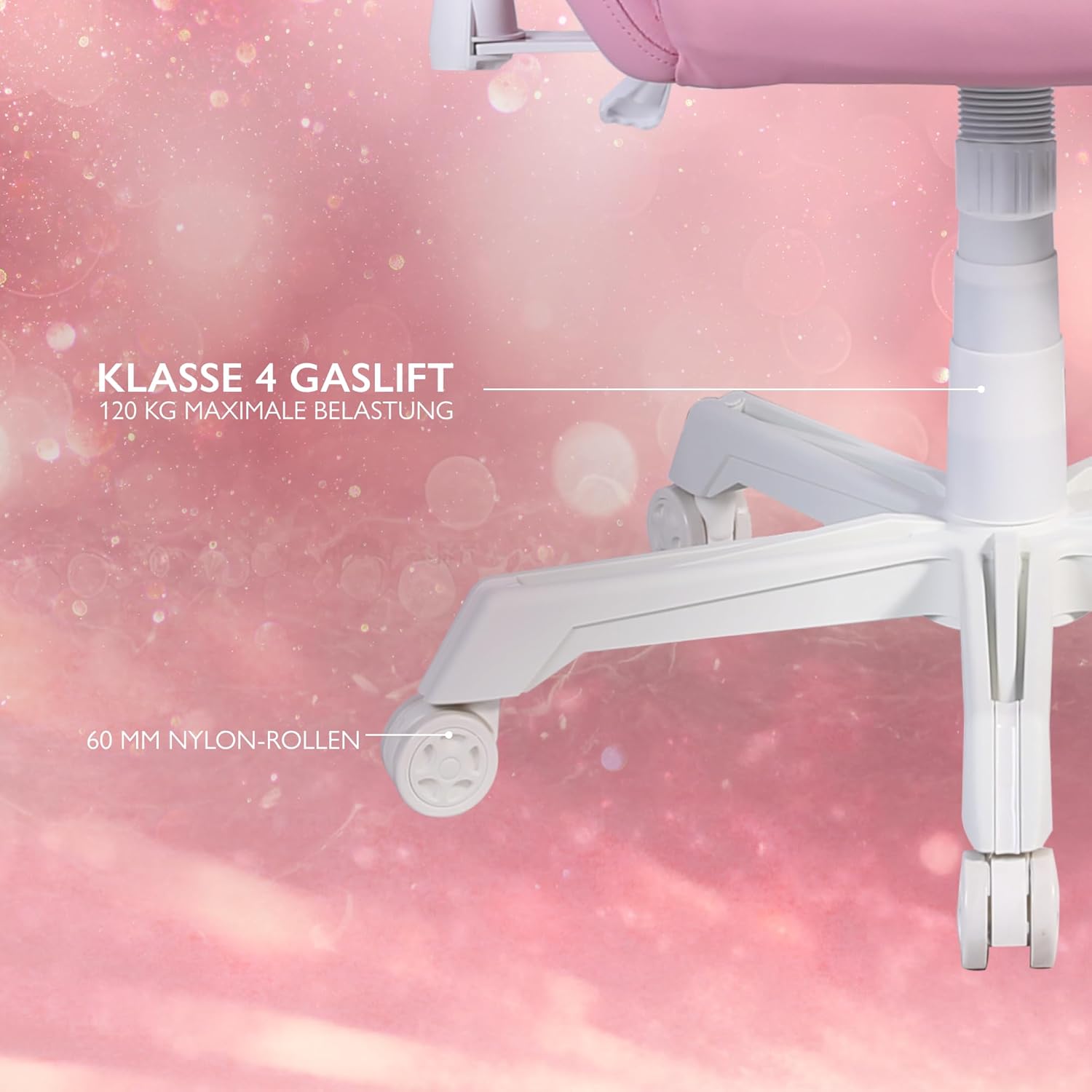
Figure 3: Star Base and Casters
This image highlights the robust 5-point star base with 60mm nylon casters, designed for smooth movement, and indicates the Class 4 gas lift for height adjustment.
5.2 Install Gas Lift
Place the gas lift cylinder into the center hole of the assembled star base. Cover the gas lift with the telescopic plastic cover.
5.3 Attach Mechanism Plate to Seat Base
Align the mechanism plate with the pre-drilled holes on the underside of the seat base. Ensure the front of the mechanism plate faces the front of the seat. Secure with screws and washers from the hardware kit, tightening them with the Allen key.
5.4 Attach Armrests to Seat Base
Attach the armrests to the sides of the seat base using the provided screws. Do not fully tighten yet.

Figure 4: 2D Adjustable Armrests
This image illustrates the 2D adjustable armrests, capable of height and side adjustments for personalized comfort.
5.5 Attach Backrest to Seat Base
Align the backrest with the mounting brackets on the seat base. Secure with screws, then fully tighten the armrest screws and backrest screws.
5.6 Connect Seat to Gas Lift
Setzen Sie den zusammengebauten Sitz und die Rückenlehne vorsichtig auf den Gasdruckfederzylinder und achten Sie darauf, dass sie mittig und stabil sitzen.
5.7 Kissen anbringen
Attach the neck cushion to the top of the backrest using its straps. Position the lumbar cushion on the lower backrest as desired.

Figure 5: Neck and Lumbar Support Cushions
This image displays the additional neck and lumbar support cushions, designed to enhance ergonomic comfort during long gaming sessions.
6. Bedienungsanleitung
Machen Sie sich mit den Einstellmöglichkeiten des Stuhls vertraut, um optimalen Komfort zu gewährleisten.
6.1 Höhenverstellung
Pull the lever located on the right side of the seat upwards to adjust the chair height. Release the lever at your desired height. The hydraulic gas lift allows for smooth and precise adjustments.
6.2 Neigungsverstellung
Pull the recline lever on the left side of the seat upwards to adjust the backrest angle. Lean back or forward to the desired position (90 to 180 degrees) and release the lever to lock it in place.

Figure 6: Full Recline Functionality
This image shows the gaming chair fully reclined, illustrating its ability to adjust from 90 to 180 degrees for various activities, from intense gaming to relaxation.
6.3 Armlehnenverstellung
The 2D armrests can be adjusted for height and pivoted horizontally. Use the buttons or levers on the armrests to make adjustments.
6.4 RGB-Beleuchtungssteuerung
The chair features 332 customizable RGB lighting modes. Connect a 5V 2A USB-A power source (e.g., a power bank, not included) to the USB cable located in the practical storage pocket on the side of the chair. Use the included remote control to select lighting modes, colors, and brightness.

Figure 7: RGB Lighting and Remote Control
This image displays the gaming chair alongside its remote control, emphasizing the 332 unique LED modes available for personalized lighting effects.

Figure 8: USB Power Pocket
This image shows the practical storage compartment on the side of the chair, ideal for a power bank to supply power to the RGB lighting via the integrated USB cable.
7. Wartung und Pflege
Proper maintenance will extend the life of your gaming chair.
- Reinigung: Wischen Sie die veganen Lederoberflächen mit einem weichen, fusselfreien Tuch ab.amp Bei hartnäckigen Flecken eine milde Seifenlauge verwenden und sofort trocken wischen. Scharfe Chemikalien oder Scheuermittel vermeiden.
- Rahmen: Überprüfen Sie regelmäßig alle Schrauben und Bolzen auf festen Sitz. Ziehen Sie sie gegebenenfalls nach.
- Rollen: Clean casters periodically to remove dust and debris that may hinder smooth movement.
- Lagerung: Lagern Sie den Stuhl an einem kühlen, trockenen Ort, geschützt vor direkter Sonneneinstrahlung und extremen Temperaturen.
8. Fehlerbehebung
Sollten Sie auf Probleme stoßen, konsultieren Sie bitte die folgenden häufigen Probleme und Lösungen:
| Problem | Mögliche Ursache | Lösung |
|---|---|---|
| Der Stuhl ist nicht höhenverstellbar. | Fehlfunktion des Gasliftzylinders oder Hebel nicht eingerastet. | Stellen Sie sicher, dass der Höhenverstellhebel vollständig gezogen ist. Sollte das Problem weiterhin bestehen, muss die Gasdruckfeder möglicherweise ausgetauscht werden. Wenden Sie sich an den Kundendienst. |
| Der Stuhl wackelt oder ist instabil. | Lose Schrauben oder unebener Boden. | Prüfen und ziehen Sie alle Montageschrauben fest. Stellen Sie sicher, dass der Stuhl auf einer ebenen, waagerechten Fläche steht. |
| Die Rollen rollen nicht reibungslos. | Fremdkörper in den Rollen oder beschädigte Rollen. | Entfernen Sie Haare und Schmutz von den Lenkrollen. Beschädigte Rollen müssen gegebenenfalls ausgetauscht werden. |
| Die RGB-Beleuchtung funktioniert nicht. | No power source, low power, or remote control issue. | Ensure a 5V 2A USB-A power source is connected and charged. Check remote control battery. Verify USB cable connection. |
If the problem persists after attempting these solutions, please contact DELTACO GAMING customer support.
9. Spezifikationen
| Besonderheit | Detail |
|---|---|
| Marke | DELTACO-SPIELE |
| Modellnummer | PCH90 |
| Farbe | Rosa |
| Material | Vegan Leather, Metal Frame |
| Produktabmessungen (L x B x H) | 57 x 68 x 55 cm (22.4 x 26.8 x 21.7 Zoll) |
| Artikelgewicht | 21 kg |
| Maximale Gewichtskapazität | 120 kg |
| Gasliftklasse | Klasse 4 |
| Nachlaufgröße | 60 mm Nylon Casters |
| Armlehnentyp | 2D Adjustable (Height & Pivot) |
| Neigungswinkel | 90 - 180 Grad |
| Beleuchtung | RGB with 332 customizable modes |
| Power for RGB | 5V 2A USB-A (external power source not included) |
10. Garantie und Support
For warranty information and customer support, please refer to the product packaging or visit the official DELTACO GAMING webBewahren Sie Ihren Kaufbeleg für Garantieansprüche auf.
Kontaktinformationen:
- Marke: DELTACO-SPIELE
- WebWebsite: www.deltacogaming.com (Examp(der tatsächliche Link kann abweichen)
- E-Mail: support@deltacogaming.com (Examp(Die tatsächliche E-Mail-Adresse kann abweichen.)


