1. Einleitung
This manual provides detailed instructions for the proper use and maintenance of your BAOFENG UV-18H Two-Way Radio. Please read this manual thoroughly before operating the device to ensure safe and efficient use. Keep this manual for future reference.
2. Produktüberschreitungview
The BAOFENG UV-18H is a versatile 6-band two-way radio equipped with GPS, NOAA weather alerts, USB-C charging, and wireless frequency copy capabilities. It features a 1.77-inch LCD screen for clear display of information.
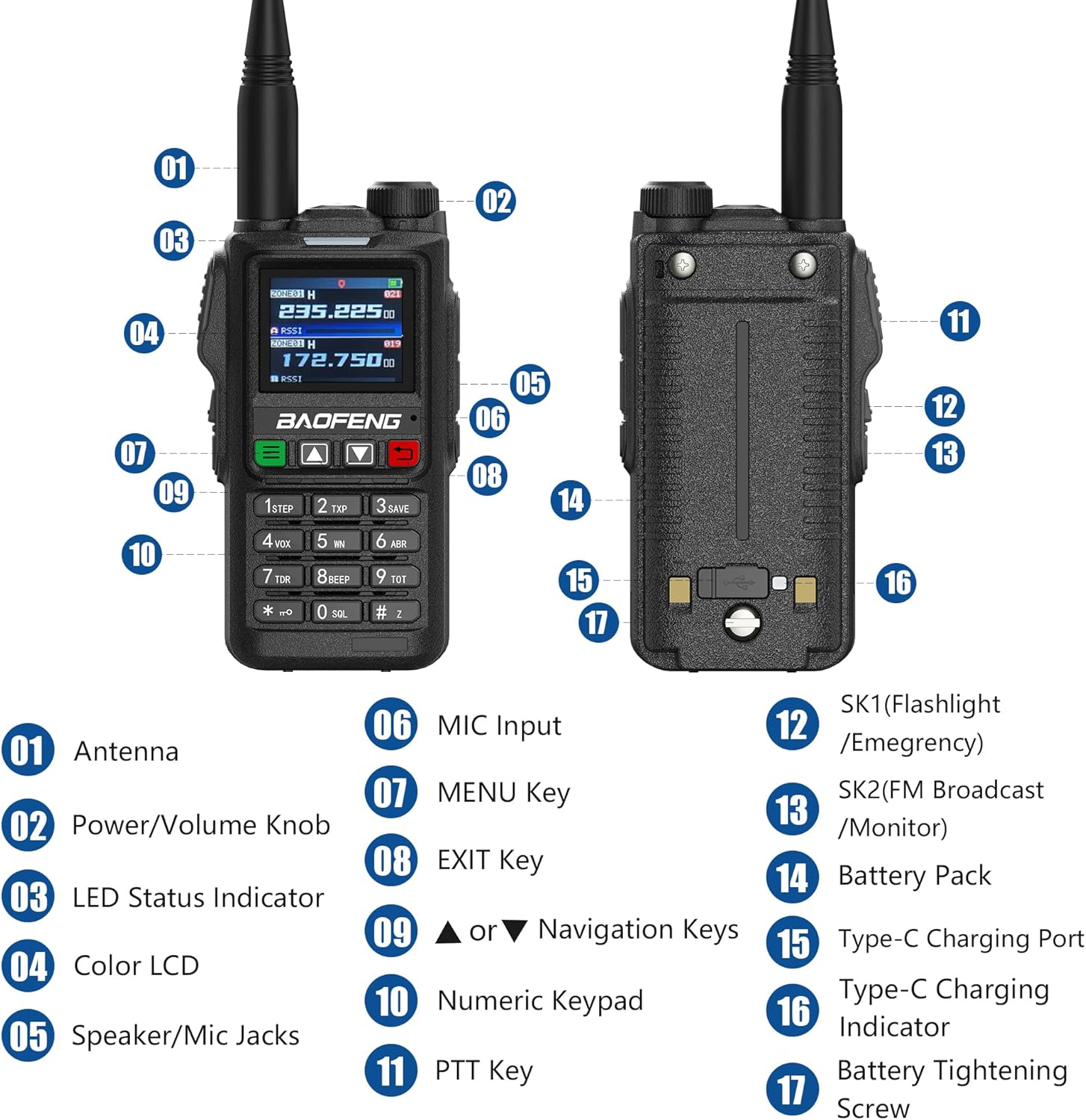
Figure 2.1: BAOFENG UV-18H Radio Components
This diagram illustrates the key components of the UV-18H radio. Numbered labels indicate: 01 Antenne, 02 Power/Volume Knob, 03 LED-Statusanzeige, 04-Farben-LCD, 05 Speaker/Mic Jacks, 06 MIC-Eingang, 07 Taste MENU, 08 EXIT Key, 09 Navigation Keys (Up/Down), 10 Numerische Tastatur, 11 PTT Key, 12 SK1 (Flashlight/Emergency), 13 SK2 (FM Broadcast/Monitor), 14 Akkupack, 15 Typ-C-Ladeanschluss, 16 Type-C Charging Indicator, 17 Battery Tightening Screw.
3. Packungsinhalt
Überprüfen Sie, ob alle Artikel im Paket vorhanden sind:
- UV-18H Tragbares Radio
- USB-C-Kabel
- Headset
- High-Gain-Antenne
- 1800 mAh Akku mit großer Kapazität
- Gürtelclip
- Akkuladegerät (Dockingstation und US-Adapter)
- Handschlaufe
- Benutzerhandbuch
- 771 Antenne
4. Einrichtung
4.1 Einlegen der Batterie
- Richten Sie den Akku an den Rillen auf der Rückseite des Radios aus.
- Schieben Sie den Akku nach oben, bis er einrastet.
- Ensure the battery tightening screw (17 in Figure 2.1) is securely fastened.
4.2 Antennenanschluss
- Schrauben Sie die Antenne im Uhrzeigersinn in den Anschluss oben am Radio, bis sie handfest sitzt. Nicht zu fest anziehen.
4.3 Laden des Akkus
The UV-18H radio can be charged using the provided charging dock or directly via a USB-C cable.

Abbildung 4.1: Ladeoptionen
The radio supports multiple charging methods including the base charger, direct Type-C charging, USB charging via a wall adapter, computer charging, power bank charging, and car charger options.
Verwendung der Ladestation:
- Connect the AC adapter to the charging dock and plug it into a power outlet.
- Place the radio (with battery installed) into the charging dock.
- The charging indicator light on the dock will illuminate to show charging status.
Direktes Laden über USB-C:
- Connect the USB-C cable to the Type-C Charging Port (15 in Figure 2.1) on the radio.
- Connect the other end of the USB-C cable to a compatible USB power source (e.g., power bank, PC, car charger, USB wall adapter).
- The Type-C Charging Indicator (16 in Figure 2.1) will show the charging status.
5. Grundlegende Bedienung
5.1 Ein-/Ausschalter und Lautstärkeregelung
- Einschalten: Rotate the Power/Volume Knob (02 in Figure 2.1) clockwise until a click is heard.
- Ausschalten: Rotate the Power/Volume Knob (02 in Figure 2.1) counter-clockwise until a click is heard.
- Lautstärkeregelung: Rotate the Power/Volume Knob (02 in Figure 2.1) clockwise to increase volume and counter-clockwise to decrease volume.
5.2 Kanalauswahl
- Use the Navigation Keys (09 in Figure 2.1) to scroll through available channels.
- Alternatively, use the Numeric Keypad (10 in Figure 2.1) to directly input a channel number.
5.3 Senden und Empfangen
- Zum Senden: Press and hold the PTT Key (11 in Figure 2.1) on the side of the radio. Speak clearly into the microphone. Release the PTT key to stop transmitting.
- Zum Empfangen: Stellen Sie sicher, dass die PTT-Taste nicht gedrückt ist. Das Funkgerät empfängt automatisch Signale auf dem ausgewählten Kanal.
6. Erweiterte Funktionen
6.1 GPS-Funktionalität
The UV-18H includes GPS functionality, displaying a simple compass on the screen to indicate location. This feature does not require an APRS cable. For detailed operation steps, refer to the manufacturer's video tutorials or support resources.

Figure 6.1: GPS Display
The radio's screen shows location information, aiding in coordination. The GPS feature provides timely location data.
6.2 NOAA-Wetterwarnungen
The radio is equipped with NOAA weather alert capabilities, allowing users to receive important weather broadcasts and alerts to stay informed about changing conditions.

Abbildung 6.2: NOAA-Wetterwarnungen
The radio provides access to NOAA weather alerts, enhancing safety by delivering timely weather information.
6.3 Frequenz für drahtloses Kopieren
The wireless copy frequency function allows for easy alignment of frequencies between two UV-18H radios without complex manual settings. Simply press the designated key to initiate the frequency alignment operation.

Abbildung 6.3: Kopie der drahtlosen Frequenz
This feature enables quick and simple frequency alignment between two radios, streamlining setup.
6.4 Scanner Function
The UV-18H includes a scanner function with VFO scan range settings. It supports three scan recovery methods, channel scanning, CTC/DCS scanning, and allows for the addition and removal of scan channels.
6.5 DTMF (Dual-Tone Multi-Frequency)
DTMF functionality enables various calling options, including individual calls, group calls, and all calls, enhancing communication flexibility within a network of compatible radios.

Figure 6.4: DTMF Calling Options
DTMF allows for targeted communication, facilitating individual, group, or broadcast calls.
6.6 AM/FM Multi-band Function
The radio supports AM/FM multi-band reception, allowing users to listen to broadcast radio in addition to two-way communication frequencies.
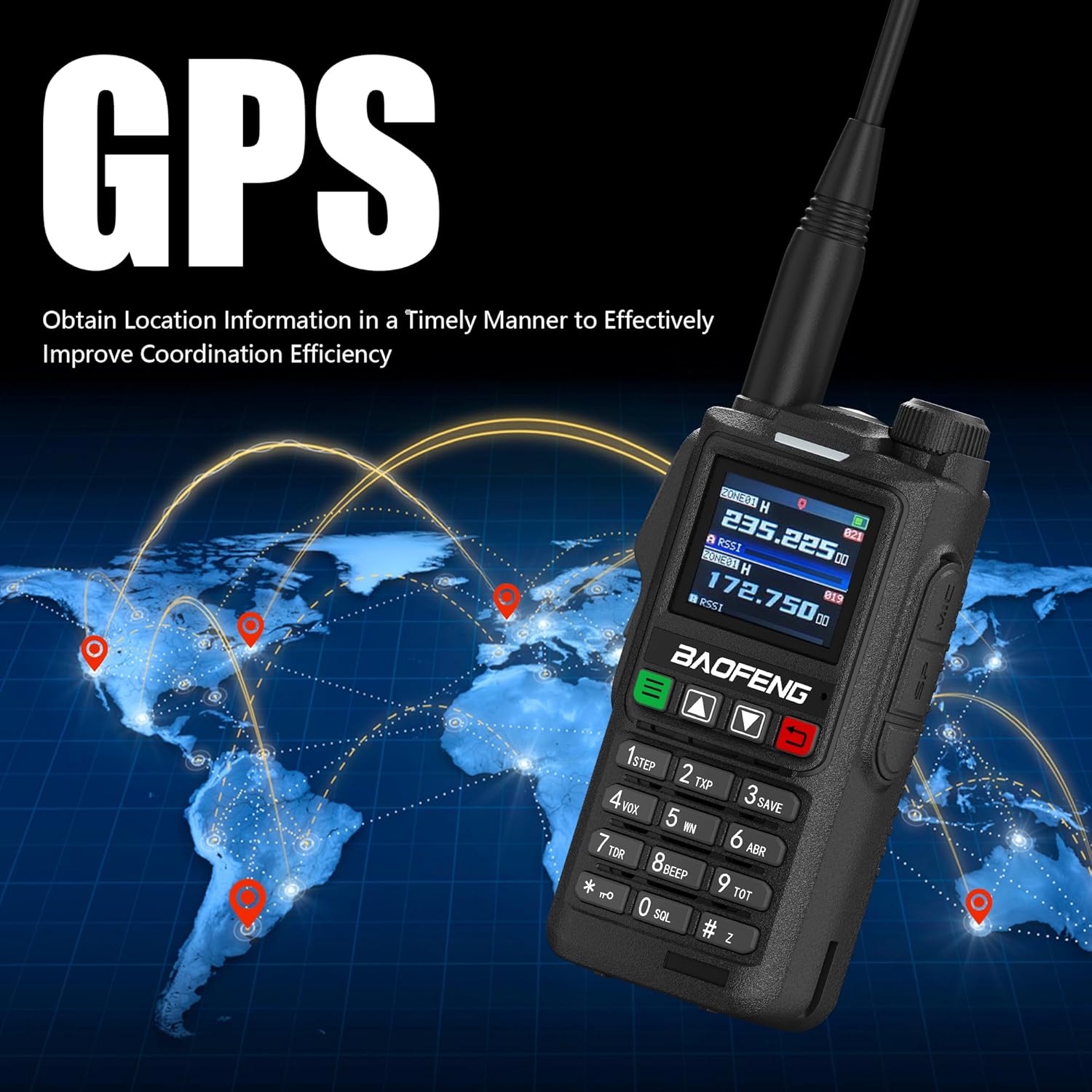
Figure 6.5: AM/FM Multi-band Function
The radio's multi-band capability includes AM/FM reception for broader utility.
7. Wartung
7.1 Reinigung
- Wischen Sie die Außenseite des Radios mit einem weichen, fusselfreien Tuch ab.amp Tuch. Verwenden Sie keine scharfen Chemikalien oder Scheuermittel.
- Vor der Reinigung muss sichergestellt sein, dass das Radio ausgeschaltet und von jeglicher Ladequelle getrennt ist.
7.2 Batteriepflege
- Um die Lebensdauer der Batterie zu verlängern, sollte eine häufige vollständige Entladung vermieden werden.
- Bewahren Sie Radio und Batterie an einem kühlen, trockenen Ort auf, wenn sie längere Zeit nicht benutzt werden.
- Setzen Sie den Akku keinen extremen Temperaturen oder direkter Sonneneinstrahlung aus.
8. Fehlerbehebung
| Problem | Mögliche Ursache | Lösung |
|---|---|---|
| Das Radio lässt sich nicht einschalten | Die Batterie ist schwach oder nicht richtig eingesetzt. | Laden Sie den Akku auf oder vergewissern Sie sich, dass er ordnungsgemäß installiert ist. |
| Senden und Empfangen nicht möglich | Incorrect frequency/channel, antenna not attached, or PTT not pressed/released | Verify channel settings, attach antenna securely, ensure PTT is used correctly. |
| Schlechte Audioqualität | Weak signal, incorrect volume, or interference | Move to an area with better signal, adjust volume, check for sources of interference. |
| GPS zeigt keinen Standort an | Poor satellite reception | Begeben Sie sich in einen offenen Außenbereich mit freiem Blick view des Himmels. |
9. Spezifikationen
| Besonderheit | Detail |
|---|---|
| Marke | BAOFENG |
| Modell | UV-18H |
| Anzahl der Kanäle | 999 |
| Besondere Merkmale | 1.77-Zoll-Bildschirm, GPS, NOAA, sechs Frequenzbänder, USB-C-Ladeanschluss |
| Frequenzbereich | 144–148 MHz, 420–450 MHz |
| Maximale Sprechreichweite | 6 Meilen |
| Bandtage | 7.4 Volt (DC) |
| Wasserbeständigkeit | Nicht wasserfest |
| Anzahl Batterien | 1 Lithium-Ionen-Akku (im Lieferumfang enthalten) |
| Artikelgewicht | 25.04 Unzen |
10. Garantie und Support
Specific warranty details for the BAOFENG UV-18H radio are not provided in the product information. For warranty claims, technical support, or further assistance, please contact the retailer or manufacturer directly. Keep your purchase receipt as proof of purchase.


