1. Einleitung
Thank you for choosing the Aveek Mini Karaoke Machine V9. This portable Bluetooth speaker with wireless microphones is designed to provide an enjoyable and interactive audio experience. This manual provides detailed instructions for setup, operation, and maintenance to ensure optimal performance and longevity of your device.
2. Packungsinhalt
Bitte überprüfen Sie beim Auspacken, ob alle unten aufgeführten Artikel enthalten sind:
- 1 x Aveek Mini Karaoke Speaker
- 2 x drahtlose Mikrofone
- 1 x USB-Ladekabel
- 1 x Benutzerhandbuch (dieses Dokument)

Image: Contents of the Aveek Mini Karaoke Machine V9 package, showing the speaker, two wireless microphones, a charging cable, and the user manual.
3. Produktüberschreitungview
The Aveek Mini Karaoke Machine V9 combines a portable Bluetooth speaker with two wireless microphones, offering versatile entertainment options. It features vibrant LED lights, multiple voice changing effects, and broad compatibility with various audio sources.
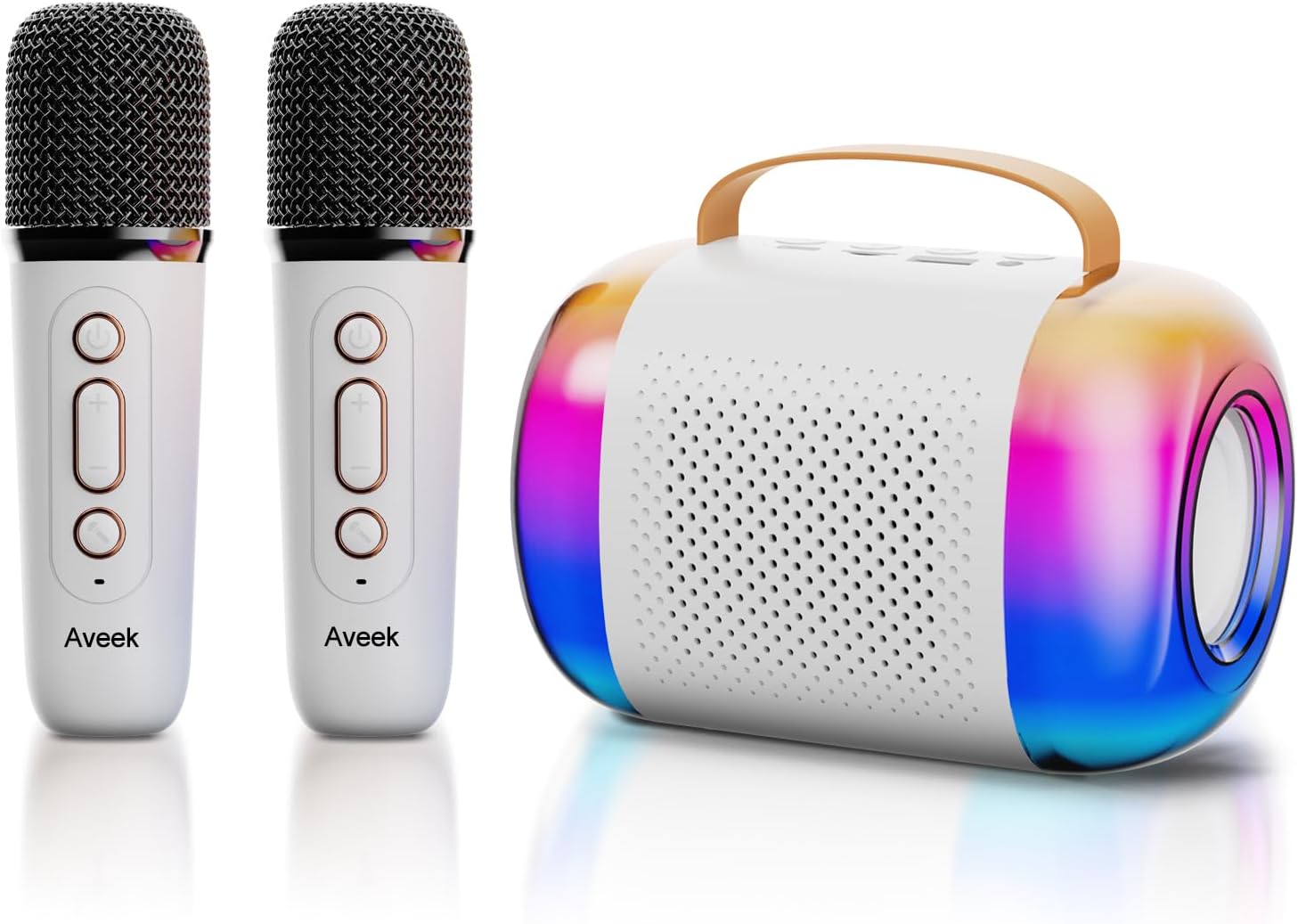
Image: The Aveek Mini Karaoke Machine V9, featuring the main speaker unit with colorful LED lights and two accompanying white wireless microphones.
Lautsprecherfunktionen:
- Bluetooth 5.3-Konnektivität: Ensures stable wireless connection up to 50 feet.
- Mehrere Wiedergabeoptionen: Unterstützt Bluetooth, TF-Karte, USB-Laufwerk und AUX-Eingang.
- Dynamische LED-Leuchten: 5 ambient light modes that synchronize with music rhythm.
- Tragbares Design: Lightweight with a convenient handle for easy transport.
- Hochwertiger Klang: Equipped with 2 x 52 tweeters and a 4060 bass diaphragm for clear stereo sound.

Bild: Eine explodierte view of the Aveek Mini Karaoke Machine V9 speaker, illustrating its internal audio components including tweeters and a bass diaphragm.
Mikrofonfunktionen:
- Drahtloser Betrieb: Provides freedom of movement during performances.
- Stimmenverzerrer: Includes 4 magic voice effects (Original, Female, Male, Baby, Monster).
- Wiederaufladbar: Built-in Lithium Polymer batteries.

Image: A visual representation of the five voice changing options available on the Aveek Mini Karaoke Machine V9, including original, female, male, baby, and monster voices.
4. Einrichtungsanweisungen
4.1 Aufladen des Geräts
The karaoke machine speaker and microphones are equipped with rechargeable Lithium Polymer batteries. Use the provided USB charging cable to charge them.
- Connect the USB charging cable to the Type-C charging port on the speaker and microphones.
- Stecken Sie das andere Ende des USB-Kabels in ein kompatibles USB-Netzteil (nicht im Lieferumfang enthalten) oder in einen USB-Anschluss Ihres Computers.
- The indicator light will show charging status (Red for charging, Blue for Bluetooth connection).
- Ladezeit: Speaker: 3.5-4 hours; Microphones: 2.5 hours.
- Arbeitszeit: Speaker: 5-6 hours; Microphones: 3-4 hours.
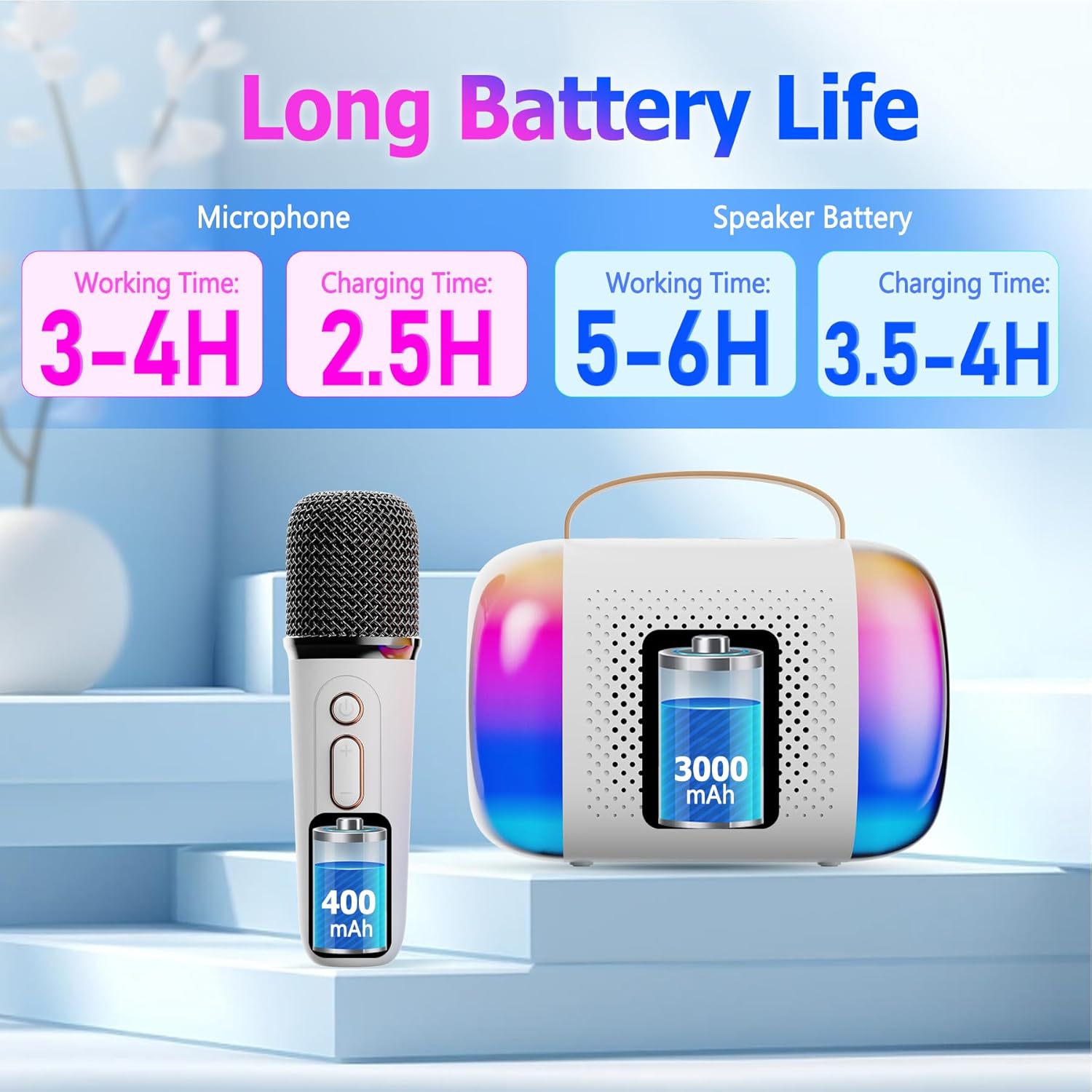
Image: A diagram illustrating the working and charging times for both the Aveek Mini Karaoke Machine V9 speaker and its wireless microphones.
4.2 Pairing Microphones with Speaker
The microphones are designed to automatically pair with the speaker when both are powered on. Ensure both devices are charged before attempting to pair.
- Power on the speaker by long pressing the Power ON/OFF Key.
- Power on each microphone by long pressing its Microphone ON/OFF button.
- The microphones should automatically connect to the speaker. A blue indicator light on the microphone signifies a successful Bluetooth connection.
4.3 Connecting to a Bluetooth Device (Phone, Tablet, PC)
To play music through the speaker, connect it to your preferred Bluetooth-enabled device.
- Ensure the karaoke speaker is powered on and in Bluetooth pairing mode (usually indicated by a flashing light).
- Navigieren Sie auf Ihrem Gerät (Telefon, Tablet, PC) zu den Bluetooth-Einstellungen.
- Suchen nach available devices and select "Aveek V9" (or similar name) to connect.
- Sobald die Verbindung hergestellt ist, können Sie Musik von Ihrem Gerät über den Karaoke-Lautsprecher abspielen.

Image: The Aveek Mini Karaoke Machine V9 demonstrating its Bluetooth 5.3 connectivity and various input options including USB Drive, TF Card, Bluetooth, and Headphone/AUX.
5. Bedienungsanleitung
5.1 Lautsprechersteuerung

Image: Detailed diagram of the Aveek Mini Karaoke Machine V9 speaker, labeling its indicator light, Type-C charging port, TF card slot, USB-A drive interface, AUX 3.5mm audio input, and control buttons (-, +, Mode, Power ON/OFF).
- Power ON/OFF Key: Long press to turn on/off. Short press to play/pause music.
- Modus-Taste: Double click to switch light modes. Long press to turn on/off the color lights.
- - Schlüssel: Long press for previous music. Short press to decrease volume (3 levels).
- + Schlüssel: Long press for next music. Short press to increase volume (3 levels).
- Kontrollleuchte: Red for charging, Blue for Bluetooth connection.
- Typ-C-Ladeanschluss: Zum Aufladen des Lautsprechers.
- TF-Karten-Slot: Legen Sie eine TF-Karte für die Musikwiedergabe ein.
- USB-A USB Drive Interface: Schließen Sie einen USB-Stick zur Musikwiedergabe an.
- AUX 3.5mm Audio Input: Schließen Sie externe Audiogeräte über ein AUX-Kabel an.
5.2 Mikrofonsteuerung

Image: Detailed diagram of the Aveek Mini Karaoke Machine V9 wireless microphone, labeling its Microphone ON/OFF button, Bluetooth/Charging Indicator, Type-C Charging Port, and control buttons (Power ON/OFF, +, -).
- Mikrofon EIN/AUS: Long press to turn the mic on/off. Short press to change voice mode. Double click to open/close accompaniment.
- Power ON/OFF Key: Long press to turn on/off. Short press to adjust microphone/reverberation/accompaniment. Double click playback pause.
- + Schlüssel: Long press to play the next music. Short press to increase volume + / reverb volume +.
- - Schlüssel: Short press to decrease reverb volume - / accompaniment volume -. Long press to play the previous music.
- Bluetooth/Charging Indicator: Blue light for Bluetooth connection, Red light for charging.
- Typ-C-Ladeanschluss: Zum Aufladen des Mikrofons.
5.3 Voice Changer-Funktionen
The microphones feature 4 unique voice changing effects in addition to the original voice. To cycle through these modes, short press the Microphone ON/OFF button.
- Originalstimme
- Weibliche Stimme
- Männliche Stimme
- Babystimme
- Monsterstimme
5.4 Lichtmodi
The speaker features 5 ambient LED light modes that can be changed by double-clicking the Mode Key on the speaker. Long press the Mode Key to turn the lights on or off.
6. Wartung
- Reinigung: Use a soft, dry cloth to clean the speaker and microphones. Do not use liquid cleaners or abrasive materials.
- Lagerung: Bewahren Sie das Gerät an einem kühlen, trockenen Ort fern von direkter Sonneneinstrahlung und extremen Temperaturen auf.
- Batteriepflege: Um die Akkulaufzeit zu verlängern, sollten Sie die Akkus nicht häufig vollständig entladen. Laden Sie das Gerät regelmäßig auf, auch wenn es längere Zeit nicht benutzt wird.
- Wassereinwirkung: Dieses Gerät ist nicht wasserdicht. Vermeiden Sie den Kontakt mit Wasser und hoher Luftfeuchtigkeit.
7. Fehlerbehebung
| Problem | Mögliche Ursache | Lösung |
|---|---|---|
| Gerät lässt sich nicht einschalten. | Schwache Batterie. | Charge the speaker/microphones fully using the provided USB cable. |
| Microphones not connecting to speaker. | Microphones are not powered on or out of range. | Ensure microphones are powered on and within 50 feet of the speaker. Re-pair if necessary. |
| Aus dem Lautsprecher kommt kein Ton. | Volume too low, device not connected, or incorrect input mode. | Increase volume on both speaker and connected device. Verify Bluetooth/AUX/TF/USB connection. |
| Schlechte Tonqualität/Rauschen. | Interference, low microphone battery, or distance. | Move away from other electronic devices. Charge microphones. Reduce distance between mic and speaker. |
| Stimmverzerrer funktioniert nicht. | Falscher Tastendruck. | Short press the Microphone ON/OFF button to cycle through voice modes. |
8. Spezifikationen
| Besonderheit | Detail |
|---|---|
| Marke | Aveek |
| Modellname | V9 |
| Konnektivitätstechnologie | Bluetooth 5.3 (Speaker), VHF (Microphones) |
| Stromquelle | Batteriebetrieben (2 Lithium-Polymer-Batterien im Lieferumfang enthalten) |
| Lautsprecherabmessungen (L x B x H) | 10.5 x 2.1 x 3.5 Zoll |
| Artikelgewicht | 0.353 Unzen (ca. 10 Gramm) |
| Material | Metall, Kunststoff |
| Signal-Rausch-Verhältnis | 96 dB |
| Anzahl der Kanäle | 2 |
| Besondere Merkmale | Battery Indicator Light, Voice Changer, RGB Lights |
| Kompatible Geräte | Amplifier, Audio Interface, Audio Mixer, Karaoke Machine, Speaker (via various inputs) |
| Eingangsanschlüsse | TF Card Slot, USB-A Drive Interface, AUX 3.5mm Jack |
9. Garantie und Support
For warranty information and customer support, please refer to the product packaging or contact Aveek customer service directly. Keep your purchase receipt for any warranty claims.


