1. Einleitung
This manual provides comprehensive instructions for the setup, operation, and maintenance of your Lecoo WS208 Wireless Mouse. Please read this manual carefully before using the product to ensure proper function and longevity. Keep this manual for future reference.
2. Produktüberschreitungview
The Lecoo WS208 is a wireless optical mouse designed for comfort and efficiency. It features a 1200 DPI sensor for precise tracking and a silent click mechanism for a quiet user experience.
Hauptmerkmale:
- Optischer Sensor mit 1200 DPI: Provides accurate and responsive cursor control.
- 3-Tasten-Design: Standard left, right, and scroll wheel buttons for essential functions.
- Leiser Klick: Reduziert Klickgeräusche für eine ruhigere Arbeitsumgebung.
- Kabellose Verbindung: Operates via a 2.4GHz USB receiver, offering a range of up to 10 meters.
- Ergonomisches und kompaktes Design: Lightweight (54g) and shaped for comfortable use over extended periods.
- Lange Akkulaufzeit: Powered by one AA battery, providing up to 6 months of usage depending on conditions.
- Universelle Kompatibilität: Supports Windows XP/7/8/10/11, Mac OS X 10.4+, Linux Kernel 2.6+, and Android devices.
Packungsinhalt:
- Lecoo WS208 Wireless Mouse
- USB Mini Receiver
- Bedienungsanleitung
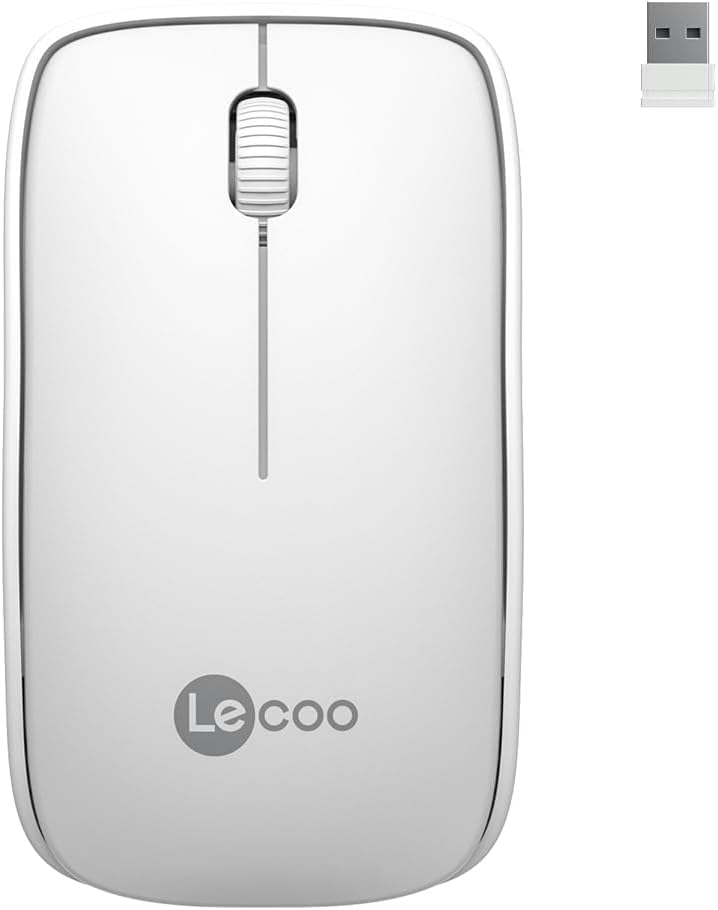
Image: Lecoo WS208 Wireless Mouse and its USB receiver.

Image: Diagram illustrating the components of the Lecoo WS208 mouse. Key features include the scroll wheel, left and right buttons, optical sensor, and USB dongle storage slot.
3. Einrichtung
3.1 Einlegen der Batterie
- Suchen Sie die Abdeckung des Batteriefachs an der Unterseite der Maus.
- Schieben oder heben Sie den Deckel vorsichtig an, um das Fach zu öffnen.
- Insert one AA battery (not included) into the compartment, ensuring the positive (+) and negative (-) terminals align correctly with the indicators.
- Bringen Sie die Abdeckung des Batteriefachs wieder an, bis sie sicher einrastet.
3.2 Anschließen des USB-Empfängers
- Remove the USB mini receiver from its storage slot, usually located inside the battery compartment or on the bottom of the mouse.
- Plug the USB receiver into an available USB port on your computer (PC, Mac, Laptop) or compatible device.
- Ihr Betriebssystem sollte die benötigten Treiber automatisch erkennen und installieren. Dies kann einige Augenblicke dauern.
3.3 Powering On the Mouse
After installing the battery and plugging in the receiver, the mouse should automatically power on. Some models may have a power switch on the bottom; ensure it is in the 'ON' position if present.
4. Bedienungsanleitung
4.1 Grundfunktionen
- Linke Taste: Primary click function (e.g., select items, open links).
- Rechter Knopf: Secondary click function (e.g., open context menus).
- Scrollrad: Scrollen Sie in den Dokumenten nach oben oder unten und web Seiten. Das Scrollrad fungiert beim Drücken auch als mittlere Taste.
4.2 DPI-Empfindlichkeit
The Lecoo WS208 operates at a fixed 1200 DPI (Dots Per Inch) sensitivity, providing a balanced speed and precision for most daily tasks. No manual DPI adjustment is available on this model.
4.3 Betriebsbereich
The mouse maintains a stable connection within a 10-meter range from the USB receiver. Performance may vary depending on environmental factors and obstacles.

Image: Icons representing universal compatibility with Android, Apple (macOS), Windows, Linux, and ChromeOS.
5. Wartung
5.1 Reinigung
- Stellen Sie sicher, dass die Maus vor der Reinigung ausgeschaltet ist.
- Verwenden Sie ein weiches, trockenes, fusselfreies Tuch, um die Oberfläche der Maus abzuwischen.
- Bei hartnäckigen Verschmutzungen leicht dampBefeuchten Sie das Tuch mit Wasser oder einem milden, nicht scheuernden Reinigungsmittel. Vermeiden Sie übermäßige Feuchtigkeit.
- Verwenden Sie keine aggressiven Chemikalien, Lösungsmittel oder Scheuermittel, da diese die Oberfläche der Maus beschädigen können.
5.2 Batteriewechsel
When the mouse's performance degrades or it stops responding, it may be time to replace the AA battery. Follow the battery installation steps in Section 3.1.
6. Fehlerbehebung
Häufige Probleme und Lösungen:
- Maus reagiert nicht:
- Stellen Sie sicher, dass die Batterie korrekt eingesetzt ist und ausreichend geladen ist. Tauschen Sie sie gegebenenfalls aus.
- Vergewissern Sie sich, dass der USB-Empfänger fest an einen funktionierenden USB-Anschluss angeschlossen ist. Versuchen Sie es mit einem anderen USB-Anschluss.
- Stellen Sie sicher, dass sich die Maus innerhalb der 10-Meter-Reichweite des Empfängers befindet.
- Starten Sie Ihren Computer neu.
- Erratic or jumpy cursor movement:
- Reinigen Sie den optischen Sensor an der Unterseite der Maus mit einem weichen, trockenen Tuch.
- Achten Sie darauf, dass Sie die Maus auf einer geeigneten Oberfläche verwenden. Vermeiden Sie stark reflektierende oder transparente Oberflächen.
- Überprüfen Sie, ob andere drahtlose Geräte Störungen verursachen.
- Verbindungsprobleme:
- Den USB-Empfänger vom Stromnetz trennen und wieder anschließen.
- Bewegen Sie die Maus näher an den USB-Empfänger.
7. Spezifikationen
| Marke | Lecoo |
| Modell | WS208 |
| Konnektivitätstechnologie | Wireless (2.4GHz USB Receiver) |
| Bewegungserkennung | Optisch |
| DPI-Empfindlichkeit | 1200 DPI |
| Anzahl der Tasten | 3 (Links, Rechts, Scrollrad/Mitte) |
| Betriebsbereich | Bis zu 10 Meter |
| Akku-Typ | 1 x AA-Batterie (nicht im Lieferumfang enthalten) |
| Akkulaufzeit | Bis zu 6 Monate (je nach Nutzung) |
| Abmessungen (L x B x H) | 95 mm x 54 mm x 31 mm |
| Gewicht | 54g (mouse only) |
| Kompatibilität | Windows XP/7/8/10/11, Mac OS X 10.4+, Linux Kernel 2.6+, Android |

Image: Visual representation of the Lecoo WS208 mouse dimensions (95mm length, 54mm width, 31mm height) and weight (54g).
8. Garantie und Support
Lecoo products are designed for reliability and performance. For warranty information or technical support, please refer to the warranty card included with your product or visit the official Lecoo webBewahren Sie Ihren Kaufbeleg als Kaufnachweis für Garantieansprüche auf.