Einführung
This manual provides detailed instructions for the setup, operation, and maintenance of your Yaheetech 10x10 Pop-Up Canopy Tent. Designed for ease of use and durability, this canopy offers ample shade and features integrated solar LED lighting for evening use. Please read this manual thoroughly before assembly and use to ensure safe and optimal performance.
Wichtige Sicherheitsinformationen
WARNUNG:
- Um optimale Leistung und Sicherheit zu gewährleisten, verwenden Sie dieses Sonnensegel nicht bei starkem Wind, anhaltendem leichtem Regen, starkem Regen oder anderen extremen Wetterbedingungen.
- Always anchor the canopy to the ground when in use using the provided stakes, sandbags, and ropes.
- Um ein Zusammenklappen zu verhindern, ist es wichtig, dass beim Aufbau alle Verriegelungsmechanismen vollständig eingerastet sind.
- Halten Sie Kinder und Haustiere während des Auf- und Abbaus vom Baldachin fern.
- Do not hang heavy objects from the canopy frame.
- Avoid using open flames or heating devices inside or near the canopy.
Komponenten- und Teileliste
Before beginning assembly, ensure all parts are present and accounted for. Refer to the image below for a visual guide.

Figure 1: All included components for the Yaheetech 10x10 Pop-Up Canopy Tent.
- Pop-Up-Pavillongestell (1)
- Canopy Fabric with 17 Solar LED Lights (1)
- Rolltragetasche (1)
- Sandbags (4)
- Anchor Ropes (4)
- Bodenanker (12)
- Solar Panel (integrated into canopy)
- Remote Control (1)
Installationsanweisungen
Follow these steps for quick and easy assembly of your canopy tent. It is recommended that two people perform the setup for optimal ease and safety.
Schritt 1: Rahmen auspacken und positionieren
- Remove the canopy frame and fabric from the wheeled carry bag.
- Platzieren Sie den zusammengefalteten Rahmen an der gewünschten Aufstellstelle.
- With a partner, gently pull the frame outwards from opposite corners to partially expand it.

Figure 2: Quick and easy installation steps.
Step 2: Attach the Canopy Fabric and Solar Panel
- Drape the canopy fabric over the partially expanded frame. Ensure the solar panel is positioned at the top center.
- Locate the electrical connector from the solar panel and connect it to the corresponding port on the canopy fabric.
- Secure the canopy fabric to the frame using the hook and loop fasteners located at each corner and along the frame.

Figure 3: Key features and attachment points of the canopy.
Step 3: Fully Extend the Frame and Adjust Height
- From underneath the canopy, push up the horizontal bars at each corner until they "click" into place, fully extending the frame.
- Adjust the canopy height by pushing the spring buttons on each leg and sliding the telescopic outer tubes along the legs. There are 3 adjustable height settings from 8.8' to 9.4'.
- Wichtig: Do not overextend the frame legs beyond the designated height settings, as this may damage the canopy fabric or frame.
Schritt 4: Befestigen Sie das Sonnendach
- Fill the four sandbags with sand or other heavy material and attach them to the canopy legs using the hook and loop fasteners.
- Attach the anchor ropes to the corner rings of the canopy.
- Drive the ground stakes into the ground at an angle, securing the anchor ropes to them. Ensure the ropes are taut to provide stability.
Bedienungsanleitung
Solar LED Lights Operation
Your canopy tent is equipped with 17 built-in solar LED lights for illumination during the evening. The lights are powered by the integrated solar panel or can be charged via a power bank (not included).
- Grundgebühr: For first-time use, allow the solar panel to charge in direct sunlight for at least 6-8 hours to ensure sufficient power for the LED lights.
- Fernbedienung: The LED lights are controlled by the included remote. The remote allows you to turn the lights ON/OFF and adjust brightness levels.
- Batterie der Fernbedienung: The remote control requires a CR2025 button cell battery (included, usually with a pull tab to activate). Remove the plastic tab before first use.
- Aufladen der Powerbank: If solar charging is insufficient, you can connect a power bank (not included) to the USB port on the solar panel unit for alternative charging.

Abbildung 4: Tag und Nacht view of the canopy with remote control for LED lights.
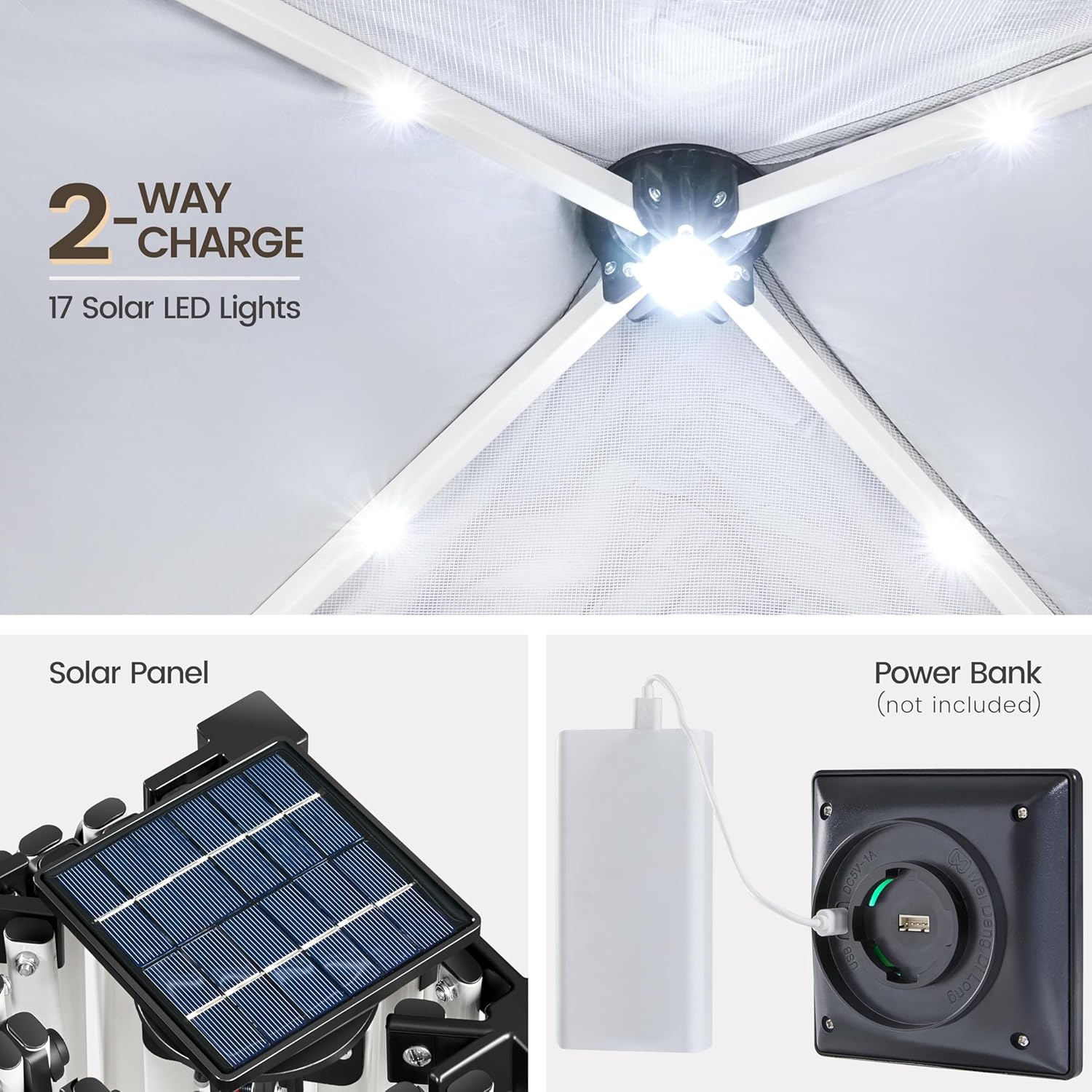
Figure 5: Two-way charging options for the solar LED lights.
Wartung
- Reinigung: Clean the canopy fabric with mild soap and water. Do not use harsh chemicals or abrasive cleaners. Allow to air dry completely before storage.
- Rahmenpflege: Inspect the steel frame regularly for any signs of rust or damage. Clean and dry any wet spots promptly.
- Lagerung: When not in use, disassemble the canopy and store it in its wheeled carry bag in a cool, dry place, away from direct sunlight and extreme temperatures.
- LED-Leuchten: Ensure the solar panel is clean and free of debris for efficient charging.
Fehlerbehebung
| Problem | Mögliche Ursache | Lösung |
|---|---|---|
| Canopy difficult to set up/take down. | Frame not fully expanded/collapsed; fabric snagging. | Ensure two people are assisting. Check for fabric snags. Apply light lubricant to frame joints if necessary. |
| LED lights not working or dim. | Insufficient solar charge; remote battery low/inactive; loose connection. | Allow solar panel to charge in direct sunlight. Check remote battery (CR2025) and remove pull tab. Verify solar panel connection to canopy. |
| Canopy unstable in light wind. | Improper anchoring; insufficient weight in sandbags. | Ensure all sandbags are filled and attached. Ropes are taut and stakes are firmly in the ground. Do not use in strong winds. |
Technische Daten
| Marke | Yaheetech |
| Modellnummer | YTxwxe0001001 |
| Abmessungen (L x B x H) | 116.93"L x 116.93"W x 113.39"H (10ft x 10ft x adjustable height) |
| Einstellbare Höhen | 8.8' to 9.4' (in 4" increments) |
| Material | Powder-Coated Steel Frame, UPF 50+ Polyester Oxford Fabric with Silver Lining |
| Gewicht | 33.5 Pfund |
| Abdeckungsbereich | 100 Quadratmeter |
| Beleuchtung | 17 Solar LED Lights |
| Mitgeliefertes Zubehör | Wheeled Bag, 4 Sandbags, 4 Anchor Ropes, 12 Stakes, Remote Control |
Garantie und Support
Informationen zur Garantie, Produktunterstützung und Ersatzteile finden Sie auf der offiziellen Yaheetech-Website. webBesuchen Sie die Website oder kontaktieren Sie direkt den Kundenservice. Die genauen Garantiebedingungen finden Sie in Ihren Kaufunterlagen.
Yaheetech Store: Besuchen Sie den Yaheetech Store auf Amazon.


