Einführung
Welcome to the user manual for your Lamax Street2 Bluetooth Speaker. This guide provides essential information for setting up, operating, maintaining, and troubleshooting your device. Please read this manual carefully before using the speaker and keep it for future reference.
Sicherheitshinweise
To ensure safe and proper operation, please observe the following safety guidelines:
- Setzen Sie das Gerät keinen extremen Temperaturen, direkter Sonneneinstrahlung oder hoher Luftfeuchtigkeit aus.
- Do not immerse the device in water. It is designed to be splash-resistant, not waterproof.
- Halten Sie den Lautsprecher außerhalb der Reichweite von Kindern und Haustieren.
- Use only approved charging cables and adapters to prevent damage and ensure safety.
- Versuchen Sie nicht, den Lautsprecher selbst zu zerlegen, zu reparieren oder zu verändern. Wenden Sie sich an qualifiziertes Servicepersonal.
Produkt überview
The Lamax Street2 is a portable Bluetooth speaker designed to deliver powerful sound with convenience. Its compact size, splash resistance, and long battery life make it ideal for various environments.
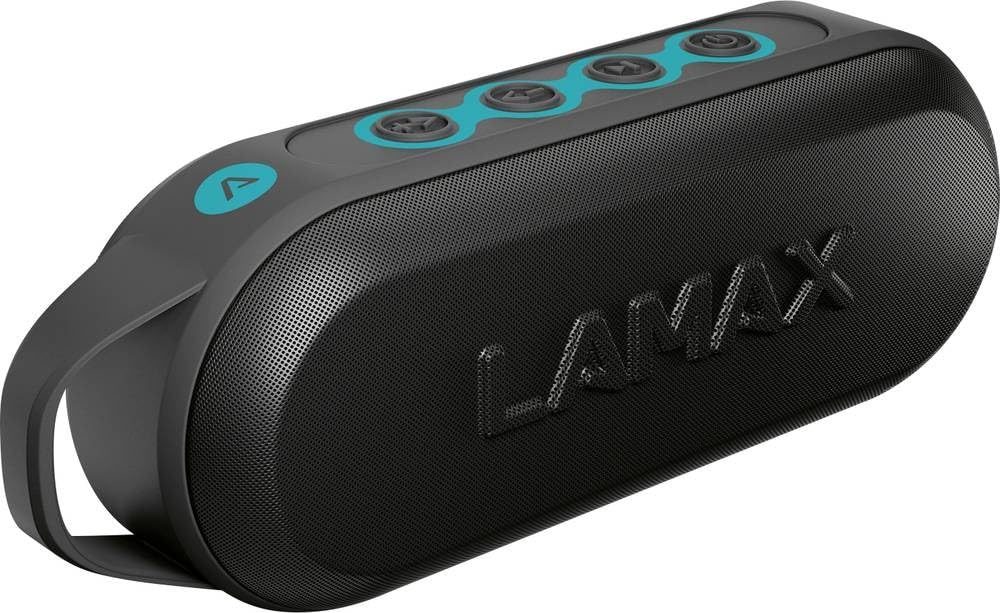
This image displays the front of the Lamax Street2 Bluetooth Speaker, showing its main body, control panel, and a sturdy carrying loop for portability.
Key features of your Lamax Street2 speaker include:
- Super-Sound: Enjoy clear and powerful audio output.
- 15 W Leistung: Delivers robust sound performance.
- Bluetooth 5.0: Für eine stabile und effiziente drahtlose Verbindung.
- Echtes drahtloses Stereo (TWS): Pair two Street2 speakers for an immersive stereo experience.
- Spritzwasserbeständigkeit: Designed to withstand splashes, making it suitable for outdoor use.
- Lange Akkulaufzeit: Extended playtime for uninterrupted music.
- Tragbares Design: Features a fixed eyelet and carabiner for easy transport.
Aufstellen
1. Laden Sie den Lautsprecher auf
Before using your Lamax Street2 speaker for the first time, ensure it is fully charged.
- Schließen Sie das mitgelieferte Ladekabel an den Ladeanschluss des Lautsprechers an.
- Verbinden Sie das andere Ende des Kabels mit einem USB-Netzteil (nicht im Lieferumfang enthalten) oder einem USB-Anschluss Ihres Computers.
- The charging indicator light will illuminate. It will typically turn off or change color once the speaker is fully charged.
2. Ein-/Ausschalten
To turn the speaker on or off:
- Einschalten: Press and hold the power button for approximately 3 seconds until you hear a power-on sound.
- Ausschalten: Press and hold the power button for approximately 3 seconds until you hear a power-off sound.
3. Bluetooth-Kopplung
To connect your Lamax Street2 to a Bluetooth-enabled device:
- Ensure the speaker is powered on and in pairing mode. The LED indicator will typically flash rapidly.
- Aktivieren Sie Bluetooth auf Ihrem Smartphone, Tablet oder einem anderen Bluetooth-fähigen Gerät und suchen Sie nach verfügbaren Geräten.
- Select "LAMAX Street2" from the list of found devices.
- Once connected, the speaker will emit a confirmation sound, and the LED indicator will stop flashing and remain solid.
4. True Wireless Stereo (TWS)-Kopplung
To pair two Lamax Street2 speakers together for a stereo sound experience:
- Ensure both Lamax Street2 speakers are powered on and are not connected to any other Bluetooth device.
- On one of the speakers, press and hold the TWS button (often indicated by a chain-link icon) for 2-3 seconds.
- Die Lautsprecher suchen und koppeln sich automatisch. Ein Bestätigungston signalisiert die erfolgreiche TWS-Kopplung.
- Now, connect your primary device (smartphone, etc.) to the primary speaker via Bluetooth as described in the "Bluetooth Pairing" section.
Bedienung des Lautsprechers
Grundlegende Bedienelemente
- Netzschalter: Press and hold for 3 seconds to turn the speaker on or off.
- Wiedergabe-/Pause-Taste: Einmal drücken, um die Audiowiedergabe abzuspielen oder anzuhalten.
- Lauter (+): Einmal drücken, um die Lautstärke zu erhöhen. Halten Sie gedrückt, um zum nächsten Titel zu springen.
- Lautstärke runter (-): Press once to decrease the volume. Press and hold to skip to the previous track.
- Call Button (if available): Press once to answer an incoming call or end an ongoing call. Press and hold to reject an incoming call.
Konnektivitätsoptionen
- Bluetooth: The primary method for wireless audio streaming from your devices.
Wartung
Proper care and maintenance will extend the life of your Lamax Street2 speaker.
- Reinigung: Gently wipe the speaker's surface with a soft, dry, lint-free cloth. Do not use abrasive cleaners, solvents, or chemical sprays.
- Lagerung: Bei längerer Nichtbenutzung sollte der Lautsprecher an einem kühlen, trockenen Ort, geschützt vor direkter Sonneneinstrahlung und extremen Temperaturen, aufbewahrt werden.
- Batteriepflege: To maintain optimal battery performance, avoid fully discharging the battery frequently. Charge the speaker regularly, even if not in active use.
Fehlerbehebung
If you encounter issues with your Lamax Street2 speaker, refer to the following table for common problems and solutions.
| Problem | Lösung |
|---|---|
| Der Lautsprecher lässt sich nicht einschalten. | Stellen Sie sicher, dass der Akku geladen ist. Schließen Sie den Lautsprecher an eine Stromquelle an und versuchen Sie es erneut. |
| Kopplung via Bluetooth nicht möglich. | Ensure the speaker is in Bluetooth pairing mode (flashing LED). Turn off and on your device's Bluetooth. Move closer to the speaker and ensure no other devices are connected. |
| Kein Ton oder geringe Lautstärke. | Check volume levels on both the speaker and your connected device. Ensure the speaker is correctly paired and not muted. |
| Schlechte Tonqualität oder zeitweise Verbindungsabbrüche. | Move your device closer to the speaker to minimize interference. Ensure there are no major obstacles between the devices. Disconnect and re-pair the Bluetooth connection. |
Technische Daten
Technical specifications for the Lamax Street2 Bluetooth Speaker:
- Modellname: Straße2
- Herstellerreferenz: LMXST2
- Marke: Lamax
- Konnektivitätstechnologie: Bluetooth 5.0
- Ausgangsleistung: 15 Watt
- Audioausgabemodus: Stereo
- Montageart: Tischmontage
- Energiequelle: Batteriebetrieben
- Besondere Merkmale: Bluetooth, Splash Resistance
- ASIN: B0CV5TH488
Garantie und Support
The Lamax Street2 Bluetooth Speaker is covered by a limited warranty. For detailed information regarding warranty terms, conditions, and duration, please refer to the warranty card included with your product or visit the official Lamax webWebsite.
For technical assistance, troubleshooting, or to inquire about warranty claims, please contact Lamax customer support. You can typically find contact information on the official Lamax weboder über den Händler, bei dem Sie das Produkt gekauft haben.


