1. Einleitung
The Pronomic DX-50 USB MKII is a professional 4-channel DJ mixer designed for a wide range of applications, including discos, parties, restaurants, and presentations. Its user-friendly design ensures that both experienced and less experienced users can fully utilize its features. This manual provides detailed instructions for setting up, operating, and maintaining your mixer.
Key features include a recording function, integrated Bluetooth interface, USB player with transport controls, and multiple input channels.
2. Wichtige Sicherheitshinweise
- Anweisungen lesen: Lesen Sie vor der Verwendung des Produkts alle Sicherheits- und Bedienungshinweise.
- Anweisungen aufbewahren: Bewahren Sie die Sicherheits- und Bedienungsanleitung zum späteren Nachschlagen auf.
- Warnungen beachten: Beachten Sie alle Warnhinweise auf dem Produkt und in der Bedienungsanleitung.
- Folgen Sie den Anweisungen: Befolgen Sie alle Bedienungs- und Nutzungsanweisungen.
- Wasser und Feuchtigkeit: Do not use this apparatus near water (e.g., bathtub, washbowl, kitchen sink, laundry tub, wet basement, or swimming pool).
- Belüftung: Die Lüftungsöffnungen dürfen nicht blockiert werden. Die Installation muss gemäß den Anweisungen des Herstellers erfolgen.
- Hitze: Installieren Sie das Gerät nicht in der Nähe von Wärmequellen wie Heizkörpern, Heizregistern, Öfen oder anderen Geräten (einschließlich ampKonverter (Lüfter), die Wärme erzeugen.
- Energiequellen: Use only power sources specified by the manufacturer.
- Netzkabelschutz: Schützen Sie das Netzkabel vor Beschädigungen oder Beschädigungen durch Fußgänger, insbesondere an den Steckern, Steckdosen und an der Stelle, an der es aus dem Gerät austritt.
- Reinigung: Nur mit trockenem Tuch reinigen.
- Wartung: Versuchen Sie nicht, dieses Produkt selbst zu warten, da Sie durch das Öffnen oder Entfernen von Abdeckungen gefährlichen Luftströmen ausgesetzt sein können.tage oder andere Gefahren. Überlassen Sie sämtliche Wartungsarbeiten qualifiziertem Servicepersonal.
3. Packungsinhalt
Please check that all items listed below are included in your package. If any items are missing or damaged, contact your dealer immediately.
- Pronomic DX-50 USB MKII DJ Mixer
- Power Adapter (AC 12V)
- USB Stick (32 GB, if included in your specific bundle)
- Benutzerhandbuch (dieses Dokument)
4. Produktüberschreitungview
Familiarize yourself with the various controls and connections on your DX-50 USB MKII mixer.
4.1 Bedienelemente auf der Vorderseite
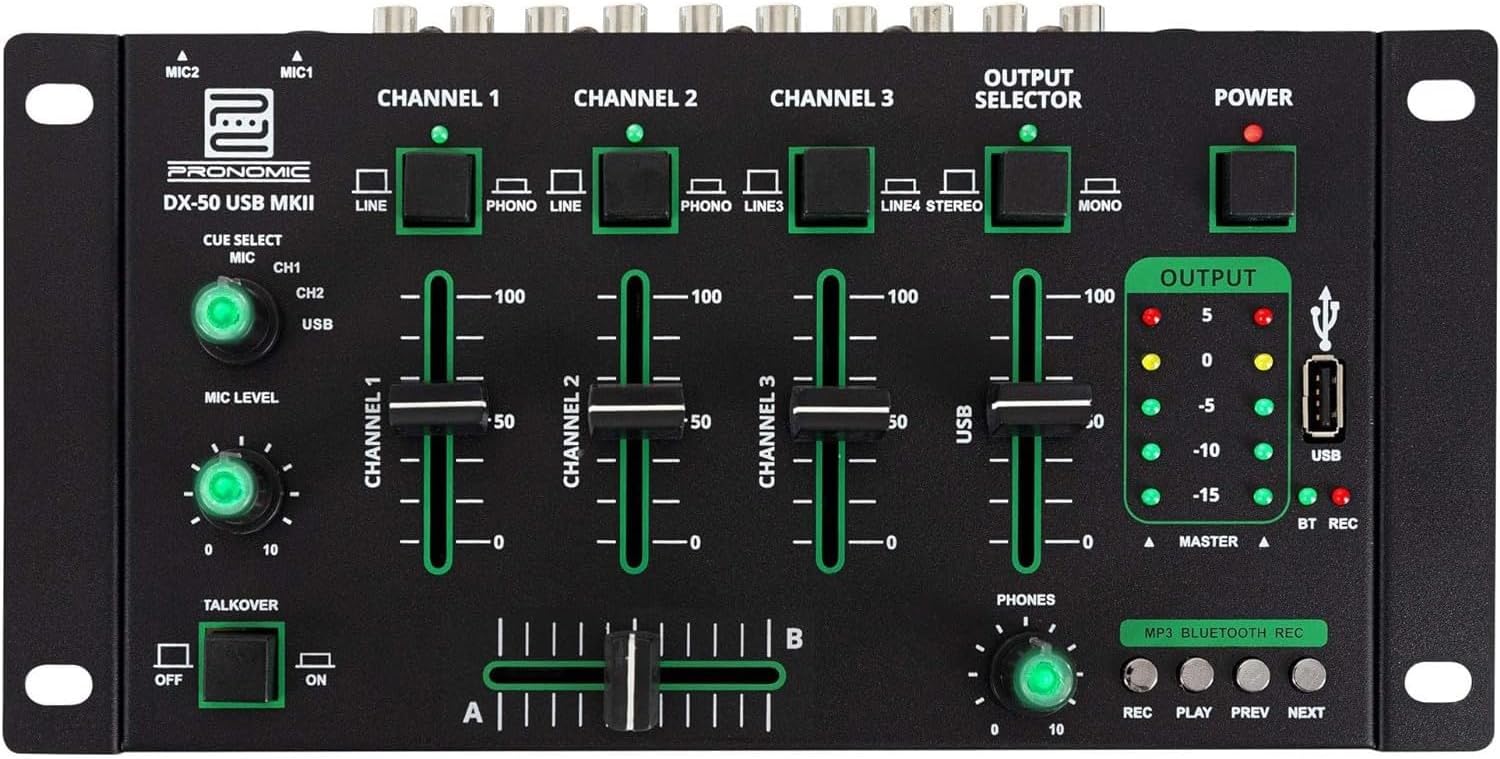
- MIC 1/2 Eingänge: Schließen Sie Mikrofone an.
- Channel 1-4 Input Selectors: Switch between LINE, PHONO, or USB/Bluetooth inputs for each channel.
- Kanalfader: Adjust the volume level for each channel.
- CUE Select Buttons: Route specific channels to the headphone output for monitoring.
- MIC Level Knob: Adjust the volume of the microphone inputs.
- Talkover-Schalter: Activates the talkover function, which automatically lowers music volume when speaking into the microphone.
- Ausgangsauswahl: Choose between Stereo or Mono master output.
- Stromschalter: Schaltet den Mixer ein/aus.
- Ausgangspegelmesser: LED indicators showing the master output level.
- USB-Anschluss: Connect a USB drive for MP3 playback and recording.
- MP3/Bluetooth/REC Player Controls: Buttons for Play/Pause, Previous, Next, and Record functions for the integrated player.
- Phones Level Knob: Regelt die Lautstärke des Kopfhörerausgangs.
- Crossfader (A/B): Blends between channels assigned to A and B.
4.2 Anschlüsse auf der Rückseite

- AC 12V Power Input: Schließen Sie hier das mitgelieferte Netzteil an.
- TELEFON-Ausgang: 6.3-mm-Klinke zum Anschluss von Kopfhörern.
- MASTER OUT L/R (RCA): Connect to your main ampVerstärker oder Aktivlautsprecher.
- Channel 1 & 2 Inputs (RCA Line/Phono): Connect turntables (Phono) or other line-level devices (CD players, media players). Use the front panel selector to switch.
- Channel 3 & 4 Inputs (RCA Line): Connect line-level devices.
- MIC 1 & 2 Inputs (6.3mm Jack): Schließen Sie Mikrofone an.
5. Einrichtung
Follow these steps to set up your Pronomic DX-50 USB MKII mixer:
- Stromanschluss: Ensure the mixer's power switch is in the OFF position. Connect the supplied AC 12V power adapter to the "AC 12V" input on the rear panel of the mixer. Plug the adapter into a suitable power outlet.
- Master Output Connection: Connect the "MASTER OUT L/R" RCA outputs on the rear panel to the inputs of your ampVerstärker oder Aktivlautsprecher.
- Anschluss des Eingabegeräts:
- Plattenspieler: Connect turntables to the "CHANNEL 1" or "CHANNEL 2" RCA inputs. Set the corresponding input selector on the front panel to "PHONO".
- CD Players/Line Devices: Connect CD players, media players, or other line-level devices to "CHANNEL 1", "CHANNEL 2", "CHANNEL 3", or "CHANNEL 4" RCA inputs. Set the corresponding input selector on the front panel to "LINE".
- Mikrofone: Connect microphones to the "MIC 1" or "MIC 2" 6.3mm jack inputs on the rear panel.
- Kopfhöreranschluss: Connect your headphones to the "PHONES" 6.3mm jack on the rear panel.
- USB Drive (Optional): If using a USB drive for playback or recording, insert it into the "USB" port on the front panel.
- Einschalten: Once all connections are made, switch the mixer's power switch to the ON position. The power indicator LED will illuminate.
6. Bedienungsanleitung
6.1 Grundlegendes Mischen
- Eingabe auswählen: For each channel, use the input selector switch (LINE/PHONO/USB/BT) to choose the desired audio source.
- Kanallautstärke anpassen: Use the vertical faders for each channel to adjust its individual volume level.
- Master-Ausgang: Monitor the "OUTPUT" LED meters and adjust the master volume knob (if present, otherwise rely on channel faders and amplifier volume) to achieve a suitable overall output level without clipping.
- Überblender: Use the crossfader to smoothly transition between channels assigned to A and B. Channels 1 and 2 are typically assigned to the crossfader.
6.2 Mikrofonnutzung
- Connect your microphone to one of the MIC inputs on the rear panel.
- Adjust the "MIC LEVEL" knob on the front panel to control the microphone's volume.
- Sprechfunktion: Activate the "TALKOVER" switch to automatically reduce the volume of the music when you speak into the microphone. This is useful for announcements.
6.3 USB-Wiedergabe und -Aufnahme
- USB-Wiedergabe: Stecken Sie ein USB-Laufwerk mit MP3 files into the "USB" port. Select "USB" as the input source for the dedicated USB channel. Use the "PLAY/PAUSE", "PREV", and "NEXT" buttons to control playback.
- USB-Aufnahme: Press the "REC" button to start recording the master output to the connected USB drive. Press "REC" again to stop recording. Ensure your USB drive has sufficient free space and is formatted correctly (FAT32 is commonly supported).
6.4 Bluetooth-Konnektivität
- Bluetooth aktivieren: Select "BT" as the input source for the dedicated Bluetooth channel. The mixer will enter pairing mode.
- Gerät koppeln: On your Bluetooth-enabled device (smartphone, tablet, etc.), search for available Bluetooth devices. Select "Pronomic DX-50 USB MKII" (or similar name) from the list to pair.
- Audio abspielen: Once paired, you can play audio from your device through the mixer. Control playback from your device or using the mixer's transport controls (if supported by your device).
6.5 Monitoring mit Kopfhörern
- Connect headphones to the "PHONES" output.
- Use the "CUE SELECT" buttons to choose which channels you want to monitor in your headphones without affecting the main output.
- Adjust the "PHONES" level knob to set your desired headphone volume.
7. Wartung
- Reinigung: Vor der Reinigung die Stromzufuhr unterbrechen. Die Oberfläche des Mischers mit einem weichen, trockenen Tuch abwischen. Keine flüssigen Reiniger, Sprays oder Lösungsmittel verwenden.
- Lagerung: Bewahren Sie den Mixer an einem kühlen, trockenen Ort fern von direkter Sonneneinstrahlung und extremen Temperaturen auf.
- Fader and Knob Care: Avoid excessive force when operating faders and knobs. Periodically check for dust or debris accumulation around moving parts.
- Kabelmanagement: Ensure cables are not kinked or strained, which can lead to damage.
8. Fehlerbehebung
| Problem | Mögliche Ursache | Lösung |
|---|---|---|
| Kein Strom | Netzteil nicht angeschlossen; Netzschalter ausgeschaltet; Steckdose defekt. | Check power adapter connection; Ensure power switch is ON; Try a different power outlet. |
| No sound from main output | Master volume too low; Amplifier/speakers off or disconnected; Incorrect input selection; Channel faders down. | Increase master volume; Check amplifier/speaker connections and power; Verify correct input selected for channels; Raise channel faders. |
| Kein Ton über Kopfhörer | Headphone volume too low; Headphones not connected; No CUE selected. | Increase PHONES level; Connect headphones properly; Press CUE button for desired channel. |
| Bluetooth nicht gekoppelt | Mischpult nicht im Kopplungsmodus; Gerät zu weit entfernt; Störungen. | Ensure BT input is selected; Bring device closer; Restart mixer and device. |
| USB-Wiedergabe funktioniert nicht | USB-Laufwerk nicht richtig eingesteckt; Falsch file Formatierung; USB-Laufwerk nicht korrekt formatiert. | USB-Laufwerk wieder einstecken; Sicherstellen files are MP3; Format USB drive to FAT32. |
9. Spezifikationen
| Modell | Pronomic DX-50 USB MKII |
| Anzahl der Kanäle | 4 |
| Konnektivitätstechnologie | Bluetooth, USB |
| Audioeingang | RCA (line/phono), 6.3mm microphone, Bluetooth, USB |
| Ausgangssteckertyp | RCA (Master Out), 6.3mm (Phones) |
| Stromquelle | Stromkabel (12-V-Wechselstromadapter) |
| Dimensions (without corner brackets and controls) | 222 x 129 x 28 mm (Breite x Tiefe x Höhe) |
| Total Dimensions (with corner brackets and controls) | 267 x 136 x 51 mm (Breite x Tiefe x Höhe) |
| Gewicht | 790 g |
10. Garantie und Support
Informationen zur Garantie und zum technischen Support finden Sie in der mitgelieferten Dokumentation oder wenden Sie sich an Ihren Händler. Bewahren Sie Ihren Kaufbeleg für eventuelle Garantieansprüche auf.
For further assistance, you may also visit the official Pronomic webWebsite oder wenden Sie sich an die Kundendienstabteilung.


