1. Einleitung
This manual provides instructions for the safe operation, maintenance, and troubleshooting of your FLEX 24V Brushless Cordless 1/2-Inch Hammer Drill Turbo Mode Kit, model FX1271T-2B. Please read this manual thoroughly before using the tool to ensure proper and safe operation.
The FLEX FX1271T-2B is a powerful 24V brushless cordless hammer drill designed for demanding drilling and driving applications. It features a 1/2-inch full-metal ratcheting chuck, two-speed settings, a Turbo Mode for increased speed, and an anti-kickback safety feature. This kit includes the drill, a 2.5Ah Lithium-Ion Battery, a 5.0Ah Lithium-Ion Battery, and a 160W Fast Charger.
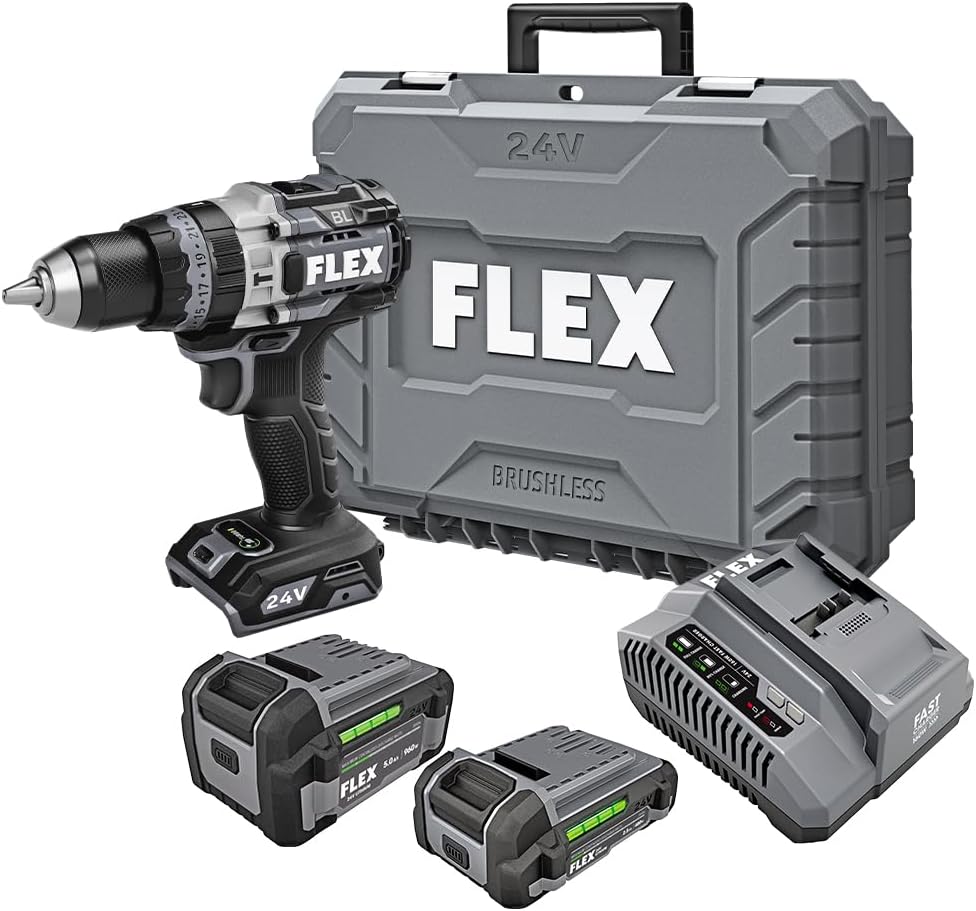
Figure 1: FLEX 24V Brushless Cordless 1/2-Inch Hammer Drill Kit (FX1271T-2B) including drill, two batteries, charger, and carrying case.
2. Allgemeine Sicherheitshinweise
WARNUNG: Lesen Sie alle Sicherheitswarnungen, Anweisungen, Abbildungen und Spezifikationen, die mit diesem Elektrowerkzeug geliefert werden. Die Nichtbeachtung aller unten aufgeführten Anweisungen kann zu elektrischem Schlag, Brand und/oder schweren Verletzungen führen.
2.1 Sicherheit am Arbeitsplatz
- Halten Sie Ihren Arbeitsbereich sauber und gut beleuchtet. Unordnung oder dunkle Bereiche führen zu Unfällen.
- Arbeiten Sie mit Elektrowerkzeugen nicht in explosionsgefährdeten Bereichen, in denen sich brennbare Flüssigkeiten, Gase oder Staub befinden. Elektrowerkzeuge erzeugen Funken, die den Staub oder die Dämpfe entzünden können.
- Halten Sie Kinder und andere Personen während der Benutzung des Elektrowerkzeugs fern. Durch Ablenkung können Sie die Kontrolle verlieren.
2.2 Elektrische Sicherheit
- Der Stecker des Elektrowerkzeugs muss in die Steckdose passen. Der Stecker darf in keiner Weise verändert werden. Verwenden Sie keine Adapterstecker gemeinsam mit geerdeten Elektrowerkzeugen. Unveränderte Stecker und passende Steckdosen verringern das Risiko eines elektrischen Schlages.
- Vermeiden Sie Körperkontakt mit geerdeten Oberflächen wie Rohren, Heizkörpern, Herden und Kühlschränken. Es besteht ein erhöhtes Risiko eines Stromschlags, wenn Ihr Körper geerdet ist.
- Setzen Sie Elektrowerkzeuge nicht Regen oder Nässe aus. Das Eindringen von Wasser in ein Elektrowerkzeug erhöht das Risiko eines Stromschlags.
2.3 Persönliche Sicherheit
- Tragen Sie immer einen Augenschutz. Verwenden Sie eine Schutzbrille, eine Schutzbrille mit Seitenschutz oder ein Gesichtsschild.
- Tragen Sie Gehörschutz, wenn Sie das Werkzeug über längere Zeiträume bedienen.
- Ziehen Sie sich angemessen an. Tragen Sie keine weite Kleidung oder Schmuck. Halten Sie Haare und Kleidung von beweglichen Teilen fern.
- Bleiben Sie wachsam, achten Sie darauf, was Sie tun, und gehen Sie mit gesundem Menschenverstand an die Arbeit mit Elektrowerkzeugen.
2.4 Verwendung und Pflege des Werkzeugs
- Überlasten Sie das Elektrowerkzeug nicht. Verwenden Sie für Ihre Anwendung das dafür geeignete Elektrowerkzeug.
- Trennen Sie den Akku vom Elektrowerkzeug, bevor Sie Einstellungen vornehmen, Zubehörteile wechseln oder Elektrowerkzeuge lagern.
- Bewahren Sie unbenutzte Elektrowerkzeuge außerhalb der Reichweite von Kindern auf. Lassen Sie das Elektrowerkzeug nicht von Personen benutzen, die mit diesem nicht vertraut sind oder diese Anweisungen nicht gelesen haben.
- Warten Sie Elektrowerkzeuge und Zubehör sorgfältig. Achten Sie auf Fehlausrichtung oder Festfressen beweglicher Teile, Bruchstellen oder andere Zustände, die die Funktion des Elektrowerkzeugs beeinträchtigen können.
2.5 Verwendung und Pflege von Akkuwerkzeugen
- Laden Sie den Akku nur mit dem vom Hersteller empfohlenen Ladegerät auf. Ein Ladegerät, das für einen bestimmten Akkutyp geeignet ist, kann bei Verwendung mit einem anderen Akkutyp Brandgefahr verursachen.
- Verwenden Sie Elektrowerkzeuge nur mit dafür vorgesehenen Akkus. Bei Verwendung anderer Akkus besteht Brand- und Verletzungsgefahr.
- Wenn der Akku nicht verwendet wird, halten Sie ihn von anderen Metallgegenständen wie Büroklammern, Münzen, Schlüsseln, Nägeln, Schrauben oder anderen kleinen Metallgegenständen fern, die eine Verbindung zwischen einem Anschluss und einem anderen herstellen können. Ein Kurzschluss der Akkuanschlüsse kann zu Verbrennungen oder Bränden führen.
- Bei unsachgemäßer Handhabung kann Flüssigkeit aus der Batterie austreten. Vermeiden Sie den Kontakt. Bei versehentlichem Kontakt mit Wasser spülen. Bei Kontakt mit den Augen ist zusätzlich ärztliche Hilfe aufzusuchen. Aus der Batterie austretende Flüssigkeit kann Reizungen oder Verbrennungen verursachen.
3. Enthaltene Komponenten
Your FLEX 24V Brushless Cordless 1/2-Inch Hammer Drill Kit (FX1271T-2B) includes the following items:
- FLEX 24V Brushless Cordless 1/2-Inch Hammer Drill
- (1) FLEX 24V 2.5Ah Lithium-Ion Battery (FX0111-1)
- (1) FLEX 24V 5.0Ah Lithium-Ion Battery (FX0121-1)
- FLEX 160W Schnellladegerät
- Zusatzhandgriff
- Tragetasche

Figure 2: The FLEX Advantage highlights the included 2.5Ah and 5.0Ah Lithium-Ion batteries, emphasizing their power, runtime, and fast charging capabilities.
4. Einrichtung und Erstgebrauch
4.1 Laden des Akkus
- Connect the 160W Fast Charger to a standard power outlet.
- Schieben Sie den Akku auf das Ladegerät, bis er einrastet.
- The charger's indicator lights will show the charging status. A fully charged battery will be indicated by a solid green light.
- Sobald der Akku vollständig aufgeladen ist, nehmen Sie ihn aus dem Ladegerät.
4.2 Einsetzen des Akkus
- Richten Sie den Akku an der Akkuöffnung am unteren Ende des Bohrmaschinengriffs aus.
- Slide the battery into the port until it locks securely into place. Ensure it is fully seated to prevent accidental dislodgement during operation.
- To remove the battery, press the release button(s) on the sides of the battery pack and slide it out.
4.3 Anbringen des Hilfsgriffs
For improved control and safety, especially during high-torque applications or hammer drilling, attach the auxiliary handle.
- Lösen Sie den Hilfsgriff clamp durch Drehen gegen den Uhrzeigersinn.
- Slide the handle over the front of the drill body, positioning it to your preferred angle.
- Ziehen Sie die Klammer fest.amp durch Drehen im Uhrzeigersinn, bis der Griff fest sitzt.

Figure 3: The drill with the auxiliary handle attached, providing enhanced control and stability, particularly when the anti-kickback feature engages.
4.4 Installing Drill Bits or Accessories
- Stellen Sie aus Sicherheitsgründen sicher, dass die Bohrmaschine ausgeschaltet und der Akku entfernt ist.
- Grip the rear collar of the 1/2-inch full-metal ratcheting chuck and rotate the front collar counter-clockwise to open the chuck jaws.
- Setzen Sie den Bohrer oder das Zubehör vollständig in die Spannbacken ein.
- Rotate the front collar clockwise to tighten the chuck jaws firmly around the bit. The ratcheting mechanism will provide an audible click when securely tightened.
- Gently pull on the bit to ensure it is properly secured.

Figure 4: Detail of the 1/2-inch full-metal ratcheting chuck, designed for secure bit retention and durability.
5. Bedienungsanleitung
5.1 Ein-/Ausschalten und Drehzahlregelung
- Auslöseschalter: Squeeze the trigger switch to turn the drill on. Release it to turn the drill off.
- Unterschiedliche Geschwindigkeit: The trigger switch is pressure-sensitive, allowing for variable speed control. Pressing the trigger further increases the speed.
- Vorwärts-/Rückwärtswähler: Located above the trigger, push the selector left for forward rotation (drilling/driving) and right for reverse rotation (removing screws). Center position locks the trigger for safety.
5.2 Gear Selection (2-Speed)
The drill features a 2-speed gearbox for optimal performance across various applications.
- Gang 1 (Niedrige Geschwindigkeit, hohes Drehmoment): Slide the gear selector switch to position '1'. Ideal for driving screws, drilling large holes, or applications requiring maximum torque.
- Gang 2 (Hohe Geschwindigkeit, Geringeres Drehmoment): Slide the gear selector switch to position '2'. Suitable for fast drilling of smaller holes in wood or metal.
NOTE: Always ensure the drill is stopped before changing gear settings to prevent damage to the gearbox.
5.3 Mode Selection (Drill, Drive, Hammer Drill)
Rotate the collar behind the chuck to select the desired operating mode:
- Bohrmodus (Bohrsymbol): For drilling holes in wood, metal, and plastics.
- Drive Mode (Screw Icon): For driving screws. The clutch settings (numbered ring) allow you to adjust the torque to prevent over-driving screws or damaging materials.
- Hammerbohrmodus (Hammersymbol): For drilling into masonry, brick, and concrete. This mode combines rotary action with a hammering motion.
5.4 Turbo-Modus
The Turbo Mode button, located on top of the drill, provides an immediate increase in speed for faster results when needed.
- Drücken Sie die TURBO button during operation to engage maximum speed.
- Release the button to return to the previously selected speed setting.

Figure 5: The Turbo Mode button, when pressed, provides increased speed for rapid task completion.
5.5 Anti-Kickback Feature
The drill is equipped with an advanced anti-kickback braking technology. If the drill bit binds during operation, the system will detect the sudden rotational force and rapidly stop the motor to reduce the risk of kickback and potential injury.
5.6 Integrierte LED-Beleuchtung
An LED light is integrated into the drill to illuminate the work area, improving visibility in dimly lit conditions. The light activates when the trigger is pressed.

Figure 6: The integrated LED light provides illumination for improved visibility in dark work environments.
5.7 Drilling into Masonry (Hammer Drill Mode)
When drilling into masonry, brick, or concrete:
- Select Hammer Drill Mode.
- Ensure the auxiliary handle is securely attached and held firmly with both hands.
- Use appropriate masonry drill bits.
- Apply steady, firm pressure to the drill, allowing the hammering action to break up the material.

Figure 7: The FLEX hammer drill in action, demonstrating its capability to drill into tough materials with 1,400 in-lbs of torque.
6. Wartung
6.1 Reinigung
- Vor Reinigungs- oder Wartungsarbeiten muss immer der Akku abgeklemmt werden.
- Verwenden Sie eine weiche Bürste oder Druckluft, um Staub und Schmutz aus den Lüftungsöffnungen zu entfernen.
- Reinigen Sie das Werkzeuggehäuse mit einem Tuch.amp Tuch. Verwenden Sie keine scharfen Chemikalien oder Scheuermittel.
- Um einen ordnungsgemäßen Halt des Bohrers zu gewährleisten, müssen die Backen des Bohrfutters sauber und frei von Verunreinigungen gehalten werden.
6.2 Speicherung
- Bewahren Sie das Werkzeug, die Batterien und das Ladegerät an einem kühlen, trockenen Ort, fern von direkter Sonneneinstrahlung und Feuchtigkeit auf.
- Ensure batteries are partially charged (not fully depleted or fully charged for long-term storage) before storing.
- Store the tool in its carrying case to protect it from damage.
7. Fehlerbehebung
| Problem | Mögliche Ursache | Lösung |
|---|---|---|
| Der Bohrer startet nicht. | Batterie nicht geladen oder falsch eingesetzt. Forward/Reverse selector in center (locked) position. | Charge battery and ensure it is securely installed. Move selector to forward or reverse position. |
| Stromausfall während des Betriebs. | Die Batterieladung ist niedrig. Überlastschutz aktiviert. | Laden Sie den Akku auf. Reduce pressure on the tool; allow it to cool down. |
| Der Bohrer rutscht im Bohrfutter ab. | Das Spannfutter war nicht ausreichend festgezogen. Die Spannbacken sind verschmutzt oder abgenutzt. | Retighten chuck firmly. Clean chuck jaws. If problem persists, chuck may need replacement. |
| Übermäßige Vibrationen oder Geräusche. | Beschädigter oder verbogener Bohrer. Lose Komponenten. | Replace drill bit. Check for loose screws or parts. If problem persists, discontinue use and contact service. |
8. Spezifikationen
| Besonderheit | Detail |
|---|---|
| Modellnummer | FX1271T-2B |
| Bandtage | 24 Volt |
| Chuck Größe | 1/2 Zoll |
| Spannfuttertyp | Full-Metal Ratcheting |
| Maximales Drehmoment | 1400 Zoll Pfund |
| Maximale Drehzahl | 2500 U/min |
| Anzahl der Geschwindigkeiten | 2 |
| Batteriekapazität (im Lieferumfang enthalten) | 2.5 Ah, 5.0 Ah Lithium-Ion |
| Charger Type (Included) | 160W Schnellladegerät |
| Besondere Merkmale | Turbo Mode, Anti-Kickback, LED Light, Brushless Motor |
| Artikelgewicht | 15.37 Pfund (Bausatz) |
| Technische Daten | 7.2"L x 4"W x 10"H (Tool) |
| Bohrleistung (Holz) | 2 Zoll |
| Bohrkapazität (Metall) | 2 Zoll |
9. Garantie und Support
9.1 FLEX Eingeschränkte lebenslange Garantie
This FLEX tool is protected by the FLEX Limited Lifetime Warranty. To qualify for this warranty, you must register your new FLEX tool, battery, or charger within 30 days of purchase through December 31, 2025. Registration can be completed at registermyFLEX.com.
Please refer to the official FLEX website or your product packaging for full terms and conditions of the warranty.
9.2 Kundendienst
For technical assistance, replacement parts, or warranty claims, please contact FLEX customer support. Contact information can typically be found on the FLEX official webauf der Website oder auf Ihrer Produktverpackung.
When contacting support, please have your model number (FX1271T-2B) and purchase date available.


