1. Einleitung
This manual provides detailed instructions for the installation, operation, and maintenance of your MOES FingerBot Tuya Bluetooth Hub. This device acts as a gateway, connecting your Bluetooth-enabled smart devices to your Wi-Fi network, enabling remote control and integration with popular smart home platforms like Alexa and Google Home.

Image 1.1: MOES FingerBot Tuya Bluetooth Hub with its packaging.
2. Produktüberschreitungview
The MOES FingerBot Tuya Bluetooth Hub is a compact device designed to bridge Bluetooth Low Energy (BLE) devices with your 2.4GHz Wi-Fi network. This allows for extended control range, voice control capabilities, and integration into broader smart home ecosystems.
Hauptmerkmale:
- Bluetooth to Wi-Fi Connectivity: Enables remote control of Bluetooth devices via the Smart Life App.
- Sprachsteuerungsintegration: Kompatibel mit Amazon Alexa und Google Home für freihändige Bedienung.
- Intelligente Szenenerstellung: Supports IFTTT and allows for automation scenarios with other smart devices.
- Unterstützung mehrerer Geräte: One gateway can connect and manage multiple FingerBots and other Bluetooth devices.
- Verbesserte Stabilität: Bluetooth solution offers a stable connection for smart home automation.

Image 2.1: The Bluetooth Hub facilitates flexible control for a wide range of Bluetooth devices via app and voice commands, compatible with Google Assistant and Amazon Alexa.
3. Einrichtungsanweisungen
- Einschalten: Connect the MOES Bluetooth Hub to a power source using the provided USB cable and adapter (5V 1A or 5V 2A, depending on model). The status LED indicator will light up.
- Lade App herunter: Download the "Smart Life" or "Tuya Smart" app from your mobile device's app store (iOS or Android).
- Registrieren/Anmelden: Öffne die App und registriere dich für ein neues Konto oder melde dich mit einem bestehenden Konto an.
- Gerät hinzufügen: In the app, tap the "+" icon or "Add Device" to begin the pairing process. Select "Gateway" or "Hub" from the device list.
- Netzwerkkonfiguration: Follow the in-app instructions to connect the hub to your 2.4GHz Wi-Fi network. Ensure your mobile device is also connected to the same 2.4GHz Wi-Fi network during setup.
- Bluetooth-Geräte koppeln: Once the hub is connected to Wi-Fi, you can then add your Bluetooth-enabled devices (e.g., FingerBots, sensors) through the hub within the Smart Life app.

Image 3.1: Illustration of the Bluetooth Mesh Gateway (Hub) linking various smart devices to your Wi-Fi network for app and voice control.
4. Bedienungsanleitung
4.1 Fernsteuerung per App
Once your Bluetooth devices are paired with the hub and the hub is connected to Wi-Fi, you can control them from anywhere using the Smart Life app. This extends the control range beyond typical Bluetooth limits.

Image 4.1: Demonstrates the extended control range achieved by using the Bluetooth Hub, allowing remote management of devices like a water timer from outside the immediate Bluetooth range.
4.2 Sprachsteuerung
Integrate the Smart Life app with Amazon Alexa or Google Home to enable voice commands for your connected devices. Follow the instructions within the Alexa or Google Home app to link your Smart Life account.
- Example Command (Alexa): "Alexa, turn on the Bluetooth Switch."
- Example Command (Google Home): "Hey Google, activate the FingerBot."

Image 4.2: Voice control setup showing Amazon Alexa and Google Assistant devices interacting with a smart switch through the Tuya Smart App.
4.3 Smart Scenarios and Automation
Create automated routines and smart scenarios within the Smart Life app. For example, link a Bluetooth window/door sensor to a smart bulb via the hub to automatically turn on lights when a door opens.

Abbildung 4.3: Beispielample of a discovery scenario where opening/closing a door triggers a smart bulb to turn on/off automatically, facilitated by the Bluetooth Hub and a window/door sensor.

Image 4.4: The Bluetooth Mesh (SIG) Gateway acts as a central point for connecting various smart devices, including Fingerbots, sensors, switches, thermostats, and alarms, into a unified smart home system.
5. Wartung
- Reinigung: Use a soft, dry cloth to clean the exterior of the hub. Do not use liquid cleaners or abrasive materials.
- Firmware-Updates: Periodically check the Smart Life app for available firmware updates for the hub to ensure optimal performance and security.
- Platzierung: Ensure the hub is placed in a central location within your home to maximize Bluetooth signal coverage for connected devices and Wi-Fi signal reception. Avoid placing it near large metal objects or other sources of interference.
6. Fehlerbehebung
| Problem | Mögliche Ursache | Lösung |
|---|---|---|
| Hub not connecting to Wi-Fi. | Incorrect Wi-Fi password, 5GHz network, weak signal, or hub too far from router. |
|
| Bluetooth devices not pairing with hub. | Device out of range, device not in pairing mode, or interference. |
|
| Sprachsteuerung funktioniert nicht. | Smart Life account not linked to Alexa/Google Home, incorrect device name, or internet connectivity issues. |
|
7. Spezifikationen
| Besonderheit | Detail |
|---|---|
| Modellnummer | BHUB-WH-MS-N |
| Technische Daten | 65 mm x 65 mm x 15 mm (2.559 x 2.559 x 0.59 Zoll) |
| Gewicht | 1.76 Unzen |
| Adapterausgang | 5V 2A (or 5V 1A, depending on specific unit) |
| LED-Statusanzeige | 2 LEDs (Wi-Fi + Bluetooth) |
| Arbeitstemperatur | -10 bis 45 °C (14 bis 113 °F) |
| Arbeitsfeuchtigkeit | 10 %–90 % relative Luftfeuchtigkeit (nicht kondensierend) |
| Wireless-Technologie | Wi-Fi 802.11 b/g/n (2.4GHz), Bluetooth single point & Mesh |
| Hersteller | WENZHOU NOVA NEW ENERGY CO., LTD-Wenzhou Morning Electronics Co., LTD' |
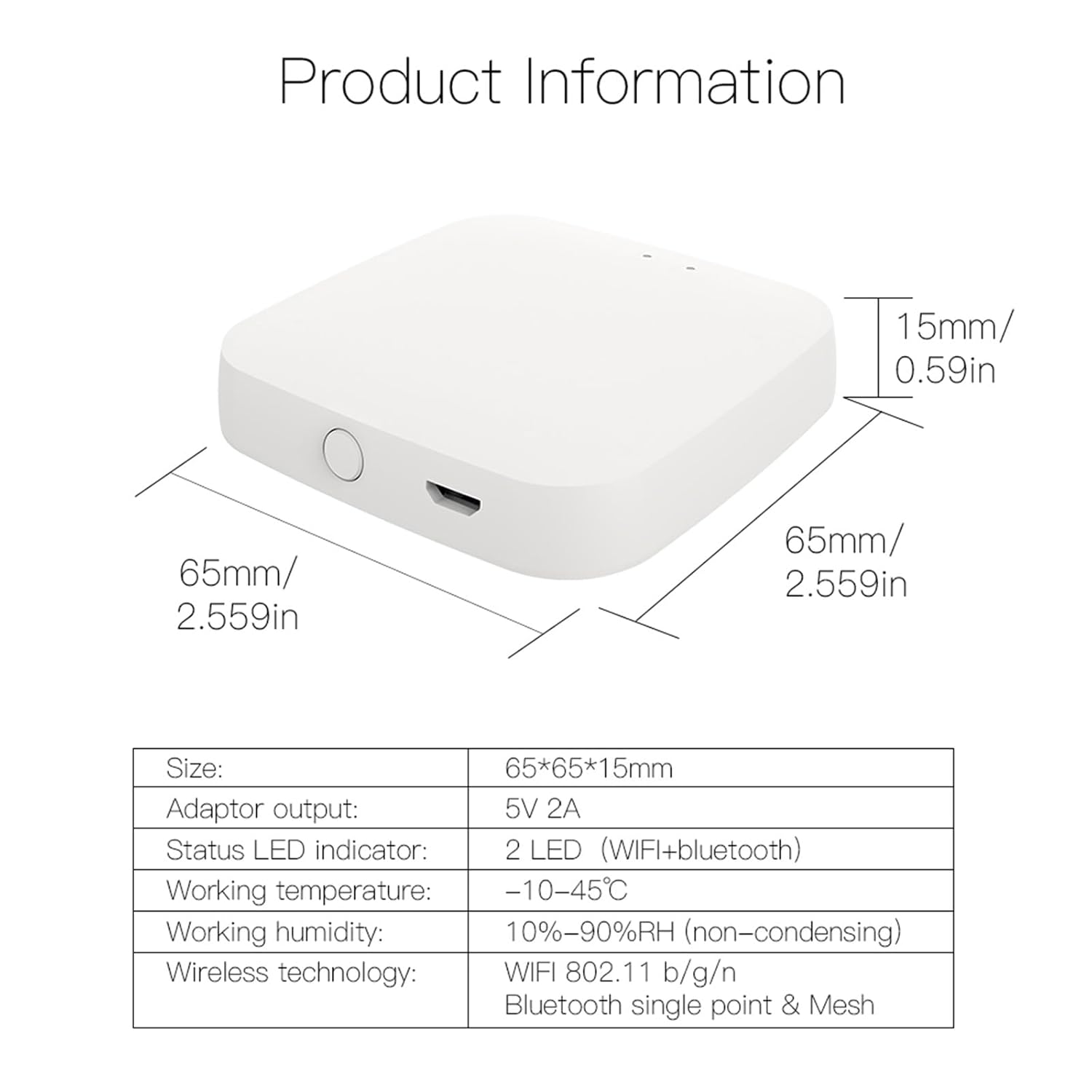
Image 7.1: Detailed product information including size, adaptor output, LED indicators, operating conditions, and wireless technology.
8. Garantie und Support
Specific warranty information is not provided in this manual. For warranty details, technical support, or further assistance, please refer to the product packaging, the manufacturer's official website, or contact MOES customer service directly.
Hersteller: WENZHOU NOVA NEW ENERGY CO., LTD-Wenzhou Morning Electronics Co., LTD'


