COLBOR W60

COLBOR Wonder W60 LED-Videoleuchte – Benutzerhandbuch

Modell: W60 | Marke: COLBOR

Compact and powerful LED video light with wide color temperature range and APP control.

1. Einleitung

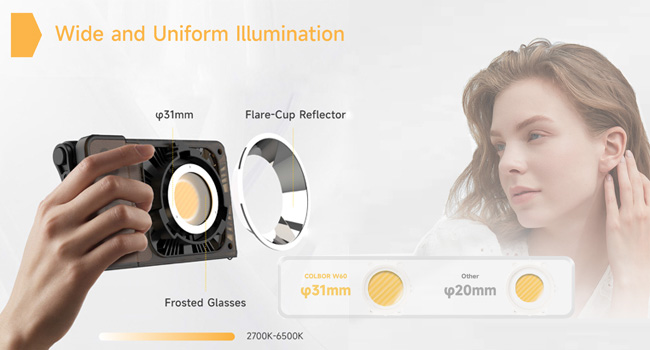
The COLBOR Wonder W60 is a compact and powerful LED video light designed for various photography and videography needs, including YouTube content creation and live streaming. It offers a wide color temperature range from 2700K to 6500K and boasts a high CRI of 97+ for accurate color rendition. Its lightweight and slim design make it highly portable, while multiple power options and APP control enhance its versatility and ease of use.

2. Lieferumfang

COLBOR Wonder W60 LED Video Light and included accessories

Image: The COLBOR Wonder W60 LED Video Light shown with its complete set of accessories.

  • COLBOR Wonder W60 Video Light x1
  • Kabel x1
  • Netzteil x1
  • COB-Abdeckung x1
  • Dome x1
  • Reflektor x1

3. Produktüberschreitungview und Setup

Familiarize yourself with the components and initial setup of your COLBOR Wonder W60 LED Video Light.

3.1 Produktkomponenten

Seite view of COLBOR Wonder W60 showing controls and ports

Abbildung: Seite view of the COLBOR Wonder W60, highlighting the control buttons and ports.

  • Netzschalter: Used for turning the device on and off.
  • Wireless Control Setting Button: For switching between 2.4GHz remote and APP control modes, and initiating pairing.
  • Brightness Control Wheel: Adjusts the light's brightness.
  • Color Temperature Control Knob: Adjusts the color temperature.
  • NFC Detection Area: For quick pairing with compatible devices.
  • COLBOR Mount Lock & Mount: Securely attach accessories.
  • Gleichstromanschluss: Zum Anschluss des Netzteils.
  • Typ C-Anschluss: For PD Type-C fast charging.
  • 1/4" Hole Screw: For mounting the light onto stands or grips.

3.2 Light Installation

Follow these steps to prepare your light for use:

  1. Removal of COB protection cover: Hold the COB cover with the COLBOR Mount tenon and rotate it to remove it.
    Removing the COB protection cover from the COLBOR W60

    Image: Demonstrating the removal of the protective COB cover by rotating it from the mount.

  2. Montage und Demontage des Reflektors: Richten Sie den Reflektor an der Rille um das l ausamp head and clip it in, then rotate it to fix it. Follow the instructions for "Removal of COB protection cover" to remove the reflector.
    Attaching a reflector to the COLBOR W60

    Image: A reflector being attached to the front of the COLBOR W60 light.

  3. Installation of stand: Align the 1/4" screw hole on the light's bottom or side with the 1/4" screw on the stand, and rotate it to fix it.
    COLBOR W60 mounted on a stand and with a power grip

    Image: The COLBOR W60 shown mounted on a light stand and also attached to a power grip, demonstrating versatile mounting options.

3.3 Einschalten des Geräts

The COLBOR Wonder W60 offers flexible powering options:

  • Power with power adapter: Schließen Sie das Netzteil an, richten Sie den Gleichstromanschluss des l ausamp body, and then power on through the cable after stable connection.

    *Do not suspend the power adapter in the air. Use wire rings to hang it on the lamp Stand.

    Connecting COLBOR W60 to power adapter

    Image: The COLBOR W60 being powered via its included power adapter.

  • Power with COLBOR Power Grip: Align the 1/4" screw hole on the light's bottom or side with the 1/4" screw on the stand. Rotate it to fix it. Connect the light to the Power Grip via the D-Tap to DC cable for powering.

    *Please do not use the Type-C to Type-C cable to power the light.

    Connecting COLBOR W60 to COLBOR Power Grip

    Image: The COLBOR W60 connected to a COLBOR Power Grip for portable power.

4. Bedienungsanleitung

Learn how to operate your COLBOR Wonder W60 LED Video Light.

Video: Official instruction video for the COLBOR Wonder W60/W100 LED Video Light, covering setup, powering, and operation.

4.1 Ein-/Ausschalten

  • Einschalten: Schließen Sie das Gerät an die Stromquelle an und drücken Sie dann lange auf den Netzschalter.
  • Ausschalten: Long-press the power button to turn it off.

4.2 Einstellung der Farbtemperatur

  • Rotate the color temperature control knob for continuous color temperature adjustment.
  • Short press the knob to select the preset color temperature: (2700K, 3200K, 4300K, 5600K, 6500K).

4.3 Helligkeitseinstellung

  • Roll the brightness adjustment wheel for continuous brightness adjustment.
  • Short press the wheel side to select preset brightness: (0%, 25%, 50%, 75%, 100%).

4.4 Wireless Connection (APP Control)

The COLBOR Wonder W60 supports APP control for seamless and efficient lighting adjustments.

  • Drücken Sie kurz die Fernbedienungstaste, um zwischen den Steuerungsmodi 2.4 GHz (STRG1-Fernbedienung) und APP (COLBOR Studio APP) zu wechseln.
  • Long-press the button to start pairing with the APP.
  • Stellen Sie eine Verbindung zur APP für Lüftereinstellungen und EFF-Einstellungen her.
COLBOR W60 controlled via smartphone app

Image: The COLBOR W60 being controlled remotely via the COLBOR Studio APP on a smartphone.

5. Wartung

To ensure the longevity and optimal performance of your COLBOR Wonder W60 LED Video Light, follow these maintenance guidelines:

Diagram of COLBOR W60's smart cooling system

Abbildung: Ein interner view highlighting the intelligent air duct and heat pipe cooling system of the COLBOR W60.

6. Fehlerbehebung

If you encounter issues with your COLBOR Wonder W60, refer to the following common problems and solutions:

ProblemMögliche UrsacheLösung
Licht geht nicht an.No power, loose connection, or power button not pressed correctly.Ensure power adapter is securely connected and plugged into a working outlet. If using a power grip, ensure it is charged and properly attached. Long-press the power button for 2-3 seconds.
Helligkeit und Farbtemperatur können nicht angepasst werden.Control knob/wheel malfunction or in locked mode.Check the display for any lock indicators. Try restarting the device. If using APP control, ensure the light is properly paired and the APP is functioning correctly.
Die App-Steuerung funktioniert nicht.Bluetooth/2.4GHz connection issue, APP not updated, or incorrect mode.Ensure the light is in APP control mode (short press wireless control button). Long-press the button to re-initiate pairing. Check your smartphone's Bluetooth settings. Update the COLBOR Studio APP to the latest version.
Licht überhitzt.Obstructed ventilation or prolonged high-power use in hot environment.Ensure ventilation grilles are clear of obstructions. Reduce brightness or allow the light to cool down. Operate in a well-ventilated area.

If the problem persists after trying these solutions, please contact COLBOR customer support for further assistance.

7. Spezifikationen

BesonderheitDetail
MarkeCOLBOR
ModellW60
Technische Daten6.18 x 1.69 x 3.66 Zoll
Artikelgewicht2.14 pounds (approx. 345g as per feature bullet)
Beleuchtung2890Lux@1m (5600K)
Farbtemperatur (CCT)2700K bis 6500K
CRI97+
KonnektivitätstechnologieBluetooth (for APP control)
EnergieoptionenCOLBOR Battery Grip, DC adapter, PD Type-C fast charging
KühlsystemIntelligent Air Duct and Heat Pipe Cooling System
WasserbeständigkeitNicht wasserfest
UrsprungslandChina

8. Garantie und Support

COLBOR products are manufactured to the highest quality standards. For warranty information and technical support, please refer to the warranty card included with your product or visit the official COLBOR webBewahren Sie Ihren Kaufbeleg als Kaufnachweis für Garantieansprüche auf.

For further assistance, you may contact COLBOR customer service through their official channels. Please provide your product model (W60) and any relevant details when seeking support.

Zugehörige Dokumente - W60

Vorview COLBOR PB74 Power Base Benutzerhandbuch
Benutzerhandbuch für die COLBOR PB74 Power Base mit detaillierten Informationen zu Funktionen, Bedienung, Aufladen, Installation, Spezifikationen und Garantiebestimmungen zur Stromversorgung von Leuchten der Serien COLBOR W60 und W100.
Vorview Colbor CL60R RGB COB LED-Monolight – Benutzerhandbuch
Ausführliches Benutzerhandbuch für die Colbor CL60R RGB COB LED-Monoleuchte mit detaillierten Sicherheitshinweisen, Produktkomponenten, Installation, Bedienung und verschiedenen Beleuchtungsmodi einschließlich CCT, HSI und Spezialeffekten.
Vorview COLBOR W200 COB Video Light User Manual - Operation, Specifications, and Warranty
Comprehensive user manual for the COLBOR W200 COB Video Light, detailing product instructions, operation, wireless connection via APP and NFC, technical specifications, packing list, and warranty information.
Vorview COLBOR CL220 COB Videoleuchte – Benutzerhandbuch
Ausführliches Benutzerhandbuch für die COLBOR CL220 COB-Videoleuchte mit detaillierten Informationen zu Funktionen, Bedienung, Installation, technischen Daten und Garantie. Erfahren Sie, wie Sie Ihre Beleuchtungsanlage einrichten, steuern und warten.
Vorview COLBOR CL220M Videoleuchte Benutzerhandbuch | Bedienung, Spezifikationen, Garantie
Ausführliches Benutzerhandbuch für die COLBOR CL220M Videoleuchte. Informieren Sie sich über Produktfunktionen, Bedienungshinweise, Stromanschluss, Einstellungen, App-Steuerung, Spezifikationen, Packungsinhalt und Garantieinformationen.
Vorview COLBOR CL220R Videoleuchte Benutzerhandbuch
Ein umfassender Leitfaden für die COLBOR CL220R Videoleuchte mit detaillierten Informationen zu Funktionen, Bedienung, Modi, App-Steuerung, Spezifikationen und Garantiebestimmungen.