1. Einleitung
The FEELWORLD P6X is a compact and durable 5.5-inch Full HD camera monitor designed for professional video production. It features a high-resolution IPS panel, 1000 nits brightness, and versatile control options including touch screen and physical buttons. This manual provides detailed instructions for setting up, operating, and maintaining your P6X monitor.

Image: The FEELWORLD P6X 5.5-inch Full HD Field Monitor, showcasing sein Display und seine kompakte Bauweise.
2. Produktmerkmale
- 5.5-Zoll-Full-HD-IPS-Panel: Provides 1920x1080 resolution with excellent detail and accurate color reproduction.
- 1000 nits High Brightness: Ensures visibility in various lighting conditions, including outdoor use.
- Rugged Aluminum Housing: Durable and lightweight design (249g) for portability and protection.
- Touch Screen and Button Operation: Offers flexible control with intuitive tap/swipe gestures and three customizable shortcut buttons.
- 4K HDMI-Ein-/Ausgang: Supports 4K video signals up to 60Hz.
- Mehrere Stromversorgungsoptionen: DC input, NP-F battery plate, and 5V Type-C input for versatile power solutions.
- DC 8V Ausgang: Can power compatible DSLR or mirrorless cameras.
- Mehrere Befestigungspunkte: Equipped with 1/4" screw threads and includes a mini hot shoe mount adapter for flexible attachment.
- Vertical Screen Marker (9:16): Ideal for vertical video content creation.

Image: Icons representing key features of the P6X monitor, including CNC aluminum, high brightness, touch screen, HDMI 2.0, 9:16 marker, waveform, HDR monitoring, and custom 3D LUT.
3. Einrichtung und Anschlüsse
3.1 Physische Überlastungview und Abmessungen
Familiarize yourself with the monitor's ports and dimensions before setup.

Image: Top, side, and bottom views of the FEELWORLD P6X monitor, showing its dimensions (84.5mm height, 22mm thickness, 138.5mm width) and port locations including HDMI In, HDMI Out, DC In 12V, DC Out 8V, and DC In 5V (Type-C).
3.2 Montage des Monitors
The P6X monitor features three standard 1/4" mounting threads for versatile attachment to cameras, brackets, or magic arms. A mini hot shoe mount adapter is included for quick release and attachment to camera hot shoes.
- Attach the mini hot shoe mount adapter to the monitor's 1/4" screw thread.
- Secure the adapter onto your camera's hot shoe or a compatible mounting point.
- Passen Sie die viewing angle using the adapter's 180° tilt and 360° rotation capabilities.
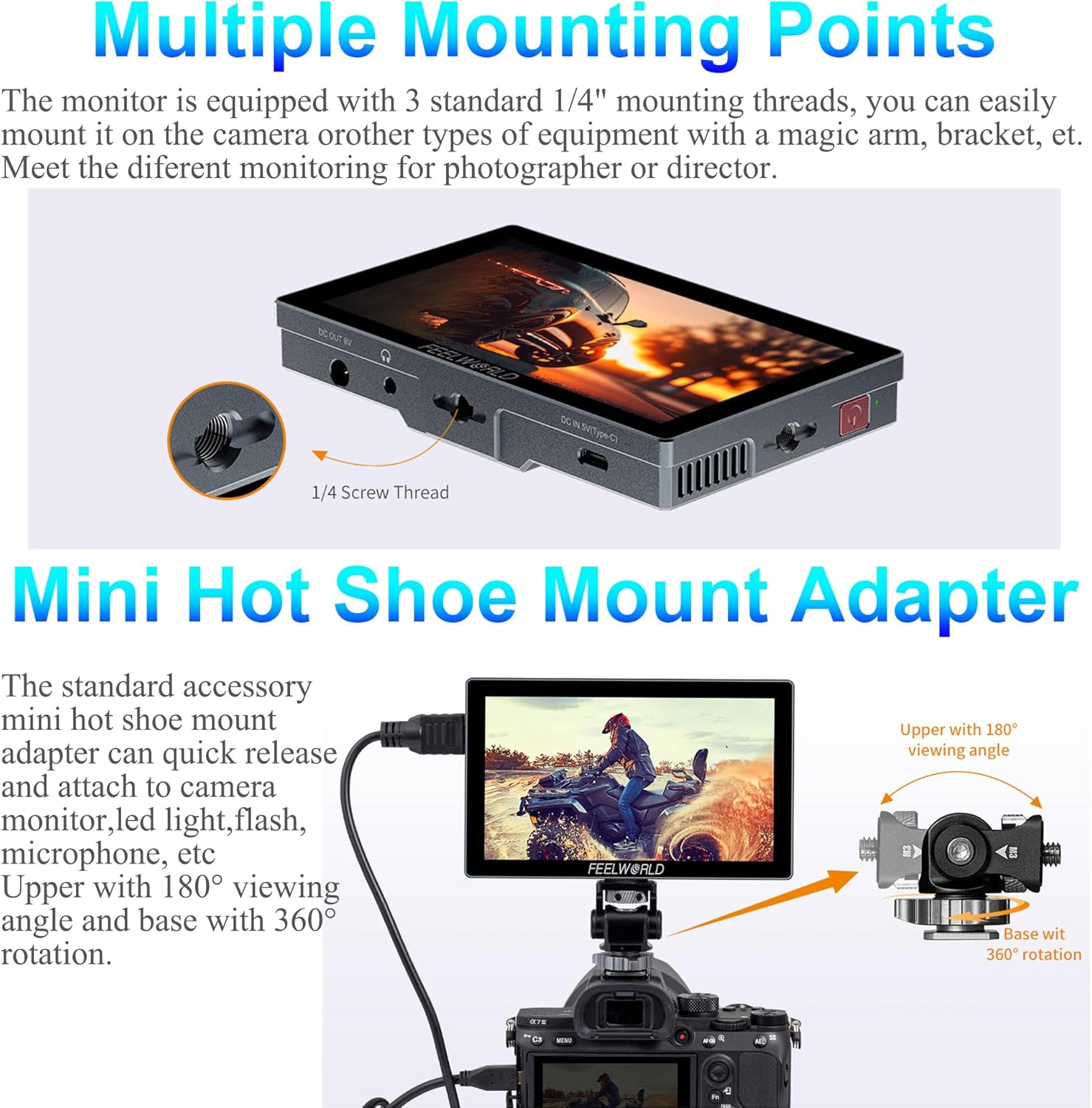
Image: The FEELWORLD P6X monitor mounted on a camera via a mini hot shoe adapter, demonstrating its adjustable viewing angles and the location of the 1/4" screw thread.
3.3 Stromversorgung des Monitors
Der P6X bietet mehrere Stromversorgungsoptionen:
- DC-12-V-Eingang: Connect a DC power adapter (5.5*2.1mm plug, 1.5A minimum) for continuous power.
- NP-F-Batterieplatte: Install an NP-F series battery (e.g., F750 for approximately 3 hours of operation) for mobile use.
- 5V Typ-C Eingang: Power the monitor using a mobile phone charger or power bank (minimum 5V/2A).

Image: The FEELWORLD P6X monitor with an NP-F battery attached, alongside close-ups of the NP-F battery plate, DC 12V input, and 5V Type-C input ports.
3.4 Connecting Video Sources (HDMI)
Connect your camera or video source to the monitor using the HDMI IN port. The monitor supports 4K HDMI signals up to 60Hz. You can also loop out the HDMI signal to another monitor or device via the HDMI OUT port.
- Supported HDMI Input Resolutions: 3840x2160p (60/59.94/50/48/47.95/30/29.97/25/24/23.98), 4096x2160p (60/59.94/50/48/47.95/30/29.97/25/24/23.98).

Image: The FEELWORLD P6X monitor displaying a video feed, with a close-up of the HDMI IN and HDMI OUT ports, highlighting 4K HDMI support and 60Hz high-speed transmission capabilities.
3.5 Powering External Devices (DC 8V Out)
The P6X monitor can provide auxiliary DC 8V power output (5.5*2.1mm cable) to power compatible DSLR or mirrorless cameras, extending their run-time. A dummy battery adapter (optional) may be required for your camera model.

Image: The FEELWORLD P6X monitor connected to and powering a DSLR camera via its DC 8V output, with a close-up of the DC OUT 8V port and the dummy battery adapter in the camera.
4. Bedienungsanleitung
4.1-Zoll-Touchscreen-Steuerung
The P6X features an intuitive touch screen interface. Use simple tap and swipe gestures to access and control monitoring functions without relying on physical buttons.
- Klopfen: Select menu items or activate functions.
- Wischen: Durch Menüs navigieren oder Einstellungen anpassen.

Image: The FEELWORLD P6X monitor showing both touch screen interaction and the physical buttons (F1/A, F2/V, F3/EXIT, MENU) for operation.
4.2 Tastenbedienung
In addition to touch control, the P6X provides physical buttons for operation, including three customizable shortcut buttons (F1/A, F2/V, F3/EXIT) and a MENU button.
- Custom Shortcut Buttons (F1/A, F2/V, F3/EXIT): These buttons can be programmed to quickly access frequently used functions. Refer to the on-screen menu for customization options.
- MENU-Taste: Press to access the main menu for comprehensive settings and features.
4.3 Key Monitoring Functions
The P6X monitor includes various professional monitoring tools:
- 3D LUT: Apply custom Look Up Tables for accurate color preview.
- Waveform, Vectorscope, Histogram: Analyze video signal levels and color distribution.
- Exposure Tools: False Color, Zebra Stripes for exposure assistance.
- Fokus-Assistent: Peaking Filter to highlight in-focus areas.
- Framing Guides: Nine Grid, Ratio Marker (including 9:16 vertical), Safe Frames.
- Zoom-in, Pixel-to-Pixel: For detailed image inspection.
- Anamorpher Modus: Entstauchen anamorpher Footage.
- Eingebettetes Audio: Audiopegel überwachen.

Image: The FEELWORLD P6X monitor displaying a vertical screen marker (9:16 ratio) overlay, useful for framing content for social media platforms.
5. Wartung
- Keep the monitor clean using a soft, dry cloth. For stubborn smudges, use a screen-specific cleaning solution applied to the cloth, not directly to the screen.
- Avoid exposing the monitor to extreme temperatures, humidity, or direct sunlight for extended periods.
- Store the monitor in a protective case when not in use to prevent scratches and damage.
- Ensure all cables are connected securely and are not under strain.
6. Fehlerbehebung
| Problem | Mögliche Ursache | Lösung |
|---|---|---|
| Der Monitor lässt sich nicht einschalten. | No power, low battery, or incorrect power connection. | Check power cable connection. Ensure battery is charged or replace with a charged one. Verify power adapter specifications (5V/2A for Type-C, 1.5A for DC 12V). |
| Kein Videosignal. | Incorrect HDMI connection, incompatible resolution, or camera output issue. | Ensure HDMI cable is securely connected to both monitor (HDMI IN) and camera. Verify camera's HDMI output settings match supported resolutions. Try a different HDMI cable. |
| Der Bildschirm ist zu dunkel oder zu hell. | Brightness settings are incorrect. | Adjust the brightness setting in the monitor's menu. |
| Touchscreen reagiert nicht. | Temporary software glitch or screen protector interference. | Restart the monitor. Ensure the screen is clean and free of debris. If a screen protector is used, ensure it is properly applied. |
7. Spezifikationen
| Besonderheit | Detail |
|---|---|
| Anzeigegröße | 5.5 Zoll |
| Auflösung | 1920x1080 Full HD |
| Helligkeit | 1000 Nits |
| Viewing-Winkel | 160° Weitwinkel |
| Gehäusematerial | CNC Aluminium |
| Bedienoberfläche | Touch Screen, Physical Buttons |
| HDMI-Eingang/Ausgang | 4K 60Hz Support |
| Leistungsaufnahme | DC 12V, NP-F Battery Plate, 5V Type-C |
| Leistungsabgabe | DC 8V (for camera power) |
| Artikelgewicht | 249 g (0.55 Pfund) |
| Maße | Ca.. 138.5mm x 84.5mm x 22mm |
8. Packungsinhalt
The standard package for the FEELWORLD P6X monitor includes the following items:
- FEELWORLD P6X Monitor
- Micro HDMI Kabel
- A-A HDMI Cable
- Mini Hot Shoe Mount + Hex Wrench
- Typ-C-zu-USB-Kabel
- Bedienungsanleitung
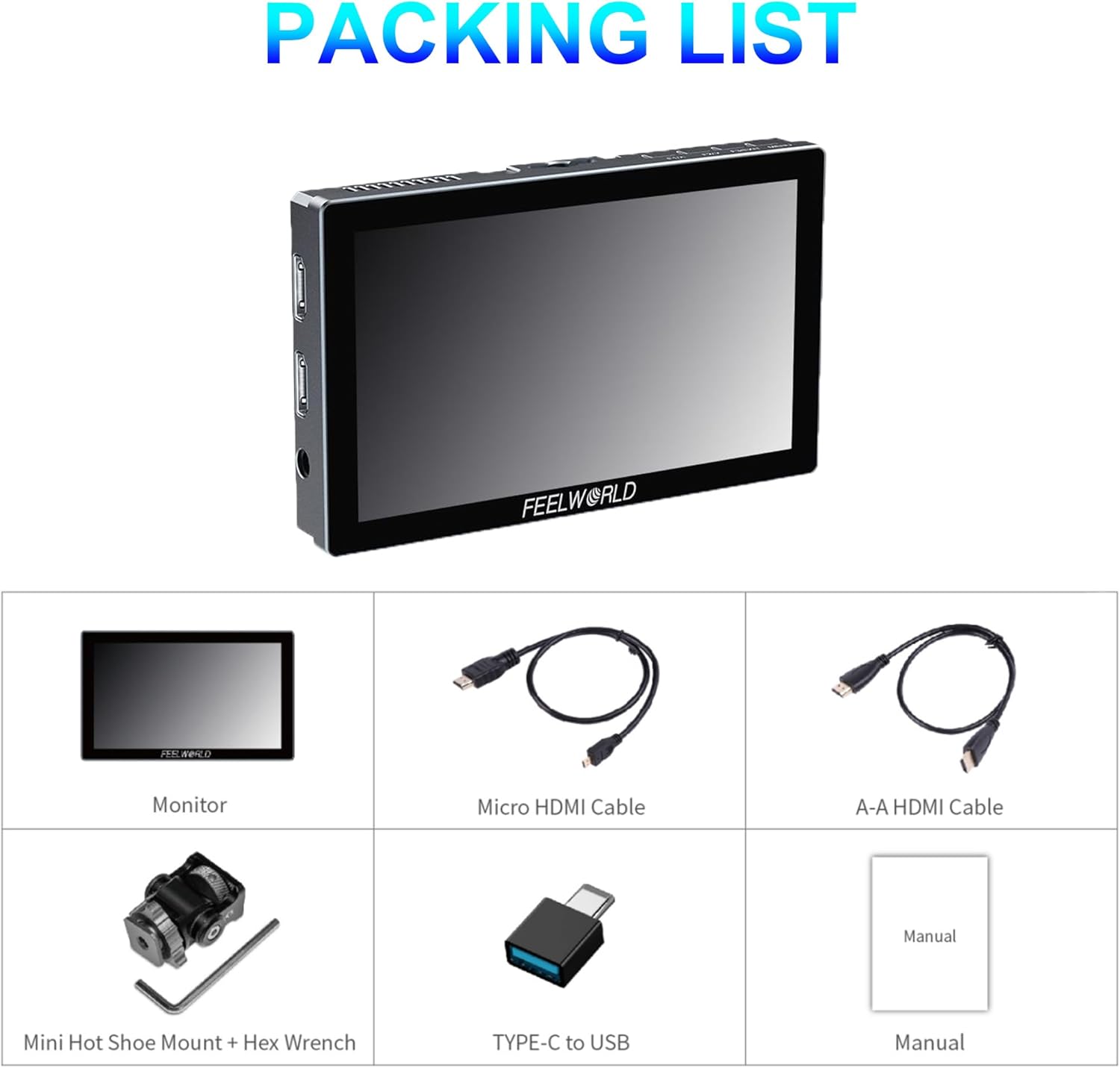
Image: A visual representation of the FEELWORLD P6X monitor and its included accessories: Micro HDMI Cable, A-A HDMI Cable, Mini Hot Shoe Mount + Hex Wrench, Type-C to USB Cable, and Instruction Manual.
9. Garantie und Support
Informationen zur Garantie und zum technischen Support finden Sie auf der offiziellen FEELWORLD-Website. webBesuchen Sie unsere Website oder wenden Sie sich an Ihren Händler vor Ort. Bewahren Sie Ihren Kaufbeleg für Garantieansprüche auf.
Hersteller: Feelworld
Datum der Erstveröffentlichung: 28. Februar 2024