Einführung
Thank you for choosing the AOC 27B3HA2 27-inch Full HD LED Monitor. This manual provides essential information for the safe and efficient use of your new monitor. Please read it thoroughly before installation and operation, and keep it for future reference.
The AOC 27B3HA2 features a 27-inch Full HD (1920 x 1080) IPS panel, offering wide viewing angles and vibrant colors. It includes a 100Hz refresh rate and 1ms MPRT response time for smooth visuals, Adaptive Sync technology, and eye-care features like Flicker-Free and Low Blue Light modes to enhance user comfort during extended use.

Abbildung 1: Vorderseite view of the AOC 27B3HA2 monitor highlighting its 27-inch size, 100Hz refresh rate, Full HD resolution, Adaptive Sync, IPS panel, and 1ms MPRT response time.
Sicherheitshinweise
- Energiequelle: Verwenden Sie ausschließlich das mit dem Monitor gelieferte Netzteil. Stellen Sie sicher, dass die Steckdose ordnungsgemäß geerdet ist.
- Platzierung: Place the monitor on a stable, flat surface. Avoid direct sunlight, heat sources, or excessive dust. Ensure adequate ventilation around the monitor.
- Feuchtigkeit: Do not expose the monitor to rain or moisture. Do not place objects filled with liquids on the monitor.
- Reinigung: Vor der Reinigung den Netzstecker ziehen. Ein weiches, trockenes Tuch verwenden. Keine flüssigen oder Aerosolreiniger verwenden.
- Belüftung: Belüftungsöffnungen nicht blockieren.
- Wartung: Führen Sie keine Reparaturen am Monitor selbst durch. Überlassen Sie alle Reparaturen qualifiziertem Servicepersonal.
Packungsinhalt
Prüfen Sie, ob alle Artikel in Ihrem Paket enthalten sind. Sollten Artikel fehlen oder beschädigt sein, wenden Sie sich bitte an Ihren Händler.
- AOC 27B3HA2 Monitor
- Monitorständer (Fuß und Hals)
- Stromkabel
- HDMI-Kabel
- Quick Setup Guide
- Garantiekarte
Aufstellen
1. Zusammenbau des Monitorständers
- Legen Sie den Monitor vorsichtig mit der Vorderseite nach unten auf eine weiche, saubere Oberfläche, um Kratzer zu vermeiden.
- Befestigen Sie den Standfuß an der Rückseite des Monitors, indem Sie die Laschen ausrichten und so lange drücken, bis er einrastet.
- Befestigen Sie den Stativfuß am Stativhals. Sichern Sie ihn mit der unverlierbaren Schraube an der Unterseite des Fußes.

Abbildung 2: Rückseite view of the monitor showing the stand attachment point.
2. Verbindungskabel
Ensure the monitor and your computer are turned off before making any connections.
- Stromanschluss: Schließen Sie das Netzkabel an den Stromeingang des Monitors und anschließend an eine geerdete Steckdose an.
- Videoanschluss (HDMI): Verbinden Sie ein Ende des HDMI-Kabels mit dem HDMI-Anschluss der Grafikkarte Ihres Computers und das andere Ende mit dem HDMI 1.4-Anschluss des Monitors.
- Videoanschluss (VGA): Alternatively, connect one end of the VGA cable to the VGA port on your computer and the other end to the VGA port on the monitor.
- Audioeingang: If using VGA for video and you want audio through the monitor's speakers, connect an audio cable from your computer's audio output to the Audio In port on the monitor.
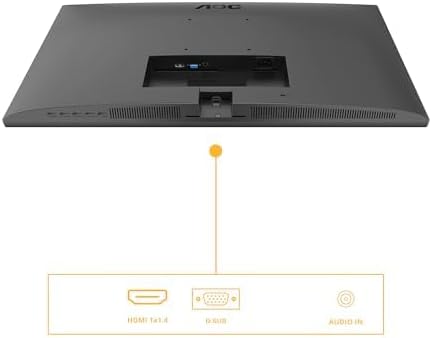
Figure 3: Diagram illustrating the available input ports on the monitor: HDMI 1.4, VGA (D-SUB), and Audio In.
3. Einschalten
- Schalten Sie Ihren Computer ein.
- Drücken Sie den Netzschalter am Monitor. Die Betriebsanzeigeleuchte sollte aufleuchten.
- The monitor should automatically detect the active input signal. If not, you may need to manually select the input source using the OSD menu.
Monitor bedienen
Bildschirmmenü (OSD)
Über das OSD-Menü können Sie verschiedene Monitoreinstellungen anpassen. Die Bedienelemente befinden sich üblicherweise an der Unter- oder Rückseite des Monitors.
- Drücken Sie die Speisekarte Taste zum Öffnen des OSD-Menüs.
- Verwenden Sie die Navigationsschaltflächen (Hoch/Runter or Links rechts) to browse through menu options.
- Drücken Sie die Wählen Sie / OK button to enter a sub-menu or confirm a setting.
- Drücken Sie die Ausfahrt Taste zum Zurückkehren zum vorherigen Menü oder zum Verlassen des OSD.
Wichtige OSD-Einstellungen
- Leuchtdichte: Adjust brightness, contrast, and gamma settings.
- Bildeinrichtung: Fine-tune image position, clock, and phase (primarily for VGA input).
- Farbeinstellungen: Select color temperature, user color, or preset modes.
- OSD-Setup: Adjust OSD language, position, and transparency.
- Extra: Select input source (HDMI, VGA), reset settings, or view Information.
- Spieleinstellung: Enable or disable Adaptive Sync, adjust response time (Overdrive), and other gaming-related features.
- Schwaches blaues Licht: Aktivieren Sie diesen Modus, um die Blaulichtemission zu reduzieren und so den Augenkomfort zu erhöhen.
- Flimmerfrei: This technology is always active to minimize screen flickering and reduce eye strain.
Wartung
Reinigen des Monitors
- Vor der Reinigung immer den Netzstecker des Monitors ziehen.
- Mit einem weichen, fusselfreien Tuch leichtampMit Wasser oder einem milden, nicht scheuernden Bildschirmreiniger abspülen.
- Sprühen Sie den Reiniger nicht direkt auf den Bildschirm. Tragen Sie ihn zuerst auf ein Tuch auf.
- Wischen Sie den Bildschirm vorsichtig ab, um Staub und Fingerabdrücke zu entfernen.
- Für den Monitor casing, use a soft, dry cloth. Avoid harsh chemicals.
Lagerung
If you need to store the monitor for an extended period, disconnect all cables, disassemble the stand if necessary, and pack it in its original packaging or a suitable protective box. Store in a cool, dry place.
Fehlerbehebung
| Problem | Mögliche Lösung |
|---|---|
| Kein Bild auf dem Bildschirm |
|
| Meldung „Kein Signal“ |
|
| Das Bild ist unscharf oder verzerrt. |
|
| Kein Ton von den Lautsprechern |
|
Technische Daten
| Besonderheit | Beschreibung |
|---|---|
| Modellnummer | 27B3HA2 |
| Bildschirmgröße | 27 Zoll (68.6 cm) |
| Panel-Typ | IPS |
| Auflösung | 1920 x 1080 (Full HD) |
| Seitenverhältnis | 16:9 |
| Bildwiederholrate | 100 Hz |
| Ansprechzeit | 1 ms MPRT |
| Helligkeit | 250 cd/m² |
| Videoeingänge | 1x HDMI 1.4, 1x VGA (D-SUB) |
| Audioeingang | Ja |
| Besondere Merkmale | Adaptive Sync, Flicker-Free, Low Blue Light |
| Produktabmessungen (mit Ständer) | 9.06 x 24.41 x 18.11 Zoll |
| Artikelgewicht (mit Ständer) | 11.66 Pfund |
| Hersteller | AOC |
| EPREL-Registrierungsnummer | 1859411 |
For detailed product information and energy labeling, please refer to the official EPREL database:
 View EPREL Produktinformationsblatt
Figure 4: EPREL QR code and link for detailed product information.
Garantie und Support
AOC monitors are manufactured to the highest quality standards. For information regarding your product's warranty, please refer to the warranty card included in your package or visit the official AOC webWebsite.
For technical support or customer service, please contact AOC directly:
- Anbieter: AOC International (Europa) BV
- Adresse: Prins Bernhardplein 200 1097 JB Amsterdam, Netherlands
- E-Mail der Kundenbetreuung: kevin.yang@tpv-tech.com
- Kundendiensttelefon: +31 (0)20 504 6962
- Offiziell WebWebsite: https://eu.aoc.com
Please have your monitor's model number (27B3HA2) and serial number ready when contacting support.


