1. Einleitung
This manual provides comprehensive instructions for the installation, operation, and maintenance of your Lloyd's Smart Full HD 1080P Video Intercom System. This system is designed to provide secure access control for your home or office, allowing you to monitor, communicate with, and grant access to visitors remotely.
Bitte lesen Sie diese Bedienungsanleitung vor der Verwendung des Produkts sorgfältig durch, um dessen einwandfreie Funktion und Sicherheit zu gewährleisten. Bewahren Sie diese Bedienungsanleitung zum späteren Nachschlagen auf.
2. Sicherheitshinweise
Um Schäden am Produkt oder Verletzungen von Ihnen selbst oder anderen zu vermeiden, beachten Sie bitte die folgenden Sicherheitsvorkehrungen:
- Vor Installation oder Wartung muss unbedingt die Stromversorgung unterbrochen werden.
- Die Installation sollte von einem qualifizierten Elektriker durchgeführt werden, wenn Sie mit elektrischen Leitungen nicht vertraut sind.
- Setzen Sie das Produkt keinen extremen Temperaturen, Feuchtigkeit oder direkter Sonneneinstrahlung aus.
- Verwenden Sie ausschließlich das mitgelieferte Netzteil und Zubehör.
- Halten Sie das Produkt von Wasser und anderen Flüssigkeiten fern.
- Versuchen Sie nicht, das Gerät selbst zu zerlegen oder zu reparieren. Wenden Sie sich an den Kundendienst.
3. Packungsinhalt
Überprüfen Sie, ob alle Artikel im Paket vorhanden sind:
- 1 x Monitor (7'' Color LCD Touchscreen)
- 1 x Outdoor Unit (Doorbell with Camera and Keypad)
- 1 x Benutzerhandbuch
- 1 x Gehäuse
- 1 x Rain Cover Bracket
- 1 x Recessed Box
- 1 x AC / DC-Adapter
- 1 x Befestigungswinkel
- Wall Plugs and Mounting Screws
- 3 x-Anschlüsse
- 1 x Allen Screwdriver
- 4 x Verbindungskabel

Abbildung 3.1: Überview of the Lloyd's Smart Video Intercom System components and packaging.
4. Produktüberschreitungview
4.1. Monitor (Indoor Unit)
- Anzeige: 7-inch color LCD touchscreen with 1020 x 600 px resolution.
- Einstellbare Einstellungen: Brightness, contrast, and volume.
- Funktionen: Hands-free intercom, call transfer (requires additional monitor), date, time, and weather display.
- Lagerung: Integrated memory for up to 30 photos, supports up to 128 GB memory card (not included).
- Konnektivität: 2.4 GHz Wi-Fi for stable connection in large areas.
4.2. Outdoor Unit (Doorbell)
- Kamera: 2MP Full HD (1920x1080) resolution.
- Nachtsicht: Yes, with LED numeric panel.
- Viewing-Winkel: 120 Grad.
- Bewegungserkennung: Detection distance of less than or equal to 3 meters.
- Audio: 2-way audio with adjustable microphone and speaker volume.
- Zugriffskontrolle: Works with a 12 VDC electric lock (not included), supports 4-6 digit password entry.
- Tamper Button: Sends alerts to your smartphone and triggers an alarm if the outdoor unit is forced.
- Haltbarkeit: IP65 rating for indoor or outdoor use.
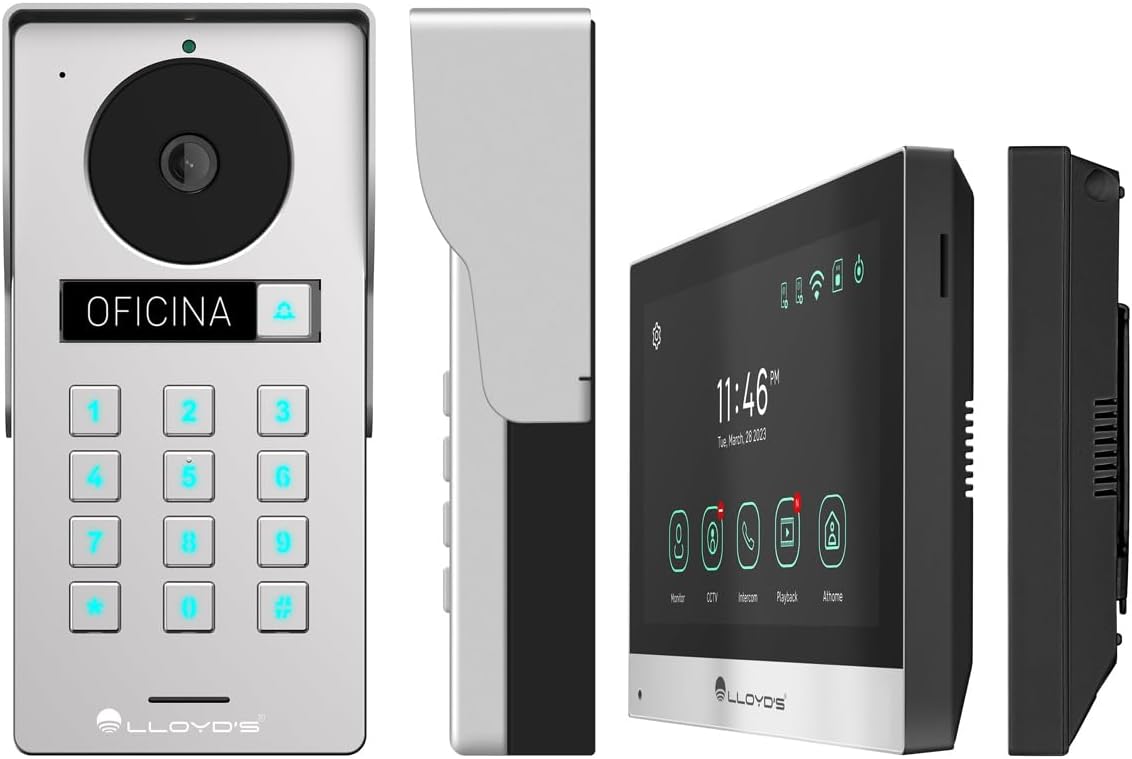
Abbildung 4.1: Ausführlich views of the outdoor unit and monitor.

Figure 4.2: Key features of the Lloyd's Smart Video Intercom System.
5. Einrichtung und Installation
5.1. Verkabelung und Montage
The system requires a wired connection between the monitor and the outdoor unit. The maximum operating distance is 50 meters using a 4-wire cable (0.5 mm² not included). Follow the wiring diagram provided in the quick start guide for correct connections.
- Montage der Außeneinheit: Choose a suitable location near your entrance, ensuring clear camera view and easy access to the keypad. Use the provided mounting bracket, wall plugs, and screws. The unit is IP65 rated for outdoor use.
- Monitormontage: Install the monitor indoors at a convenient height for viewing and interaction. Use the mounting bracket and screws.
- Stromanschluss: Connect the AC/DC adapter to the monitor and a power outlet.
- Anschluss für elektrische Verriegelung (optional): If using an electric lock (12 VDC, not included), connect it to the outdoor unit as per the wiring diagram.
5.2. App and Wi-Fi Connection
To utilize smart features, download the Lloyd's smart home application on your smartphone (compatible with Android 5.0+ and iOS 11+).
- Power on the monitor and outdoor unit.
- On the monitor, navigate to the Wi-Fi settings and connect to your 2.4 GHz Wi-Fi network.
- Open the Lloyd's app on your smartphone and create an account or log in.
- Follow the in-app instructions to add your new video intercom system. This typically involves scanning a QR code displayed on the monitor or manually entering device details.
- Sobald die Verbindung hergestellt ist, erhalten Sie Benachrichtigungen und können das System über die App fernsteuern.
6. Bedienungsanleitung
6.1. Answering Calls and Communication
- When a visitor presses the doorbell button, the monitor will ring, and you will receive a notification on your smartphone.
- On the monitor, tap the "Answer" icon to establish two-way audio and video communication.
- On your smartphone, open the app and tap the incoming call notification to answer.
- The intercom communication time is 60 seconds.

Figure 6.1: Communicate with visitors from anywhere using the app or monitor.

Figure 6.2: Receive instant notifications on your smartphone and monitor.
6.2. Door Opening
- Aus der App: During a call, tap the "Unlock" icon in the app to open the connected electric lock.
- From the Monitor: During a call, tap the "Unlock" icon on the monitor's touchscreen.
- From the Outdoor Unit: Visitors can enter a pre-set 4-6 digit password on the numeric keypad to open the door.
6.3. Bewegungserkennung und -aufzeichnung
- The system automatically captures photos and videos when motion is detected within 3 meters of the outdoor unit or when someone rings the doorbell.
- You will receive real-time alerts on your smartphone via the app when motion is detected.
- Review recorded events and snapshots through the app or on the monitor.
- The monitoring time for motion detection is 30 seconds.

Figure 6.3: Receive motion detection alerts directly on your smartphone app.

Figure 6.4: Automatic photo and video capture for events.
6.4. Systemerweiterung
The system supports expansion for enhanced security and convenience:
- Up to 2 additional Outdoor Units (Doorbell)
- Up to 3 additional Monitors
- Up to 2 additional Cameras
- Up to 2 additional Sensors
(Additional units and sensors are not included and must be purchased separately.)
You can also integrate the system with other Lloyd's smart home products to create customized routines and share device access with family members.
7. Wartung
- Reinigung: Reinigen Sie den Monitorbildschirm und das Außengerät mit einem weichen, trockenen Tuch. Verwenden Sie keine Scheuermittel oder Lösungsmittel.
- Software-Updates: Periodically check the Lloyd's app for firmware updates to ensure optimal performance and security.
- Speicherverwaltung: If using a memory card, regularly back up important recordings and delete old files, um Speicherplatz freizugeben.
8. Fehlerbehebung
| Problem | Mögliche Ursache | Lösung |
|---|---|---|
| No image or sound from outdoor unit. | Loose wiring, power issue, unit malfunction. | Check all cable connections. Ensure power adapter is properly connected. Restart the system. |
| Die WLAN-Verbindung ist instabil oder unterbrochen. | Schwaches WLAN-Signal, falsches Passwort, Routerprobleme. | Stellen Sie sicher, dass sich der Monitor in WLAN-Reichweite befindet. Geben Sie das WLAN-Passwort erneut ein. Starten Sie Ihren Router neu. |
| Cannot open door via app/monitor. | Electric lock not connected, lock malfunction, wiring issue. | Verify electric lock connection and functionality. Check wiring between outdoor unit and lock. |
| Keine Bewegungserkennungsalarme. | Motion detection disabled, incorrect sensitivity, app notification settings. | Enable motion detection in app settings. Adjust sensitivity. Check smartphone notification permissions for the app. |
| Schlechte Videoqualität. | Dirty camera lens, poor lighting, network bandwidth. | Reinigen Sie die Kameralinse. Sorgen Sie für ausreichend Licht. Überprüfen Sie Ihre Internetgeschwindigkeit. |
9. Spezifikationen
| Besonderheit | Detail |
|---|---|
| Modellnummer | LC-1373 |
| Monitoranzeige | 7-Zoll-Farb-LCD-Touchscreen |
| Monitorauflösung | 1020 x 600 px |
| Outdoor Unit Camera Resolution | 2MP Full HD (1920x1080) |
| Viewing-Winkel | 120 Grad |
| Nachtsichtbereich | Bis zu 10 Meter |
| Bewegungserkennungsbereich | ≤ 3 Meter |
| Kabellose Konnektivität | 2.4 GHz Wi-Fi |
| Lagerung | Integrated (30 photos), supports up to 128 GB MicroSD (not included) |
| Stromversorgung | 12 VDC (via AC/DC adapter) |
| Stromverbrauch (Standby) | 4W |
| Stromverbrauch (im Betrieb) | 10 W |
| Operating Distance (Wired) | Up to 50m (with 0.5 mm² 4-wire cable) |
| Ingress Protection (Outdoor Unit) | IP65 |
| Monitor Dimensions (H x W x D) | 12.4 cm x 18 cm x 2.1 cm |
| Abmessungen der Außeneinheit (H x B x T) | 18 cm x 8.7 cm x 3.2 cm |
| Kompatible Geräte | Android 5.0 oder höher, iOS 11 oder höher |

Figure 9.1: Dimensions of the Monitor and Outdoor Unit.
10. Garantie und Support
For warranty information, please refer to the warranty card included with your product or visit the official Lloyd's website. If you encounter any issues or require technical assistance, please contact Lloyd's customer support.
Kundendienst: Refer to the contact information provided on the product packaging or the official Lloyd's webWebsite.
Online-Ressourcen: Besuchen Lloyd's Official Store on Amazon für zusätzliche Produktinformationen und Support.
11. Offizielle Produktvideos
In den verfügbaren Daten waren keine offiziellen Verkäufervideos für dieses Produkt enthalten.


