Einführung
This manual provides essential information for setting up, operating, maintaining, and troubleshooting your Tecno CAMON 30 5G smartphone. Please read this manual carefully to ensure proper use and to maximize the device's capabilities.
1. Einrichtung
1.1 Auspacken und erste Inspektion
Prüfen Sie nach dem Öffnen der Verpackung, ob alle Komponenten vorhanden und unbeschädigt sind. Zum Standardlieferumfang gehören:
- Tecno CAMON 30 5G Smartphone
- 70-W-Schnellladegerät
- USB-Kabel
- SIM-Fach-Auswerfer
- Schutzhülle (kann je nach Region variieren)
- Kurzanleitung
- Garantiekarte

Figure 1.1: Tecno CAMON 30 5G smartphone, showcasing verfügt über ein Frontdisplay und ein Rückkameramodul.
1.2 Einlegen der SIM-Karte
To ensure network connectivity, insert your Nano-SIM card(s) into the device. The Tecno CAMON 30 5G supports dual SIM functionality.
- Suchen Sie das SIM-Kartenfach an der Seite des Geräts.
- Führen Sie das mitgelieferte SIM-Karten-Auswurfwerkzeug in die kleine Öffnung neben dem Fach ein und drücken Sie vorsichtig, bis das Fach herausspringt.
- Ziehen Sie den SIM-Karten-Einschub vorsichtig heraus.
- Legen Sie Ihre Nano-SIM-Karte(n) in die dafür vorgesehenen Schlitze des Kartenfachs ein und achten Sie darauf, dass die goldenen Kontakte nach unten zeigen und die abgeschrägte Ecke richtig ausgerichtet ist.
- Drücken Sie den SIM-Kartenhalter vorsichtig wieder in das Gerät hinein, bis er einrastet.

Figure 1.2: The SIM tray ejector tool, used for accessing the SIM card slot.
1.3 Aufladen des Geräts
Before first use, it is recommended to fully charge your device. The Tecno CAMON 30 5G supports 70W Flash Charging.
- Connect the USB cable to the 70W Flash Charger.
- Stecken Sie das Ladegerät in eine Steckdose.
- Connect the other end of the USB cable to the USB-C port at the bottom of your phone.
- The charging indicator will appear on the screen. A full charge from 0-50% can be achieved in approximately 19 minutes.

Figure 1.3: The bottom of the Tecno CAMON 30 5G, featuring the USB-C port for charging and data transfer.
1.4 Einschalten und Ersteinrichtung
Press and hold the Power button (located on the right side of the device) until the Tecno logo appears. Follow the on-screen instructions to complete the initial setup, which includes selecting your language, connecting to Wi-Fi, and setting up your Google account.
2. Bedienung des Geräts
2.1 Grundlegende Navigation
The Tecno CAMON 30 5G operates on Android 14 with HiOS. Navigation is primarily touch-based:
- Klopfen: Wählen Sie ein Element aus oder öffnen Sie eine Anwendung.
- Wischen: Durch Bildschirme, Listen oder Inhalte scrollen.
- Pinch-to-Zoom: Inhalte auf dem Bildschirm vergrößern oder verkleinern.
- Langes Drücken: Kontextmenüs aufrufen oder Symbole verschieben.
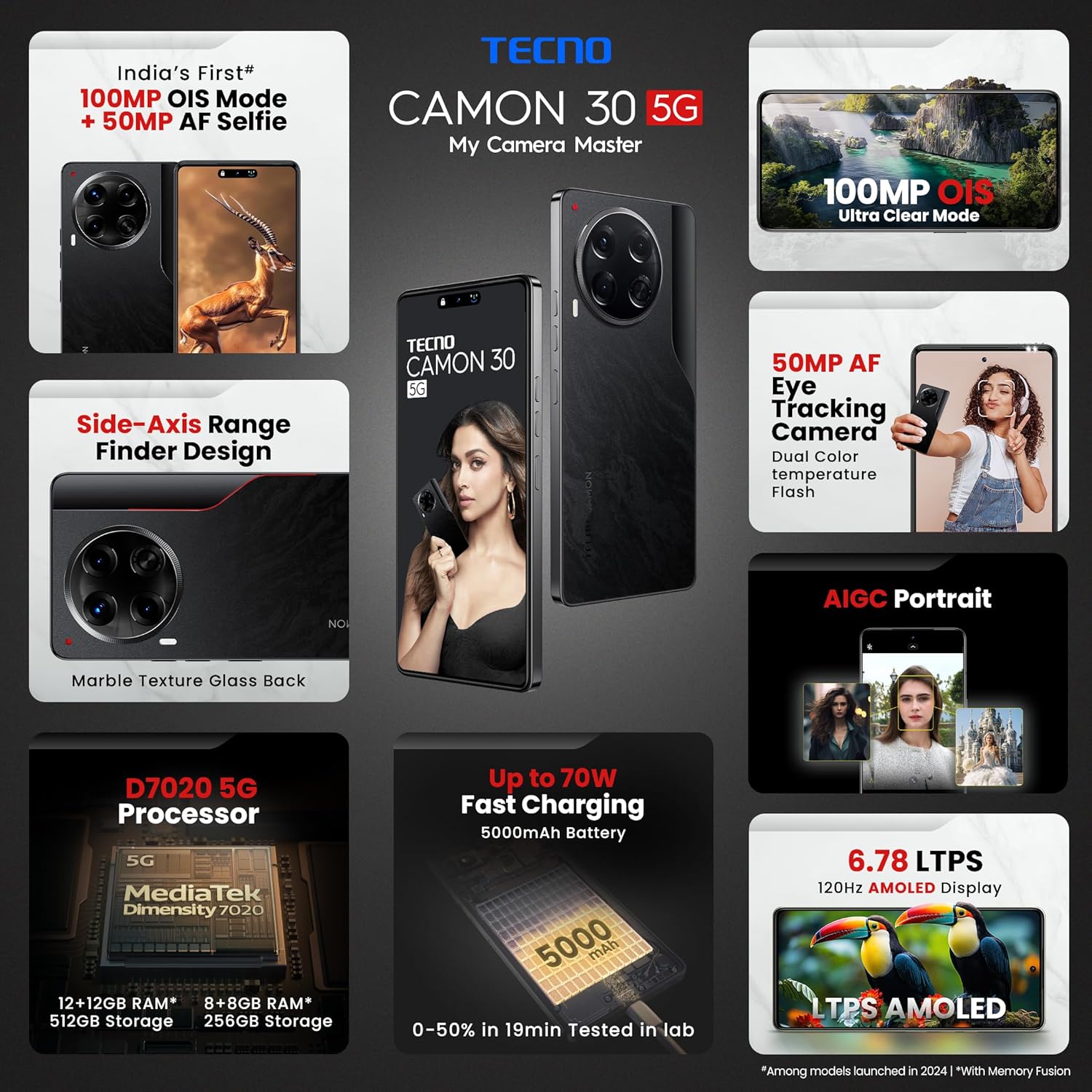
Figure 2.1: The Tecno CAMON 30 5G's vibrant LTPS AMOLED display.
2.2 Anzeigefunktionen
The device features a 6.78-inch FHD+ LTPS AMOLED Dot-in display with a resolution of 1080 x 2436 pixels. Key display features include:
- 1300 nits Peak Brightness: Ensures clear visibility even in bright outdoor conditions.
- 120Hz Adaptive Refresh Rate: Automatically adjusts between 120Hz, 90Hz, and 60Hz for smooth scrolling and power efficiency.
- 2160Hz High-Frequency PWM Dimming: Reduziert das Bildschirmflimmern für mehr Augenkomfort.
- TÜV Rheinland Low Blue Light Emission Certified: Protects your eyes from harmful blue light.
- Wet Hand Touch Technology: Allows for smooth navigation even with wet hands.
2.3-Kamerasystem
The Tecno CAMON 30 5G is equipped with an advanced camera system for high-quality photography and videography.
- Rückfahrkamera: 100MP OIS (Optical Image Stabilization) main sensor with a 2MP Depth Sensor. Features include Ultra Steady videos (OIS + EIS), 10X Zoom, Twinkle Portrait Filter, Super Night Photography Mode, Sky Shop, and Slow Motion Videos.
- Frontkamera: 50MP Auto Focus Selfie camera with Dual Color Temperature Front Flash. Supports DSLR-level portrait system and Video HDR.
- AIGC Portrait (OTA): AI Generative Content for enhanced portrait photography.

Figure 2.2: The distinctive rear camera module of the Tecno CAMON 30 5G.
2.4 Leistung und Speicherung
Powered by the MediaTek Dimensity 7020 chipset with a 6nm processor, the device offers robust performance for gaming and multitasking.
- Prozessor: MediaTek Dimensity 7020 (6nm) for Ultra 5G Performance.
- RAM: Up to 24GB* (12GB physical + 12GB Memory Fusion) LPDDR4x RAM.
- Interner Speicher: 512GB UFS 3.1 Storage.
2.5 Audio and Smart Features
- Dolby Atmos: Bietet ein immersives Audioerlebnis.
- Ella with ChatGPT: Integrated AI assistant for various tasks.
- AI Eraser (OTA): Allows for intelligent object removal from photos.
- Infrarot-Fernbedienung: Supports control of up to 15 types of home appliances.
- Dynamic Pet AOD: Customizable Always-On Display with dynamic pet animations.
3. Wartung
3.1 Reinigung Ihres Geräts
Um das Aussehen und die Funktionalität Ihres Geräts zu erhalten:
- Wischen Sie Bildschirm und Gehäuse mit einem weichen, fusselfreien Tuch ab.
- Vermeiden Sie die Verwendung aggressiver Chemikalien, Scheuermittel oder Druckluft.
- Halten Sie die Anschlüsse frei von Staub und Schmutz.
3.2 Softwareaktualisierungen
Prüfen Sie regelmäßig, ob Software-Updates verfügbar sind, und installieren Sie diese, um optimale Leistung, Sicherheit und Zugriff auf neue Funktionen zu gewährleisten. Gehen Sie zu Einstellungen > System > Systemupdate um nach Updates zu suchen.
3.3 Batteriepflege
Das Gerät ist mit einem 5000-mAh-Akku ausgestattet. Zur Verlängerung der Akkulaufzeit:
- Vermeiden Sie extreme Temperaturen.
- Use only the official Tecno charger and cable.
- Vermeiden Sie es, den Akku häufig vollständig zu entladen.
3.4 Speicherverwaltung
Regularly manage your device's storage to ensure smooth operation. Delete unnecessary files, clear app caches, and uninstall unused applications. You can check storage usage in Einstellungen > Speicher.
4. Fehlerbehebung
This section addresses common issues you might encounter with your Tecno CAMON 30 5G.
4.1 Gerät schaltet sich nicht ein
- Stellen Sie sicher, dass der Akku geladen ist. Schließen Sie das Ladegerät an und warten Sie einige Minuten, bevor Sie versuchen, das Gerät einzuschalten.
- Halten Sie den Netzschalter mindestens 10-15 Sekunden lang gedrückt, um einen Neustart zu erzwingen.
4.2 Ladeprobleme
- Vergewissern Sie sich, dass das Ladegerät und das USB-Kabel fest mit dem Telefon und der Steckdose verbunden sind.
- Versuchen Sie es mit einer anderen Steckdose.
- Überprüfen Sie den Ladeanschluss auf Schmutz oder Beschädigungen.
4.3 Probleme mit der Netzwerkverbindung
- Check if Airplane Mode is enabled (swipe down from the top of the screen to access Quick Settings).
- Stellen Sie sicher, dass Ihre SIM-Karte richtig eingelegt ist.
- Starten Sie das Gerät neu.
- Gehe zu Einstellungen > Netzwerk & Internet > Mobilfunknetz und stellen Sie sicher, dass mobile Daten aktiviert sind.
4.4 Abstürzende oder einfrierende Apps
- Schließen Sie die problematische App und öffnen Sie sie erneut.
- Löschen Sie den Cache der App (Einstellungen > Apps > [App-Name] > Speicher & Cache > Cache leeren).
- Stellen Sie sicher, dass die App auf die neueste Version aktualisiert ist.
- Sollte das Problem weiterhin bestehen, empfiehlt sich die Deinstallation und anschließende Neuinstallation der App.
4.5 Werksreset
Sollten anhaltende Softwareprobleme auftreten, kann ein Zurücksetzen auf die Werkseinstellungen diese möglicherweise beheben. Warnung: Dadurch werden alle Daten auf Ihrem Telefon gelöscht. Sichern Sie wichtige Daten, bevor Sie fortfahren.
- Gehe zu Einstellungen > System > Optionen zurücksetzen.
- Wählen Alle Daten löschen (Werksreset).
- Bestätigen Sie Ihre Entscheidung und geben Sie gegebenenfalls Ihre PIN/Ihr Entsperrmuster/Ihr Passwort ein.
5. Spezifikationen
Below are the detailed technical specifications for the Tecno CAMON 30 5G (Model: CL7 512+12).
| Besonderheit | Spezifikation |
|---|---|
| Betriebssystem | Android 14 (HiOS) |
| Prozessor | MediaTek Dimensity 7020 (6nm) |
| RAM | 12GB (expandable up to 24GB with Memory Fusion) |
| Interner Speicher | 512 GB UFS 3.1 |
| Anzeige | 6.78" FHD+ LTPS AMOLED Dot-in Display, 1080 x 2436 resolution, 120Hz Adaptive Refresh Rate, 1300 nits Peak Brightness, 2160Hz PWM Dimming |
| Rückfahrkamera | 100MP OIS Main Camera + 2MP Depth Sensor |
| Frontkamera | 50MP Auto Focus Selfie Camera |
| Batterie | 5000 mAh |
| Laden | 70-W-Schnellladung, 10-W-Rückladung |
| Maße | 16.54 x 0.76 x 0.78 cm |
| Gewicht | 199 g |
| Konnektivität | 5G, WLAN, Bluetooth, USB Typ-C |
| Sensoren | In-display Fingerprint Sensor, Accelerometer, Gyroscope, Proximity, Compass |
| Lieferumfang | SIM Tray Ejector (other accessories like charger and cable are typically included but not explicitly listed in 'Whats in the box' field) |
6. Garantie und Support
6.1 Garantieinformationen
Your Tecno CAMON 30 5G comes with a limited manufacturer's warranty. Please refer to the warranty card included in your product package for specific terms, conditions, and duration of coverage. Keep your proof of purchase for warranty claims.
6.2 Kundendienst
For technical assistance, service, or any inquiries regarding your device, please contact Tecno customer support:
- Gebührenfreie Nummer: 18004190525
- E-Mail: Service.india@carlcare.com
- Hersteller: G mobiles, Ismartu India Private Limited, D-197 and 198, Sector 63, Noida, Gautam Buddha Nagar, Uttar Pradesh 201301, India.
Tecno provides a robust after-sales service network with over 1300 service centers across more than 1000 towns in India.