Einführung
This user manual provides essential information for the GEEKOM A8 Mini PC. It covers setup, operation, maintenance, troubleshooting, and detailed specifications to help you maximize your experience with this powerful and compact device.
The GEEKOM A8 Mini PC is designed for high performance, featuring an AMD Ryzen 7 8845HS processor, 32GB DDR5 RAM, and a 1TB M.2 2280 NVMe Gen4*4 SSD. It supports Windows 11 Pro and offers extensive connectivity options including USB4, WiFi 6E, and Bluetooth 5.2, making it suitable for various applications from creative work to gaming and office tasks.

Abbildung 1: Vorderseite view des GEEKOM A8 Mini-PCs, gezeigtasing dank seines kompakten Designs und der leicht zugänglichen Anschlüsse.
Installationshandbuch
1. Auspacken
Your GEEKOM A8 Mini PC package includes the following items:
- 1 x A8 Mini-PC
- 1 x HDMI-Kabel
- 1 x Netzteil
- 1 x Benutzerhandbuch
2. Peripheriegeräte anschließen
- Display anschließen: Use the provided HDMI cable to connect your monitor to one of the HDMI 2.0 ports on the back of the Mini PC. Alternatively, you can use a USB4 Type-C port for 8K display output. The GEEKOM A8 supports up to four 4K displays or one 8K display.
- Tastatur und Maus anschließen: Plug your USB keyboard and mouse into the available USB 3.2 Gen 2 Type-A ports. For wireless peripherals, use Bluetooth 5.2.
- Mit Netzwerk verbinden: For a wired connection, plug an Ethernet cable into the 2.5 Gigabit RJ45 port. For wireless, the device supports Wi-Fi 6E.
- Strom anschließen: Stecken Sie das Netzteil in den DC-Eingang des Mini-PCs und verbinden Sie es anschließend mit einer Steckdose.

Abbildung 2: Ausführlich view of the GEEKOM A8 Mini PC's connectivity ports, including USB, HDMI, and Ethernet.
3. Erstes Einschalten
Press the power button located on the front of the Mini PC. The system will boot up, and you will be guided through the Windows 11 Pro setup process.
Video 1: This video demonstrates various usage scenarios for the GEEKOM Mini PC, including home entertainment, gaming, home office, workplaces, post-production, music studios, libraries, computer labs, call centers, control centers, healthcare institutions, factories, and warehouses, highlighting its versatility.
Bedienungsanleitung
1. Windows 11 Pro
The GEEKOM A8 Mini PC comes pre-installed with Windows 11 Pro, offering a secure and productive computing environment. Follow the on-screen instructions for initial setup and personalization.
2. Leistungsmerkmale
- Prozessor: Powered by an AMD Ryzen 7 8845HS processor with 8 cores, 16 threads, and a boost clock up to 5.1GHz, ensuring smooth performance for demanding applications.
- Erinnerung: Equipped with 32GB of DDR5-5600MHz RAM for efficient multitasking.
- Lagerung: Features a 1TB M.2 2280 NVMe Gen4*4 SSD for rapid boot times and fast data access.
- Grafik: Integrated AMD Radeon 780M graphics provide excellent visual performance for 4K content and light gaming.

Figure 3: An illustration detailing the AMD Hawk Point Ryzen 8040 Series processor, highlighting its 8 cores, 16 threads, up to 5.1GHz max boost clock, 4nm process, and 38 TOPS AMD Ryzen AI capabilities.
3. KI-Fähigkeiten
The AMD Ryzen 7 8845HS processor includes a Neural Processing Unit (NPU) that enhances AI tasks by up to 60% compared to previous generations. This enables faster AI-assisted creative work, text-to-image conversion, and automated summaries.
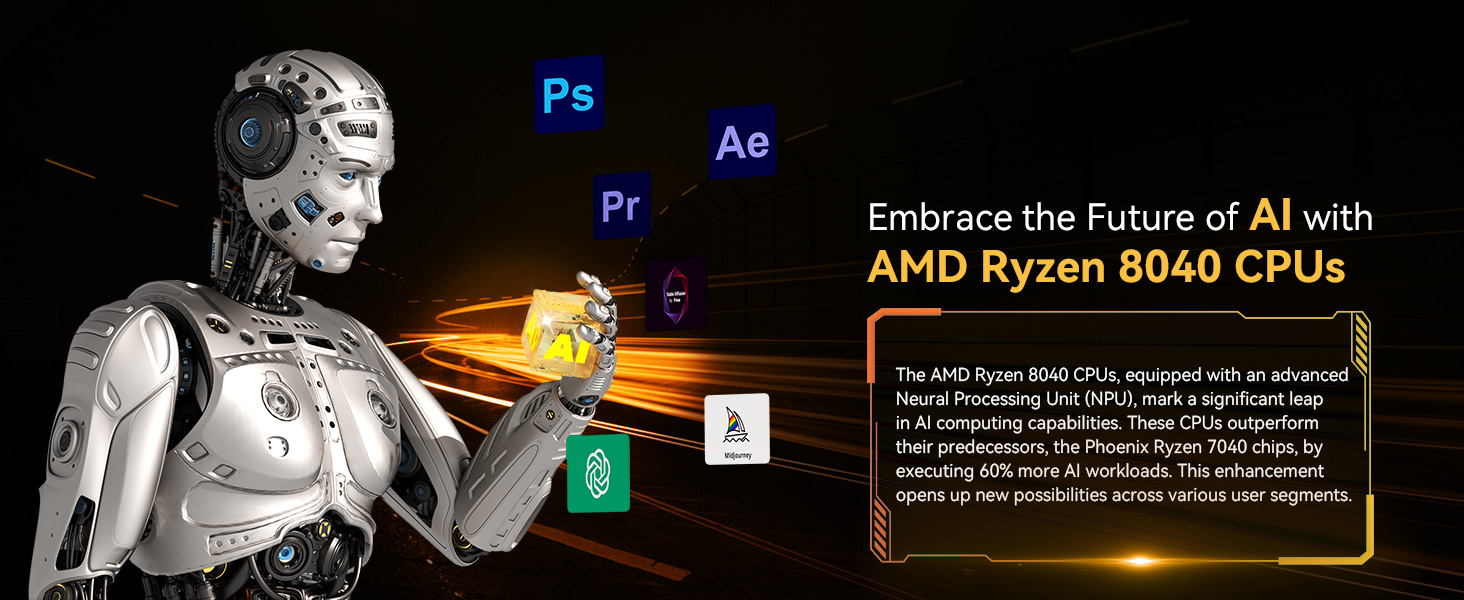
Figure 4: A visual representation of AI computing capabilities with AMD Ryzen 8040 CPUs, showing a robot hand interacting with an AI cube and various creative application icons.
Video 2: This video highlights the GEEKOM A8 as a Next-Gen AI PC, showcasing its compact design, multi-port connectivity, ultra-fast RAM and SSD, AMD Ryzen 8000 Processors, and IceBlast Cooler, all contributing to an enhanced gaming experience.
Wartung und Upgrades
1. Allgemeine Pflege
To ensure the longevity of your GEEKOM A8 Mini PC, keep it in a well-ventilated area, free from dust and direct sunlight. Clean the exterior with a soft, dry cloth. Avoid liquid cleaners.
2. Upgrade Options
The GEEKOM A8 is designed to be upgrade-friendly:
- RAM: The dual-channel 32GB DDR5-5600MHz RAM can be expanded up to 64GB.
- SSD: The 1TB M.2 2280 NVMe Gen4*4 SSD can be upgraded to up to 2TB.
Refer to the detailed instructions in the included user guide for safe and proper component replacement.
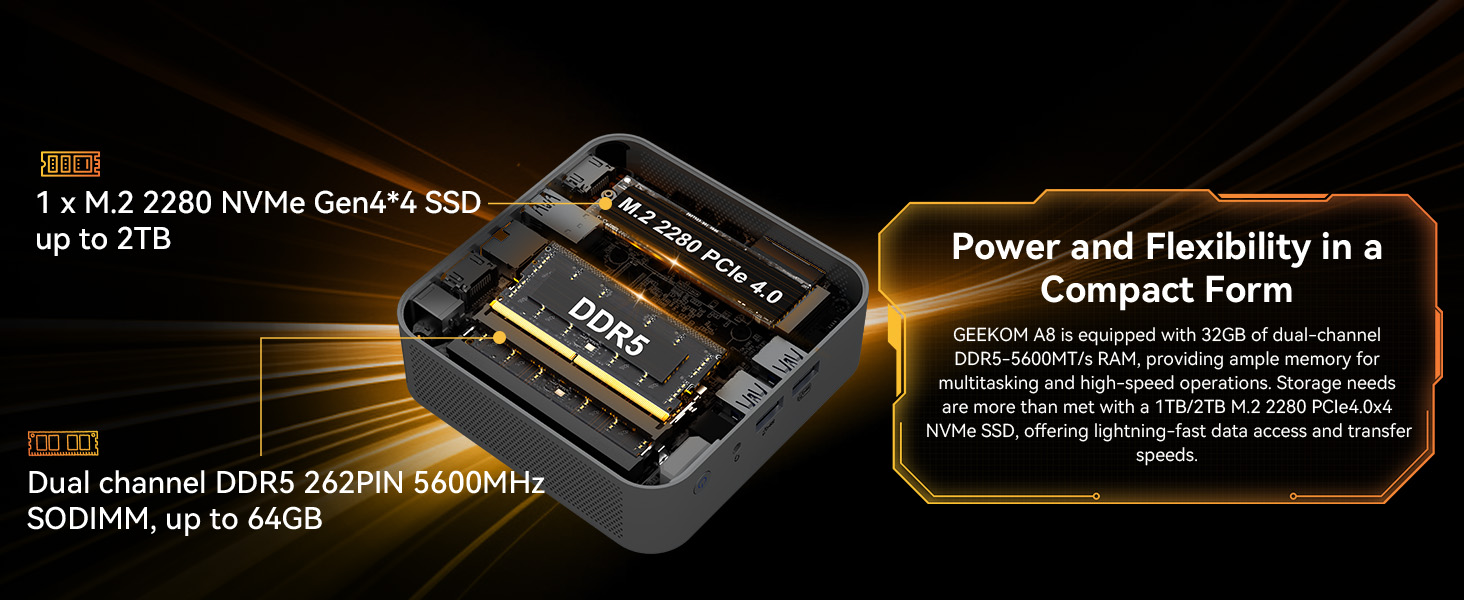
Abbildung 5: Eine explodierte view of the GEEKOM A8 Mini PC, illustrating the dual-channel DDR5 SODIMM slots (up to 64GB) and the M.2 2280 NVMe Gen4*4 SSD slot (up to 2TB), emphasizing its upgradeability.
3. Kühlsystem
The Mini PC features IceBlast 1.5 Cooling Technology, which includes an efficient CPU fan, a large heat sink, and dual heat pipes to maintain optimal operating temperatures and stable performance even under heavy loads.
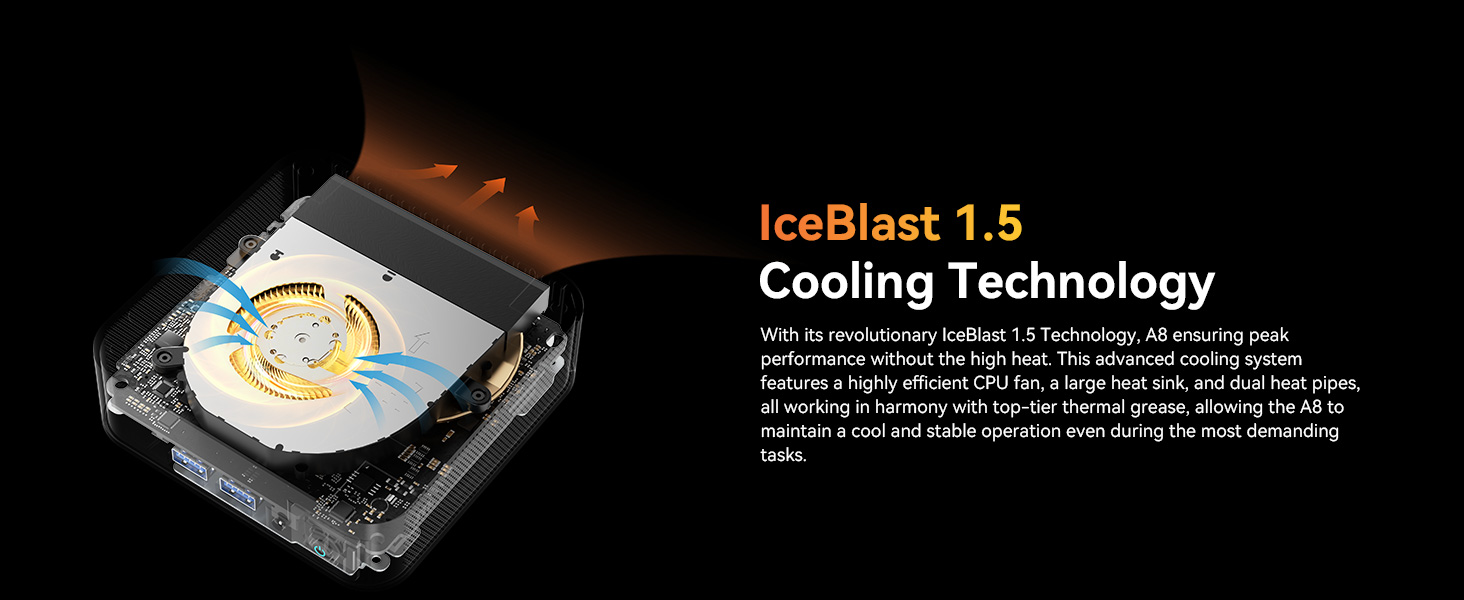
Figure 6: A diagram illustrating the IceBlast 1.5 Cooling Technology within the GEEKOM A8, showing the airflow and internal components designed for efficient heat dissipation.
Fehlerbehebung
If you encounter any issues with your GEEKOM A8 Mini PC, please refer to the following general troubleshooting steps:
- Kein Strom: Stellen Sie sicher, dass das Netzteil fest mit dem Mini-PC und einer funktionierenden Steckdose verbunden ist. Versuchen Sie gegebenenfalls eine andere Steckdose.
- Kein Bildschirm: Verify that the HDMI or USB4 cable is correctly connected to both the Mini PC and the monitor. Check the monitor's input source settings.
- Periphere Probleme: Ensure USB devices are properly seated. For Bluetooth devices, check pairing status and battery levels.
- System reagiert nicht: Perform a hard reset by holding the power button for 10 seconds until the device turns off, then power it back on.
- Softwareprobleme: If Windows 11 Pro is experiencing issues, try restarting the system. If problems persist, consider using Windows recovery options.
For more specific issues or advanced troubleshooting, please contact GEEKOM customer support.
Technische Daten
| Besonderheit | Detail |
|---|---|
| Marke | GEEKOM |
| Serie | GEEKOM A8 |
| Modellnummer | GEEKOM Mini A8R7 |
| Prozessor | AMD Ryzen 7 8845HS (8 Cores, 16 Threads, 3.8GHz to 5.1GHz) |
| RAM | 32 GB DDR5-5600 (Expandable up to 64 GB) |
| Lagerung | 1 TB M.2 2280 NVMe Gen4*4 SSD (Expandable up to 2 TB) |
| Grafik-Coprozessor | AMD Radeon 780M |
| Betriebssystem | Windows 11 Pro |
| Maximale Bildschirmauflösung | 7680 × 4320 Pixels (8K) |
| Kabellose Konnektivität | Wi-Fi 6E, Bluetooth 5.2 |
| Ethernet | 2.5-Gigabit-RJ45 |
| USB-Anschlüsse | 1 x USB 2.0, 4 x USB 3.0, 1 x USB4 (40Gbps) |
| Videoausgang | 2 x HDMI 2.0, 1 x USB4 Type-C (8K@30Hz), 1 x USB 3.2 Gen2 Type-C (8K@30Hz) |
| Abmessungen (LxBxH) | 4.42 x 4.42 x 1.5 Zoll |
| Artikelgewicht | 3.12 Pfund |
Video 3: This video compares the energy consumption of the GEEKOM Mini PC with traditional desktop computers, demonstrating significant power savings and environmental benefits.
Garantie und Support
1. Garantieinformationen
GEEKOM bietet ein 3 Jahr eingeschränkte Garantie on every Mini PC from the date of purchase. This warranty covers all defects in design and workmanship. Please retain your proof of purchase for warranty claims.

Figure 7: A badge indicating the 3-Year Manufacturer Protection for GEEKOM products.
2. Kundendienst
For any inquiries, technical assistance, or warranty claims, GEEKOM provides professional after-sales support:
- Online-Hilfe: Log in to your Amazon buyer's account, find your order, and click 'Get help' to contact the seller directly.
- E-Mail-Support: You can also send an email to the after-sales team at shirley.li@geekom.tw.
The support team is ready to assist you with your needs.

Figure 8: GEEKOM After-sales Service options, including finding the seller on Amazon and sending an email to the after-sales team.


