1. Einleitung
This manual provides essential information for the proper use and maintenance of your CAMMHD F6 1TB 4K Body Camera. Please read it thoroughly before operating the device to ensure optimal performance and longevity.

Image 1.1: CAMMHD F6 4K Body Camera
2. Packungsinhalt
Überprüfen Sie, ob alle Artikel im Paket vorhanden sind:
- 1x CAMMHD F6 Body Camera (1TB integrated memory)
- 1x 5V/1A-Adapter
- 1x USB-Datenkabel
- 1x 360° Rotatable Long Clip
- 1x 360° Rotatable Short Clip
- 1x Benutzerhandbuch

Abbildung 2.1: Packungsinhalt
3. Produktüberschreitungview
3.1 Hauptmerkmale
- 4K Video & 42MP Photo Resolution: Equipped with Novatek 675 controller and IMX335 sensor for clear recordings.
- 170°-Weitwinkelobjektiv: Umfasst ein breites Spektrum an view.
- 1TB Internal Storage: Non-removable high-speed memory for extensive recording.
- Infrarot Nachtsicht: 6 IR lights with a 15m/50ft range, supporting auto or manual activation.
- LED White Light: Sorgt für Beleuchtung bei schwachen Lichtverhältnissen.
- Verlängerte Akkulaufzeit: 3400mAh battery offers over 12 hours (480P) or 8 hours (4K) of continuous recording.
- H.265-Videokodierung: Reduziert file size by 50% and speeds up transfer by 30%.
- Wasserdichtes Design: Gewährleistet Langlebigkeit in verschiedenen Umgebungen.
- Multifunktional: Includes loop recording, pre/post-recording, continuous shooting, date stamping, password protection, and LOG functions.
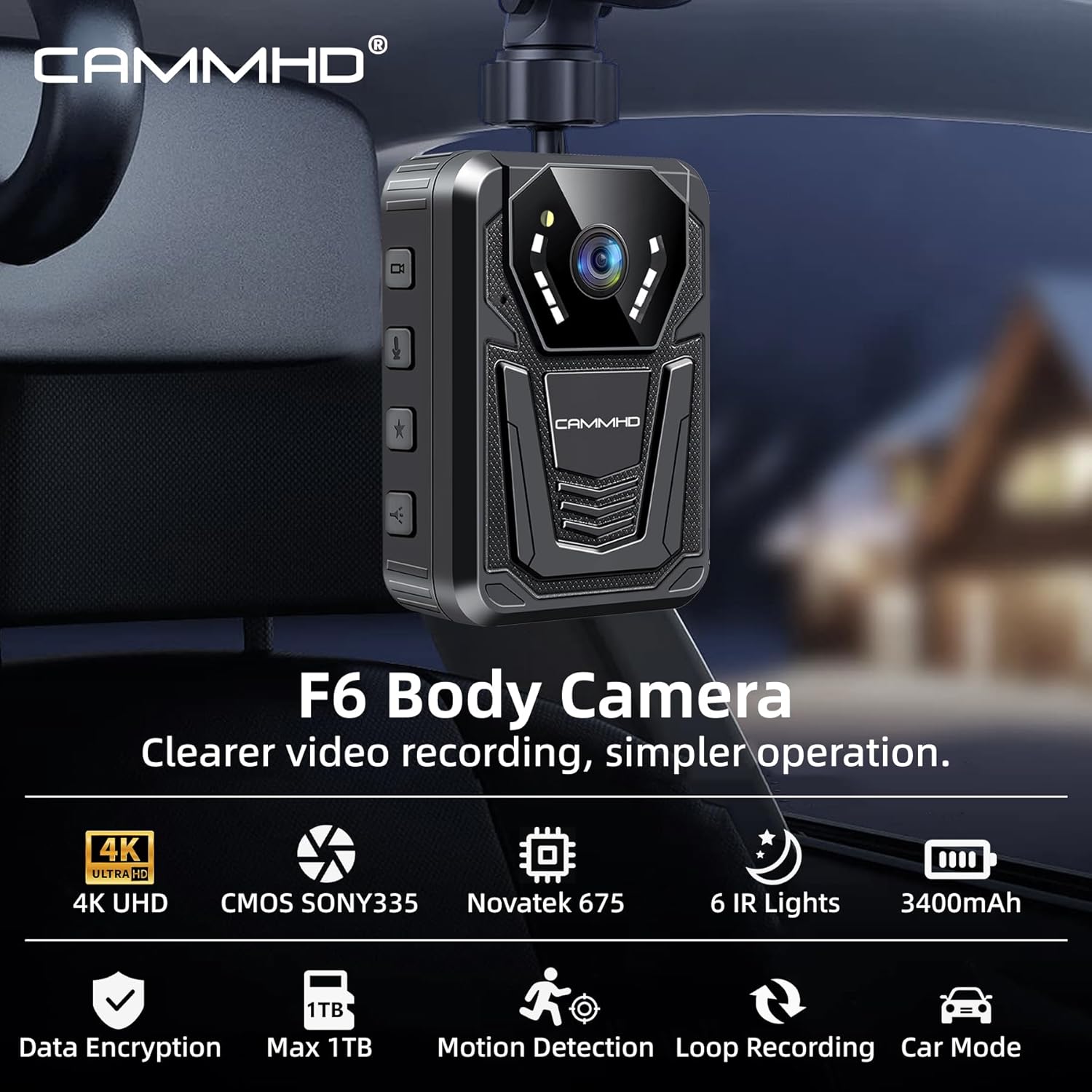
Image 3.1: CAMMHD F6 Key Features
4. Einrichtung
4.1 Aufladen des Geräts
Before first use, fully charge the CAMMHD F6 body camera. Connect the provided USB data cable to the camera's port and the 5V/1A adapter. Plug the adapter into a power outlet. The charging indicator will show the charging status. A full charge typically takes approximately 4 hours.
4.2 Anbringen der Clips
Select either the long or short rotatable clip based on your preference. Align the clip with the slot on the back of the camera and slide it in until it clicks securely into place. To remove, press the release tab and slide the clip out.
4.3 Erstes Einschalten und Grundeinstellungen
Press and hold the Power button to turn on the camera. Upon first startup, you may need to set the date, time, and device ID. Navigate through the menu using the control buttons to adjust these settings. Refer to the on-screen prompts for guidance.
5. Bedienung
5.1 Videoaufzeichnung
To start video recording, press the dedicated Video Record button. The camera supports 4K resolution and utilizes H.265 encoding for efficient storage. Press the button again to stop recording. The camera also supports loop recording, pre-recording, and post-recording features, which can be configured in the settings menu.

Image 5.1: 4K UHD Video Recording
5.2 Fotoaufnahme
To take a still photograph, press the Photo Capture button. The camera captures images at 42MP resolution. Continuous shooting mode can be enabled in the settings.
5.3 Night Vision and LED Light
The CAMMHD F6 features 6 infrared night vision lights for clear recording in low-light conditions up to 15 meters (50 feet). You can set the infrared switching mode to automatic or manual via the settings. Additionally, an integrated LED white light can be activated to provide consistent illumination.

Image 5.2: Auto/Manual Night Vision
5.4 G-Sensor and Password Protection
The built-in G-sensor can automatically activate recording upon detecting significant movement or impact. Password protection can be enabled to secure your recorded files and prevent unauthorized access.
6. Datenverwaltung
6.1 Viewing Files auf Kamera
Recorded videos and photos can be reviewed directly on the camera's 2-inch screen. Navigate through your files Verwendung der Steuerungstasten.
6.2 Übertragung Files an einen Computer
Connect the camera to a computer using the provided USB data cable. The camera will appear as a removable storage device. You can then transfer video, audio, and image content. Data transfer speeds are optimized, reaching 15MB/s-20MB/s. Files are automatically sorted into folders for easy organization.

Image 6.1: H.265 Video Compression Benefits
7. Akkulaufzeit
The CAMMHD F6 is equipped with a 3400mAh polymer lithium battery. When fully charged, it provides:
- Up to 14 hours of recording at 480P.
- Over 8 hours of recording at 4K resolution.
The camera supports simultaneous charging and recording, ensuring uninterrupted operation.

Image 7.1: Battery Performance
8. Wartung
8.1 Reinigung
Reinigen Sie das Kameragehäuse mit einem weichen, trockenen Tuch. Verwenden Sie für das Objektiv ein spezielles Objektivreinigungstuch und eine entsprechende Reinigungslösung, um Kratzer zu vermeiden. Verwenden Sie keine scharfen Chemikalien oder Scheuermittel.
8.2 Speicherung
Store the camera in a cool, dry place away from direct sunlight and extreme temperatures. Ensure the battery is partially charged (around 50%) if storing for extended periods to preserve battery health.
9. Fehlerbehebung
If you encounter issues with your CAMMHD F6 body camera, refer to the following common solutions:
- Kamera lässt sich nicht einschalten: Stellen Sie sicher, dass der Akku geladen ist. Schließen Sie ihn an das Ladegerät an und versuchen Sie es erneut.
- Aufnahmeprobleme: Check available storage space. Ensure settings are correctly configured for desired recording mode (e.g., loop recording, pre/post-recording).
- File transfer problems: Verify the USB cable connection. Try a different USB port or computer. Ensure the camera is in the correct mode for data transfer (if applicable).
- Schlechte Nachtsichtqualität: Ensure the IR lights are not obstructed. Check night vision settings (auto/manual).
- Bildschirm reagiert nicht: Versuchen Sie, das Gerät neu zu starten. Sollte das Problem weiterhin bestehen, wenden Sie sich bitte an den Kundendienst.
10. Spezifikationen
| Besonderheit | Spezifikation |
|---|---|
| Modell | F6 |
| Videoauflösung | Up to 4K (2160P) |
| Fotoauflösung | 42 Megapixel |
| Linsenwinkel | 170 Grad |
| Interner Speicher | 1TB (non-removable) |
| Nachtsichtbereich | 15 Meter / 50 Fuß |
| Batteriekapazität | 3400 mAh |
| Akkulaufzeit (4K) | Über 8 Stunden |
| Akkulaufzeit (480p) | Über 12 Stunden |
| Videokodierung | H.265 |
| Bildschirmgröße | 2 Zoll |
| Konnektivität | USB |
| Wasserbeständigkeit | Wasserdicht |
| Maße | 2.17 x 1.18 x 3.07 Zoll |
| Gewicht | 5.3 Unzen |
11. Garantie und Support
For warranty information or technical support, please refer to the official CAMMHD webBesuchen Sie die Website oder kontaktieren Sie direkt den Kundenservice. Bewahren Sie Ihren Kaufbeleg für Garantieansprüche auf.


