Einführung
This manual provides detailed instructions for the LAMA Magnetic Keyboard Case, designed to enhance the functionality of your compatible iPad. It covers setup, operation, maintenance, and troubleshooting to ensure optimal performance and user experience.

Image: The LAMA Magnetic Keyboard Case with an iPad attached, showcasing the keyboard and trackpad in use.
Kompatibilität
The LAMA Magnetic Keyboard Case is compatible with the following iPad models:
- iPad 10. Generation, 10.9 Zoll (2022)Modellnummern A2696, A2757, A2777
- iPad (A16) 11th Generation 11-inch (2025)Modellnummern A3354, A3355, A3356
To verify your iPad model, check the "Axxxx" logo on the rear of your iPad or navigate to Einstellungen > Allgemein > Info and tap the "Mxxxx" part number to reveal the "Axxxx" model number.

Image: Visual representation of compatible iPad models and their corresponding model numbers.
Packungsinhalt
- LAMA Magnetic Keyboard Case
- USB-C-Ladekabel
- Benutzerhandbuch (dieses Dokument)
Installationshandbuch
1. Verbinden Sie Ihr iPad
- Align your iPad with the magnetic back panel of the case.
- The iPad will magnetically snap into place, ensuring a secure connection.
- Ensure the camera cutout and ports align correctly with the case openings.
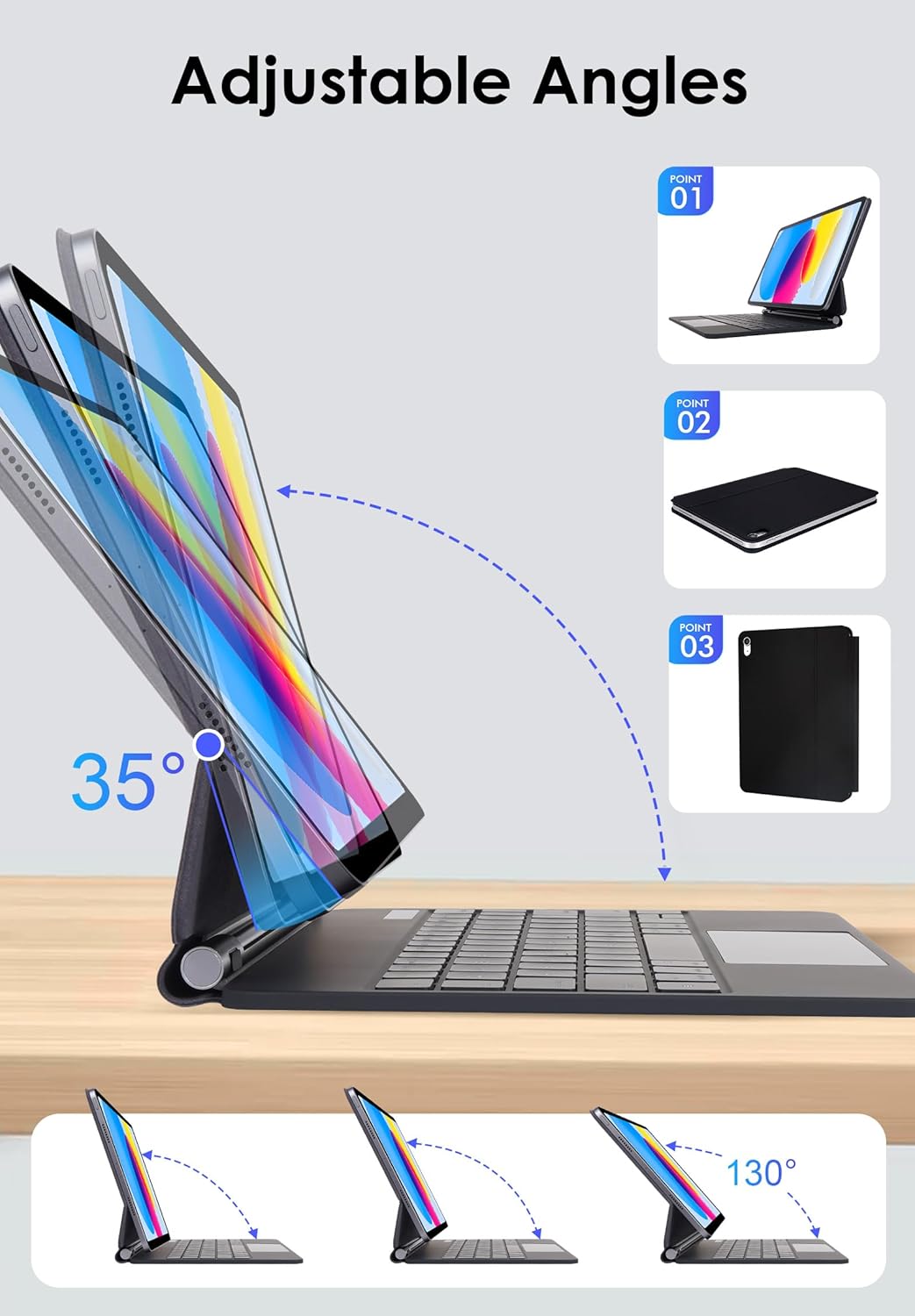
Image: The keyboard case demonstrating its adjustable angles and how the iPad attaches magnetically.
2. Aufladen der Tastatur
- Suchen Sie den USB-C-Ladeanschluss an der Seite der Tastatur.
- Connect the provided USB-C cable to the keyboard and a power source (e.g., USB wall adapter, computer USB port).
- Die Ladeanzeige leuchtet auf. Eine vollständige Ladung dauert in der Regel 2–3 Stunden.
- The keyboard has a long standby time of up to 150 days and a working time of 80 hours on a single charge.
3. Bluetooth-Kopplung
- Turn on the keyboard by sliding the power switch. The Bluetooth indicator light will flash.
- Gehen Sie auf Ihrem iPad zu Einstellungen > Bluetooth.
- Stellen Sie sicher, dass Bluetooth aktiviert ist.
- Select "LAMA Keyboard" (or similar name) from the list of available devices.
- Folgen Sie den Anweisungen auf dem Bildschirm, um den Kopplungsvorgang abzuschließen. Die Bluetooth-Anzeigeleuchte an der Tastatur hört auf zu blinken, sobald die Kopplung erfolgreich war.
Video: This video demonstrates the magnetic attachment of the iPad to the keyboard case, followed by typing and trackpad usage, illustrating the setup and basic operation.
Bedienungsanleitung
Tastaturfunktionen
- Steuerung der Hintergrundbeleuchtung: Drücken Sie Fn + Lichtsymbol to cycle through 7 backlight colors. Press Fn + Sonnensymbol to adjust the 3 levels of brightness.
- Tastenkombinationen: The keyboard includes dedicated iOS multimedia and standard layout shortcut keys. Refer to the keyboard layout for specific functions (e.g., volume control, media playback, home screen).

Image: The keyboard displaying its 7-color backlight feature with brightness adjustment options.
Multi-Touch Trackpad Gestures
The integrated multi-touch trackpad supports various gestures for enhanced navigation:
- Tippen mit einem Finger: Click/Select.
- Scrollen mit zwei Fingern: Scroll up/down or left/right.
- Two Finger Pinch: Zoom in/out.
- Wischen mit drei Fingern nach oben: Open the App Switcher.
- Mit drei Fingern nach unten streichen: Return to Home Screen.
- Anpassen der Empfindlichkeit: Gehe zu iPad Settings > General > Trackpad & Mouse > Tracking Speed.

Image: A user's hands demonstrating multi-touch gestures on the trackpad of the LAMA keyboard case.
Verstellbarer Ständer
Der freitragende Kragarmständer ermöglicht flexible viewing angles from 0-180°. Adjust the iPad to your preferred angle for typing, drawing, viewing, or reading.
Automatische Schlaf-/Wachfunktion
The keyboard case features an auto sleep/wake function. Opening the case will wake your iPad, and closing it will put your iPad to sleep, conserving battery life. The iPad will automatically disconnect from the keyboard after 10 minutes of inactivity; press any key to re-establish the connection.
Wartung
- Reinigung: Verwenden Sie ein weiches, damp cloth to clean the exterior of the case and keyboard. Avoid harsh chemicals or abrasive materials.
- Lagerung: When not in use, keep the keyboard case closed to protect your iPad and conserve keyboard battery. Store in a cool, dry place.
- Laden: Charge the keyboard regularly, even if not used frequently, to maintain battery health.
Fehlerbehebung
Tastatur verbindet sich nicht über Bluetooth
- Stellen Sie sicher, dass die Tastatur eingeschaltet und vollständig aufgeladen ist.
- Schalten Sie Bluetooth auf Ihrem iPad aus und anschließend wieder ein.
- Forget the device ("LAMA Keyboard") in your iPad's Bluetooth settings and attempt to re-pair.
- Starten Sie sowohl Ihr iPad als auch die Tastatur neu.
Trackpad reagiert nicht
- Stellen Sie sicher, dass die Tastatur per Bluetooth verbunden ist.
- Check iPad settings for trackpad functionality: Settings > General > Trackpad & Mouse.
- Reinigen Sie die Oberfläche des Trackpads, um eventuelle Verunreinigungen zu entfernen.
Keys Not Working
- Prüfen Sie, ob die Tastatur geladen und angeschlossen ist.
- Stellen Sie sicher, dass sich keine Fremdkörper unter den Schlüsseln befinden.
- Sollten bestimmte Tasten nicht reagieren, wenden Sie sich bitte an den Kundendienst.
Technische Daten
| Marke | LAMA |
| Modellnummern | A2696/A2757/A2777 (iPad 10th Gen), A3354/A3355/A3356 (iPad 11th Gen) |
| Konnektivität | Kabellos (Bluetooth) |
| Tastatur Hintergrundbeleuchtung | 7 Colors, 3 Brightness Levels (RGB) |
| Besondere Merkmale | Multi-Touch Trackpad, Floating Cantilever Stand, Auto Sleep/Wake, Foldable |
| Akku-Typ | Lithium-Polymer (im Lieferumfang enthalten) |
| Arbeitszeit | Bis zu 80 Stunden |
| Standby-Zeit | Bis zu 150 Tage |
| Ladezeit | 2-3 Stunden |
| Technische Daten | 9.84 x 7.56 x 4.33 Zoll |
| Artikelgewicht | 1.5 Pfund |
Garantie und Support
LAMA products are designed for quality and reliability. For warranty information or technical support, please refer to the contact details provided with your purchase or visit the official LAMA webWebsite. Bewahren Sie Ihren Kaufbeleg für Garantieansprüche auf.
Weitere Unterstützung finden Sie unter LAMA Store on Amazon.


