1. Einleitung
Thank you for choosing the FLYBIRD 4D Vibration Plate. This manual provides essential information for the safe and effective operation, maintenance, and troubleshooting of your new fitness equipment. Please read this manual thoroughly before initial use and retain it for future reference.
2. Sicherheitshinweise
Um einen sicheren Betrieb zu gewährleisten und Verletzungen vorzubeugen, beachten Sie bitte die folgenden Sicherheitsrichtlinien:
- Konsultieren Sie vor Beginn eines neuen Trainingsprogramms einen Arzt, insbesondere wenn Sie bereits Vorerkrankungen haben.
- Do not use the device if you are pregnant, have a pacemaker, or suffer from acute thrombosis, severe diabetes, epilepsy, or recent surgery.
- Stellen Sie sicher, dass die Vibrationsplatte auf einer stabilen, ebenen Fläche steht.
- Maintain a clear area around the device during operation.
- The maximum user weight capacity for this device is 500 pounds (226 kg). Do not exceed this limit.
- Halten Sie Kinder und Haustiere während des Betriebs vom Gerät fern.
- Halten Sie sich bei der Benutzung immer an einer stabilen Stütze fest, wenn Sie sich unsicher fühlen.
- Stop using the device immediately if you experience pain, dizziness, or discomfort.
- Ziehen Sie den Netzstecker, wenn das Gerät nicht benutzt wird oder bevor Sie es reinigen.
3. Packungsinhalt
Überprüfen Sie, ob alle Komponenten im Paket vorhanden sind:
- FLYBIRD 4D Vibrationsplatte
- Fernbedienung (benötigt 1 Lithium-Metall-Batterie, im Lieferumfang enthalten)
- 4 Widerstandsbänder
- 2 Loop Bands
- Trainingsmatte
- Bedienungsanleitung

Abbildung 3.1: The FLYBIRD 4D Vibration Plate shown with its complete set of accessories, including resistance bands, loop bands, an exercise mat, and the remote control.
4. Einrichtung
Befolgen Sie diese Schritte für die Ersteinrichtung:
- Auspacken: Entnehmen Sie vorsichtig alle Komponenten aus der Verpackung.
- Platzierung: Place the vibration plate on a firm, level, and non-slip surface. Ensure there is adequate space around the device for safe movement.
- Stromanschluss: Connect the power cord to the vibration plate and then to a grounded electrical outlet.
- Fernbedienung: Insert the included Lithium Metal battery into the remote control.
- Exercise Mat: Place the exercise mat under the vibration plate for added stability and floor protection.
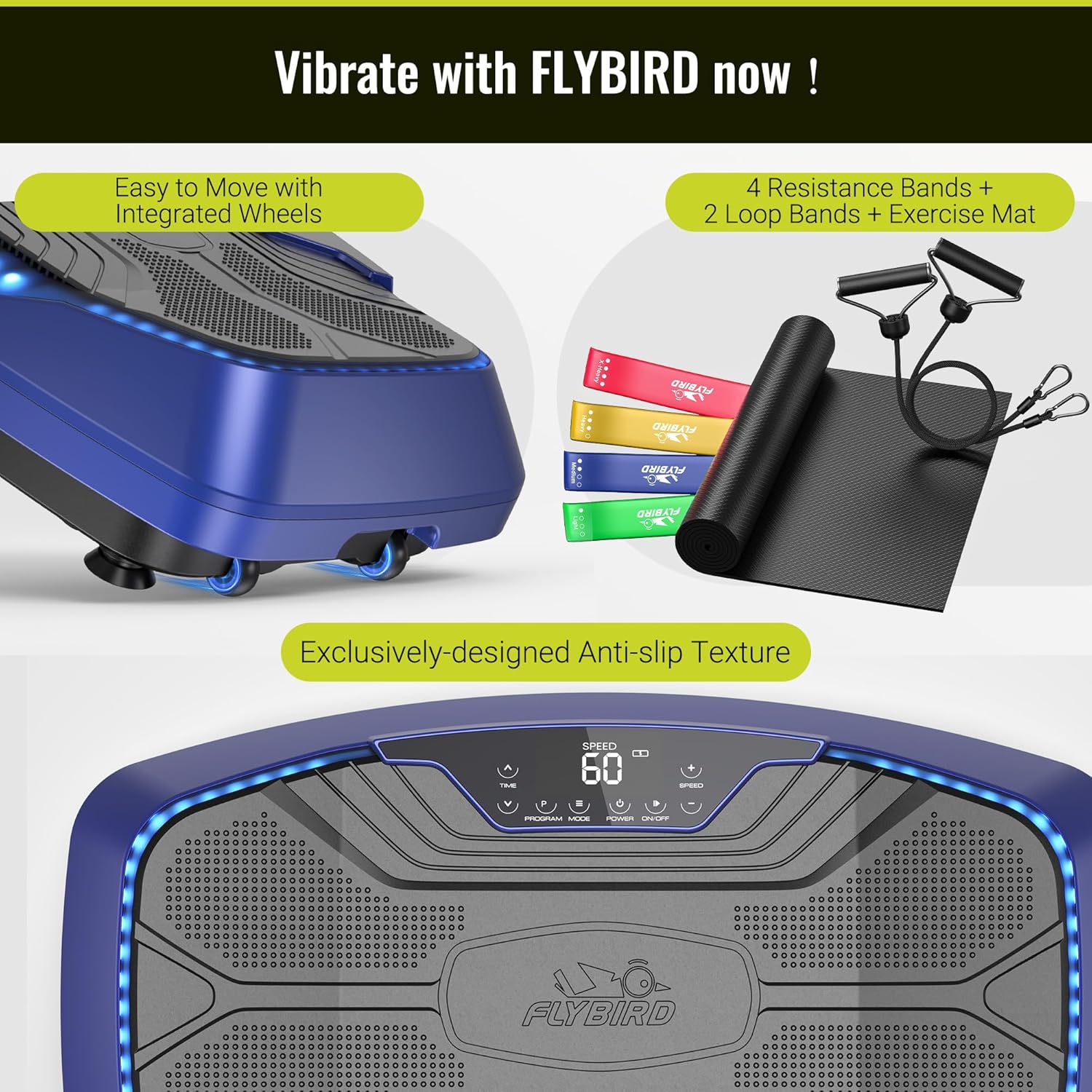
Abbildung 4.1: The vibration plate features integrated wheels for easy relocation and an exclusively designed anti-slip texture on the platform for user safety during exercise.
5. Bedienungsanleitung
The FLYBIRD 4D Vibration Plate offers multiple modes and settings for a versatile workout experience.
5.1 Ein-/Ausschalten
- Drücken Sie die LEISTUNG button on the LED touch screen or the remote control to turn the device on or off.
5.2 4D Vibration Modes
The device features triple high-performance motors, providing 7-in-1 4D vibration modes. These modes can be operated individually or in combination:
- Schwingung: Up-down motion.
- Linear: Seitliche Bewegung.
- Pulsieren: Wave-like motion.
- Combinations of Oscillation + Linear, Oscillation + Pulsation, Linear + Pulsation, and Oscillation + Linear + Pulsation.
Verwenden Sie die MODUS button on the control panel or remote to cycle through the available vibration modes.
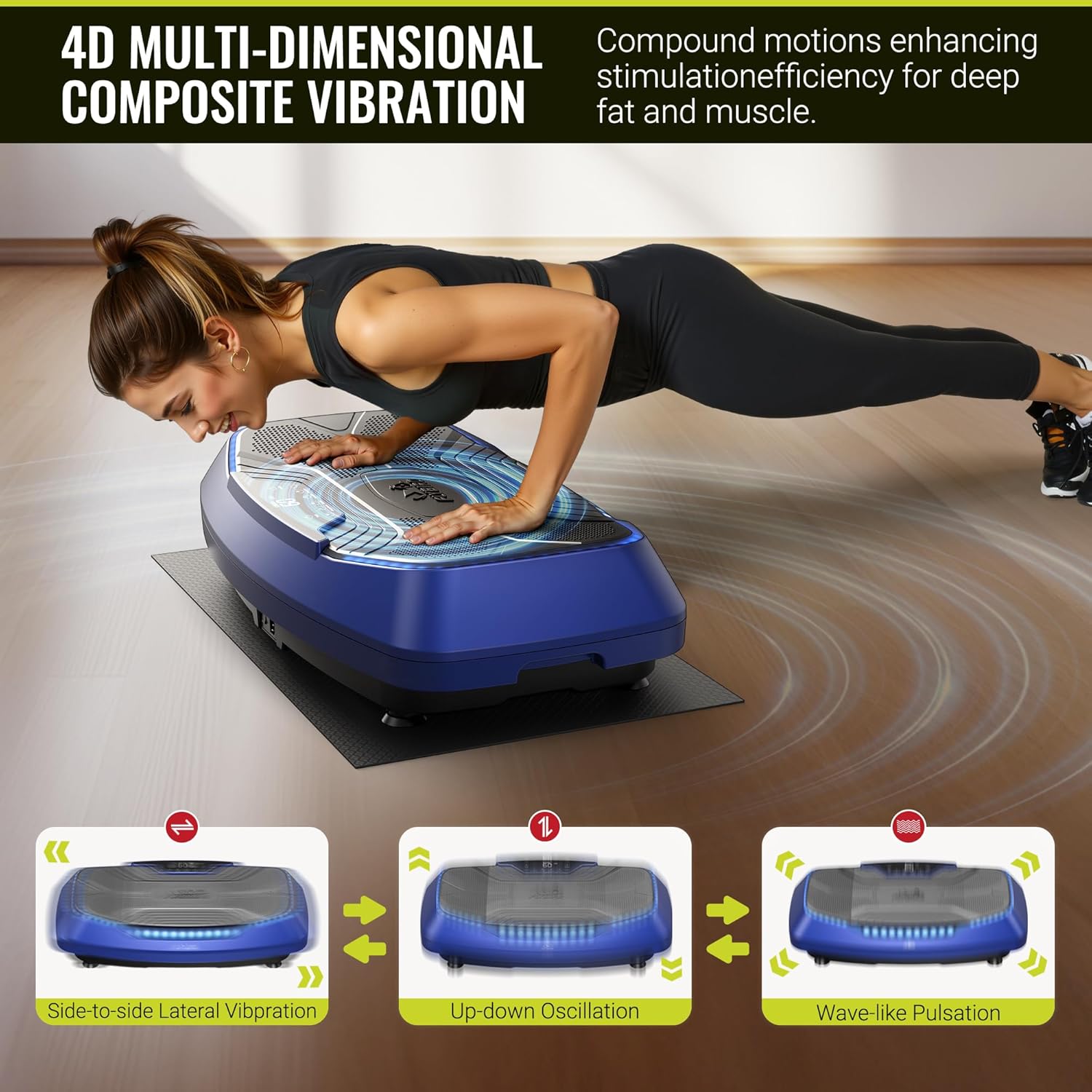
Abbildung 5.1: Visual representation of the three primary vibration types: side-to-side lateral vibration, up-down oscillation, and wave-like pulsation, which can be combined for 4D effects.
5.3 Speed Levels and Preset Programs
The vibration plate offers 99 speed levels and 9 preset programs for diverse training:
- Geschwindigkeitsanpassung: Verwenden Sie die GESCHWINDIGKEIT +/- buttons on the control panel or remote to increase or decrease the vibration intensity.
- Voreingestellte Programme: Drücken Sie die PROGRAMM button to select from the 9 pre-programmed workout routines.
- LED-Anzeigen: Three LED light colors indicate the current speed level:
- Green: Speed 1-30
- Blue: Speed 31-60
- Red: Speed 61-99
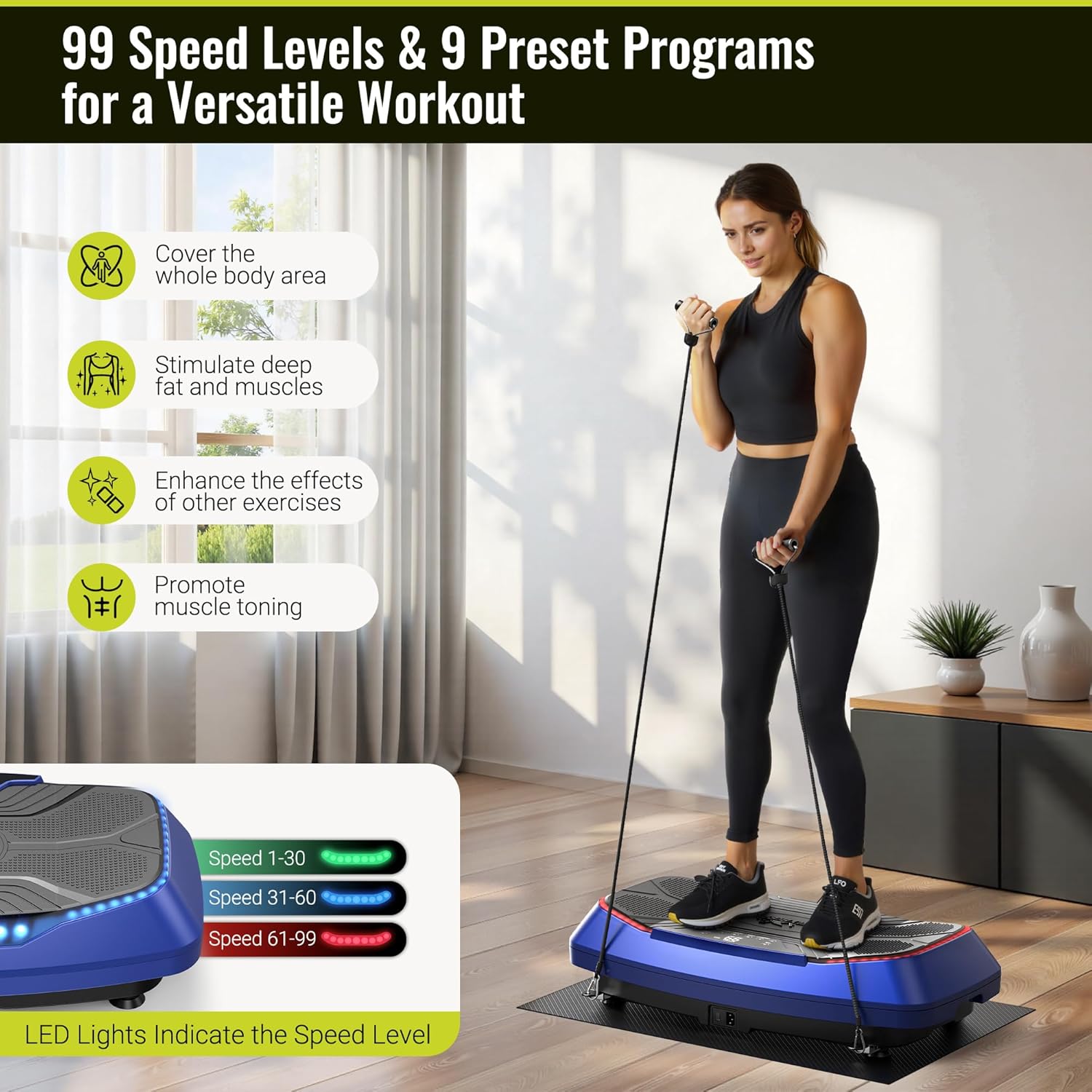
Abbildung 5.2: A user demonstrates an exercise on the vibration plate, highlighting the LED lights that change color to indicate the current speed level, ranging from 1 to 99.
5.4 Remote Control and Bluetooth Speaker
- Fernbedienung: The included remote allows for convenient adjustment of power, mode, speed, and program settings without interrupting your workout.
- Bluetooth Lautsprecher: The built-in Bluetooth speaker allows you to connect your smartphone or other Bluetooth-enabled devices to play music during your exercise session. Refer to your device's Bluetooth pairing instructions to connect.

Abbildung 5.3: A user operates the vibration plate via the intuitive LED touch screen and remote control. The image also illustrates the built-in Bluetooth speaker functionality, allowing for music playback from a connected smartphone.
6. Übungsanleitung
The FLYBIRD 4D Vibration Plate can be used for various exercises to stimulate muscles and improve circulation. The large pedal area (31.5" x 17.7") accommodates different stances and movements.
6.1 Basic Stances
- Stehen: Stand with feet shoulder-width apart, knees slightly bent. Adjust foot placement to vary intensity. Wider stance increases vibration intensity.
- Kniebeugen: Perform squats on the plate to engage leg and glute muscles.
- Kälberaufzucht: Stand on your toes to target calf muscles.

Abbildung 6.1: A man demonstrates a squat exercise on the vibration plate, highlighting the spacious 31.5" x 17.7" pedal area that allows for flexible foot positioning and various movements.
6.2 Verwendung von Widerstandsbändern
Attach the included resistance bands to the designated anchor points on the plate for upper body and full-body exercises. The loop bands can be used for lower body resistance.
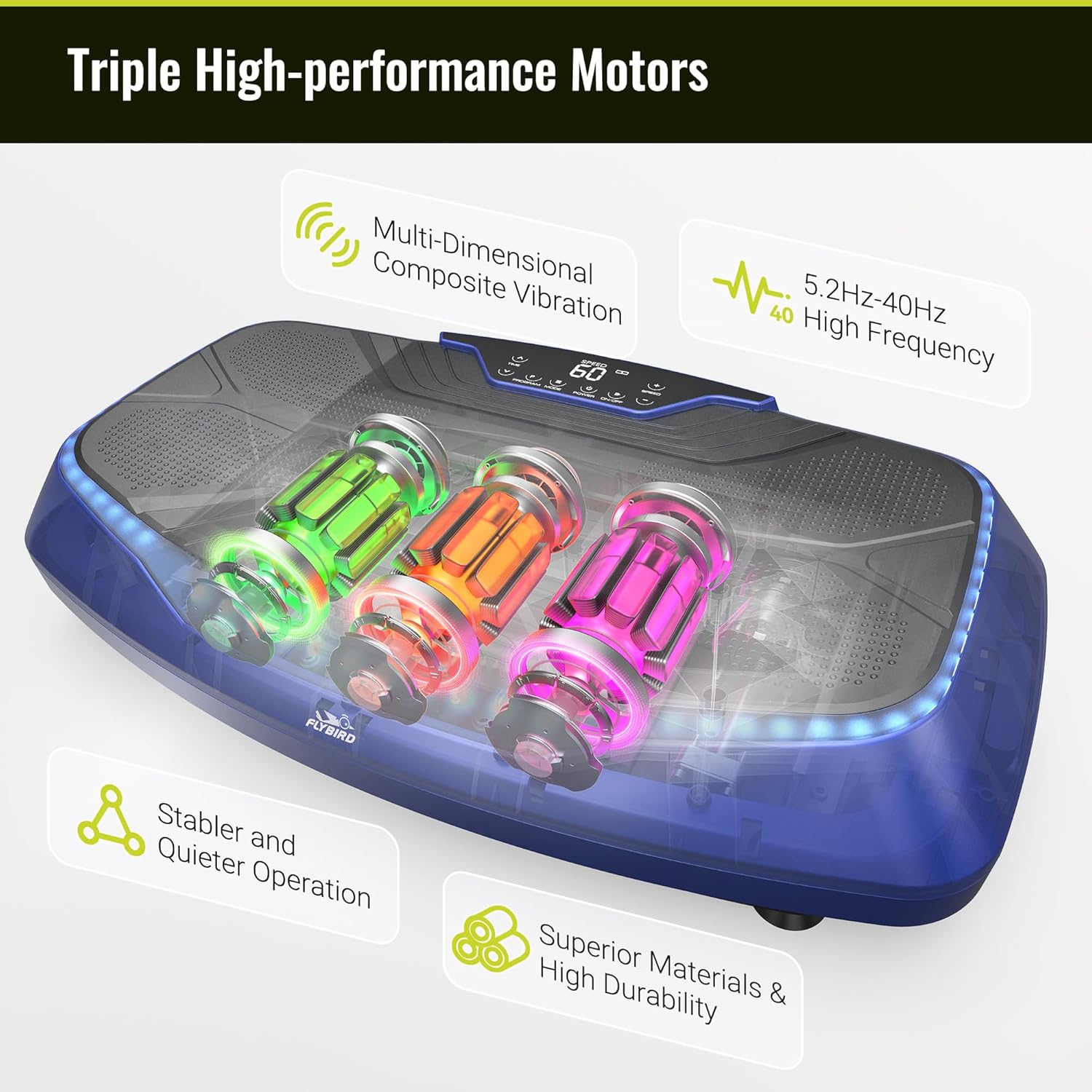
Abbildung 6.2: A man uses the vibration plate while incorporating resistance bands for a comprehensive full-body workout.
6.3 Vorteile der Nutzung
Regular use of the vibration plate may contribute to:
- Relief of back and leg pain.
- Accelerated recovery.
- Improved stability and flexibility.
- Increased blood and lymphatic circulation.
- Muscle toning and enhanced exercise effects.

Abbildung 6.3: An elderly man uses the vibration plate while seated, demonstrating its potential for gentle stimulation to aid in relaxation, recovery, and improved circulation.
7. Wartung
Durch sachgemäße Wartung wird die Langlebigkeit und optimale Leistung Ihrer Vibrationsplatte gewährleistet.
7.1 Reinigung
- Wischen Sie die Oberfläche der Vibrationsplatte mit einem weichen, damp Tuch nach jedem Gebrauch.
- Verwenden Sie keine Scheuermittel oder Lösungsmittel, da diese die Oberfläche beschädigen können.
- Stellen Sie sicher, dass das Gerät vor der Reinigung vom Stromnetz getrennt ist.
7.2 Speicherung
- Store the vibration plate in a cool, dry place away from direct sunlight and moisture.
- Stellen Sie keine schweren Gegenstände auf das Gerät.
- The integrated wheels allow for easy movement and storage.
8. Fehlerbehebung
If you encounter any issues with your FLYBIRD 4D Vibration Plate, refer to the following table:
| Problem | Mögliche Ursache | Lösung |
|---|---|---|
| Gerät lässt sich nicht einschalten. | Das Netzkabel ist nicht richtig angeschlossen. Es kommt kein Strom aus der Steckdose. | Überprüfen Sie den Anschluss des Netzkabels. Testen Sie die Steckdose mit einem anderen Gerät. |
| Fernbedienung funktioniert nicht. | Battery depleted or incorrectly inserted. Obstruction between remote and device. | Replace remote battery. Ensure clear line of sight to the device's receiver. |
| Die Vibration fühlt sich schwach oder ungleichmäßig an. | Incorrect mode or speed setting. Device overloaded. | Adjust speed and mode settings. Ensure user weight is within limits. |
| Die LED-Leuchten funktionieren nicht. | Internes elektrisches Problem. | Wenden Sie sich für Hilfe an den Kundendienst. |
| Bluetooth-Lautsprecher verbindet sich nicht. | Bluetooth not enabled on external device. Device too far from plate. | Ensure Bluetooth is active on your device. Keep devices within range. |
If the problem persists after attempting these solutions, please contact FLYBIRD customer support.
9. Spezifikationen
Key technical details of the FLYBIRD 4D Vibration Plate:
| Besonderheit | Detail |
|---|---|
| Modellname | FBVP-4D-BLX |
| Steuerelementtyp | Fernbedienung, LED-Touchscreen |
| Anzeigetyp | LED |
| Anzahl der Widerstandsstufen | 99 |
| Betriebsmodus | Automatisch |
| Stromquelle | Kabelgebundene Elektrik |
| Abmessungen des Artikelpakets | 32 x 19 x 10 Zoll |
| Artikelgewicht | 43.4 Pfund (19.68 kg) |
| Material | Plastik |
| Maximalgewichtsempfehlung | 500 Pfund (226 kg) |
| Vibration Frequency Range | 5.2 Hz bis 40 Hz |
10. Garantie und Support
FLYBIRD offers a lifetime warranty for this product, ensuring long-term reliability and customer satisfaction.
For technical support, warranty claims, or any questions regarding your FLYBIRD 4D Vibration Plate, please contact FLYBIRD customer service through the official brand website or your retailer's support channels. When contacting support, please have your model name (FBVP-4D-BLX) and purchase information readily available.