1. Produktüberschreitungview
The SJOYBRING Wireless Double Din Carplay & Android Auto Car Stereo is a 7-inch full HD capacitive touchscreen unit designed to enhance your in-car entertainment and connectivity. It features wireless Apple CarPlay and Android Auto, Bluetooth, 4-channel RCA output, high power output, subwoofer support, and includes a backup camera.
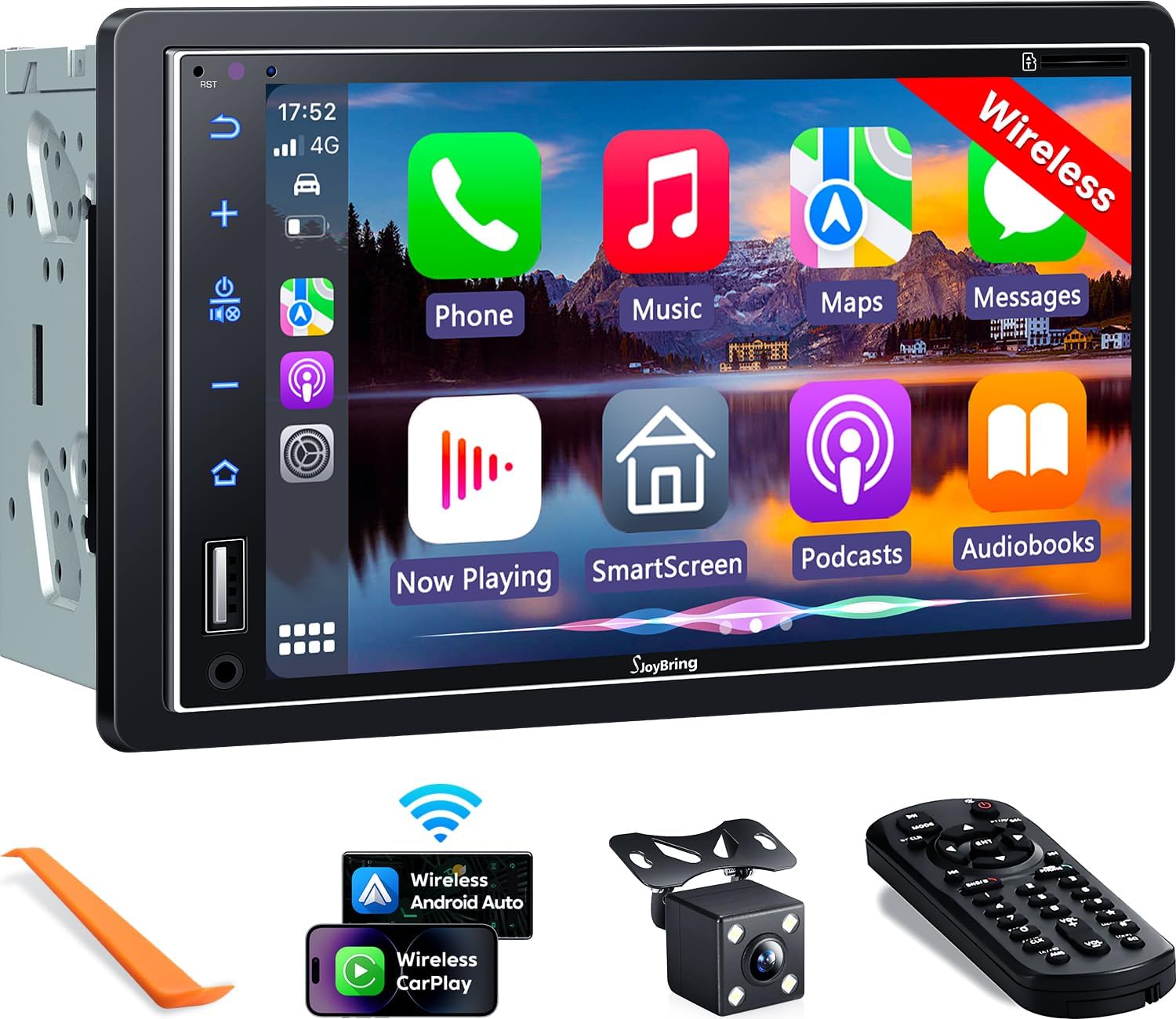
Bild 1.1: Vorderseite view of the SJOYBRING car stereo displaying the CarPlay interface.
2. Packungsinhalt
Bitte überprüfen Sie, ob alle unten aufgeführten Artikel in Ihrem Paket enthalten sind:
- Head Unit (Autoradio)
- Rahmen
- Hinteren View Kamera
- Rückfahrkamera-Kabel
- Kabelbaum
- Fernbedienung
- Benutzerhandbuch (dieses Dokument)
- Montagehalterungen
- Demontagewerkzeug
- Schrauben (verschiedene Größen)

Image 2.1: Visual representation of the SJOYBRING car stereo package contents.
3. Einrichtung und Installation
3.1 Wichtige Installationshinweise
- The standard size of this unit is 170mm x 97mm. Ensure your vehicle's dashboard opening matches this size.
- If the stereo size does not fit your dash, an additional suitable dash kit may be required (not included).
- Read this instruction manual thoroughly before beginning installation.
- Some vehicles may require additional accessories for installation, such as a wire harness adapter and a radio antenna adapter specific to your car model (not included).
3.2 Schaltplan
Beachten Sie das folgende Diagramm für die korrekten Verdrahtungsanschlüsse. Eine falsche Verdrahtung kann das Gerät oder die Fahrzeugelektrik beschädigen.

Image 3.1: ISO Standard Double DIN wiring and dimension diagram.
3.3 Rückseite View Kameraverbindung
The included HD night vision rear view camera provides a 170° ultra-wide viewing angle and is waterproof. Connect the camera as shown in the diagram below. The display will automatically switch to the rear view wenn das Fahrzeug im Rückwärtsgang ist.

Image 3.2: One-step wiring connection for the rear camera.
4. Bedienungsanleitung
4.1 Kabellose Apple CarPlay- und Android Auto-Unterstützung
Connect your smartphone to the car stereo via Bluetooth and Wi-Fi for wireless Apple CarPlay or Android Auto functionality. This allows access to navigation, music, messages, and other phone features directly on the stereo's screen. Voice control via Siri or Google Assistant is supported for safer operation.
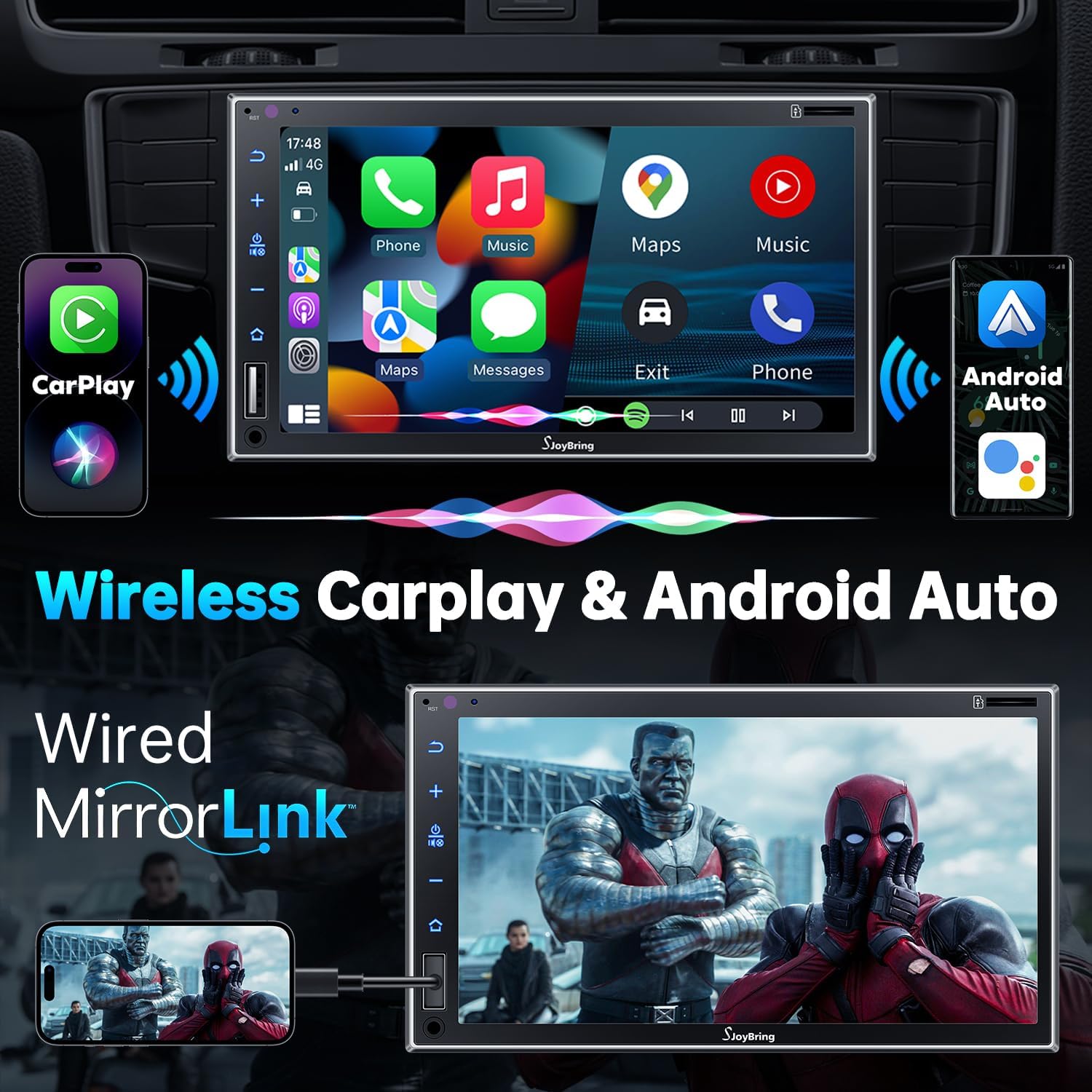
Abbildung 4.1: Kabelloses Apple CarPlay und Android Auto im Betrieb.
4.2 Wired Mirror Link
The unit supports wired mirror link for both iOS and Android phones (no version limit). Use a USB connection to mirror your smartphone's screen, displaying apps like Google Maps, Spotify, or YouTube on the 7-inch HD touchscreen.

Image 4.2: Wired Mirror Link functionality.
4.3 Audiofunktionen
- 4.2-Channel Audio Output: Features 4 channels of pre-amplifier (RCA) for front right, front left, rear right, and rear left speakers, allowing for precise sound adjustment.
- Subwoofer-Ausgang: Includes two high RMS power subwoofer outputs for enhanced bass effects.
- 10-Band-EQ: An integrated 10-band audio equalizer allows customization of the music effect.

Image 4.3: 4.2 Channel Audio Output diagram.

Image 4.4: 10-Band Equalizer interface.
4.4 Bluetooth-Konnektivität
Utilizes the latest Bluetooth technology with an independent Bluetooth module and antenna for a strong and stable connection, ensuring clear calls and uninterrupted music playback.

Image 4.5: Latest Bluetooth technology for stable connection.
4.5 Lenkradsteuerung (SWC)
The unit supports steering wheel controls, allowing you to manage audio functions without taking your hands off the wheel. Refer to the wiring diagram for SWC connections and the unit's settings for programming.

Abbildung 4.6: Benutzeroberfläche zur Einrichtung der Lenkradsteuerung.
4.6 FM & AM Radio
Access FM radio frequencies from 87.5 to 107.9 MHz and AM radio frequencies from 530 to 1710 KHz. The unit allows for station presets and scanning.

Image 4.7: FM & AM Radio interface.
5. Wartung
To ensure the longevity and optimal performance of your SJOYBRING car stereo, follow these maintenance guidelines:
- Bildschirmreinigung: Verwenden Sie ein weiches, fusselfreies Tuch, um den Touchscreen vorsichtig abzuwischen. Bei hartnäckigen Flecken etwas nachhelfen.ampReinigen Sie das Tuch mit Wasser oder einem für Bildschirme geeigneten Reiniger. Vermeiden Sie aggressive Chemikalien oder Scheuermittel.
- Staubentfernung: Reinigen Sie die Lüftungsschlitze und Tasten des Geräts regelmäßig mit einer weichen Bürste oder Druckluft von Staub.
- Temperaturkontrolle: Vermeiden Sie es, das Gerät über längere Zeiträume extremen Temperaturen auszusetzen.
- Verkabelungsprüfung: Überprüfen Sie regelmäßig alle Kabelverbindungen, um sicherzustellen, dass sie fest sitzen und keine Beschädigungen aufweisen.
6. Fehlerbehebung
If you encounter issues with your SJOYBRING car stereo, refer to the following common troubleshooting steps:
- Kein Strom: Check all power connections, including the ACC (accessory) and 12V constant power wires. Ensure the vehicle's fuse for the stereo is not blown.
- Kein Ton: Verify speaker connections are correct. Check the volume level and ensure the mute function is not activated. Confirm the audio source is properly selected.
- Probleme mit der Bluetooth-Verbindung: Ensure Bluetooth is enabled on both the stereo and your smartphone. Delete previous pairings and attempt to re-pair. Move closer to the unit if interference is suspected.
- CarPlay/Android Auto verbindet sich nicht: For wireless connection, ensure both Bluetooth and Wi-Fi are active on your phone and the stereo. For wired mirror link, try a different USB cable or port.
- Rückfahrkamera zeigt kein Bild an: Check the camera's power and video signal connections. Ensure the reverse gear trigger wire is correctly connected to the vehicle's reversing light circuit.
- Touchscreen reagiert nicht: Versuchen Sie, das Gerät neu zu starten. Sollte das Problem weiterhin bestehen, wenden Sie sich bitte an den Kundendienst.
If these steps do not resolve the issue, please contact SJOYBRING customer support for further assistance.
7. Spezifikationen
| Modellnummer | 7825d65e-cac9-443c-8d2b-17a564819d91 |
| Anzeige | 7 Inch Full HD Capacitive Touchscreen (1024 x 600 resolution) |
| Konnektivität | Wireless Apple CarPlay, Wireless Android Auto, Bluetooth, Wired Mirror Link (USB) |
| Audioausgabemodus | Stereo |
| Surround Sound-Kanalkonfiguration | 4 Channel (RCA Pre-amp Ausgänge) |
| Subwoofer-Ausgang | 2 High RMS Power Outputs |
| Equalizer | 10-Band-EQ |
| Maximale Leistungsabgabe | 60W x 4 |
| Arbeitsvolumentage | Gleichstrom 12 V |
| Funkfrequenzen | FM: 87.5~107.9MHz, AM: 530~1710KHz |
| Videokodierung | H.264, H.265/HEVC, MPEG-4 |
| Artikelgewicht | 2.7 Pfund |
| Verpackungsabmessungen | 9.25 x 6.3 x 5.94 Zoll |
| Hersteller | SJOYBRING |
8. Garantie und Support
8.1 Garantieinformationen
For specific warranty details regarding your SJOYBRING car stereo, please refer to the warranty card included in your product packaging or contact SJOYBRING customer support directly. Warranty terms typically cover manufacturing defects for a specified period from the date of purchase.
8.2 Kundendienst
If you have any questions, require technical assistance, or need to report an issue, please contact SJOYBRING customer support. Contact information can usually be found on the manufacturer's official webauf der Website oder auf der Produktverpackung.
Manufacturer: SJOYBRING
For the most up-to-date support information, visit the official SJOYBRING store on Amazon: SJOYBRING Store
