Einführung
This manual provides detailed instructions for setting up, operating, and maintaining your Ajazz AK820MAX 75% Mechanical Keyboard. Please read this manual thoroughly before using the product to ensure optimal performance and longevity.
Produkteigenschaften
- TFT Smart Display & Knob: Features a high-definition TFT color screen displaying time, connectivity modes, battery status, and custom GIF animations. The integrated knob allows for quick adjustments.
- Gasket Structure & PCB Single Key Slotting: Designed with a gasket structure and 1.2mm thick PCB single key slotting for enhanced resilience, stability, and a softer, more elastic typing feel. Multiple internal fillings reduce noise for a pure and pleasant sound.
- Dreimodus-Konnektivität: Supports wireless connectivity via Bluetooth 5.1, 2.4GHz, or a wired Type-C USB cable. Easily switch between modes for efficient multitasking across various devices.
- Langlebige Batterie: Equipped with an 8000mAh battery for extended use without frequent recharging.
- RGB Backlighting with Music Rhythm: Offers 20 customizable backlighting effects, including a mode that synchronizes with music playback.
- 75% Hot-Swappable Layout: A compact 75% layout saves desktop space. The 3/5-pin PCB mounting design allows for easy hot-swapping of mechanical switches, enabling customization of typing preferences.
Packungsinhalt
Bitte vergewissern Sie sich beim Auspacken, dass alle folgenden Artikel vorhanden sind:
- Ajazz AK820MAX Mechanical Keyboard
- USB-Typ-C-Kabel
- Bedienungsanleitung

Image: The Ajazz AK820MAX keyboard, USB-C cable, and user manual as they appear when unboxed.
Aufstellen
- Aufladen der Tastatur: Connect the provided USB Type-C cable to the keyboard's Type-C port and the other end to a USB power source (e.g., computer, wall adapter). The TFT display will indicate charging status.
- Einstellen des Tastaturwinkels: Flip the keyboard over and extend the adjustable feet on the underside to achieve your preferred typing angle.
- Selecting Connectivity Mode:
- Kabelgebundener Modus: Connect the USB Type-C cable to your computer. The keyboard will automatically switch to wired mode.
- 2.4-GHz-Wireless-Modus: Locate the 2.4GHz receiver (usually stored in a slot on the keyboard's underside). Plug the receiver into an available USB port on your computer. Switch the mode selector on the keyboard to 2.4G.
- Bluetooth-Modus: Switch the mode selector on the keyboard to BT. On your device (PC, laptop, tablet), search for Bluetooth devices and select "AK820MAX" to pair.

Abbildung: Seite view of the keyboard highlighting the USB-C port and switches for selecting wired, 2.4G, or Bluetooth connectivity modes.

Image: The keyboard displaying battery life information on its TFT screen, indicating approximate usage times for wireless with lights off and wireless streamer light life, along with charging time.
Bedienungsanleitung
TFT Smart Display and Knob Functions
The integrated TFT color screen and multi-function knob provide quick access to various settings:
- Knob Rotation: Rotate the knob to navigate through menu options or adjust values (e.g., brightness, speed).
- Knob Press: Press the knob to confirm a selection or enter a menu.
- Anzeigeinformationen: The screen shows current time, active connectivity mode (wired, 2.4G, BT), and battery level.
- Custom GIF Animations: The display supports custom colorful GIF animations. Refer to the software for customization options.

Image: A close-up of the keyboard's 0.85-inch TFT color screen, illustrating its capability to display settings such as backlight brightness, speed, color, and effect modes.
RGB-Hintergrundbeleuchtungssteuerung
The keyboard features 20 backlighting effects. Use the knob or dedicated function keys (refer to the keyboard's keycap legends or software) to:
- Change lighting effects.
- Passen Sie die Helligkeitsstufen an.
- Animationsgeschwindigkeit ändern.
- Select specific colors.
- Activate music rhythm mode, where lighting fluctuates with audio.
Hot-Swap-fähige Schalter
The AK820MAX supports hot-swappable mechanical switches, allowing you to change switches without soldering.
- Entfernen Sie die Tastenkappe vorsichtig mit einem Tastenkappenabzieher.
- Use a switch puller to gently remove the switch from the PCB.
- Richten Sie die Pins des neuen Schalters an den Löchern auf der Platine aus und drücken Sie ihn fest, bis er einrastet. Achten Sie darauf, dass die Pins nicht verbogen sind.
- Tauschen Sie die Tastenkappe aus.
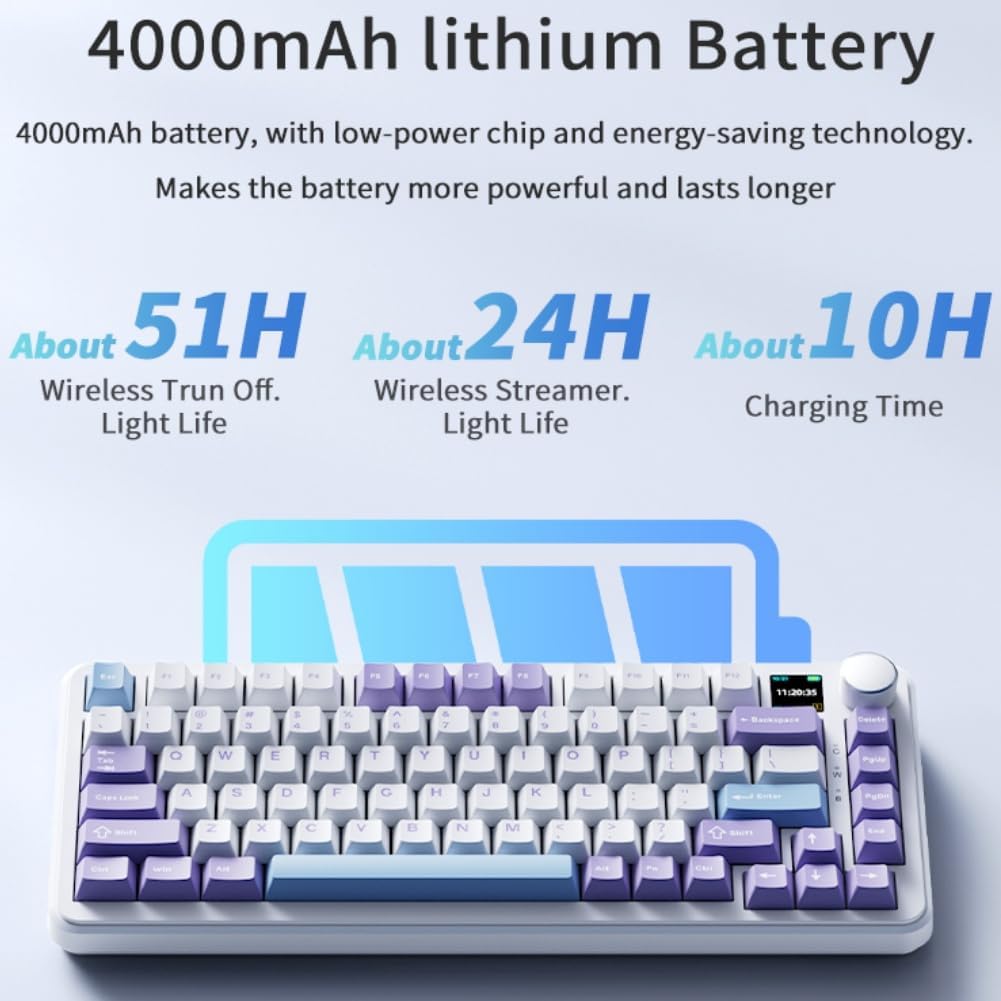
Bild: Eine Nahaufnahme view of the keyboard's hot-swappable key switches, demonstrating the ease with which switches can be changed to customize typing preferences.

Bild: Eine detaillierte view of the keyboard's PCB, showcasing the 1.2mm thick single key slot design for improved switch stability and feel.

Image: A diagram illustrating the internal gasket structure of the keyboard, which contributes to a softer and more elastic typing experience.

Image: A cross-section diagram detailing the five-layer internal filling, including silicone bottom pad, IXPE switch pad, and PET voice actor pad, designed to reduce noise and produce a pure sound.
Wartung
- Reinigung: Use a soft, dry cloth to wipe the keyboard surface. For deeper cleaning, remove keycaps and use compressed air to clear debris.
- Schalterpflege: Avoid spilling liquids on the keyboard. If a switch feels inconsistent, it may need to be replaced or lubricated.
- Lagerung: Bewahren Sie die Tastatur an einem kühlen, trockenen Ort fern von direkter Sonneneinstrahlung und extremen Temperaturen auf.
Fehlerbehebung
- Tastatur reagiert nicht:
- Stellen Sie sicher, dass die Tastatur aufgeladen ist.
- Check the connectivity mode switch (wired, 2.4G, BT) matches your connection type.
- Bei 2.4 GHz muss sichergestellt sein, dass der Empfänger ordnungsgemäß angeschlossen ist.
- For Bluetooth, ensure the keyboard is paired and within range. Try re-pairing.
- Um drahtlose Probleme auszuschließen, versuchen Sie, eine Verbindung über ein USB-C-Kabel herzustellen.
- RGB-Beleuchtung funktioniert nicht/ist fehlerhaft:
- Check brightness settings using the knob or software.
- Ensure the keyboard software is up to date.
- Reset lighting effects to default via software or keyboard shortcuts (refer to specific key combinations if available).
- Schlüssel werden nicht registriert:
- If a specific key is not working, try hot-swapping the switch with a known working one to determine if the switch or PCB socket is faulty.
- Stellen Sie sicher, dass die Tastenkappe richtig sitzt.
Technische Daten
| Besonderheit | Detail |
|---|---|
| Modellnummer | AK820MAX |
| Layout | 75 % (81 Tasten) |
| Konnektivität | Bluetooth 5.1, 2.4-GHz-Funkverbindung, USB Typ-C-Kabelverbindung |
| Schaltertyp | Hot-swappable Mechanical (Avocado Switch) |
| Hintergrundbeleuchtung | RGB (20 effects, music rhythm) |
| Anzeige | 0.85-inch TFT Color Smart Display |
| Batteriekapazität | 8000 mAh Lithium-Polymer (wiederaufladbar) |
| Kompatible Geräte | PC, Laptop, Tablet |
| Maße | 15.75 x 6.89 x 2.71 Zoll |
| Artikelgewicht | 2.75 Pfund |
| Hersteller | Odpaltoy |
Garantie und Support
For warranty information and technical support, please refer to the warranty card included with your product or contact the manufacturer directly. You can also visit the official Ajazz webWebsite mit häufig gestellten Fragen und weiterführenden Informationen.
Manufacturer: Odpaltoy
Contact: Please refer to the contact information provided in the product packaging or on the manufacturer's official webWebsite für Supportanfragen.


