1. Zu Endeview
The Waveshare ESP32-S3 7inch Capacitive Touch Screen Development Board is a high-performance microcontroller board designed for various applications. It integrates a 7-inch capacitive touch LCD with an 800x480 resolution and 65K RGB colors. Powered by an Xtensa 32-bit LX7 dual-core processor running up to 240MHz, it supports 2.4GHz Wi-Fi (802.11 b/g/n) and Bluetooth 5 (LE) with an onboard antenna. The board features 5-point capacitive touch control via an I2C interface with interrupt support, and includes 8MB Flash and 8MB PSRAM. Multiple external peripheral interfaces such as CAN, RS485, I2C, and a Micro SD card slot are available, along with a full-speed USB serial port.

Figure 1: Waveshare ESP32-S3 7inch Capacitive Touch Screen Development Board with connection cables.
Hauptmerkmale:
- 7-inch capacitive touch screen with 800x480 resolution and 65K colors.
- Xtensa 32-bit LX7 dual-core processor, up to 240MHz main frequency.
- Supports 2.4GHz Wi-Fi (802.11 b/g/n) and Bluetooth 5 (LE) with onboard antenna.
- 5-point capacitive touch control via I2C interface with interrupt support.
- Eingebauter 512 KB SRAM und 384 KB ROM, mit integriertem 8 MB Flash-Speicher und 8 MB PSRAM.
- Onboard CAN, RS485, I2C interfaces, Micro SD card slot, and full-speed USB serial port.
- Flexible clock and independent module power supply settings for low power consumption.
2. Packungsinhalt
Bitte überprüfen Sie, ob alle unten aufgeführten Artikel in Ihrem Paket enthalten sind:
- ESP32-S3-Touch-LCD-7 x1
- HY2.0 2P auf 2PIN Steckerkabel 10cm x2
- HY2.0 2P auf 3PIN Steckerkabel 10cm x1
- HY2.0 2P auf 4PIN Steckerkabel 10cm x2
3. Spezifikationen
| Besonderheit | Detail |
|---|---|
| Technische Daten | 7 x 7 x 7 Zoll |
| Artikelgewicht | 10.2 Unzen |
| Modellname | ESP32-S3-Touch-LCD-7 |
| Größe des installierten RAM-Speichers | 8 MB |
| Speicherkapazität | 8 MB |
| CPU-Geschwindigkeit | 240 MHz |
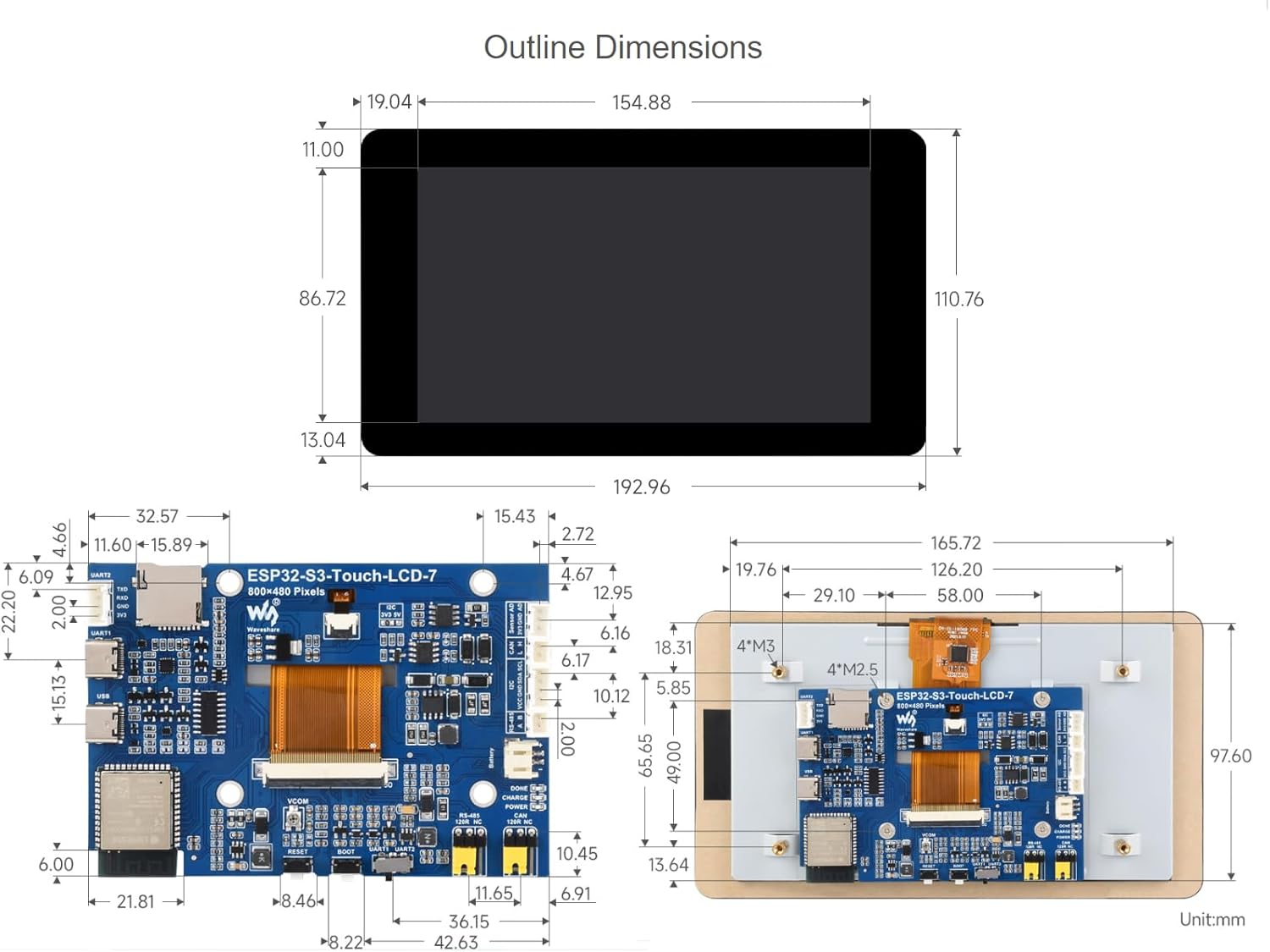
Figure 2: Outline dimensions of the ESP32-S3 7inch LCD development board.
4. Einrichtung
4.1 Hardwareüberlastungview
The development board features various components and interfaces. Familiarize yourself with the layout for proper connection and operation.
Figure 3: Labeled diagram of the ESP32-S3 7inch LCD board components.
- ESP32-S3N8R8: SoC with WiFi and Bluetooth, up to 240MHz, 8MB PSRAM and Flash.
- 3.7V einzelne Lithiumbatterie PH2.0 Stecker.
- Anschluss für Touchpanel.
- Auswahl des CAN-Anschlusswiderstands.
- TF-Karten-Slot.
- Auswahl des RS485-Anschlusswiderstands.
- USB-Typ-C-Anschluss.
- UART selection: select UART1 or UART2.
- UART1 Port.
- BOOT-Taste: Zum Brennen des Programms beim Einschalten gedrückt halten.
- UART2 connector.
- Reset-Knopf.
- Sensorkopf.
- I2C level selection: 3.3V / 5V.
- CAN-Header.
- DONE: Lithium battery charging completed indicator.
- I2C-Header.
- CHG: Lithium battery charging indicator.
- RS485-Stecker.
- PWR: Power supply indicator.
4.2 Software-Einrichtung (Arduino IDE)
To program the ESP32-S3 development board, you will typically use the Arduino IDE. Follow these steps for proper setup:
- Bibliotheken installieren: Select the correct installation library path in your Arduino IDE preferences. If a 'libraries' folder does not exist, create one. Copy all necessary library files in diesen Ordner.
- Ausschuss auswählen: In the Arduino IDE, navigate to 'Tools' -> 'Board' and select 'ESP32S3 Dev Module'.
- Configure Flash Mode: Set the 'Flash Mode' to 'QIO 80MHz'.
- Configure Flash Size: Select 'Flash Size' as '8MB (64Mb)'.
- Configure PSRAM: Select 'PSRAM' as 'OPI PSRAM'.
- COM-Port auswählen: Before uploading, ensure you select the correct COM port corresponding to your connected device under 'Tools' -> 'Port'.
- Kompilieren und Hochladen: Click the 'Upload' button to compile and upload your code to the board.
Video 1: This video demonstrates the software setup and upload process for an ESP32-S3 Touch-LCD board using the Arduino IDE. While it features a 4.3-inch model, the library installation, board selection, and upload steps are generally applicable to the 7-inch model.
5. Bedienung des Geräts
5.1 Grundlegende Interaktion
The 7-inch capacitive touch screen allows for intuitive interaction with your applications. The 5-point touch support enables multi-touch gestures, enhancing user experience for GUI interfaces developed with frameworks like LVGL.

Figure 4: The ESP32-S3-Touch-LCD-7 displaying a graphical user interface.
5.2 Anwendungsszenarien
This development board is suitable for a wide range of applications, including Human-Machine Interfaces (HMI) and GUI development using LVGL. Its multiple peripheral interfaces allow for integration with various sensors and external devices.

Abbildung 5: Bspamples of application scenarios for the ESP32-S3 board.
5.3 Peripheral Expansion
The board supports expansion of multiple peripherals via its CAN, RS485, and I2C interfaces, as well as UART and USB ports. This flexibility allows for complex system designs.

Figure 6: The ESP32-S3 board supporting multiple peripherals.

Abbildung 7: Ein Bspample of the ESP32-S3 board in an application setup.
6. Wartung
To ensure the longevity and optimal performance of your Waveshare ESP32-S3 7inch Capacitive Touch Screen Development Board, follow these maintenance guidelines:
- Reinigung: Use a soft, dry cloth to clean the screen and board. Avoid abrasive materials or harsh chemicals that could damage the components or screen coating.
- Lagerung: Store the board in a cool, dry environment away from direct sunlight, extreme temperatures, and high humidity.
- Handhabung: Handle the board by its edges to avoid touching sensitive electronic components. Static electricity can damage the board, so use anti-static precautions when necessary.
- Stromversorgung: Always use a stable and appropriate power supply as specified in the documentation to prevent damage.
7. Fehlerbehebung
Dieser Abschnitt behandelt häufig auftretende Probleme und deren mögliche Lösungen:
- CAN reception failure:
- Starten Sie den COM-Port in UCANV2.0.exe neu und drücken Sie mehrmals die Reset-Taste des ESP32-S3-Touch-LCD-7.
- Deaktivieren Sie DTR und RTS im Debugging-Assistent für die serielle Schnittstelle.
- No screen response after uploading an Arduino demo for RGB screen displaying:
- Check whether the correct configurations are set in Arduino IDE -> Tools. Ensure 'Flash (8MB)' and 'PSRAM (8MB OPI)' are enabled.
- Fails to compile an Arduino demo for the RGB screen and shows errors:
- Verify that the ESP32-S3-Touch-LCD-7_libraries are correctly installed. Refer to the installation steps in Section 4.2.
8. Garantie und Support
Informationen zur Garantie, zum technischen Support und weitere Ressourcen finden Sie auf der offiziellen Waveshare-Website. webBesuchen Sie die Website oder kontaktieren Sie den Kundenservice. Bewahren Sie Ihren Kaufbeleg für eventuelle Garantieansprüche auf.


