1. Einleitung
This manual provides comprehensive instructions for the Tera P600 Android 11 Barcode Scanner PDA. Designed for efficiency and durability, the P600 features a 6-inch full screen, Qualcomm CPU, HS7 Scan Engine, and an IP67 rating, making it ideal for inventory management and various mobile computing tasks. Please read this manual thoroughly before operating the device to ensure proper usage and maintenance.

Figure 1: Tera P600 Android Barcode Scanner PDA with Pistol Grip.
2. Packungsinhalt
Überprüfen Sie, ob alle Artikel im Paket vorhanden sind:
- P600 Android Barcode Scanner x1
- Pistol Grip x1
- Displayschutz x1
- USB-Kabel x1
- Charge Adapter x1
- Benutzerhandbuch x1
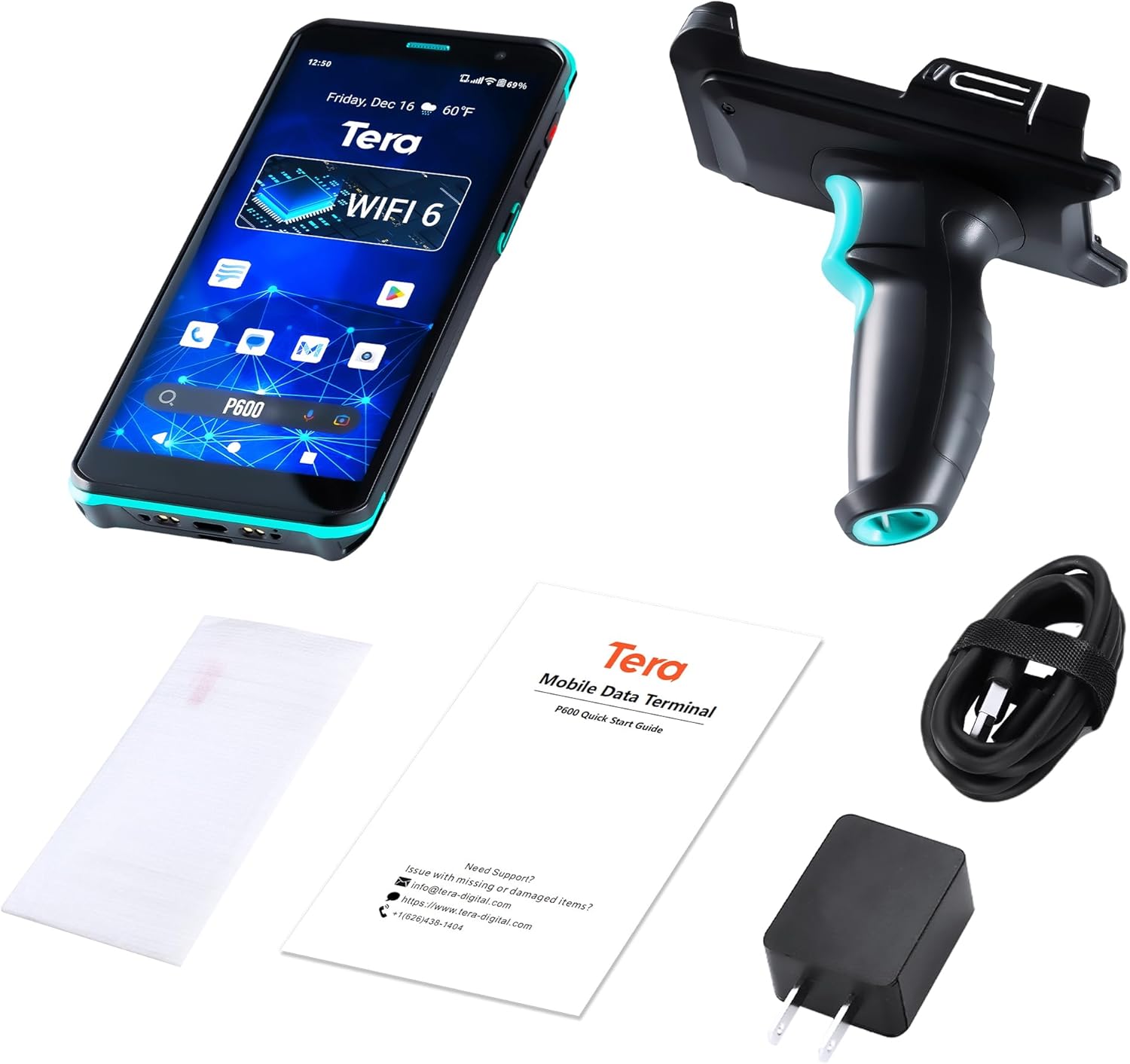
Figure 2: Included components of the Tera P600 package.
3. Einrichtung
3.1 Erstaufladung
Before first use, fully charge the Tera P600. Connect the provided USB cable to the device and the charge adapter, then plug it into a power outlet. The device supports QC 3.0 fast charging and can be fully charged in approximately 2.5 hours.
3.2 Attaching the Pistol Grip
Align the pistol grip with the designated slot at the bottom of the P600 device. Gently slide the device into the grip until it clicks securely into place. Ensure the connection is firm before use.

Figure 3: Tera P600 with the pistol grip attached, ready for use.
4. Bedienung des Geräts
4.1 Ein-/Ausschalten
Press and hold the power button located on the side of the device until the screen illuminates to power on. To power off, press and hold the power button, then select "Power off" from the options.
4.2 Barcode-Scanning
The P600 is equipped with an HS7 scan engine for precise and rapid barcode scanning. Point the scanner at the barcode and press the trigger button on the pistol grip (or the scan button on the device itself). The device will emit a light beam to read the barcode. The HS7 engine is designed to scan fast-moving barcodes efficiently.

Figure 4: The HS7 Scan Engine demonstrating its capability to read various barcode types, including blurred, contorted, smeared, and DPM codes.
4.3 Touchscreen-Bedienung
The 6-inch 1080P HD display provides a clear and responsive touch interface. It supports operation with gloves and wet hands, ensuring versatility in various working environments. The screen offers excellent readability in all lighting conditions, from backlight to strong light or low light.

Figure 5: The 6-inch 1080P Full HD IPS display of the Tera P600, highlighting its immersive viewErfahrung.
4.4 Connectivity (Wi-Fi 6)
The P600 is Wi-Fi 6 ready, facilitating seamless data transfer and efficient online operations. This advanced connectivity ensures reliable connections even in high-density environments and supports faster sync speeds and transaction processing.

Figure 6: Illustration of how Wi-Fi 6 connectivity on the Tera P600 doubles productivity with faster sync speeds and transaction processing.
4.5 Performance (Qualcomm CPU)
Powered by a Qualcomm Snapdragon 662 Octa-core 2.0GHz processor, the PDA offers robust performance and stable connectivity. This ensures smooth multitasking and superior application compatibility, crucial for demanding environments.

Figure 7: Visual representation of the Tera P600's seamless performance powered by the Qualcomm Snapdragon processor, with 4GB RAM and 64GB ROM.
4.6 Offizielles Produktvideo
Video 1: "Speed and Passion: Tera P600 with HS7 Scanner in Action." This video demonstrates the Tera P600's scanning capabilities, touchscreen responsiveness, and overall performance in a dynamic environment.
5. Wartung
5.1 Durability and Protection (IP67 Rating)
The Tera P600 boasts an IP67 rating, providing resistance to dust, water immersion (up to 1 meter for 30 minutes), and drops from up to 4.9 feet (1.5 meters). This robust design ensures reliable operation in challenging industrial, retail, logistics, and warehouse environments.

Figure 8: The Tera P600 demonstrating its IP67 rating for dust prevention and water resistance.
5.2 Battery Life and Care
The device is equipped with a 5000 mAh removable battery, offering up to 300 hours of standby time and over 12 hours of continuous use. To maximize battery lifespan, avoid extreme temperatures and fully charge the device regularly using the provided charger.

Figure 9: Information on the Tera P600's 5000 mAh removable battery, showing standby time, working time, and charging time.
6. Fehlerbehebung
If you encounter issues with your Tera P600, please refer to the following common troubleshooting steps:
- Gerät lässt sich nicht einschalten: Ensure the battery is sufficiently charged. Connect the device to the charger and wait a few minutes before attempting to power on again.
- Probleme beim Scannen: Verify that the barcode is clean and not damaged. Ensure proper lighting conditions and that the scanner is held at an optimal distance from the barcode. Restarting the scanning application or the device may resolve temporary glitches.
- Verbindungsprobleme: Check Wi-Fi settings to ensure the device is connected to the correct network. If issues persist, try restarting the device and the Wi-Fi router.
- Touchscreen reagiert nicht: Perform a soft reset by holding the power button until the device restarts. If the screen is wet, dry it thoroughly before attempting to use it.
For persistent issues or advanced troubleshooting, please contact Tera customer support.
7. Spezifikationen
| Besonderheit | Detail |
|---|---|
| Technische Daten | 3.9 x 7 x 8.1 Zoll |
| Artikelgewicht | 1.3 Pfund |
| ASIN | B0D7378FR5 |
| Artikelmodellnummer | P600_DE |
| Hersteller | Tera |
| Kompatible Geräte | Tablet, Smartphone, Desktop, Laptop |
| Stromquelle | Batteriebetrieben |
| Marke | Tera |
| Konnektivitätstechnologie | W-lan |
| Spezifikation erfüllt | IP67 |
8. Garantie und Support
Tera, a US-based brand with a local company in California, offers comprehensive support for its products. We provide lifetime technical assistance to ensure your satisfaction and peace of mind.
8.1 Kundendienst
For any inquiries, technical assistance, or customization services, our dedicated 24/7 customer support team is available to help. Contact information can be found on the official Tera webauf der Website oder in der beiliegenden Bedienungsanleitung.
8.2 SDK Kits and Customization
Tera provides SDK kits for developers and offers extensive customization services, including light options (labeling, packaging, branding), moderate options (OS, modules, functions, interface integration), and advanced options (fully or semi-customized solutions).


Figure 10: Tera's commitment to customer support, SDK development, and advanced R&D.


