1. Einleitung
This manual provides detailed instructions for the safe and efficient operation of your KUAIQU 600V 1A Programmable Laboratory Power Supply, model SPPS-D6001-232. This device is designed for precise voltage and current regulation in various laboratory, research, and industrial applications. Please read this manual thoroughly before use and retain it for future reference.
2. Sicherheitshinweise
WARNUNG: Die Nichtbeachtung dieser Sicherheitshinweise kann zu Stromschlag, Brand oder Beschädigung des Produkts führen.
- Schließen Sie das Netzteil immer an eine geerdete Steckdose an.
- Betreiben Sie das Gerät nicht bei Nässe oder damp Bedingungen.
- Ensure proper ventilation to prevent overheating. The integrated cooling fan automatically controls temperature to prolong product life.
- Öffnen Sie nicht das casing; im Inneren befinden sich keine vom Benutzer wartbaren Teile.
- This power supply is equipped with multiple protection systems: Over Voltage Protection (OUP), Over Current Protection (OCP), Over Temperature Protection (OTP), and Short Circuit Protection.
- Always disconnect the load before making adjustments to prevent accidental damage. The built-in output switch allows voltage and current adjustment without active output.
- The device is FCC/CE certified, ensuring reliable and stable performance.
3. Packungsinhalt
Bitte überprüfen Sie, ob alle unten aufgeführten Artikel in Ihrem Paket enthalten sind:
- 1 x KUAIQU Programmable Laboratory Power Supply (SPPS-D6001-232)
- 1 x Netzkabel
- 1 x Output Cable (with alligator clips)
- 1 x USB-Kabel
- 1 x Benutzerhandbuch
4. Produktüberschreitungview
Machen Sie sich mit den Komponenten und Bedienelementen Ihres Netzteils vertraut.
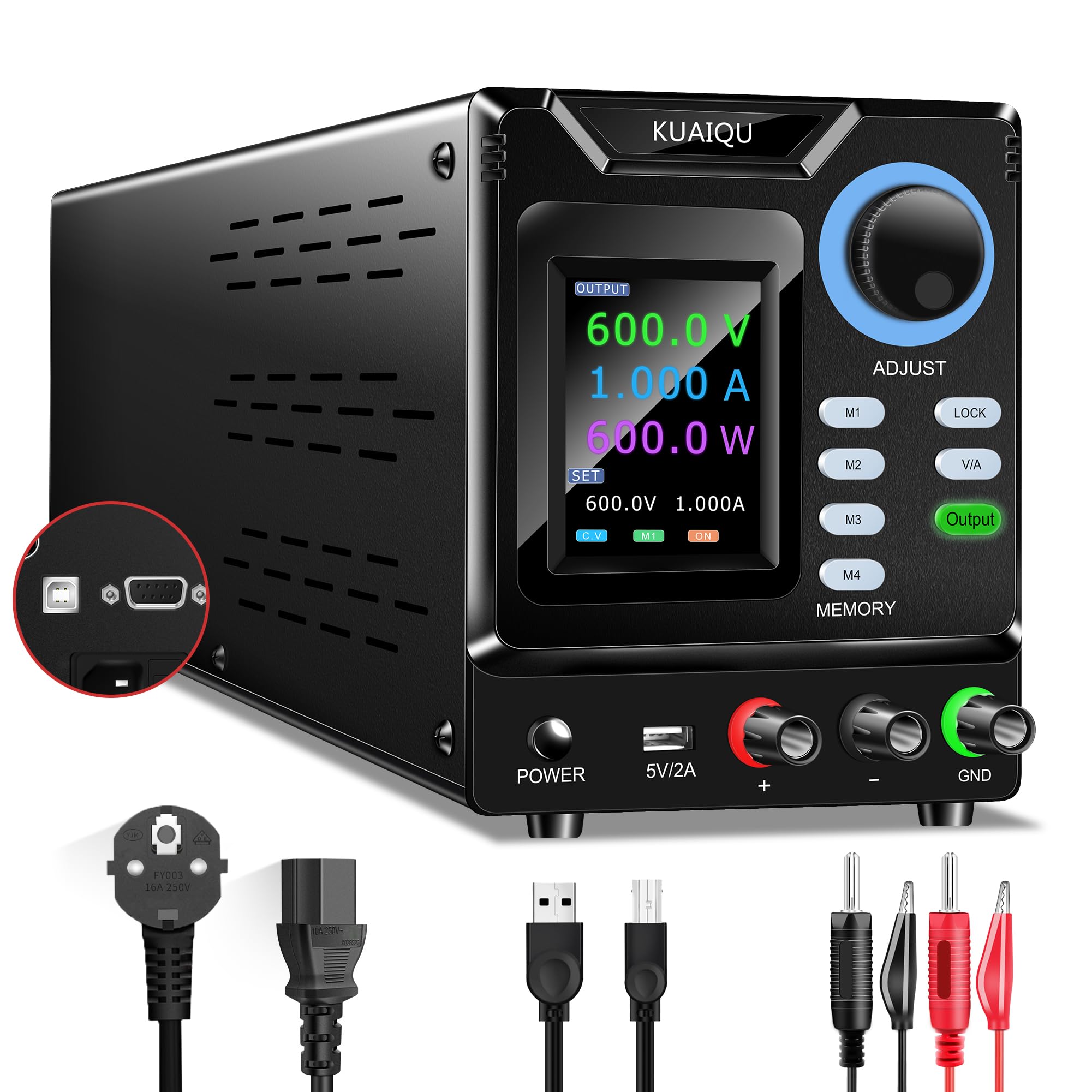
Abbildung 4.1: Frontplattenlayout und Bedienelemente
4.1 Merkmale der Frontplatte
- LCD Anzeige: A 4-digit color backlit LCD shows voltage, current, and power readings with high precision (0.01V, 0.001A resolution). It also displays set values.
- Encoder Knob (ADJUST): Wird zur präzisen Einstellung der Lautstärke verwendettage and current values. Press to switch between digits, then rotate to change the value.
- M1-M4 Memory Buttons: Store and recall up to four sets of frequently used voltage und aktuelle Einstellungen.
- Sperrknopf: Prevents accidental changes to settings by locking the controls.
- V/A-Taste: Schaltet zwischen Lautstärke umtage und aktuelle Einstellmodi.
- Ausgabetaste: Enables or disables the power output to the terminals.
- POWER-Taste: Hauptschalter für das Gerät.
- 5V/2A USB Port (Front): Provides a 5V, 2A output for charging mobile devices or powering small USB accessories.
- Ausgangsanschlüsse (+, -): Connect your load here. Red for positive (+), Black for negative (-).
- GND-Anschluss: Masseanschluss.
4.2 Merkmale der Rückseite
- Leistungsaufnahme: Schließen Sie hier das mitgelieferte Netzkabel an.
- USB-Anschluss (Rückseite): Used for connecting the power supply to a computer for programmable control and firmware updates.
- RS232-Anschluss: Alternative serial port for computer connectivity and control.
- Lüfter: Aktiviert sich automatisch, um Wärme abzuleiten und die optimale Betriebstemperatur aufrechtzuerhalten.
5. Einrichtung
5.1 Erstverbindung
- Stellen Sie sicher, dass das Netzteil auf einer stabilen, ebenen Fläche mit ausreichender Belüftung steht.
- Connect the provided power cord to the power input on the rear panel of the power supply and then to a grounded AC power outlet.
- Do not connect any load to the output terminals yet.
5.2 Einschalten
Drücken Sie die LEISTUNG button on the front panel to turn on the unit. The LCD display will illuminate, showing the current voltage-, Strom- und Leistungsmesswerte.
6. Bedienungsanleitung
6.1 Lautstärke anpassentage und Strom

Abbildung 6.1: Bedienung des Drehknopfes
- Ensure the output is OFF (Output button LED is off).
- Drücken Sie die V / A. button to select whether to adjust voltage (V) or current (A). The active parameter will be highlighted on the LCD.
- To adjust the value, press the Encoder Knob (ADJUST). This will highlight a digit on the display.
- Drehen Sie den Encoder-Knopf to change the value of the highlighted digit (0-9).
- Drücken Sie die Encoder-Knopf again to move to the next digit. Repeat until the desired voltage or current is set.
- Once the desired values are set, connect your load to the output terminals.
- Drücken Sie die Ausgabe button to enable the power output. The Output button LED will illuminate.
6.2 Memory Function (M1-M4)

Abbildung 6.2: Speicherfunktion
The power supply allows you to store and recall up to four sets of voltage und aktuelle Einstellungen.
6.2.1 Einstellungen speichern
- Stellen Sie die gewünschte Lautstärke eintage and current values using the Encoder Knob as described above.
- Halten Sie eine der gedrückt M1 bis M4 buttons for approximately 3 seconds until the display indicates the settings have been saved.
6.2.2 Recalling Settings
To recall a saved setting, simply press the corresponding M1 bis M4 button. The stored voltage and current values will be loaded.
6.3 Sperrfunktion
Drücken Sie die SPERREN button to prevent accidental changes to the voltage, current, and memory settings. When locked, the controls will not respond to input. Press the SPERREN Zum Entsperren erneut drücken.
6.4 PC Connectivity (USB/RS232)

Figure 6.3: PC Connection via USB/RS232
The power supply can be connected to a computer via the rear USB or RS232 port for precise control and monitoring using dedicated software.
- Connect the power supply to your computer using the provided USB cable (or an RS232 cable, if applicable).
- Install the control software and necessary drivers. Download links and detailed instructions can be found on the product's detail page or by contacting KUAIQU support.
- The software allows for precise adjustment, real-time curve display of current and voltage, and advanced programming features.
6.5 Front USB Charging Port
The 5V 2A USB port on the front panel can be used to charge mobile phones or power other compatible USB devices. Simply connect your device's USB cable to this port.
7. Wartung
7.1 Reinigung
To clean the exterior of the power supply, use a soft, dry cloth. Do not use abrasive cleaners or solvents. Ensure the unit is powered off and unplugged before cleaning.
7.2 Lüfter

Figure 7.1: Smart Cooling Fan
The power supply features an intelligent temperature-controlled cooling fan. Ensure the rear ventilation openings are not obstructed to allow for proper airflow. The fan will operate automatically as needed to maintain optimal internal temperatures.
8. Fehlerbehebung
8.1 PC Software Issues
IMPORTANT: The control software is compatible only with WINDOWS operating systems.
If you encounter issues with the PC control software, consider the following:
- Spracheinstellungen: European language settings may cause conflicts. Try setting your computer's language to English (USA). Ensure decimal points in the software input boxes use "." instead of ",".
- Antivirensoftware: Antivirus programs may incorrectly identify the installation files as threats and delete them, preventing the software from functioning. Temporarily disable your antivirus during installation or add the software to its exceptions list.
- Zugriffsberechtigungen: Ensure your computer's access permissions allow the software to interact with the necessary system databases. Run the software as an administrator if necessary.
8.2 Allgemeine Fragen
- Kein Strom: Überprüfen Sie den Netzanschluss und die Steckdose. Stellen Sie sicher, dass der Netzschalter gedrückt ist.
- Keine Leistung: Verify that the Output button is pressed and its LED is illuminated. Check load connections.
- Falsche Messwerte: Ensure all connections are secure. If using external meters, compare readings.
9. Spezifikationen
| Besonderheit | Spezifikation |
|---|---|
| Modellnummer | SPPS-D6001-232 |
| Ausgangsvolumentage | 0–600 V (einstellbar) |
| Ausgangsstrom | 0-1 A (einstellbar) |
| Bandtage-Auflösung | 0.01 V |
| Aktuelle Auflösung | 0.001 A |
| Anzeige | 4-stelliges LCD |
| Speicherfunktionen | 4 sets (M1-M4) |
| Konnektivität | Rear USB, RS232 |
| USB-Ausgang an der Vorderseite | 5 V, 2 A |
| Schutzfunktionen | OUP, OCP, OTP, Short Circuit |
| Abmessungen (L x B x H) | 28.5 x 12 x 13 cm |
| Gewicht | 1.9 kg |
| Hersteller | KUAIQU |
| Ursprungsland | China |
10. Garantie und Support
10.1 Garantiebestimmungen
This KUAIQU power supply comes with a 12-month warranty from the date of purchase, covering manufacturing defects and malfunctions under normal use.
10.2 Technischer Support
KUAIQU provides lifetime technical support for this product. If you have any questions, require assistance with setup, operation, or troubleshooting, please do not hesitate to contact us. You can reach our support team through the Amazon backend messaging system, and we will respond within 24 hours.


