Einführung
The Mytrix Tac Master Wireless Gaming Headset is designed to provide a high-quality audio experience for gaming across multiple platforms. Featuring 2.4GHz lossless wireless technology, Bluetooth 5.3, and a 3.5mm wired connection, this headset offers versatile connectivity, low latency, and immersive surround sound. The detachable noise-canceling microphone ensures clear communication, while the ergonomic design and long battery life provide comfort for extended use.
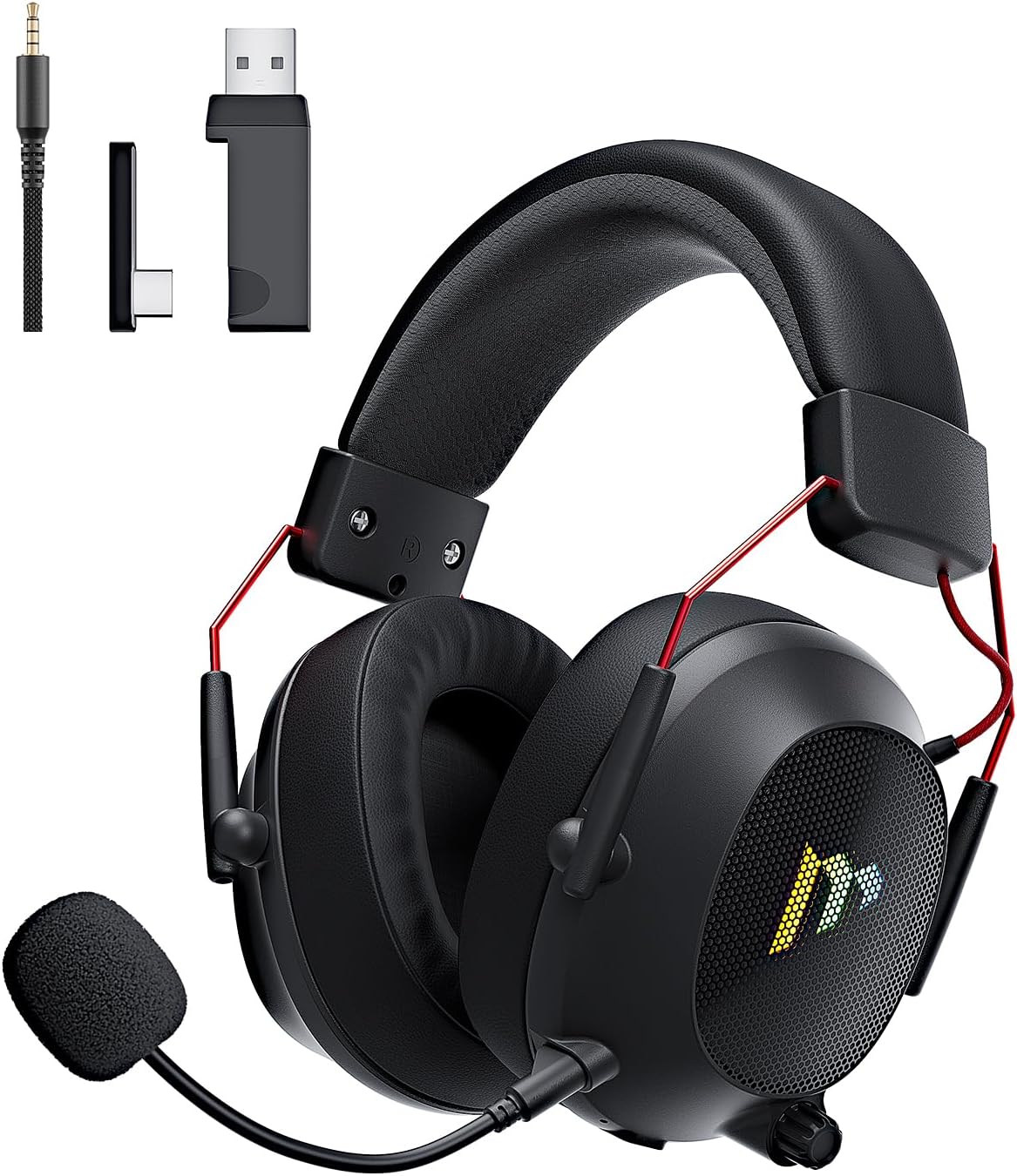
Image: The Mytrix Tac Master Wireless Gaming Headset, showcasing its sleek black design with red accents, detachable microphone, and included USB dongle and Type-C adapter.
Packungsinhalt
Bitte überprüfen Sie, ob alle unten aufgeführten Artikel in Ihrem Paket enthalten sind:
- Mytrix Tac Master Wireless Gaming Headset
- Abnehmbares Mikrofon mit Geräuschunterdrückung
- 2.4GHz USB-A Wireless Dongle
- USB Type-C Transmitter
- 3.5-mm-Audiokabel
- USB-Ladekabel (USB-A auf USB-C)
- Benutzerhandbuch (dieses Dokument)
Headset Controls and Components
Familiarize yourself with the various controls and components of your Mytrix Tac Master headset:

Image: Diagram illustrating the location and function of controls on the Mytrix Tac Master headset, including power button, volume wheel, microphone mute button, and mode switch.
- Netzschalter: Press and hold for 3 seconds to turn on/off. Single press to pause/play audio.
- Modus-Taste (M): Single press to toggle microphone on/off. Double press to switch between Bluetooth and 2.4G wireless modes. Press and hold for 3 seconds to turn RGB lights on/off.
- Lautstärkerad: Rotate up to increase volume, rotate down to decrease volume.
- Mikrofonanschluss: Zum Anbringen des abnehmbaren Mikrofons.
- 3.5-mm-Audiobuchse: Für kabelgebundene Verbindungen.
- USB-C-Ladeanschluss: Zum Aufladen des Headsets.
- RGB-Beleuchtung: Befinden sich an den Ohrmuscheln.
Aufstellen
1. Laden des Headsets
Before first use, fully charge the headset. Connect the USB charging cable to the headset's USB-C port and the other end to a USB power source (e.g., computer USB port, USB wall adapter). The LED indicator will show charging status and turn off when fully charged. A full charge takes approximately 3 hours and provides up to 48 hours of battery life.

Image: Visual representation of the headset's long-lasting battery life, indicating approximately 50 hours of use and a 3-hour charging time.
2. Anschließen des Mikrofons
Insert the detachable microphone into the microphone port on the left earcup. Ensure it is securely seated. The microphone is flexible and omni-directional, allowing for angle adjustment.
3. Konnektivitätsoptionen
The Mytrix Tac Master headset offers multiple connection methods for broad compatibility:

Image: Diagram illustrating the four connection modes: 2.4GHz Dongle (USB-A and USB-C), Bluetooth 5.3, and 3.5mm Wired, along with compatible devices for each mode.
3.1. 2.4GHz Wireless Connection (Recommended for PC, PS4, PS5, Switch Docked Mode)
- Identify the appropriate dongle for your device:
- For devices with a USB-A port (PC, PS4, PS5, Switch Docked): Use the 2.4GHz USB-A dongle.
- For devices with a USB-C port (Switch Handheld, Laptops, Tablets): Use the USB Type-C transmitter.
- Plug the selected 2.4GHz dongle/transmitter into an available USB port on your device.
- Schalten Sie das Headset ein, indem Sie den Ein-/Ausschalter 3 Sekunden lang gedrückt halten.
- Ensure the headset is in 2.4GHz mode. If not, double-press the 'M' button to switch modes until the headset connects to the dongle. The headset will automatically pair with the dongle.
- On your device, select the headset as the audio output and input device.
3.2. Bluetooth 5.3 Connection (Recommended for Mobile Phones, Tablets, Laptops)
- Schalten Sie das Headset ein, indem Sie den Ein-/Ausschalter 3 Sekunden lang gedrückt halten.
- Double-press the 'M' button to switch the headset to Bluetooth pairing mode. The LED indicator will flash, indicating it's ready to pair.
- On your device, enable Bluetooth and search for "Mytrix Tac Master" in the list of available devices.
- Select "Mytrix Tac Master" to connect. Once connected, the LED indicator will stop flashing.
3.3. 3.5mm Wired Connection (Recommended for Xbox, Game Console Controllers, Devices without USB/Bluetooth)
- Verbinden Sie ein Ende des 3.5-mm-Audiokabels mit der 3.5-mm-Klinkenbuchse des Headsets.
- Connect the other end of the 3.5mm audio cable to the audio jack on your device (e.g., Xbox controller, phone).
- In wired mode, the headset's microphone and RGB lighting functions are not active.
Bedienungsanleitung
Ein-/Ausschalten
- So schalten Sie das Gerät ein: Press and hold the Power button for approximately 3 seconds until the headset powers on.
- So schalten Sie das Gerät aus: Press and hold the Power button for approximately 3 seconds until the headset powers off.
Lautstärkeregelung
- Lautstärke erhöhen: Rotate the Volume wheel upwards.
- Lautstärke verringern: Rotate the Volume wheel downwards.
Mikrofonsteuerung
- Mikrofon stummschalten/Stummschaltung aufheben: Single press the 'M' button.
- The detachable microphone features noise cancellation for clear voice chat.
RGB-Beleuchtungssteuerung
- Turn RGB Lights On/Off: Press and hold the 'M' button for approximately 3 seconds.
Audiowiedergabesteuerung
- Audio abspielen/pausieren: Einmal die Ein-/Aus-Taste drücken.
Surround-Sound
The headset features 7.1 stereo surround sound for an immersive audio experience, allowing for precise positioning of sound details in games.

Bild: Eine explodierte view of the headset's 50mm drivers, illustrating the components that contribute to its 7.1 stereo surround sound capability.
Wartung
- Reinigung: Reinigen Sie das Headset mit einem weichen, trockenen Tuch. Verwenden Sie keine Scheuermittel oder Lösungsmittel. Wischen Sie die Ohrmuscheln vorsichtig mit einem Tuch ab.amp Das Tuch auftragen und vor Gebrauch vollständig an der Luft trocknen lassen.
- Lagerung: Store the headset in a cool, dry place away from direct sunlight and extreme temperatures. If storing for an extended period, ensure the battery is partially charged (around 50%) to preserve battery health.
- Batteriepflege: Avoid fully discharging the battery frequently. Charge the headset regularly, even if not in constant use, to maintain battery longevity.
- Mikrofonpflege: Behandeln Sie das abnehmbare Mikrofon vorsichtig. Vermeiden Sie übermäßiges Biegen oder Verdrehen.
Fehlerbehebung
| Problem | Mögliche Ursache | Lösung |
|---|---|---|
| Kein Ton vom Headset. | Headset not powered on, low battery, incorrect audio output selected, connection issue. | Ensure headset is powered on and charged. Check device's audio settings to confirm "Mytrix Tac Master" is selected as output. Re-establish 2.4GHz or Bluetooth connection. For wired mode, ensure cable is fully inserted. |
| Mikrofon funktioniert nicht. | Microphone muted, not properly attached, incorrect audio input selected, wired mode limitation. | Single press the 'M' button to unmute. Ensure microphone is securely attached. Check device's audio settings to confirm "Mytrix Tac Master" is selected as input. Note: Microphone does not function in 3.5mm wired mode. |
| Verbindung über 2.4-GHz-Funkverbindung nicht möglich. | Dongle not recognized, headset not in 2.4GHz mode, interference. | Ensure dongle is fully inserted into a working USB port. Double-press 'M' button to switch headset to 2.4GHz mode. Try a different USB port. Move closer to the dongle to reduce interference. |
| Verbindung via Bluetooth nicht möglich. | Headset not in pairing mode, Bluetooth disabled on device, already connected to another device. | Double-press 'M' button to enter Bluetooth pairing mode (LED flashes). Ensure Bluetooth is enabled on your device. Disconnect from other Bluetooth devices if necessary. |
| Die RGB-Beleuchtung funktioniert nicht. | Lights turned off, low battery, wired mode limitation. | Press and hold the 'M' button for 3 seconds to toggle RGB lights. Ensure headset has sufficient battery. Note: RGB lights do not function in 3.5mm wired mode. |
Technische Daten
| Besonderheit | Detail |
|---|---|
| Modellname | Gaming Headset (G901) |
| Konnektivitätstechnologie | 2.4-GHz-Funkverbindung, Bluetooth 5.3, 3.5-mm-Kabelanschluss |
| Kopfhöreranschluss | 3.5 mm Klinke |
| Drahtlose Reichweite | Up to 50 feet (in open spaces) |
| Latenz | ≤20ms (2.4GHz) |
| Audiotreibertyp | 50 mm dynamische Treiber |
| Soundfunktionen | 7.1 Stereo-Surround-Sound |
| Mikrofon | Detachable, Omni-directional, Noise-Canceling |
| Akkulaufzeit | Bis zu 48 Stunden |
| Ladezeit | Ca. 3 Stunden |
| Akku-Typ | 1 Lithium-Ionen-Akku (im Lieferumfang enthalten) |
| Form der Hörmuschel | Über dem Ohr |
| Besondere Merkmale | Ergonomic Design, RGB Lighting, Foldable & Portable |
| Technische Daten | 5.91 x 3.94 x 5.91 Zoll |
| Artikelgewicht | 13.4 Unzen |
| Hersteller | Mytrix |
Garantie und Support
Mytrix products are manufactured to high quality standards. For information regarding warranty coverage, technical support, or service inquiries, please refer to the warranty card included with your product or visit the official Mytrix website. You may also contact Mytrix customer support directly for assistance with your Tac Master Gaming Headset.
Weitere Hilfe finden Sie unter Mytrix Store on Amazon.
Wichtige Sicherheitsinformationen
- Setzen Sie das Headset keinen extremen Temperaturen, hoher Luftfeuchtigkeit oder Flüssigkeiten aus.
- Vermeiden Sie es, das Headset fallen zu lassen oder starken Stößen auszusetzen.
- Do not attempt to disassemble or repair the headset yourself. This will void the warranty.
- Um Gehörschäden vorzubeugen, sollten Sie die Lautstärke mäßig einstellen. Längere Einwirkung lauter Geräusche kann zu dauerhaftem Hörverlust führen.
- Außerhalb der Reichweite von Kindern aufbewahren.


