1. Einleitung
This manual provides essential instructions for the safe and efficient use of your GT POWER 200W AC/DC Adapter, Model 475. This adapter is designed to provide power to compatible portable power stations, such as the Anker Powerhouse II 400 and Anker 533. Please read this manual thoroughly before using the product and retain it for future reference.
2. Sicherheitshinweise
WARNUNG: Die Nichtbeachtung dieser Sicherheitshinweise kann zu Bränden, Stromschlägen oder anderen Verletzungen führen.
- Nur zur Verwendung im Innenbereich: This adapter is designed for indoor use in dry locations. Do not expose it to rain, moisture, or extreme temperatures.
- Richtige Bdtage: Stellen Sie sicher, dass die Eingangslautstärketage (AC 100-240V) matches your local power supply.
- Belüftung: Do not cover the adapter or place it in an enclosed space during operation. Ensure adequate ventilation to prevent overheating.
- Kabelintegrität: Regularly inspect the power cord and adapter for any damage. Do not use if the cord is frayed or the adapter casing ist gesprungen.
- Stromversorgung trennen: Always unplug the adapter from the power outlet before cleaning or when not in use for extended periods.
- Keine Demontage: Do not attempt to open or repair the adapter. It contains no user-serviceable parts. Unauthorized disassembly voids the warranty and poses a safety risk.
- Kinder und Haustiere: Keep the adapter and its cables out of reach of children and pets.
- Kompatibilität: Use this adapter only with compatible devices as specified. Using it with incompatible devices may cause damage or malfunction.
- Schutzfunktionen: Dieser Adapter beinhaltet Over Voltage Protection (OVP), Over Current Protection (OCP), and Short Circuit Protection (SCP) to safeguard your devices.
VORSICHT: STROMSCHLAGGEFAHR. NICHT ÖFFNEN.
3. Packungsinhalt
Überprüfen Sie, ob alle Artikel in Ihrem Paket vorhanden sind:
- GT POWER 200W AC/DC Adapter (Model 475)
- AC-Eingangsstromkabel
4. Produktüberschreitungview
The GT POWER 200W AC/DC Adapter is a robust power supply designed for efficient charging of your portable power station.

Abbildung 4.1: Front view of the GT POWER 200W AC/DC Adapter, showing the model number (H-200-24), input (AC 100-240V, 1.8A, 50-60Hz), and output (DC 24V, 8A) specifications, along with safety certifications and a "Risk of Electric Shock" warning.

Abbildung 4.2: Spitze view of the GT POWER 200W AC/DC Adapter, highlighting the LED indicator light which shows the operational status of the adapter.

Abbildung 4.3: Close-up of the DC output barrel connector, which connects to the portable power station.
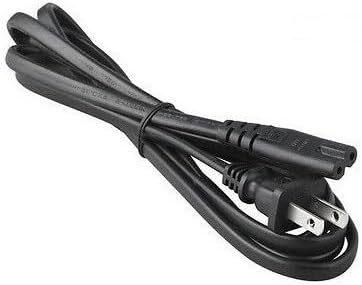
Abbildung 4.4: The AC input power cord, featuring a standard US plug for connecting the adapter to a wall outlet.
Schlüsselkomponenten:
- Adaptereinheit: The main body containing the power conversion circuitry.
- AC-Eingangsanschluss: Where the AC power cord connects to the adapter.
- DC Output Cable with Barrel Connector: Permanently attached cable that delivers power to your device.
- LED-Anzeige: Illuminates when the adapter is receiving power and operating correctly.
- Netzkabel: Connects the adapter to a wall outlet.
5. Einrichtungsanweisungen
Follow these steps to set up your GT POWER AC/DC Adapter:
- Auspacken: Carefully remove the adapter and AC power cord from the packaging.
- Connect AC Cord: Insert the female end of the AC power cord firmly into the AC input port on the adapter unit.
- Anschluss an das Kraftwerk: Plug the DC barrel connector from the adapter's output cable into the DC input port of your compatible portable power station (e.g., Anker Powerhouse II 400/533). Ensure a secure connection.
- An die Wandsteckdose anschließen: Plug the male end of the AC power cord into a standard wall outlet (AC 100-240V).
- Leistung überprüfen: The LED indicator on the adapter should illuminate, indicating that it is receiving power and ready to charge.
Notiz: Always connect the adapter to the device first, then to the wall outlet, and disconnect from the wall outlet first, then from the device.
6. Bedienungsanleitung
Once set up, the adapter operates automatically:
- When connected to a power outlet and a compatible power station, the adapter will begin supplying power for charging.
- The LED indicator will remain lit during operation.
- The adapter features an "Automatic Off" special feature, which implies it will cease charging or power delivery once the connected device is fully charged or if an overload/fault condition is detected. Refer to your power station's manual for specific charging indicators.
- To stop operation, first unplug the AC power cord from the wall outlet, then disconnect the DC barrel connector from your power station.
7. Wartung
Eine ordnungsgemäße Wartung gewährleistet die Langlebigkeit und den sicheren Betrieb Ihres Adapters:
- Reinigung: Trennen Sie den Adapter vor der Reinigung von allen Stromquellen. Wischen Sie die Außenseite mit einem weichen, trockenen Tuch ab. Verwenden Sie keine flüssigen Reiniger oder Lösungsmittel.
- Lagerung: When not in use, store the adapter in a cool, dry place, away from direct sunlight and moisture. Coil the cables loosely to prevent damage.
- Inspektion: Periodically inspect the adapter casing, cables, and connectors for any signs of wear, cuts, or damage. If damage is found, discontinue use immediately and replace the adapter.
8. Fehlerbehebung
Sollten Sie Probleme mit Ihrem Adapter haben, beachten Sie bitte die folgenden häufig auftretenden Probleme und Lösungen:
| Problem | Mögliche Ursache | Lösung |
|---|---|---|
| Adapter LED is off, no power output. |
|
|
| Power station not charging. |
|
|
| Der Adapter fühlt sich übermäßig heiß an. |
|
|
Wenn das Problem nach dem Ausprobieren dieser Lösungen weiterhin besteht, wenden Sie sich bitte an den Kundensupport.
9. Spezifikationen
| Modellnummer | 475 (H-200-24) |
| Eingangslautstärketage | Wechselstrom 100–240 V, 1.8 A, 50–60 Hz |
| Ausgangsvolumentage | Gleichstrom 24 V |
| Ausgangsstrom | 8A |
| Wastage | 200 W |
| Steckertyp | Fassverbinder |
| Schutzfunktionen | OVP (Über Voltage Schutz), OCP (Überstromschutz), SCP (Kurzschlussschutz) |
| Besonderheit | Automatisch aus |
| Kompatible Geräte | Anker Powerhouse II 400, Anker 533 Portable Power Stations (and other devices requiring 24V, 8A DC input with compatible barrel connector) |
| Abmessungen (ca.) | 7 x 5 x 3 Zoll (Verpackungsmaße) |
| Gewicht (ca.) | 14 Unzen |
10. Kundendienst und Garantie
For technical assistance, warranty information, or to report any issues with your GT POWER 200W AC/DC Adapter, please contact your retailer or the manufacturer directly.
Bitte halten Sie Ihre Produktmodellnummer (475) und die Kaufinformationen bereit, wenn Sie sich an den Support wenden.
Warranty details are typically provided at the point of purchase or on the manufacturer's official webWebsite.


