1. Einleitung
This manual provides detailed instructions for the safe and effective use of your PARD Night Stalker 4K NS4K Pro-70/850/LRF digital night vision scope. Please read this manual thoroughly before operating the device to ensure optimal performance and longevity. The PARD Night Stalker 4K is an advanced digital night vision scope designed for observation, featuring a 4K Ultra-HD sensor, an integrated 1000m laser rangefinder (LRF), and an 850nm infrared (IR) illuminator.
2. Sicherheitshinweise
- Augensicherheit: Never look directly at the sun or any bright light source through the device, as this can cause permanent eye damage.
- IR-Strahler: The integrated IR illuminator emits invisible infrared light. Avoid direct, prolonged exposure to the IR beam at close range.
- Batteriehandhabung: Use only recommended rechargeable batteries. Do not expose batteries to extreme temperatures, disassemble, or short-circuit them. Dispose of batteries according to local regulations.
- Wassereinwirkung: While the device is IP67 waterproof, ensure all covers and ports are securely closed before exposure to water. Do not submerge the device beyond its rated depth or duration.
- Temperatur: Operate and store the device within specified temperature ranges to prevent damage.
3. Produktmerkmale
The PARD Night Stalker 4K NS4K Pro-70/850/LRF incorporates several advanced features for enhanced performance:
- 4K Ultra-HD CMOS Sensor: Provides superior resolution and an extended matrix for significantly improved image clarity and detailed observation.
- Detachable LRF and IR Module: Allows for customization of equipment based on operational needs, enabling weight reduction when certain functions are not required.
- Lateral Focus Wheel: Offers clear visibility and easy access for smooth, precise adjustments, ensuring an instant sharp image. Ergonomic design facilitates use even with gloves.
- 1000m Laser Rangefinder: An advanced laser measurement system provides real-time distance readings of observed objects up to 1000 meters. Includes an integrated calculation tool for distance evaluation.
- Bild-in-Bild-Modus (PIP): Displays a 2x magnified area at the top of the screen for more detailed subject identification.
- Integriertes WLAN: Enables connection to a smartphone for shared viewing and remote control.
- Wasserdichtigkeitsklasse IP67: Designed to withstand extreme weather conditions, ensuring reliable performance in various outdoor environments.
4. Einrichtung
4.1 Auspacken und erste Inspektion
Carefully remove all components from the packaging. Verify that all items are present: the Night Stalker 4K scope, mounting rings, charging cable, and user manual. Inspect the device for any signs of damage.
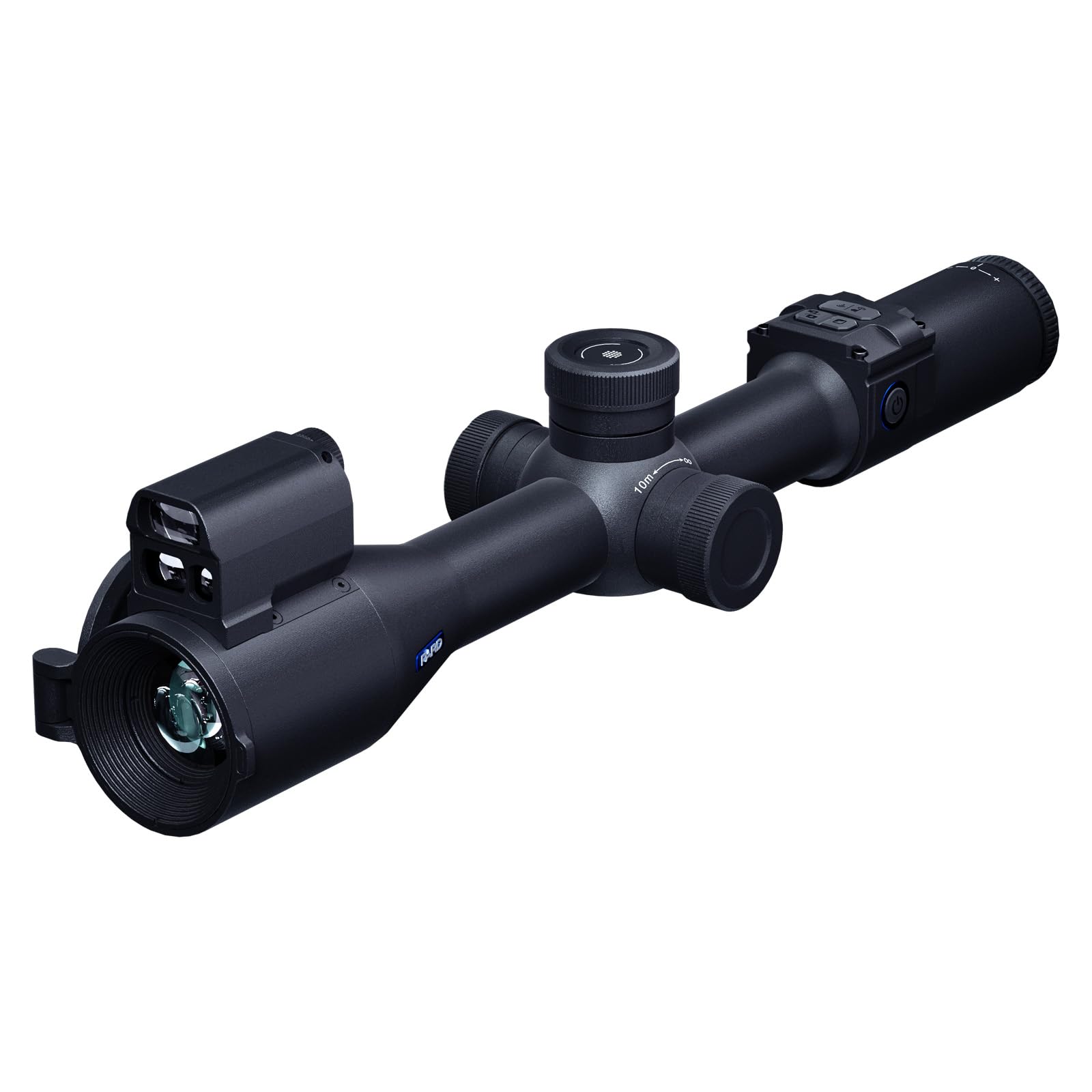
Image 4.1: PARD Night Stalker 4K NS4K Pro-70/850/LRF Digital Night Vision Scope. This image shows the overall design and included accessories.
4.2 Einlegen und Laden der Batterie
The device uses a rechargeable battery. Locate the battery compartment, typically on the side or bottom of the main body. Insert the battery according to the polarity indicators. To charge, connect the provided charging cable to the device's charging port and a suitable USB power source. An indicator light will show charging status.
4.3 Montage des Zielfernrohrs
Attach the included mounting rings to your preferred rail system. Secure the Night Stalker 4K scope into the rings, ensuring it is level and positioned for comfortable eye relief. Tighten the mounting screws firmly but do not overtighten.
4.4 Erstes Einschalten und Dioptrieneinstellung
Press and hold the power button to turn on the device. Once the display is active, adjust the diopter ring, usually located near the eyepiece, until the on-screen display (OSD) text and icons appear sharp and clear to your eye. This adjustment is personal and crucial for comfortable viewing.
5. Bedienungsanleitung
5.1 Ein-/Ausschalten und Standby
- Einschalten: Halten Sie den Netzschalter etwa 3 Sekunden lang gedrückt.
- Ausschalten: Press and hold the power button for approximately 3 seconds until the device shuts down.
- Stehen zu: A short press of the power button typically puts the device into standby mode, conserving battery while allowing quick reactivation.
5.2 Day and Night Mode Selection
The Night Stalker 4K automatically adjusts to ambient light conditions. For optimal daylight use, keep the objective lens cap closed with the small central aperture open. For night use, remove the objective lens cap completely to allow maximum light intake. The device will switch to night vision mode automatically or can be manually toggled via the menu.
5.3 Fokussierung
Use the large lateral focus wheel to adjust the image clarity for different distances. Rotate the wheel until the observed object appears sharp on the display. This is separate from the diopter adjustment, which focuses the display for your eye.
5.4 Digitalzoom
The device features digital zoom. Locate the zoom control, typically a knob or dedicated button. Rotate or press to increase or decrease magnification. Note that digital zoom may reduce image quality at higher levels.
5.5 Laser Rangefinder (LRF) Operation
To activate the LRF, press the dedicated LRF button. Aim the reticle at the target, and the distance will be displayed on the screen. The LRF can measure distances up to 1000 meters. Ensure there are no obstructions between the device and the target.
5.6 IR Illuminator Control
The integrated 850nm IR illuminator enhances visibility in low-light or complete darkness. Activate the IR illuminator via its dedicated button or through the menu. Adjust the IR intensity level as needed for optimal illumination without overexposure.
5.7 Bild-in-Bild-Modus (PIP)
Activate PIP mode via its dedicated button or menu option. A magnified 2x window will appear on the display, allowing for detailed observation of a specific area while maintaining a wider field of view in the main display.
5.8 Videoaufzeichnung und Fotoaufnahme
The Night Stalker 4K can record videos and capture photos. Insert a compatible microSD card (not included) into the designated slot. Use the record/capture button to start/stop video recording or take a photo. Files are saved to the microSD card.
5.9 WLAN-Konnektivität
Download the official PARD Vision app on your smartphone. Enable Wi-Fi on the Night Stalker 4K via the menu. Connect your smartphone to the device's Wi-Fi network. This allows for live viewFernbedienung und file Übertragung.
5.10 Menünavigation
Access the main menu by pressing the menu button. Use the directional buttons or scroll wheel to navigate through options such as brightness, contrast, reticle settings, system settings, and more. Press the menu button again to exit.
6. Wartung
6.1 Gerät reinigen
- Linsen: Use a soft, lint-free cloth specifically designed for optical lenses. For stubborn smudges, use a small amount of lens cleaning fluid. Avoid abrasive materials.
- Körper: Wischen Sie das Gerätegehäuse mit einem weichen, fusselfreien Tuch ab.amp Tuch. Verwenden Sie keine aggressiven Chemikalien oder Lösungsmittel.
6.2 Pflege und Lagerung der Batterie
- Die Batterien vor längerer Lagerung vollständig aufladen.
- Store the device and batteries in a cool, dry place, away from direct sunlight and extreme temperatures.
- If storing for long periods, remove the battery from the device.
6.3 Abdichtung
The IP67 rating indicates protection against dust ingress and immersion in water up to 1 meter for 30 minutes. Always ensure all port covers and battery compartment seals are intact and properly closed before exposing the device to moisture or dust.
7. Fehlerbehebung
Sollten Probleme auftreten, beachten Sie bitte die folgenden gängigen Schritte zur Fehlerbehebung:
- Das Gerät lässt sich nicht einschalten: Ensure the battery is correctly installed and fully charged. Try a different charged battery if available.
- Das Bild ist unscharf oder undeutlich: Adjust the diopter for your eye and the lateral focus wheel for the object distance. Clean the objective and eyepiece lenses.
- Laser-Entfernungsmesser funktioniert nicht: Ensure the LRF is activated. Check for any obstructions in the laser path. The target may be outside the 1000m range or too small/non-reflective.
- Probleme mit der Wi-Fi-Verbindung: Ensure Wi-Fi is enabled on the device and your smartphone. Restart both devices. Verify you have the correct PARD Vision app installed.
- No video recording/photo capture: Ensure a compatible microSD card is inserted and has sufficient free space. Check if the card is properly formatted (refer to menu settings).
Sollten die Probleme nach Durchführung dieser Schritte weiterhin bestehen, wenden Sie sich bitte an den Kundendienst.
8. Spezifikationen
| Besonderheit | Spezifikation |
|---|---|
| Modell | NS4K Pro-70/850/LRF |
| Sensorauflösung | 3840 x 2160 (4K Ultra-HD CMOS) |
| Laser Rangefinder (LRF) Range | Bis zu 1000 m |
| Wellenlänge des IR-Strahlers | 850 nm |
| Wasserdichtigkeit | IP67 |
| Konnektivität | W-lan |
| Gewicht | 730 Gramm |
| Videoaufzeichnung | Ja |
| Bild-in-Bild (PIP) | Ja |
9. Garantie und Support
For detailed warranty information, please refer to the official documentation included with your product or visit the PARD official webDie Garantiebedingungen können je nach Region und Händler variieren.
For technical support, service, or inquiries regarding your PARD Night Stalker 4K NS4K Pro-70/850/LRF, please contact the PARD Official Store or your authorized dealer. Keep your purchase receipt and product serial number readily available when seeking support.


