1. Einleitung
This manual provides essential information for the safe and efficient use of your SPC Discovery 2 ME smartphone. Please read this guide thoroughly before operating the device to ensure proper functionality and to prevent damage.
2. Sicherheitshinweise
- Batteriesicherheit: Do not disassemble, puncture, or modify the battery. Use only approved chargers and cables. Avoid extreme temperatures.
- Wasserbeständigkeit: Dieses Gerät ist nicht wasserdicht. Vermeiden Sie den Kontakt mit Flüssigkeiten.
- Gehörschutz: Vermeiden Sie längeres Hören bei hoher Lautstärke, um Gehörschäden zu vermeiden.
- Fahrsicherheit: Do not use your phone while driving. Follow local laws and regulations regarding mobile device use.
- Medizinische Geräte: Maintain a safe distance between the phone and medical implants like pacemakers. Consult your physician and medical device manufacturer for specific guidelines.
- Entsorgung: Dispose of the device and battery responsibly according to local regulations. Do not dispose of with household waste.
3. Packungsinhalt
Prüfen Sie, ob alle Artikel in Ihrer Produktverpackung enthalten sind:
- SPC Discovery 2 ME Smartphone
- USB-C-auf-USB-C-Kabel
- SIM-Auswerferwerkzeug
- Kurzanleitung (falls zutreffend)
Note: A power adapter is not included and must be purchased separately. For optimal charging, use an 18W USB Power Delivery (PD) compatible charger.
4. Gerätelayout
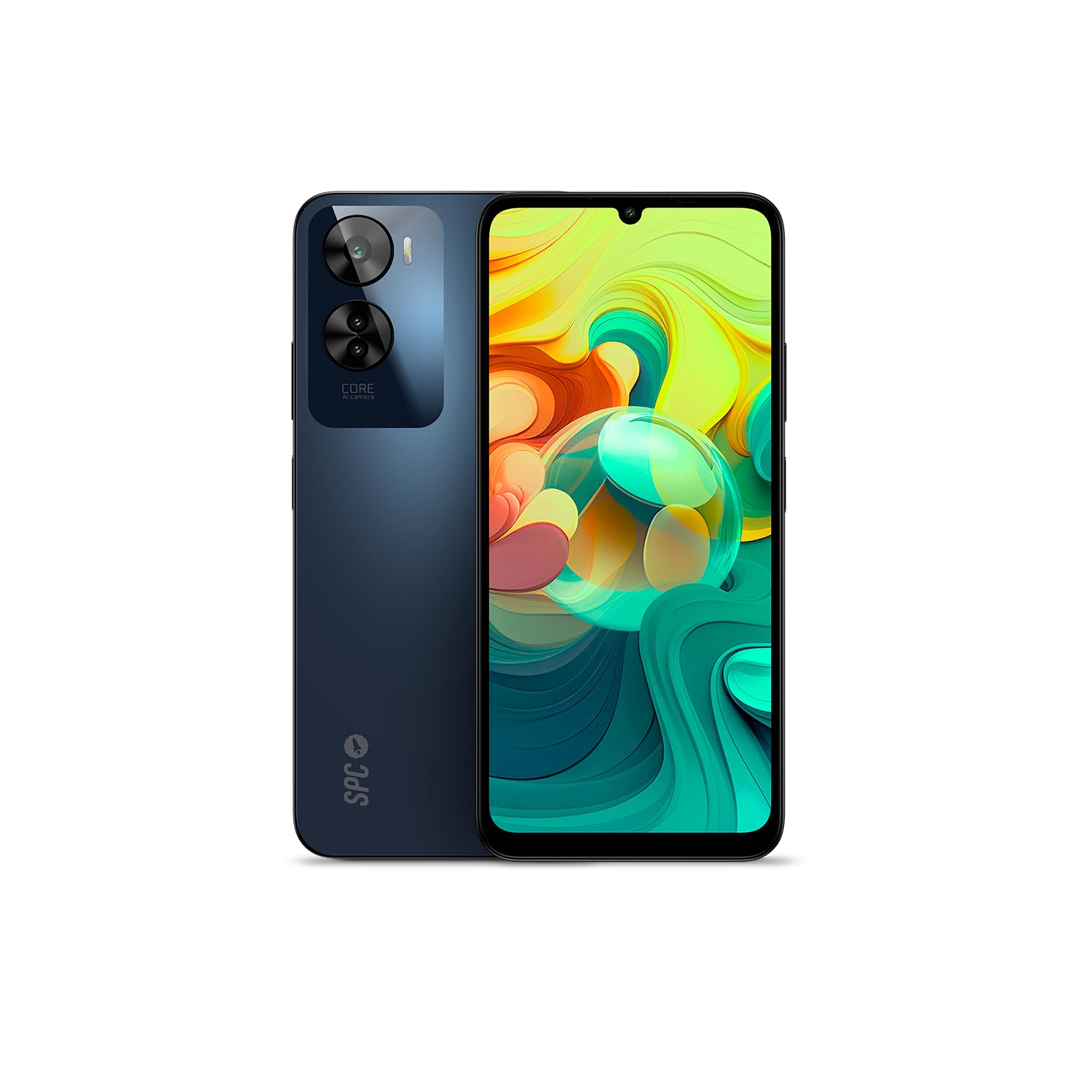
Abbildung 4.1: Front view of the SPC Discovery 2 ME, showing the display and front camera.

Abbildung 4.2: Zurück view of the SPC Discovery 2 ME, highlighting the triple camera module and fingerprint sensor.

Abbildung 4.3: Abgewinkelt view of the SPC Discovery 2 ME, showing both front and back, and side buttons.
- Frontkamera: Befindet sich oben in der Mitte des Displays.
- Anzeige: 6.75-inch HD+ IPS InCell screen.
- Lautstärketasten: Auf der rechten Seite des Geräts.
- Ein-/Ausschalter/Fingerabdrucksensor: Auf der rechten Seite, unterhalb der Lautstärketasten.
- USB-C-Anschluss: Unten befinden sich die Anschlüsse für Laden und Datenübertragung.
- 3.5-mm-Audiobuchse: Für Kopfhörer.
- SIM-/MicroSD-Kartenfach: Auf der linken Seite des Geräts.
- Dreifache Rückkamera: Befindet sich oben links auf der Rückseite.
5. Einrichtung
5.1. Einlegen der SIM- und microSD-Karten
- Locate the SIM/MicroSD card tray on the left side of the phone.
- Führen Sie das SIM-Auswurfwerkzeug in die kleine Öffnung am Fach ein und drücken Sie fest, bis das Fach herausspringt.
- Place your Nano-SIM card(s) and/or MicroSD card into the designated slots on the tray. Ensure the gold contacts face downwards. The device supports dual SIM and MicroSD expansion up to 512GB.
- Setzen Sie das Fach vorsichtig wieder in das Telefon ein, bis es einrastet.
5.2. Erste Inbetriebnahme und grundlegende Einrichtung
- Press and hold the Power button on the right side of the device until the SPC logo appears.
- Folgen Sie den Anweisungen auf dem Bildschirm, um die Ersteinrichtung abzuschließen:
- Wählen Sie Ihre Sprache.
- Stellen Sie eine Verbindung zu einem Wi-Fi-Netzwerk her.
- Review und die Allgemeinen Geschäftsbedingungen akzeptieren.
- Melden Sie sich mit Ihrem Google-Konto an oder erstellen Sie ein neues.
- Set up screen lock (PIN, pattern, password) and biometric security (fingerprint, facial recognition).
6. Bedienungsanleitung
6.1. Grundlegende Navigation
- Touch-Gesten: Zum Auswählen tippen, zum Scrollen wischen, zum Zoomen zusammenziehen.
- Startbildschirm: Zugriff auf Apps, Widgets und Benachrichtigungen.
- Benachrichtigungsfeld: Wischen Sie vom oberen Bildschirmrand nach unten zu view Benachrichtigungen und Schnelleinstellungen.
- App-Schublade: Wischen Sie vom unteren Bildschirmrand nach oben, um auf alle installierten Anwendungen zuzugreifen.
6.2. Anrufe tätigen und Nachrichten senden
- Anrufe: Öffnen Sie die App „Telefon“, geben Sie die Nummer ein und tippen Sie auf das Anrufsymbol.
- Nachrichten: Öffnen Sie die App „Nachrichten“, tippen Sie auf das Symbol für eine neue Nachricht, geben Sie den Empfänger und Ihre Nachricht ein.
- Dual-SIM: If using two SIM cards, you can select which SIM to use for calls or messages from the respective app settings.
6.3. Kameranutzung
The SPC Discovery 2 ME features a triple AI camera system, including a 50MP main sensor.
- Öffnen Sie die App „Kamera“.
- Wählen Sie den gewünschten Modus (Foto, Video, Porträt, Makro usw.).
- Tippen Sie auf den Auslöser, um ein Foto aufzunehmen oder die Videoaufnahme zu starten/stoppen.
- Use the AI scene detection for optimized settings.
- For close-up shots, switch to Macro mode.
6.4. NFC for Contactless Payments
Your device supports NFC (Near Field Communication) for secure contactless payments.
- Stellen Sie sicher, dass NFC in den Einstellungen Ihres Telefons aktiviert ist (Einstellungen > Verbundene Geräte > Verbindungseinstellungen > NFC).
- Set up your preferred payment app (e.g., Google Pay) and add your credit/debit cards.
- To make a payment, unlock your phone and hold the back of the device near the contactless payment terminal.
6.5. Biometric Unlock
The device offers both fingerprint and facial recognition for secure unlocking.
- Fingerabdruck Sensor: Located on the side power button. Register your fingerprints via Settings > Security & privacy > Device unlock > Fingerprint unlock.
- Gesichtserkennung: Register your face via Settings > Security & privacy > Device unlock > Face unlock. Ensure good lighting when setting up and using this feature.
6.6. Batteriemanagement
The 5000 mAh battery provides extended usage. For optimal battery life:
- Charge your device using the provided USB-C cable and an 18W PD compatible charger.
- Vermeiden Sie häufiges vollständiges Entladen des Akkus.
- Aktivieren Sie den Energiesparmodus, wenn der Akku schwach ist.
- Schließen Sie nicht verwendete Apps, die im Hintergrund ausgeführt werden.
7. Wartung
- Reinigung: Reinigen Sie Bildschirm und Gehäuse mit einem weichen, fusselfreien Tuch. Vermeiden Sie scheuernde Materialien und aggressive Chemikalien.
- Software-Updates: Regularly check for and install system updates (Settings > System > System update) to ensure optimal performance and security. The device runs on Android 14.
- Lagerung: Verwalten Sie Ihren 256 GB großen internen Speicher, indem Sie regelmäßig unnötige Dateien löschen. files or moving them to the expandable MicroSD card (up to 512GB).
8. Fehlerbehebung
| Ausgabe | Mögliche Lösung |
|---|---|
| Gerät lässt sich nicht einschalten. | Stellen Sie sicher, dass der Akku geladen ist. Schließen Sie das Gerät mindestens 15 Minuten lang an ein Ladegerät an und versuchen Sie dann erneut, es einzuschalten. |
| Der Akku entlädt sich schnell. | Reduce screen brightness, close background apps, disable unused features like GPS or Bluetooth, or enable battery saver mode. |
| Apps stürzen ab oder frieren ein. | Clear the app's cache (Settings > Apps > [App Name] > Storage & cache > Clear cache). If the issue persists, restart the device. |
| Es kann keine Verbindung zum WLAN hergestellt werden. | Restart your router and phone. Forget the network and reconnect. Ensure Wi-Fi is enabled on your device. |
| Fingerabdrucksensor funktioniert nicht. | Stellen Sie sicher, dass Ihr Finger sauber und trocken ist. Registrieren Sie Ihre Fingerabdrücke erneut in den Einstellungen. |
9. Spezifikationen
| Besonderheit | Detail |
|---|---|
| Modellname | Discovery 2 ME |
| Modellnummer | 25246256D |
| Betriebssystem | Android 14 |
| Anzeigegröße | 6.75 Zoll |
| Bildschirmauflösung | 1600 x 720 (HD+) |
| Bildwiederholrate | 90 Hz |
| CPU-Geschwindigkeit | 1.6 GHz (Octa-core) |
| RAM | 6 GB (erweiterbar auf bis zu 14 GB virtuellen RAM) |
| Interner Speicher | 256 GB |
| Erweiterbarer Speicher | MicroSD bis zu 512 GB |
| Auflösung der Rückkamera | 50 Megapixels (Main) |
| Batteriekapazität | 5000 mAh (Lithium-Ionen) |
| Laden | 18W Fast Charge (USB PD) |
| Konnektivität | 4G, Bluetooth, Wi-Fi, NFC |
| Häfen | USB Typ C, 3.5-mm-Buchse |
| Besondere Merkmale | Dual SIM, Integrated GPS, Expandable Memory, USB OTG Support, Biometric Unlock (Fingerprint, Facial Recognition) |
10. Garantie und Support
Your SPC Discovery 2 ME smartphone is covered by a standard manufacturer's warranty. For detailed warranty terms and conditions, please refer to the warranty card included in your package or visit the official SPC webWebsite.
For technical support, troubleshooting assistance, or service requests, please contact SPC customer support through their official channels. Contact information can typically be found on the SPC webauf der Website oder in der Kurzanleitung.


