1. Einführung und Endeview
The Infinity Smart Watch for Women is designed to seamlessly integrate into your daily life, offering a blend of elegance and advanced functionality. Featuring a vibrant AMOLED 1.1" screen, this smartwatch provides comprehensive health and fitness tracking, communication features, and smart notifications. It is compatible with both iOS and Android phones.

Abbildung 1: Vorderseite view of the Infinity Smart Watch for Women, showcasing its elegant design and vibrant AMOLED display.
2. Lieferumfang
- Infinity Smart Watch (Model WS_BLK)
- Ladekabel
- Bedienungsanleitung
3. Einrichtung
3.1 Erstaufladung
Laden Sie Ihre Smartwatch vor der ersten Verwendung vollständig auf. Verbinden Sie das magnetische Ladekabel mit den Ladekontakten auf der Rückseite der Uhr und stecken Sie das USB-Ende in ein kompatibles Netzteil (nicht im Lieferumfang enthalten) oder einen USB-Anschluss Ihres Computers. Der Ladestatus wird auf dem Display der Uhr angezeigt.

Figure 2: The smartwatch connected to its magnetic charging cable, showing the battery charging indicator.
3.2 App-Installation und -Kopplung
- Scan the QR code provided in the manual or on the watch screen (if available) to download the companion app. Alternatively, search for the app name (e.g., 'VeryFit' or 'FitCloudPro' as seen in related videos) in your smartphone's app store (iOS App Store or Google Play Store).
- Installieren Sie die App auf Ihrem Smartphone.
- Öffnen Sie die App und folgen Sie den Anweisungen auf dem Bildschirm, um ein Konto zu erstellen und Ihr Pro-Konto einzurichten.file.
- Stellen Sie sicher, dass Bluetooth auf Ihrem Smartphone aktiviert ist.
- In the app, navigate to the device pairing section and select your Infinity Smart Watch from the list of available devices.
- Bestätigen Sie die Kopplungsanfrage sowohl auf Ihrem Smartphone als auch auf der Smartwatch.
Video 1: Official product video demonstrating the Infinity Smart Watch for Women, including its features and design. This video provides a visual guide to the watch's capabilities.
4. Bedienungsanleitung
4.1 Grundlegende Navigation
- Nach oben wischen: View Aktuelle Benachrichtigungen/Nachrichten.
- Nach unten wischen: Access quick settings (brightness, Do Not Disturb, flashlight, phone finder, settings).
- Nach links/rechts wischen: Scroll through main features like activity data, heart rate, sleep tracking, and weather.
- Seitlichen Knopf drücken: Kehren Sie zum Zifferblatt zurück oder rufen Sie das Hauptmenü auf.
4.2 Anrufe tätigen und beantworten
Sobald die Smartwatch mit Ihrem Smartphone gekoppelt ist, können Sie Anrufe direkt von Ihrer Smartwatch aus tätigen und entgegennehmen.
- Anrufen: Access the phone function from the main menu, use the dial pad or select a contact from your synced phonebook.
- So beantworten Sie einen Anruf: Bei einem eingehenden Anruf zeigt die Uhr die Anrufer-ID an. Tippen Sie auf das grüne Symbol, um den Anruf anzunehmen, oder auf das rote Symbol, um ihn abzulehnen.
4.3 Intelligente Benachrichtigungen
Receive alerts for incoming calls, text messages, and app notifications directly on your wrist. Configure notification preferences within the companion app.

Figure 3: The smartwatch interface showing options for Bluetooth calls, smart notifications, and voice assistant.
4.4 Anpassen von Zifferblättern
The smartwatch offers a variety of customizable watch faces to suit your style. You can change them directly on the watch or through the companion app, which provides over 200 options.
5. Funktionen zur Gesundheitsüberwachung
The Infinity Smart Watch is equipped with a comprehensive suite of health and fitness tracking features:
- Herzfrequenz-Überwachung: Erfasst kontinuierlich Ihre Herzfrequenz den ganzen Tag über.
- Blutdrucküberwachung: Provides on-demand blood pressure readings.
- Schlafüberwachung: Analysiert Ihre Schlafmuster, einschließlich Tiefschlaf, Leichtschlaf und Wachphasen.
- Schrittzähler: Counts your steps, distance traveled, and calories burned.
- Mehrere Sportmodi: Supports over 100 sports modes, allowing you to track specific workouts like walking, running, cycling, and swimming.
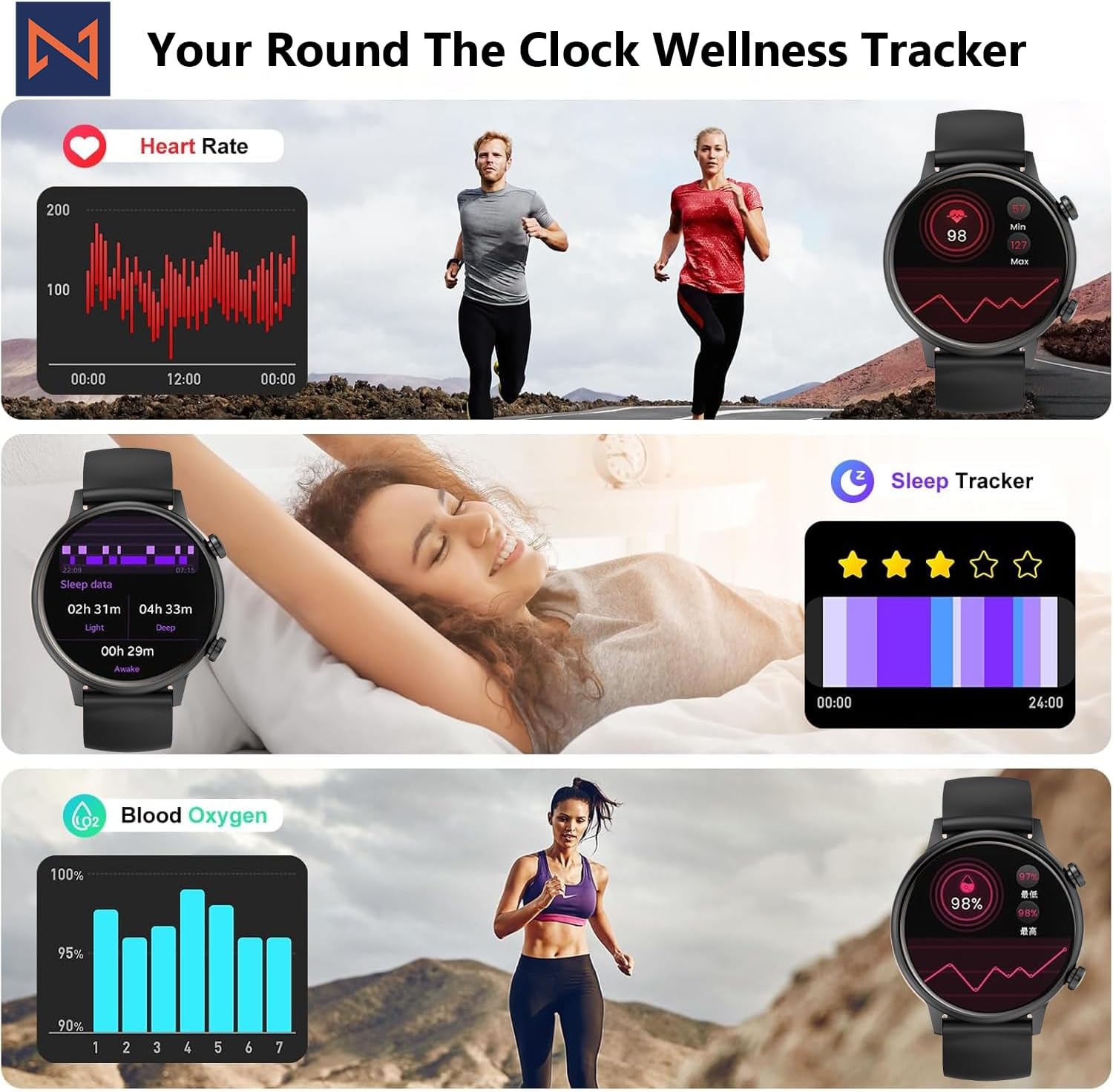
Figure 4: The smartwatch interface showing real-time heart rate, sleep tracking, and blood oxygen levels.

Figure 5: The smartwatch showing a selection of its multiple sports tracking modes.
6. Wasserbeständigkeit
The Infinity Smart Watch has an IP68 waterproof rating, making it resistant to dust, sweat, and water. It is suitable for daily wear, including hand washing, face washing, and swimming. Notiz: Avoid using the watch in hot water (e.g., hot showers, saunas) or for deep-sea diving, as extreme temperatures or high-pressure water may compromise its water resistance.

Figure 6: The smartwatch demonstrating its IP68 waterproof capability during water exposure.
7. Akku und Aufladen
The smartwatch features a 200 mAh Lithium Polymer battery. A full charge typically takes approximately 2 hours, providing 3-5 days of working time and up to 30 days of standby time, depending on usage.
8. Spezifikationen
| Besonderheit | Detail |
|---|---|
| Modellnummer | WS_BLK |
| Bildschirmgröße | 1.1 Zoll AMOLED |
| Wasserdichtigkeit | IP68 |
| Batteriekapazität | 200 Milliamp Stunden (Lithium-Polymer) |
| Konnektivität | Bluetooth |
| Betriebssystem | Android (kompatibel mit iOS) |
| Speicherkapazität | 128 MB |
| Artikelgewicht | 5 Unzen |
| Hersteller | Kizzy Enterprises Inc |
9. Fehlerbehebung
- Uhr schaltet sich nicht ein: Ensure the watch is fully charged. Long-press the side button to power on.
- Kopplung mit dem Telefon nicht möglich: Ensure Bluetooth is enabled on your phone and the watch is within range. Restart both devices and try pairing again through the app.
- Benachrichtigungen nicht erhalten: Check app settings on your phone to ensure notification permissions are granted for the smartwatch app. Also, verify that 'Do Not Disturb' mode is not active on the watch.
- Ungenaue Gesundheitswerte: Ensure the watch is worn snugly on your wrist, not too tight or too loose. Clean the sensors regularly. Note that the blood pressure monitor may not be medically accurate and is for reference only.
- Bildschirm friert ein: Restart the smartwatch by long-pressing the side button until it powers off, then power it back on. If the issue persists, check for app updates.
10. Garantie und Support
For warranty information, technical support, or service inquiries, please refer to the contact details provided on the product packaging or the manufacturer's official webBewahren Sie Ihren Kaufbeleg als Kaufnachweis für Garantieansprüche auf.


