Einführung
Vielen Dank für Ihren Einkauf.asing the Xtrike Me SK403 Gaming Stereo Speakers. This manual provides essential information for the proper setup, operation, and maintenance of your new speakers. Please read this manual thoroughly before use to ensure optimal performance and longevity of the product.
Sicherheitshinweise
- Die Lautsprecher dürfen weder Wasser noch übermäßiger Feuchtigkeit ausgesetzt werden.
- Vermeiden Sie es, die Lautsprecher in der Nähe von Wärmequellen oder in direktem Sonnenlicht aufzustellen.
- Versuchen Sie nicht, die Lautsprecher selbst zu zerlegen oder zu reparieren. Überlassen Sie alle Wartungsarbeiten qualifiziertem Fachpersonal.
- Außerhalb der Reichweite von Kindern aufbewahren.
- Use only with compatible power sources (USB 5V).
Packungsinhalt
Bitte prüfen Sie das Paket auf folgende Artikel:
- Xtrike Me SK403 Gaming Stereo Speakers
- Integriertes USB-Stromkabel
- Integrated 3.5mm AUX Audio Cable
- Benutzerhandbuch (dieses Dokument)
Produkt überview
The Xtrike Me SK403 speakers are designed to deliver a balanced, rich, and clear room-filling sound experience. They feature a lightweight design, 6W total output power, and dynamic rainbow LED lighting. The easy-access volume knob provides convenient control.

Abbildung 1: Vorderseite view of the Xtrike Me SK403 Gaming Stereo Speakers, showcasing the integrated rainbow LED lighting and speaker grille.

Abbildung 2: Schräg view of the speakers, highlighting the top-mounted volume knob and the vibrant LED light strip.
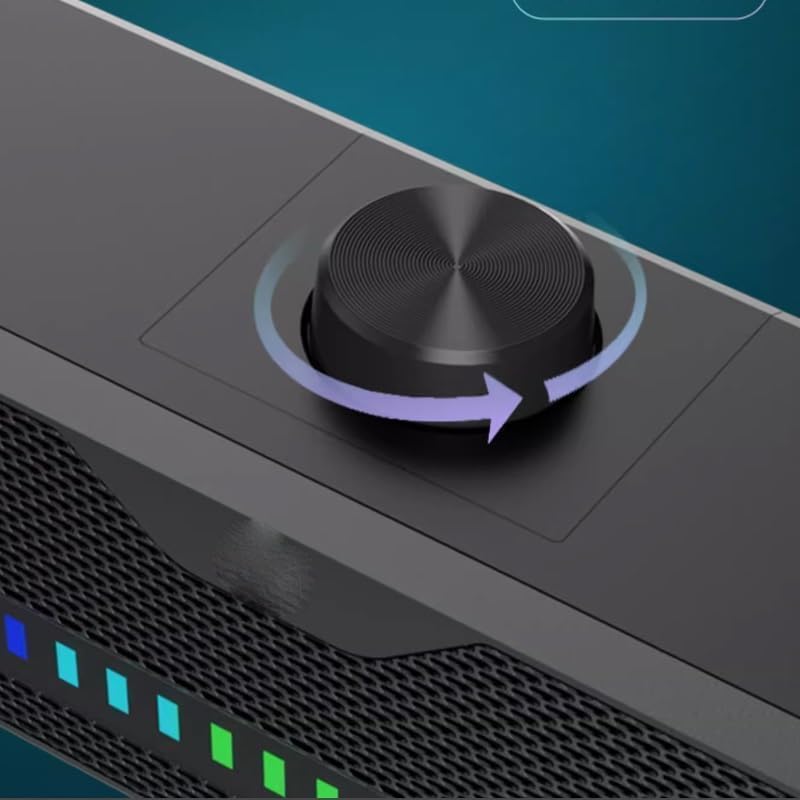
Abbildung 3: Ausführlich view of the easy-access volume control knob, located on the top surface of the speaker unit.

Figure 4: The speakers connected to a laptop and a smartphone, demonstrating their versatility with various devices.
Installationsanweisungen
- Platzierung: Place the Xtrike Me SK403 speakers on a stable, flat surface, such as a desk or table. Ensure there is adequate space for sound dispersion.
- Audio anschließen: Plug the 3.5mm AUX audio cable into the audio output jack of your computer, laptop, smartphone, or gaming console.
- Strom anschließen: Plug the USB power cable into an available USB port on your computer, a USB wall adapter (not included), or a power bank. The speakers require a 5V USB power source.
- Einschalten: Once both cables are connected, the speakers will power on, and the LED lighting will activate.
Bedienungsanleitung
- Lautstärkeregelung: Rotate the knob located on the top of the speaker unit clockwise to increase the volume and counter-clockwise to decrease it.
- LED-Beleuchtung: The speakers feature automatic rainbow LED lighting that activates upon power-on. There are no user-adjustable settings for the LED lighting.
- Audioquelle: Ensure your connected device's volume is also adjusted appropriately and that the correct audio output is selected on your device.
Wartung
- Reinigung: Reinigen Sie die Außenseite der Lautsprecher mit einem weichen, trockenen Tuch. Verwenden Sie keine flüssigen Reinigungsmittel oder Scheuermittel.
- Lagerung: Bei längerer Nichtbenutzung sollten die Lautsprecher an einem kühlen, trockenen Ort und vor direkter Sonneneinstrahlung geschützt aufbewahrt werden.
- Kabelpflege: Um Beschädigungen zu vermeiden, sollten die Kabel nicht übermäßig gebogen oder verdreht werden.
Fehlerbehebung
| Problem | Mögliche Ursache | Lösung |
|---|---|---|
| Kein Ton von den Lautsprechern |
|
|
| LED-Leuchten funktionieren nicht |
|
|
| Verzerrter Ton |
|
|
Technische Daten
| Besonderheit | Detail |
|---|---|
| Markenname | Xtrike Me (Generic listed in some specifications) |
| Modellname | SK403 (Soundbar type) |
| Maximale Lautsprecherausgangsleistung | 6 Watt |
| Konnektivitätstechnologie | USB + AUX 3.5mm |
| Audioausgabemodus | Stereo |
| Montagetyp | Tischhalterung |
| Material | Metall |
| Besondere Merkmale | LED-Licht |
| Empfohlene Verwendung | For Computers, Laptops, and Digital Video Game Consoles |
Garantie und Support
Informationen zu Garantie und technischem Support finden Sie in der Ihnen beim Kauf ausgehändigten Dokumentation oder wenden Sie sich an Ihren Händler. Bewahren Sie Ihren Kaufbeleg für eventuelle Garantieansprüche auf.


