Einführung
The Wireless Express Sing-Along Bling Karaoke Microphone and Stereo Speaker is a versatile 2-in-1 device designed for entertainment. It combines a microphone with a Bluetooth speaker, allowing users to sing along to music from various compatible devices. This manual provides essential information for setup, operation, and maintenance of your device.
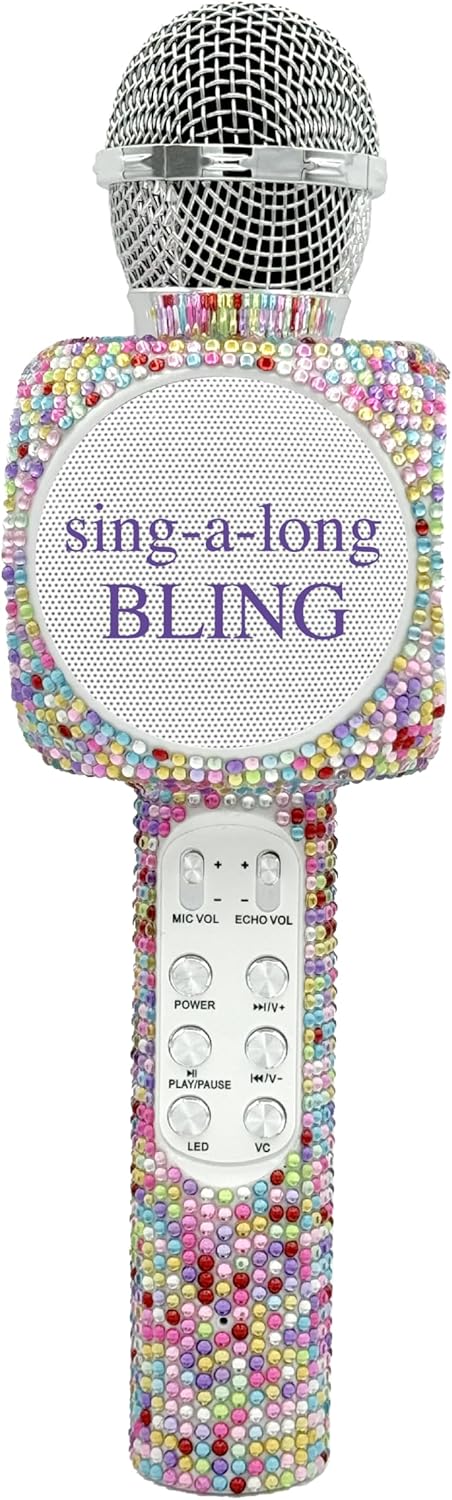
The Sing-Along Bling Karaoke Microphone, featuring its unique Confetti Bling design.
Hauptmerkmale
- 2-in-1-Design: Combines a microphone and a Bluetooth stereo speaker for integrated audio and vocal performance.
- Bluetooth-Konnektivität: Easily connects wirelessly to smartphones, tablets, and computers (Android & Apple compatible) for streaming music.
- Dynamische LED-Leuchten: Features dazzling LED lights that enhance the karaoke experience.
- Soundeffekte: Includes echo effects and voice changers for varied vocal styles.
- Integrierte Kontrollen: Offers convenient buttons for volume control, track skipping (previous/next), and recording.
- Tragbares Design: Compact and lightweight, suitable for both indoor and outdoor use.
- Wiederaufladbarer Akku: Powered by a battery for wireless operation.
- SD-Kartensteckplatz: Allows for playback from an SD card.
- Kopfhörerbuchse: Provides an option for private listening or monitoring.

Ein Überview of the microphone's features, highlighting its Bluetooth capability, voice changer, LED lights, portability, and rechargeable battery.
Installationshandbuch
1. Aufladen des Mikrofons
- Suchen Sie den Micro-USB-Ladeanschluss am Mikrofon.
- Connect the provided charging cable to the microphone and a compatible USB power source (e.g., computer, USB wall adapter).
- The LED indicator will show charging status (refer to product-specific LED behavior for details, usually red for charging, off/blue for full).
- Warten Sie vor dem ersten Gebrauch ausreichend, bis der Akku vollständig aufgeladen ist.
2. Ein-/Ausschalten
- To power on, press and hold the Power button (usually marked with a power symbol) until the device activates and the LED lights illuminate.
- Zum Ausschalten die Ein-/Aus-Taste erneut gedrückt halten, bis sich das Gerät ausschaltet.
3. Bluetooth-Kopplung
- Ensure the microphone is powered on and in pairing mode (indicated by a flashing LED light, often blue).
- Aktivieren Sie Bluetooth auf Ihrem Smartphone, Tablet oder Computer und suchen Sie nach verfügbaren Geräten.
- Select "WE-BLING-MIC" or a similar device name from the list.
- Once paired, the microphone will usually emit an audible confirmation and the LED light will become solid.
Bedienungsanleitung
1. Grundlegende Steuerelemente
- Lautstärkeregelung: Use the "VOL+" and "VOL-" buttons to adjust the overall speaker volume.
- Mikrofonlautstärke: Use the "MIC VOL" slider or buttons to adjust your vocal volume.
- Echo-Effekt: Use the "ECHO VOL" slider or buttons to add or reduce echo to your voice.
- Musikwiedergabe:
- Abspielen/Pause: Press the "PLAY/PAUSE" button.
- Vorheriges Lied: Press the "PREV" button.
- Nächster Titel: Press the "NEXT" button.
- LED-Leuchten: Press the "LED" button to cycle through different light modes or turn them off.
- Stimmenverzerrer: Press the "VC" button to activate and cycle through various voice changing effects.
2. Singing with Music
Once connected via Bluetooth, open your preferred karaoke app or music streaming service on your device. Play a song, and the music will stream through the microphone's speaker. You can then sing into the microphone, adjusting your vocal volume and echo as desired.
3. Recording Your Performance
The microphone supports recording. Connect an audio cable from the microphone's audio output to your recording device (e.g., smartphone with a recording app). Alternatively, some karaoke apps may allow direct recording through the Bluetooth connection.
4. Using the SD Card Slot
Insert a compatible SD card loaded with MP3 files into the designated slot. The microphone will automatically detect and begin playing music from the SD card. Use the music playback controls to manage tracks.
Demonstration of a similar wireless microphone's sound quality and features in a car environment, including FM radio connectivity and various sound modes. This video is provided by a seller and offers insights into potential usage scenarios and audio performance.
Wartung
- Reinigung: Reinigen Sie die Außenseite des Mikrofons mit einem weichen, trockenen Tuch. Verwenden Sie keine scharfen Chemikalien oder Scheuermittel.
- Lagerung: Store the microphone in a cool, dry place away from direct sunlight and extreme temperatures. If a carrying case is provided, utilize it for protection during storage and transport.
- Batteriepflege: Um die Akkulaufzeit zu verlängern, vermeiden Sie häufiges vollständiges Entladen des Akkus. Laden Sie das Gerät regelmäßig auf, auch wenn es längere Zeit nicht benutzt wird.
Fehlerbehebung
| Problem | Lösung |
|---|---|
| Das Mikrofon lässt sich nicht einschalten. | Stellen Sie sicher, dass der Akku geladen ist. Schließen Sie das Ladekabel an und versuchen Sie es erneut. |
| Kopplung via Bluetooth nicht möglich. | Make sure the microphone is in pairing mode (flashing LED). Ensure Bluetooth is enabled on your device and it's within range. Try restarting both devices. |
| Kein Ton aus dem Lautsprecher. | Überprüfen Sie die Lautstärke sowohl am Mikrofon als auch an Ihrem angeschlossenen Gerät. Stellen Sie sicher, dass das Mikrofon ordnungsgemäß gekoppelt ist. |
| Echo/Voice Changer not working. | Ensure the "ECHO VOL" or "VC" functions are activated and adjusted to an audible level. |
Technische Daten
| Besonderheit | Detail |
|---|---|
| Marke | Wireless Express |
| Modellnummer | WE-BLING-MIC |
| Konnektivitätstechnologie | Bluetooth |
| Stromquelle | Batteriebetrieben |
| Material | Plastic And Metal |
| Hardware-Plattform | Karaoke Machine, Smartphone, Tablet |
| Artikelgewicht | 1.46 Pfund |
| Verpackungsabmessungen | 15.04 x 5.71 x 3.7 Zoll |
| Richtcharakteristik | Unidirektional |
| Mikrofon-Formfaktor | Handgerät |
| Besonderheit | Lautstärkeregelung |
| Steckertyp | Micro USB |
Lieferumfang
- Sing-Along Bling Bluetooth-Karaoke-Mikrofon
- Ladekabel
Garantie und Support
For warranty information or technical support, please refer to the product packaging or contact Wireless Express customer service directly. Contact details can typically be found on the manufacturer's official webauf der Website oder in der Produktdokumentation.


