1. Produktüberschreitungview
The Chilkey ND75 is a 75% percent mechanical keyboard featuring a full aluminum alloy case with an anodized surface treatment, providing a delicate touch and texture. It is designed for gaming, office, and general PC use, offering a blend of sleek minimalist style and advanced functionality. The keyboard incorporates a counterweighted backplate with an artistic gradient pattern and boasts a highly customizable per-key RGB lighting system.
Zu den Hauptmerkmalen gehören:
- 75% Layout
- Tri-mode Connectivity (BT5.0, 2.4GHz Wireless, USB-C Wired)
- Per-key RGB Backlighting
- Hot-Swap-fähige Schalter
- Doppelt gespritzte PBT-Tastenkappen
- Pre-Lubed Linear Switches
- Four Layers of Padding for Acoustic Performance
- 3600mAh Akku
- Independent Driver/Software for Customization
- Functional LCD Screen
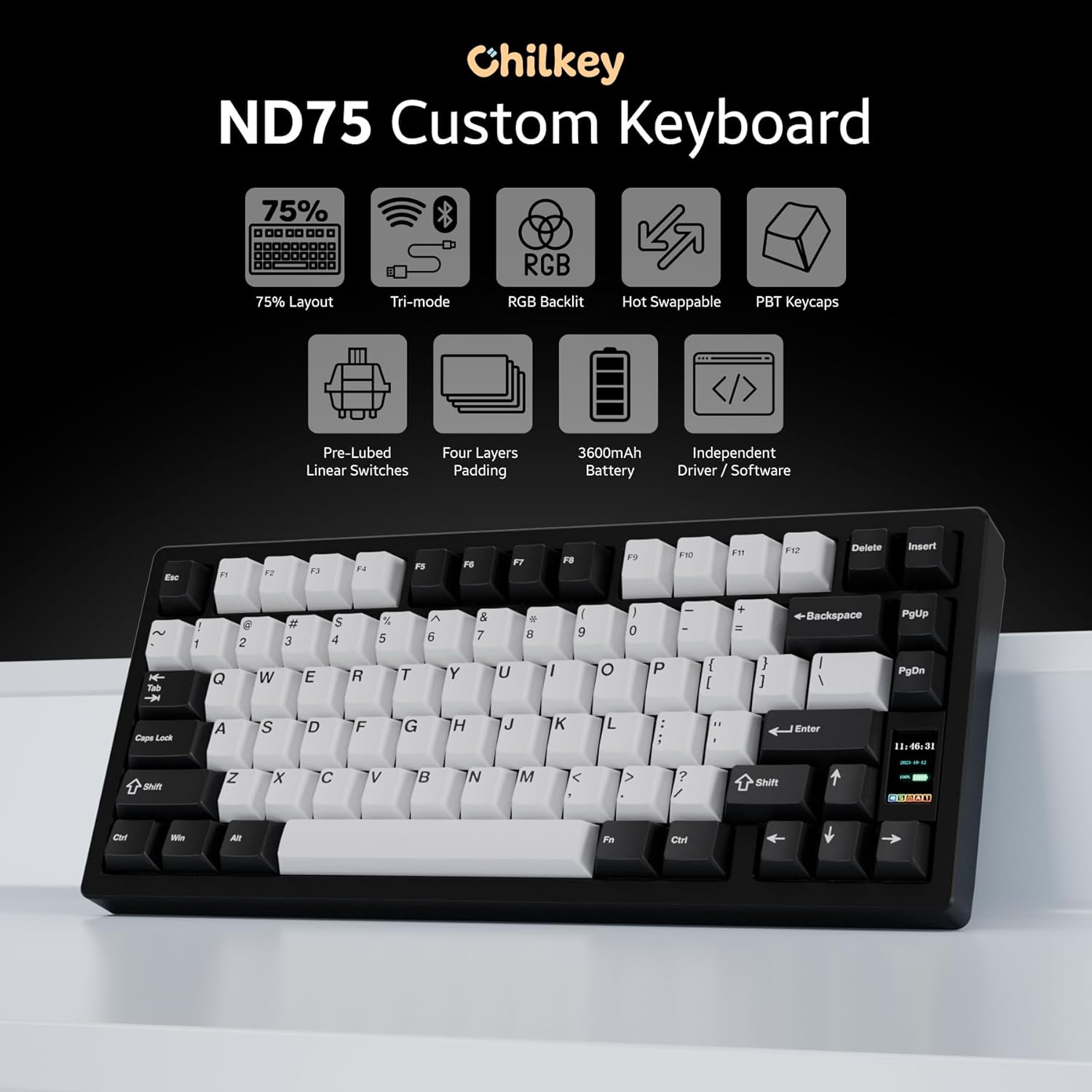
Bild: Überview of Chilkey ND75 keyboard features, including 75% layout, tri-mode, RGB, hot-swappable, PBT keycaps, pre-lubed linear switches, four layers padding, 3600mAh battery, independent driver/software, and LCD screen.

Image: The Chilkey ND75 keyboard showcasing its CNC full aluminum alloy case and anodization surface finish.

Bild: Draufsicht view of the Chilkey ND75 mechanical keyboard, highlighting its 75% layout with black and white keycaps.
2. Einrichtung und Verbindung
The ND75 mechanical keyboard offers three versatile connection modes: Bluetooth 5.0, 2.4GHz wireless, and USB-C wired. This allows for seamless integration with various devices and usage scenarios.
2.1 Packungsinhalt
- Chilkey ND75 Mechanical Keyboard
- USB-Kabel
- Benutzerhandbuch (dieses Dokument)
2.2 Anschließen Ihrer Tastatur
Before connecting, ensure the keyboard is charged or connected via USB-C for initial setup.
- Kabelgebundener Modus (USB-C): Connect the provided USB-C cable from the keyboard to your computer's USB port. The keyboard will automatically detect the connection and function in wired mode.
- 2.4-GHz-Wireless-Modus:
- Locate the 2.4GHz wireless dongle, typically stored within the keyboard's chassis (refer to the diagram below for dongle location).
- Remove the Right Shift Keycap to access the wireless switch and turn it ON.
- Stecken Sie den 2.4-GHz-Dongle in einen freien USB-Anschluss Ihres Computers.
- The keyboard should automatically pair. If not, refer to the LCD screen for pairing instructions.
- Bluetooth 5.0-Modus:
- Remove the Right Shift Keycap to access the wireless switch and turn it ON.
- On the keyboard's LCD screen, navigate to the Bluetooth pairing option.
- On your device (Laptop, PC, Tablet), go to Bluetooth settings and search for new devices.
- Select "Chilkey ND75" from the list of available devices to pair.
- The keyboard can switch between BT5.0, 2.4GHz, and USB-C modes easily by FN key combinations (refer to Section 3.1 for details).

Image: Visual representation of the tri-mode connection options (2.4GHz, Bluetooth, USB-C) and multi-system compatibility (Windows, Apple, Linux, Android).
3. Bedienungsanleitung
3.1 Wichtige Funktionen und Kombinationen
The ND75 keyboard features a 75% layout with dedicated function keys (F1-F12) and a compact design. Many advanced functions are accessible via the Fn Taste in Kombination mit anderen Tasten.
| Kombination | Funktion |
|---|---|
| Fn+F1-F12 | Multimedia controls (e.g., Play/Pause, Volume Up/Down, Mute) |
| Fn + Q/W/E | Switch between Bluetooth devices (if multiple paired) |
| Fn + R | Wechseln Sie in den 2.4-GHz-Funkmodus. |
| Fn + T | Switch to USB-C wired mode |
| Fn + Rücktaste | Toggle RGB lighting effects |
| Fn + Eingabetaste | Access LCD screen menu/settings |
For a complete list of key combinations and customizable functions, please refer to the dedicated software.
3.2 Functional LCD Screen
The ND75 features a functional LCD screen that provides real-time information and allows for direct control over various keyboard settings without requiring external software. You can customize the display with custom GIF images.
The screen displays information such as:
- Connection mode (Wired, 2.4G, BT)
- Batteriestand
- Systeminformationen
- Backlight brightness and speed
- RGB mode and color selection
- Lautstärkeregelung
- Spracheinstellungen
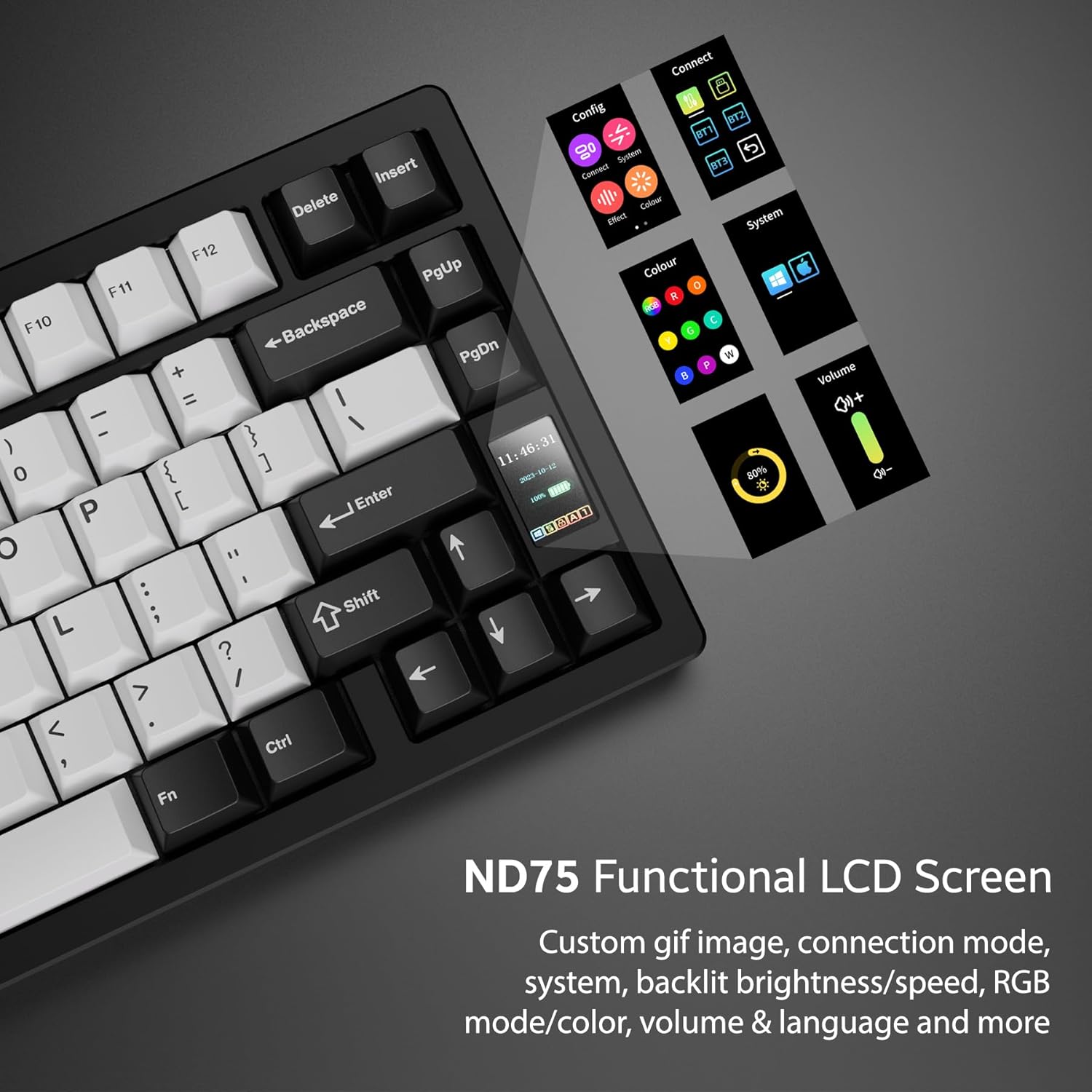
Image: Close-up of the ND75 keyboard's functional LCD screen, showing various menu options for configuration, connection, effects, color, system, volume, and language.
3.3 RGB-Hintergrundbeleuchtung pro Taste
The ND75 keyboard offers 19 preset lighting effects. You can customize individual key colors and create your own lighting profiles using the keyboard's onboard controls via the LCD screen or through the dedicated software.

Image: The ND75 keyboard with vibrant per-key RGB backlighting illuminated, showcasing various colors across the keys.
4. Wartung und Anpassung
4.1 Hot-Swap-fähige Schalter
The ND75 features a hot-swappable PCB, allowing you to easily replace switches without soldering. This supports both 3-pin and 5-pin switches, providing flexibility for customization and maintenance. The keyboard comes with pre-lubed linear switches for a smooth typing experience.

Image: A switch puller tool removing a key switch from the hot-swappable PCB of the ND75 keyboard, demonstrating the ease of switch replacement.
4.2 Quick Assembly Structure and Mounting Systems
The ND75 keyboard is designed with a screwless quick assembly structure, utilizing a ball catch system for easy disassembly and reassembly. This design is particularly beneficial for beginner keyboard enthusiasts who wish to explore different typing feels.
The keyboard supports three different mounting systems:
- Split O-Ring Mounting: Provides a softer, more flexible typing feel.
- Silica Gel Particle Mounting: Offers a balanced feel with good vibration dampende.
- Top-Montage: Delivers a firmer, more consistent typing experience.
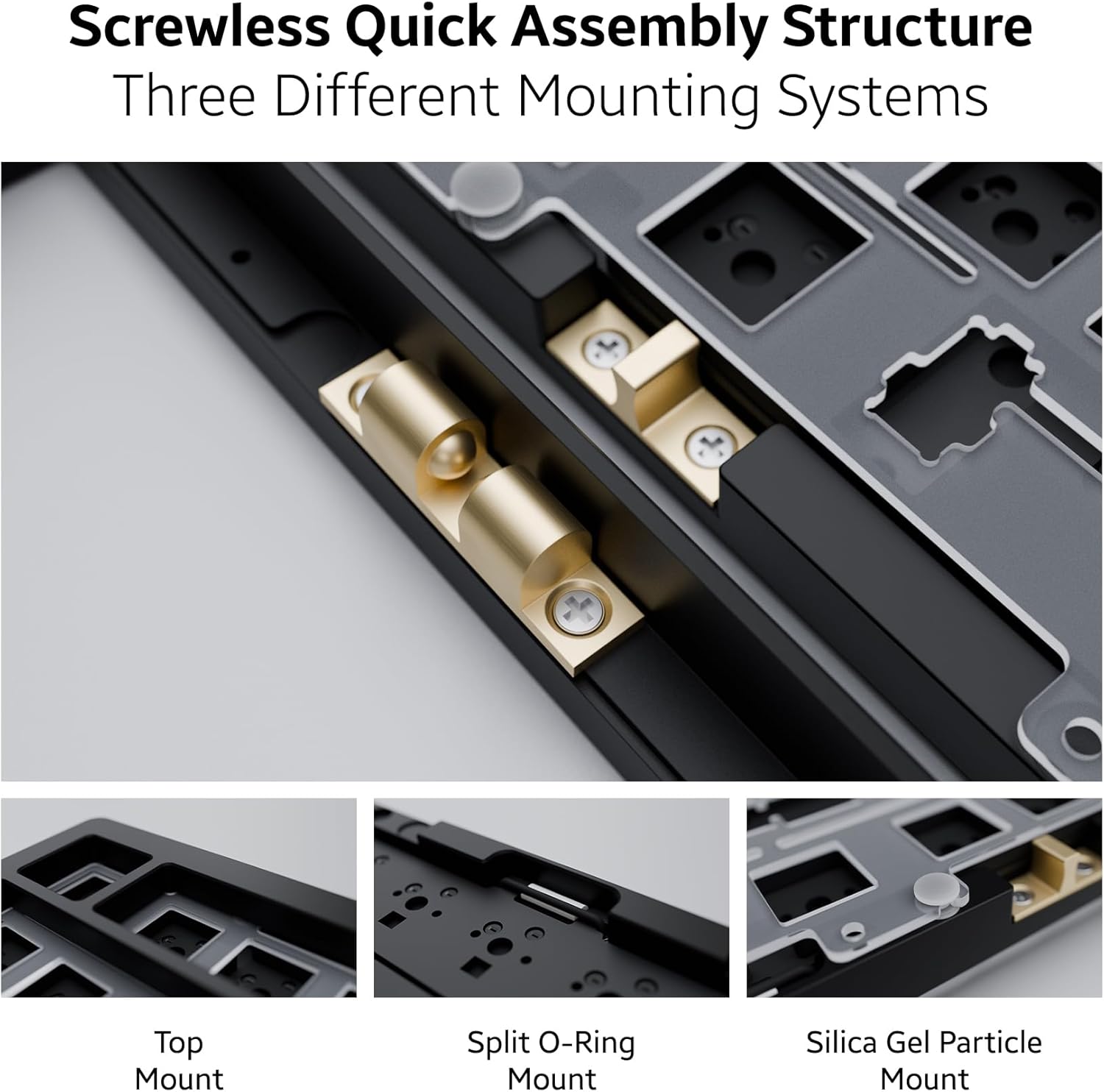
Bild: Detailliert view of the ND75 keyboard's internal structure, illustrating the screwless quick assembly and the three distinct mounting systems: Top Mount, Split O-Ring Mount, and Silica Gel Particle Mount.
4.3 Reinigung und Pflege
Um die Leistungsfähigkeit und das Aussehen Ihrer Tastatur zu erhalten:
- Use a soft, dry cloth to wipe down the aluminum case.
- For keycaps, remove them and clean with mild soap and water if necessary, ensuring they are completely dry before reattaching.
- Verwenden Sie Druckluft, um Staub und Schmutz zwischen den Tastenkappen und Schaltern zu entfernen.
- Vermeiden Sie es, die Tastatur übermäßiger Feuchtigkeit oder extremen Temperaturen auszusetzen.
Video: Demonstrates the quick disassembly and assembly process of the Chilkey ND75 Aluminum Keyboard, showing how easily the top case can be removed and reattached.
5. Fehlerbehebung
If you encounter issues with your Chilkey ND75 keyboard, please refer to the following common solutions:
- Tastatur reagiert nicht:
- Stellen Sie sicher, dass die Tastatur vollständig aufgeladen oder über USB-C angeschlossen ist.
- Check the connection mode (wired, 2.4GHz, Bluetooth) and ensure it matches your device's connection. Use Fn key combinations to switch modes.
- For 2.4GHz, ensure the dongle is securely plugged into a working USB port.
- Stellen Sie bei Bluetooth sicher, dass Bluetooth auf Ihrem Gerät aktiviert und die Tastatur gekoppelt ist. Versuchen Sie gegebenenfalls, die Kopplung erneut durchzuführen.
- Verify the wireless switch under the Right Shift Keycap is in the correct position (ON for wireless modes).
- RGB-Beleuchtungsprobleme:
- Check the keyboard's LCD screen settings for brightness and effect controls.
- Ensure the keyboard's battery has sufficient charge, as low power can affect lighting.
- If using custom software, ensure it is up-to-date and correctly configured.
- Keys Not Registering / Mushy Feel:
- Due to the hot-swappable design, switches can sometimes come loose when removing keycaps. Gently press down on the affected switch to ensure it is fully seated in the PCB.
- If a switch feels mushy or is not registering, consider replacing the individual switch. The hot-swappable feature makes this easy.
- Software-/Treiberprobleme:
- The keyboard has independent driver/software for advanced customization. If you experience issues, ensure you have the latest version installed from the official Chilkey support webWebsite.
- Some users have noted the software can be clunky; ensure your operating system is compatible and try reinstalling the software if problems persist.
If these steps do not resolve your issue, please contact Chilkey customer support.
6. Spezifikationen
| Besonderheit | Detail |
|---|---|
| Modell | ND75 |
| Layout | 75 % (80 Tasten) |
| Gehäusematerial | Full Aluminum Alloy (CNC with anodization) |
| Konnektivität | 2.4-GHz-Funk, Bluetooth 5.0, USB-C-Kabel |
| Tastenkappen | Doubleshot PBT, Cherry Profile |
| Schalter | Hot-Swappable (3-pin/5-pin support), Pre-lubed Linear |
| Hintergrundbeleuchtung | Per-key RGB (19 preset effects, customizable) |
| Interne Struktur | Screwless Quick Assembly, 3 Mounting Systems (Split O-Ring, Silica Gel Particle, Top Mount) |
| Akustikdesign | Four layers of sound insulation and shock absorption (Poron plate foam, IXPE switch foam, PET acoustic pad, Poron PCB foam) |
| Batterie | 2 Lithium Polymer batteries (included), 3600mAh total |
| Technische Daten | 12.68 x 5.5 x 1.38 Zoll |
| Artikelgewicht | 4.49 Pfund |
| Hersteller | OOCTPK |
| Zuerst verfügbar | 23. September 2024 |

Image: Exploded diagram showing the internal components of the ND75 keyboard, including doubleshot PBT keycaps, blue lotus switch, aluminum top case, plate, Poron plate foam, IXPE switch foam, PET acoustic pad, PCB, Poron PCB foam, aluminum bottom case, and lithium batteries.
7. Garantie und Support
7.1 Garantieinformationen
For detailed warranty information regarding your Chilkey ND75 Mechanical Keyboard, please refer to the warranty card included with your product or visit the official Chilkey webDie Garantiebedingungen können je nach Region und Händler variieren.
7.2 Kundendienst
If you require further assistance, technical support, or have questions not covered in this manual, please contact Chilkey customer support. Many users find the official Chilkey Discord community to be a valuable resource for quick help and community-driven solutions.
For the most up-to-date contact information and support resources, please visit the official Chilkey webWebsite oder deren Amazon-Markenshop:
- Chilkey Amazon Brand Store
- Refer to product packaging for direct website link or support email.


