BTECH UV-PRO User Manual
Model: UV-PRO
IP67 Dual Band VHF/UHF Two-Way Radio
Einführung
The BTECH UV-PRO is a robust and versatile IP67-rated dual-band VHF/UHF two-way radio designed for reliable communication in various environments. It features advanced capabilities such as APRS, Bluetooth connectivity for app control, GPS, text messaging, aviation band scanning, and NOAA weather alerts. This manual provides detailed instructions for the proper setup, operation, and maintenance of your UV-PRO radio.

Image: The BTECH UV-PRO radio shown alongside a smartphone, illustrating its app connectivity.
Packungsinhalt
Bitte überprüfen Sie, ob alle unten aufgeführten Artikel in Ihrem Paket enthalten sind:
- UV-PRO Radio Unit
- 2600mAh Lithium-Ionen-Akku
- Antenne
- Gürtelclip
- USB-Ladekabel Typ C.
- Screws and Screwdriver (for belt clip attachment)
- Benutzerhandbuch (dieses Dokument)

Image: A complete layout of the BTECH UV-PRO radio and its included accessories.
Aufstellen
Einsetzen und Aufladen der Batterie
Insert the 2600mAh Lithium Ion battery into the compartment on the back of the radio, ensuring it clicks securely into place. To charge the radio, connect the provided Type-C USB charging cable to the USB-C port on the radio and to a compatible USB power source. The charging indicator light will illuminate red during charging and turn green when fully charged.
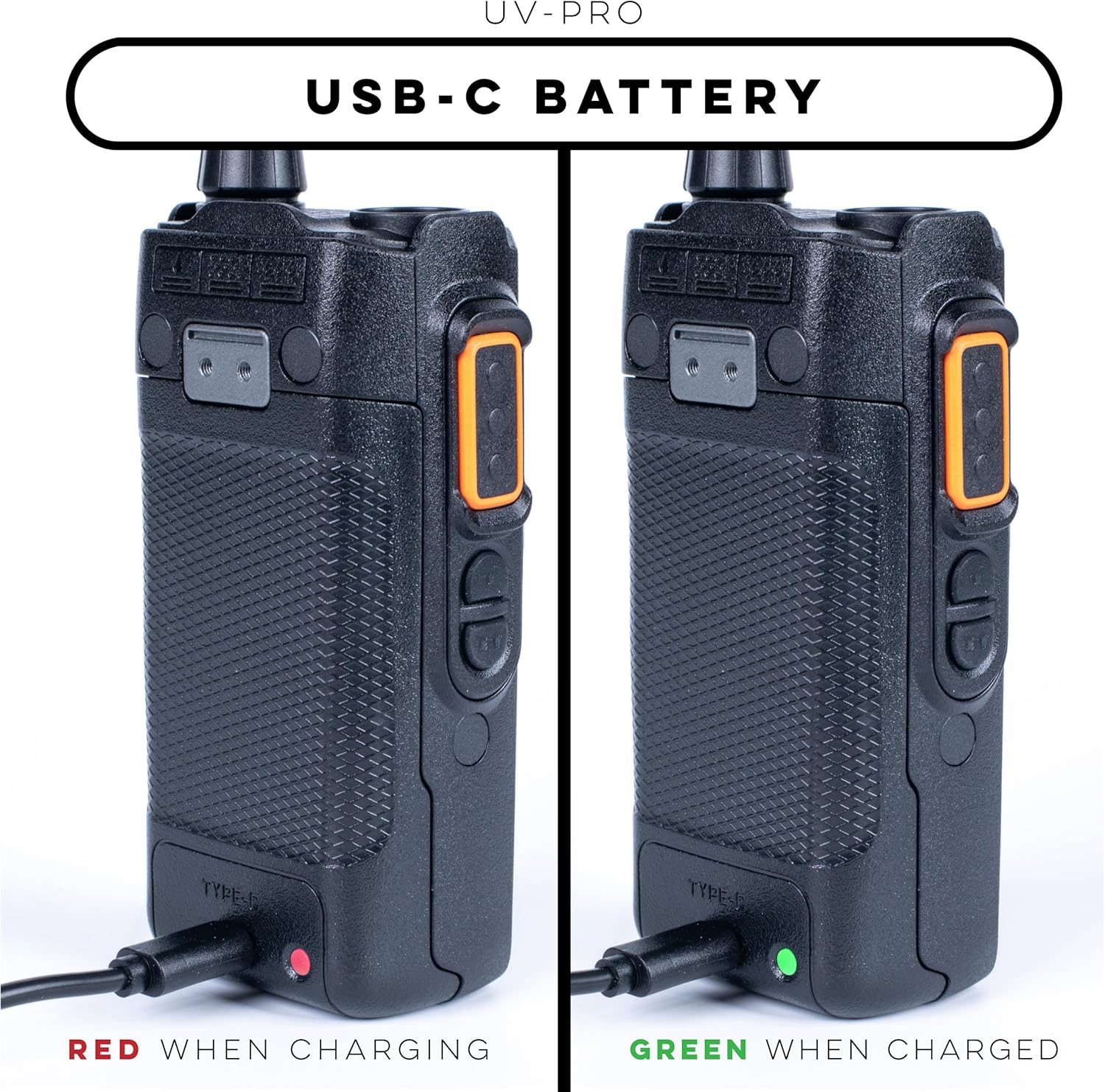
Image: The USB-C charging port on the UV-PRO radio, demonstrating the charging indicator lights.
Antennenbefestigung
Schrauben Sie die Antenne im Uhrzeigersinn auf den Antennenanschluss oben am Radio, bis sie handfest sitzt. Nicht zu fest anziehen.
Erstes Einschalten
To power on the radio, rotate the power/volume knob clockwise. Adjust the knob to set your desired volume level. The display will illuminate, indicating the radio is ready for use.
Bedienungsanleitung
Grundlegende Bedienung
Familiarize yourself with the keypad and menu navigation. Use the arrow keys to scroll through menu options and the 'OK' button to confirm selections. The 'Return' button typically navigates back to the previous screen or exits a menu.
Bluetooth-Konnektivität und App-Integration
The UV-PRO features Bluetooth for seamless integration with the BTECH UV Programmer App (available on iOS and Android). This app allows for text messaging, GPS sharing, and streamlined device management, including channel programming. To pair, navigate to the 'Pairing' option in the radio's menu and follow the instructions in the app.

Image: The UV-PRO radio being paired with the BTECH UV Programmer App on a mobile device.
Video: Ein überview of the BTECH UV-PRO's features, including its Bluetooth connectivity and app integration.
Frequency Scanning (Frequency Sync Rapid Scanning)
The Frequency Sync Rapid Scanning feature allows you to quickly locate and lock onto nearby active frequencies. This is useful for identifying channels in use or for emergency monitoring. Consult the user manual's detailed section on scanning for specific instructions.

Image: The UV-PRO radio demonstrating its frequency sync rapid scanning capability.
APRS and GPS Functions
The UV-PRO supports APRS (Automatic Packet Reporting System) for real-time position reporting and data exchange. It also includes built-in GPS functionality for accurate location tracking. These features enhance situational awareness and communication in the field.

Image: The UV-PRO radio highlighting its APRS capabilities.
NOAA-Wetterwarnungen
Stay informed about severe weather conditions with integrated NOAA weather alerts. The radio can receive real-time alerts, providing critical information for safety and preparedness.

Image: The UV-PRO radio featuring its NOAA weather alert function.
Aviation Band Scanning
The UV-PRO is capable of scanning the aviation band (108-136MHz), allowing users to monitor air traffic communications. This feature is particularly useful for aviation enthusiasts or those operating near airfields.
Image: The UV-PRO radio highlighting its aviation band reception.
Wartung
Reinigung
Verwenden Sie zum Reinigen des Radios ein weiches,amp cloth. Do not use harsh chemicals or abrasive cleaners, as these can damage the radio's surface or internal components.
Lagerung
When not in use for extended periods, store the radio in a cool, dry place away from direct sunlight and extreme temperatures. Ensure the battery is partially charged (around 50%) before long-term storage to preserve battery life.
Wasserbeständigkeit (IP67)
The UV-PRO has an IP67 rating, meaning it is fully protected against dust and can withstand immersion in water up to 1 meter for 30 minutes. Ensure all port covers are securely closed before exposing the radio to water or dusty environments. While rugged, avoid intentional prolonged submersion or exposure to high-pressure water jets.

Image: The UV-PRO radio demonstrating its IP67 water resistance.
Fehlerbehebung
This section addresses common issues you might encounter with your UV-PRO radio. For problems not listed here, please contact BTECH support.
| Problem | Mögliche Ursache | Lösung |
|---|---|---|
| Das Radio lässt sich nicht einschalten | Schwache oder leere Batterie; Batterie nicht korrekt installiert | Laden Sie den Akku auf; stellen Sie sicher, dass der Akku korrekt eingesetzt ist. |
| Kein Ton oder schwacher Ton | Volume too low; squelch level too high; faulty speaker/mic | Increase volume; adjust squelch level; test with external speaker/mic if available. |
| Senden und Empfangen nicht möglich | Falsche Frequenz/falscher Kanal; Antenne nicht angeschlossen; außerhalb der Reichweite | Verify frequency/channel settings; ensure antenna is securely attached; move closer to other radios or repeater. |
| Probleme mit der Bluetooth-Kopplung | Bluetooth not enabled; radio not in pairing mode; interference | Ensure Bluetooth is active on both devices; put radio in pairing mode; try pairing in a different location. |
Technische Daten
| Besonderheit | Detail |
|---|---|
| Modellnummer | UV-PRO |
| Abmessungen (H x B x T) | 11 x 3 x 3 Zoll |
| Gewicht | 11 Unzen |
| Akku-Typ | Lithium-Ionen-Akku (2600 mAh) |
| Bandtage | 7.4 Volt |
| Anzahl der Kanäle | 180 |
| Frequenzbereich | VHF, UHF, FM RX, Aviation RX (108-136MHz) |
| Wasserbeständigkeit | IP67 (Dustproof, Submersible up to 1m for 30 mins) |
| Besondere Merkmale | Dual Band, Long Range, Voice Operated Transmission, APRS, Bluetooth, GPS, Text Messaging, NOAA Weather Alerts |
Garantie und Support
The BTECH UV-PRO radio comes with a 1 Jahr Garantie for products purchased directly through BaoFengTech.com. This warranty covers manufacturing defects and ensures your product functions as intended under normal use.
BTECH is proud to be based in the USA, offering dedicated local support for any issues that may arise. For technical assistance, warranty claims, or general inquiries, please visit the official BTECH website or contact their customer service department. Keeping your radio's firmware updated is also recommended for optimal performance and access to the latest features.
For further information and support resources, please visit: BTECH Store on Amazon


