Einführung
This manual provides comprehensive instructions for the setup, operation, maintenance, and troubleshooting of your BPXX D463B Bluetooth Thermal Label Printer. Please read this manual thoroughly before using the printer to ensure proper function and longevity of the device.
Sicherheitshinweise
- Use only the original power adapter provided with the printer.
- Setzen Sie den Drucker weder Wasser noch übermäßiger Feuchtigkeit aus.
- Vermeiden Sie es, den Drucker direkter Sonneneinstrahlung oder der Nähe von Wärmequellen auszusetzen.
- Keep the printer away from dust and debris to prevent internal damage.
- Versuchen Sie nicht, den Drucker selbst zu zerlegen oder zu reparieren. Wenden Sie sich an den Kundendienst.
- Sorgen Sie während des Betriebs für ausreichende Belüftung rund um den Drucker.
Packungsinhalt
Bitte überprüfen Sie, ob alle unten aufgeführten Artikel in Ihrem Paket enthalten sind:
- BPXX D463B USB & Bluetooth Printer
- USB-Kabel
- Netzteil
- Netzkabel
- U Disk (USB flash drive with drivers and guide)
- OTG-Adapter
- Labels (sample rolle)
- Kurzanleitung

Image: Contents of the BPXX D463B Thermal Label Printer package.
Produkt überview
The BPXX D463B is a compact and efficient thermal label printer designed for various labeling needs, including shipping labels, product labels, and more. It features both Bluetooth and USB connectivity for versatile use across different operating systems.

Bild: Vorderseite view of the BPXX D463B Thermal Label Printer in operation.
Hauptmerkmale:
- Hochwertiger Druck: 203dpi resolution for clear images, text, and barcodes.
- Duale Konnektivität: Supports Bluetooth for iOS, Android, and Windows, and USB for Windows, Mac OS, Linux, and ChromeOS.
- Breite Kompatibilität: Works with major e-commerce and shipping platforms like Amazon, Shopify, eBay, UPS, USPS, FedEx, and more.
- Schnelle Druckgeschwindigkeit: Up to 152mm/s (72 sheets of 4x6 labels per minute).
- Automatische Etikettenerkennung: Automatically identifies label size for ease of use.
- Langlebiger Druckkopf: Features an aluminum alloy print head with smart temperature control for prolonged service life.
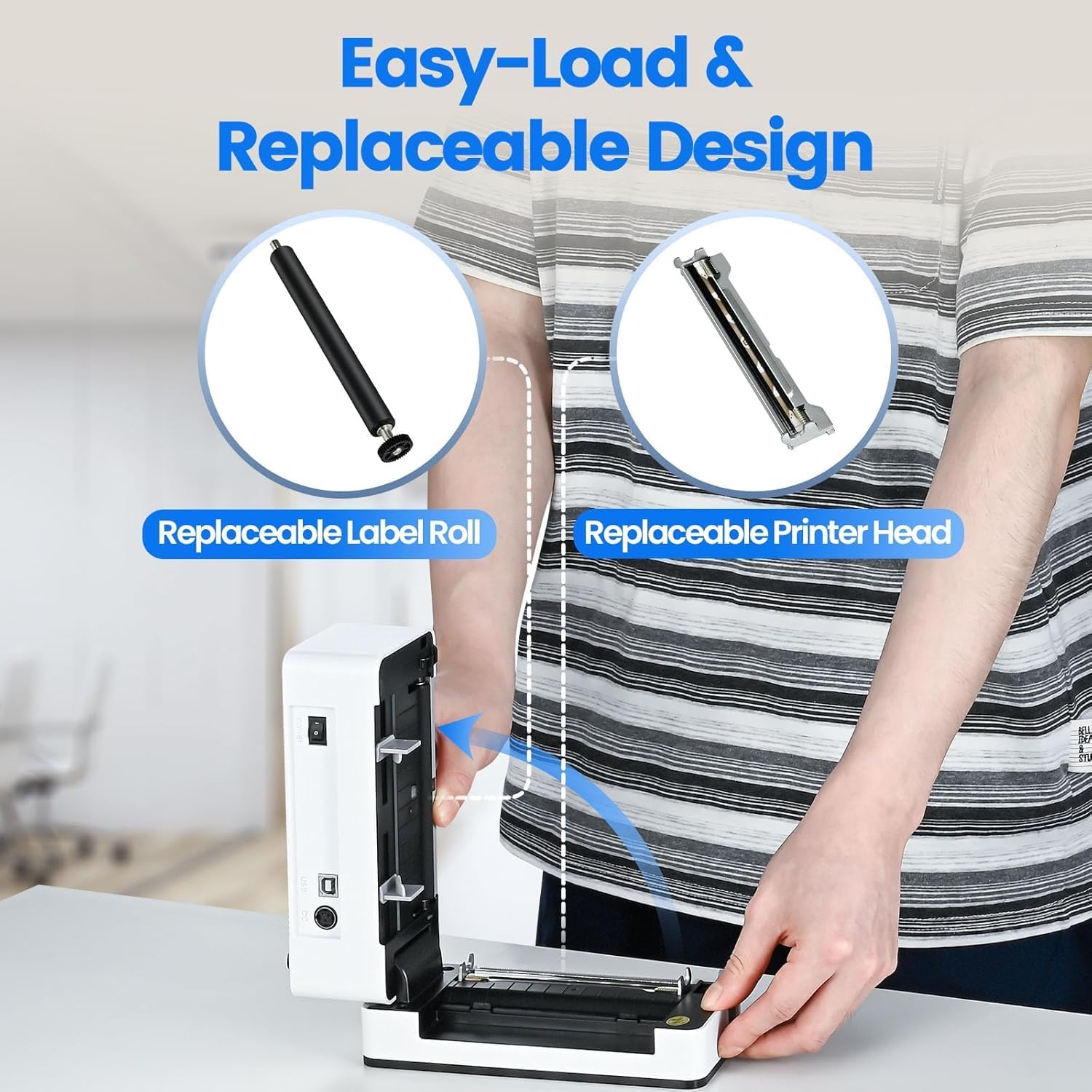
Image: The printer's aluminum alloy print head, designed for durability and extended service life.
Aufstellen
1. Etiketten einlegen
- Öffnen Sie die obere Abdeckung des Druckers.
- Insert the thermal labels into the label compartment, ensuring the printable side is facing up.
- Adjust the label guides to fit the width of your labels snugly.
- Close the top cover. The printer will automatically detect the label size and feed a few labels to calibrate.

Image: Illustration of the easy-load label mechanism.
2. Verbindung mit Ihrem Gerät herstellen
The D463B printer offers both Bluetooth and USB connectivity.

Image: Connectivity options for the BPXX D463B printer.
Bluetooth Connection (iOS, Android, Windows):
- Ensure the printer is powered on. The indicator light should be blue.
- Download the "4Barcode" APP from your device's app store (iOS/Android) or install the driver for Windows from the provided U Disk.
- Aktivieren Sie Bluetooth auf Ihrem Mobilgerät oder Computer.
- Open the "4Barcode" APP or the printer driver software.
- Suchen nach available Bluetooth devices and select "D463B" or a similar name.
- Pair the device. Once paired, you can begin printing wirelessly.
USB Connection (Windows, Mac OS, Linux, ChromeOS):
- Connect one end of the USB cable to the printer and the other end to your computer.
- Stecken Sie den mitgelieferten USB-Stick in Ihren Computer.
- Follow the instructions on the U Disk to install the appropriate printer drivers for your operating system. A detailed installation guide video is included on the U Disk.
- Sobald die Treiber installiert sind, wird der Drucker von Ihrem Computer erkannt und ist einsatzbereit.
Bedienung des Druckers
Druckverfahren
After successful setup and connection, you can print labels from various applications and platforms.

Image: Demonstrating the printer's high-speed and high-definition printing capabilities.
- Öffnen Sie das Dokument oder Etikett file you wish to print (e.g., a shipping label PDF).
- Wählen Sie in Ihrer Anwendung die Druckoption aus.
- Choose the "BPXX D463B" printer from the list of available printers.
- Ensure the correct label size is selected in the print settings (e.g., 4x6 inches). The printer supports various label sizes up to 4.1 inches in width.
- Druckeinstellungen bestätigen und Druckvorgang starten.

Image: The printer's maximum 4.1-inch label width capability and auto-detection feature.
Plattformkompatibilität
The BPXX D463B is compatible with a wide range of e-commerce and shipping platforms, streamlining your workflow:
- Amazonas
- Shopify
- eBay
- Shopee
- UPS
- USPS
- Schiffspost
- FedEx
- Etsy
- Schiffsstation
- PayPal
- Und viele mehr.

Image: The printer's compatibility with major e-commerce and shipping platforms.
Wartung
Reinigen des Druckers
Regelmäßige Reinigung gewährleistet optimale Druckqualität und verlängert die Lebensdauer Ihres Druckers.
- Turn off the printer and unplug it from the power source before cleaning.
- Benutzen Sie ein weiches, fusselfreies Tuch, dampened with isopropyl alcohol to clean the print head. Allow it to dry completely before use.
- Wipe down the exterior of the printer with a dry, soft cloth.
- Remove any dust or label debris from the label compartment.
Komponenten austauschen
The BPXX D463B is designed for easy replacement of key components to maximize its lifespan.
Image: Easy-load and replaceable design for label roll and printer head.
Replacing the Label Roll:
Follow the "Loading Labels" instructions in the Setup section to replace an empty label roll.
Replacing the Printer Head:
While the aluminum alloy print head is designed for durability, it is replaceable if needed. Refer to the detailed instructions provided on the U Disk or contact customer support for guidance on replacing the print head.
Fehlerbehebung
| Problem | Mögliche Ursache | Lösung |
|---|---|---|
| Der Drucker lässt sich nicht einschalten. | Stromkabel nicht angeschlossen; Problem mit der Steckdose. | Stellen Sie sicher, dass das Netzkabel fest angeschlossen ist. Versuchen Sie es mit einer anderen Steckdose. |
| Verbindung via Bluetooth nicht möglich. | Bluetooth not enabled; incorrect app/driver; printer not discoverable. | Ensure Bluetooth is on. Use the "4Barcode" APP. Restart printer and device. |
| Poor print quality (faded, unclear). | Print head dirty; incorrect label type; low-quality labels. | Clean the print head. Ensure you are using thermal labels. Try new labels. |
| Die Etiketten werden nicht richtig eingezogen. | Labels improperly loaded; label guides not adjusted. | Reload labels, ensuring they are straight and guides are snug. |
| Printer not recognized by computer (USB). | Drivers not installed; faulty USB cable/port. | Install drivers from the U Disk. Try a different USB cable or port. |
Technische Daten
| Besonderheit | Detail |
|---|---|
| Modellname | D463B |
| Drucktechnologie | Thermal |
| Konnektivitätstechnologie | Bluetooth, USB |
| Druckauflösung | 203 DPI (Punkte pro Zoll) |
| Maximale Druckgeschwindigkeit (Monochrom) | 152mm/s (72 sheets 4x6 labels/min) |
| Maximale Etikettenbreite | 4.1 Zoll |
| Compatible Label Sizes | 4"x6", 3"x2", 3"x1", 2"x1", 2-5/16" x 4" inches |
| Kompatible Geräte | Laptops, PCs, Tablets, Smartphones |
| Unterstützte Betriebssysteme | iOS, Android, Windows, Mac OS, Linux, ChromeOS |
| Technische Daten | 3.35"T x 3.35"B x 7.28"H |
| Artikelgewicht | 3.12 Pfund |
| Stromquelle | Netzteil (im Lieferumfang enthalten) |

Image: The compact size of the BPXX D463B printer.
Garantie
The BPXX D463B Thermal Label Printer comes with a ein Jahr Garantie Diese Garantie gilt ab Kaufdatum und deckt Herstellungsfehler und Funktionsstörungen bei normalem Gebrauch ab. Sie deckt keine Schäden ab, die durch Missbrauch, Unfälle, nicht autorisierte Reparaturen oder Naturkatastrophen verursacht wurden.
Bitte bewahren Sie Ihren Kaufbeleg für Garantieansprüche auf.
Kundenservice
For any questions, technical assistance, or warranty claims, please contact BPXX customer support through the following channels:
- E-Mail: Refer to the contact information provided in your product packaging or on the official BPXX webWebsite.
- Online-Hilfe: Visit the BPXX official webWebsite mit FAQs, Treibern und Support-Ressourcen.
When contacting support, please have your printer model (D463B) and purchase information ready.


