1. Einleitung
This manual provides essential instructions for the safe and efficient operation, setup, and maintenance of your OMTech 30W MOPA Fiber Laser Engraver with Rotary Axis, Model LYF-30JW(S). Please read this manual thoroughly before operating the machine to ensure proper usage and to prevent damage or injury.
The OMTech 30W MOPA Fiber Laser Engraver is designed for precise and high-speed marking and engraving on various materials, including metals and certain plastics. It features a robust 30W JPT fiber laser source, a 5.9"x5.9" (150x150mm) work area, and comes with a rotary axis for cylindrical object engraving.
2. Sicherheitshinweise
WARNING: This is a Class 2 laser product. Always wear appropriate laser safety glasses when operating the machine. Never look directly into the laser beam.
- Stellen Sie vor der Benutzung sicher, dass die Maschine ordnungsgemäß geerdet ist.
- Operate the laser engraver in a well-ventilated area to dissipate fumes and debris.
- Halten Sie den Arbeitsbereich frei von brennbaren Materialien.
- Lassen Sie die Maschine während des Betriebs nicht unbeaufsichtigt.
- Machen Sie sich mit dem Standort und der Funktion des Not-Aus-Knopfes vertraut.
- Only trained personnel should operate or maintain the machine.
- Avoid placing reflective materials in the laser path without proper precautions.
3. Produktkomponenten
The OMTech 30W MOPA Fiber Laser Engraver system includes the main laser unit, a rotary axis attachment, and necessary cables and software.

Image 3.1: The OMTech 30W MOPA Fiber Laser Engraver with the rotary axis accessory.
3.1 Main Laser Unit
- Laser Head (Galvo Scanner): Directs the laser beam.
- Arbeitsplattform: The base where materials are placed for engraving.
- Bedienfeld: Includes power switch, emergency stop, and key switch.
- Focusing Column: Adjustable column for setting the correct focal distance.
- Dual Red Dot Locators: Aids in precise material positioning and focusing.
3.2 Rotary Axis
The included rotary axis allows for engraving on cylindrical or irregularly shaped objects.

Image 3.2: The laser engraver shown with the rotary axis connected, ready for cylindrical object engraving.
4. Installationsanleitung
4.1 Auspacken und Aufstellen
- Entnehmen Sie vorsichtig alle Komponenten aus der Verpackung.
- Place the laser engraver on a stable, level surface in a well-ventilated area.
- Ensure adequate space around the machine for operation and maintenance.
4.2 Elektrischer Anschluss
- Connect the power cable to the machine and a grounded electrical outlet.
- Stellen Sie sicher, dass die Lautstärketage entspricht den Anforderungen der Maschine.
4.3 Softwareinstallation
The engraver is compatible with LightBurn and EZCad software. Install the software on your computer using the provided media or by downloading the latest version from the official OMTech webWebsite.
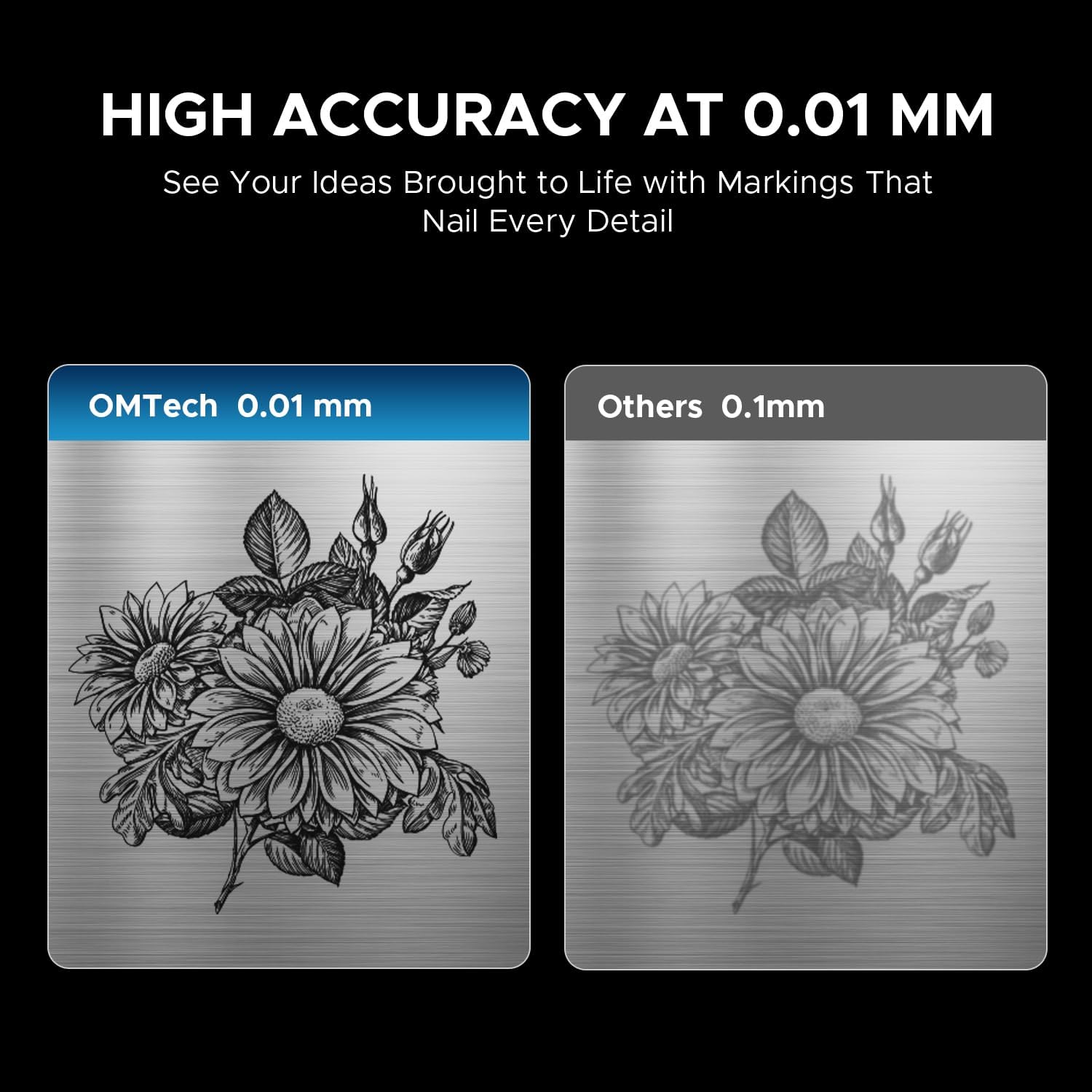
Image 4.1: The laser engraver connected to a computer, illustrating software compatibility and setup.
4.4 Rotary Axis Connection (Optional)
- If using the rotary axis, connect its cable to the designated port on the main laser unit.
- Securely mount the rotary axis to the work platform if required for your application.
5. Bedienungsanleitung
5.1 Einschalten
- Stecken Sie den Schlüssel in das Zündschloss und drehen Sie ihn in die Position „EIN“.
- Drücken Sie den Hauptschalter.
- The machine will initialize.
5.2 Materialvorbereitung und -platzierung
Ensure your material is clean and free of obstructions. Place the material securely on the work platform or within the rotary axis chuck.
5.3 Fokussieren des Lasers
Use the dual red dot locators to achieve the correct focal distance. Adjust the height of the laser head until the two red dots converge into a single, sharp point on the material surface. This ensures optimal engraving quality and depth.
5.4 Software Operation (LightBurn/EZCad)
- Launch the engraving software (LightBurn or EZCad) on your computer.
- Importieren oder erstellen Sie Ihr eigenes Design.
- Set engraving parameters such as power, speed, frequency, and pulse width according to your material and desired effect. Refer to the software's user manual for detailed parameter guidance.
- Vorview the engraving path to confirm positioning.
5.5 Gravurprozess
- Stellen Sie sicher, dass alle Sicherheitsvorkehrungen getroffen sind, einschließlich des Tragens einer Laserschutzbrille.
- Initiate the engraving job from the software.
- Monitor the engraving process. In case of any issue, press the emergency stop button immediately.
- Once complete, wait for the laser to stop before removing the engraved material.
5.6 Kompatible Materialien
The OMTech 30W MOPA Fiber Laser Engraver is suitable for marking and engraving a wide range of materials:

Abbildung 5.1: Beispielamples of materials that can be engraved with the OMTech MOPA Fiber Laser.
- Metals: Brass, Gold, Silver, Aluminum, Titanium, Tungsten, Stainless Steel.
- Other Materials: Brick, Tile, Marble, Granite.
5.7 Engraving Performance
The machine offers high speed and precision for various applications.

Image 5.2: Illustration of the high engraving speed capability of fiber lasers compared to other laser types.

Abbildung 5.3: Beispielample of engraving depth, demonstrating the machine's capability for multi-pass cutting up to 0.8 mm.

Image 5.4: Visual comparison highlighting the 0.01 mm engraving accuracy of the OMTech laser.
6. Wartung
Regelmäßige Wartung gewährleistet die Langlebigkeit und optimale Leistung Ihres Lasergravierers.
- Reinigung der Linse: Periodically inspect and clean the laser lens using specialized lens cleaning solutions and wipes to prevent dust and debris from affecting beam quality.
- Aufräumen des Arbeitsbereichs: Keep the work platform and surrounding area clean from engraved material residue.
- Kabelinspektion: Überprüfen Sie regelmäßig alle Kabel auf Verschleiß oder Beschädigungen. Ersetzen Sie beschädigte Kabel umgehend.
- Belüftungsöffnungen: Ensure the machine's air vents are clear and unobstructed to maintain proper cooling.
The fiber laser source has an estimated service life of over 100,000 hours, requiring minimal maintenance for the laser source itself.
7. Fehlerbehebung
This section addresses common issues you might encounter. For more complex problems, please contact OMTech support.
- Keine Laserleistung:
- Check if the machine is powered on and the key switch is in the 'ON' position.
- Ensure the emergency stop button is not engaged.
- Verify all cables are securely connected. - Mangelhafte Gravurqualität:
- Re-check the laser focus. The red dots should converge perfectly.
- Clean the laser lens if it appears dirty.
- Adjust engraving parameters (power, speed, frequency, pulse width) for the specific material.
- Stellen Sie sicher, dass das Material flach und sicher liegt. - Softwareverbindungsprobleme:
- Restart both the machine and the computer.
- Überprüfen Sie die USB-Kabelverbindung.
- Reinstall software drivers if necessary. - Drehachse funktioniert nicht:
- Ensure the rotary axis is correctly connected to the main unit.
- Verify that the rotary axis settings are enabled and configured in the software.
8. Spezifikationen
| Besonderheit | Spezifikation |
|---|---|
| Modellnummer | LYF-30JW(S) |
| Laserleistung | 30 W |
| Laserquelle | JPT Fiber Laser |
| Laserwellenlänge | 1064 nm |
| max. Markierungsgeschwindigkeit | 10,000 mm/s |
| Markierungsgenauigkeit | 0.01 mm |
| Maximale Markierungstiefe in einem Arbeitsgang | 0.08 mm |
| Frequenzbereich | 1-4000 kHz |
| Adjustable Pulse Width | 2-500 ns |
| Arbeitsbereich | 5.9" x 5.9" (150 mm x 150 mm) |
| Geschätzte Laser-Lebensdauer | 100,000+ Stunden |
| Kühlsystem | Luftkühlung |
| Kompatible Software | LightBurn (Windows 7, 8, 10, 11, macOS), EZCad2 |
| Unterstützte Bildformate | .bmp, .gif, .jpg, .jpeg, .dxf, .dst, .ai |
| Abmessungen (L x B x H) | 15.8 x 13.4 x 21.3 Zoll |
| Nettogewicht | 40 Pfund. |
| Zertifizierungen | FDA, CE |
Hinweis: Spezifikationen können ohne vorherige Ankündigung geändert werden.
9. Support und Garantie
9.1 Kundendienst
For technical assistance, troubleshooting, or any inquiries regarding your OMTech laser engraver, please contact our support team:

Image 9.1: OMTech customer support contact details.
- Telefon: +1 (949) 438-4949
- Allgemeine E-Mail: SUPPORT@OMTECHLASER.COM
- E-Mail des technischen Supports: TECHSUPPORT@OMTLASER.COM
Support is available 24/7.
9.2 Garantieinformationen
Please refer to the official OMTech website or your purchase documentation for detailed warranty information regarding your OMTech 30W MOPA Fiber Laser Engraver. Warranty terms and conditions may vary.


