1. Einleitung
Vielen Dank für Ihren Einkauf.asing the AFK Portable Bluetooth Wireless Speaker. This manual provides detailed instructions on how to set up, operate, and maintain your speaker to ensure optimal performance and longevity. Please read this manual thoroughly before using the product.

Image: The AFK Portable Bluetooth Wireless Speaker, showcasing its sleek black cylindrical design and top-mounted control panel.
2. Produktüberschreitungview
2.1 Packungsinhalt
Bitte überprüfen Sie den Packungsinhalt nach dem Auspacken:
- AFK Portable Bluetooth Wireless Speaker (Model: BT528) with built-in microphone
- USB-C-Ladekabel
- Benutzerhandbuch (dieses Dokument)
2.2 Hauptmerkmale
- Kraftvoller Klang: Dual speaker drivers and a powerful amplifier module deliver up to 15W room-filling sound with punchy bass, strong midranges, and crisp highs.
- Bluetooth 5.3-Konnektivität: Offers fast and stable wireless connections up to 100 feet (30 meters).
- Dynamische Beleuchtung: Features 5 colorful light colors and 6 light modes, including mixed color flashes that sync with the beat, creating an immersive audio-visual experience.
- Erweiterte Spielzeit: Enjoy up to 18 hours of non-stop playback at 50% volume, or up to 4 hours at 100% volume. Lights can be turned off to conserve battery.
- Mehrere Wiedergabeoptionen: Supports wireless playback via Bluetooth, TF card, or USB.
- Eingebautes Mikrofon: Allows for clear hands-free calls within the Bluetooth range.
- Tragbares Design: Lightweight and easy to carry for indoor and outdoor use.
- USB-C-Aufladung: Praktischer und moderner USB-C-Anschluss zum Aufladen.
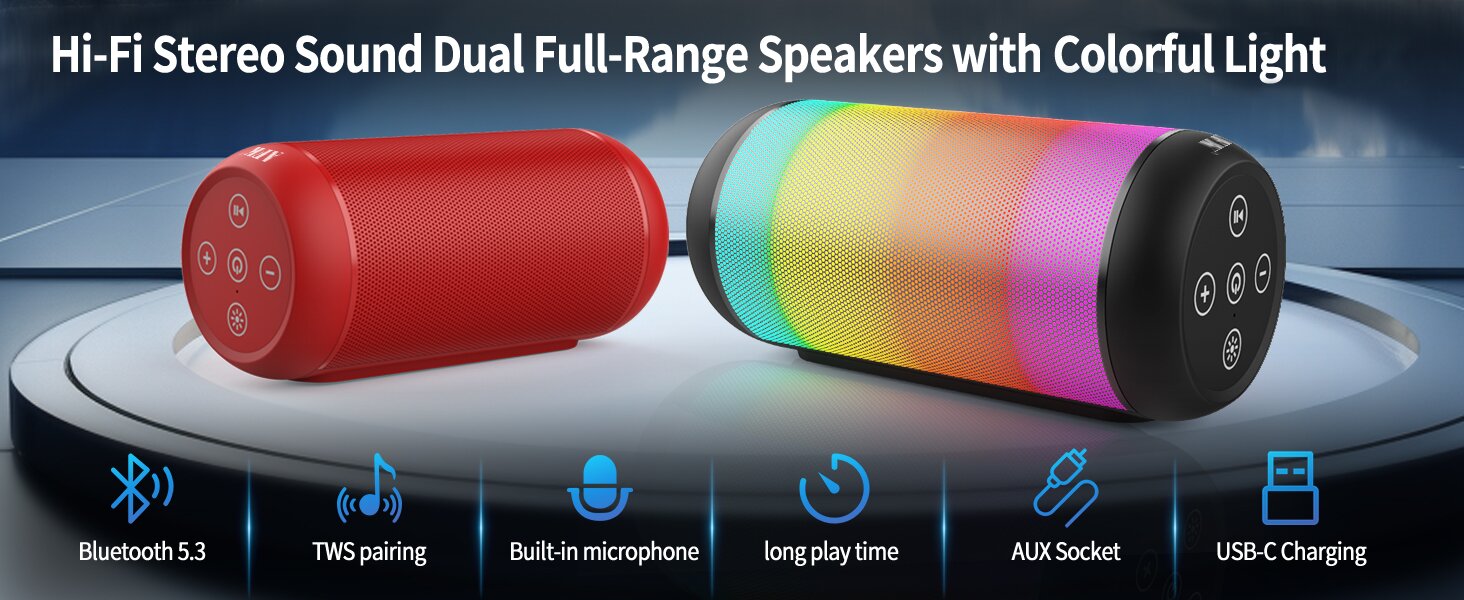
Image: An illustration highlighting key features such as Bluetooth 5.3, TWS pairing, built-in microphone, long playtime, AUX socket, and USB-C charging.

Abbildung: Eine Schnittzeichnung view illustrating the dual speaker drivers responsible for deep bass stereo sound.

Image: The speaker positioned on a table, demonstrating its 360-degree stereo surround sound capability.
3. Einrichtung
3.1 Aufladen des Lautsprechers
Before first use, fully charge the speaker. Connect the provided USB-C charging cable to the speaker's USB-C port and the other end to a compatible USB power adapter (not included) or a computer's USB port. The charging indicator light will show the charging status and turn off when fully charged.
3.2 Ein-/Ausschalten
- Zum Einschalten: Halten Sie die Ein-/Aus-Taste gedrückt (⏻Warten Sie einige Sekunden, bis Sie ein akustisches Signal hören und die Kontrollleuchten aufleuchten.
- Zum Ausschalten: Halten Sie die Ein-/Aus-Taste gedrückt (⏻) again for a few seconds until you hear an audible prompt and the indicator lights turn off.
4. Bedienungsanleitung
4.1 Bluetooth-Kopplung
So verbinden Sie Ihren Lautsprecher mit einem Bluetooth-fähigen Gerät:
- Ensure the speaker is powered on and in Bluetooth pairing mode (indicated by a flashing blue light, or similar).
- Aktivieren Sie auf Ihrem Gerät (Smartphone, Tablet, Computer) Bluetooth und suchen Sie nach verfügbaren Geräten.
- Select "AFK Speaker" (or similar name) from the list of found devices.
- Once paired, the speaker will indicate a successful connection (e.g., a solid blue light or an audible prompt).
The speaker will automatically attempt to reconnect to the last paired device when powered on, if the device is within range and Bluetooth is enabled.

Image: The speaker in an outdoor setting, demonstrating its stable Bluetooth connection range of up to 100 feet.
4.2 Musikwiedergabe
- Bluetooth-Modus: Once paired, play music from your connected device. Use the speaker's control buttons or your device to control playback (play/pause, next/previous track, volume).
- TF-Karte/USB-Modus: Legen Sie eine TF-Karte oder einen USB-Stick mit Audiodateien ein. files into the respective port on the speaker. The speaker will automatically switch to the corresponding mode and begin playback. Use the speaker's control buttons for navigation.
4.3 Lichtsteuerung
The speaker features dynamic lighting modes. Press the Light button (💡) to cycle through the available light modes:
- Tarry Sky Light
- Atmung
- Fließend
- Schneller Sprung
- Rhythm Jump
- Licht aus

Bild: Ein überview of the six dynamic light modes available on the speaker, including options to turn the lights off.
4.4 Anrufbearbeitung
With the built-in microphone, you can manage calls when connected via Bluetooth:
- Anruf annehmen/beenden: Drücken Sie die Play / Pause-Taste (⏸) einmal.
- Anruf ablehnen: Drücken und halten Sie die Wiedergabe-/Pause-Taste (⏸) 2 Sekunden lang.

Image: The speaker being used for a hands-free call, demonstrating the functionality of its built-in microphone.
5. Wartung
5.1 Reinigung
To clean your speaker, use a soft, dry, lint-free cloth. Do not use abrasive cleaners, alcohol, or chemical solvents, as these may damage the surface or internal components. Avoid getting moisture into any openings.
5.2 Speicherung
Store the speaker in a cool, dry place away from direct sunlight, extreme temperatures, and humidity. If storing for an extended period, charge the battery periodically (e.g., every 3 months) to maintain battery health.
6. Fehlerbehebung
If you encounter issues with your AFK Portable Bluetooth Wireless Speaker, please refer to the following common problems and solutions:
| Problem | Mögliche Ursache | Lösung |
|---|---|---|
| Der Lautsprecher lässt sich nicht einschalten. | Schwache Batterie; Einschalttaste nicht richtig gedrückt. | Laden Sie den Lautsprecher vollständig auf. Halten Sie den Ein-/Ausschalter einige Sekunden lang gedrückt. |
| Kein Ton. | Lautstärke zu niedrig; Gerät nicht angeschlossen; Falscher Eingangsmodus. | Increase speaker and device volume. Ensure Bluetooth is connected or TF/USB is inserted correctly. |
| Kopplung via Bluetooth nicht möglich. | Lautsprecher nicht im Kopplungsmodus; Bluetooth-Verbindung des Geräts deaktiviert; Zu weit vom Lautsprecher entfernt; Störungen. | Ensure speaker is in pairing mode. Turn device Bluetooth off/on. Move device closer to speaker. Avoid strong electromagnetic interference. |
| Kurze Akkulaufzeit. | High volume usage; Lights constantly on; Battery degradation. | Reduce volume. Turn off lights when not needed. Battery life naturally decreases over time. |
7. Spezifikationen
| Besonderheit | Detail |
|---|---|
| Modellname | BT528-BLK-US |
| Lautsprechertyp | Doppellautsprecher |
| Konnektivitätstechnologie | Bluetooth 5.3 |
| Drahtlose Kommunikationstechnologie | Bluetooth |
| Maximale Reichweite | 30 Meter |
| Maximale Lautsprecherausgangsleistung | 11 Watts (RMS) / 15 Watts (Peak) |
| Frequenzgang | 20 kHz (Hinweis: Dies ist wahrscheinlich die obere Grenze, der typische Bereich liegt zwischen 20 Hz und 20 kHz) |
| Audioausgabemodus | Stereo |
| Surround Sound-Kanalkonfiguration | 2.0 |
| Besonderheit | Built-in Microphone, Dynamic LED Lights |
| Empfohlene Verwendung | Indoor/Outdoor, Sport, Outdoor Events, Parties, CampWandern, Wandern |
| Kompatible Geräte | Desktop, Smartphone, Tablet, Television |
| Stromquelle | Batteriebetrieben (1 Lithium-Ionen-Akku im Lieferumfang enthalten) |
| Kontrollmethode | Touch-Tasten |
| Farbe | Schwarz |
| Technische Daten | 2.6"T x 6.1"B x 2.6"H (6.6 cm T x 15.5 cm B x 6.6 cm H) |
| Artikelgewicht | 1.26 Pfund (0.57 Kilogramm) |
| Ist wasserdicht | FALSCH |
8. Garantie und Support
8.1 Eingeschränkte Garantie
This AFK Portable Bluetooth Wireless Speaker comes with a limited warranty. Please refer to the warranty card included in your package or contact AFK customer support for specific terms and conditions. The warranty typically covers manufacturing defects and malfunctions under normal use.
8.2 Kundendienst
For further assistance, technical support, or warranty claims, please contact AFK customer service. Contact information can usually be found on the product packaging, the official AFK webWebsite oder über die Supportkanäle Ihres Händlers.


