Willkommen
Thank you for choosing the BYTECH BICONIC True Wireless Earbuds. This manual provides essential information on how to set up, operate, maintain, and troubleshoot your new earbuds. Please read this manual thoroughly before use to ensure optimal performance and longevity of your device.
Wichtige Sicherheitshinweise
- Die Ohrhörer und das Ladecase dürfen keinen extremen Temperaturen, hoher Luftfeuchtigkeit oder Flüssigkeiten ausgesetzt werden.
- Vermeiden Sie es, das Gerät fallen zu lassen, Stößen auszusetzen oder es auseinanderzunehmen.
- Verwenden Sie keine Scheuermittel oder aggressive Chemikalien zur Reinigung der Ohrhörer oder des Ladecase.
- Um Gehörschäden vorzubeugen, sollten Sie die Lautstärke mäßig einstellen. Längere Einwirkung lauter Geräusche kann zu irreversiblem Hörverlust führen.
- Außerhalb der Reichweite von Kindern und Haustieren aufbewahren.
- Entsorgen Sie das Gerät gemäß den örtlichen Vorschriften. Geben Sie es nicht in den Hausmüll.
Im Leistungsumfang enthalten
Bitte überprüfen Sie den Packungsinhalt, um sicherzustellen, dass alle Artikel vorhanden sind:
- BYTECH BICONIC True Wireless Earbuds (Left and Right)
- Ladeetui
- Ladekabel
- Bedienungsanleitung
Produkt überview
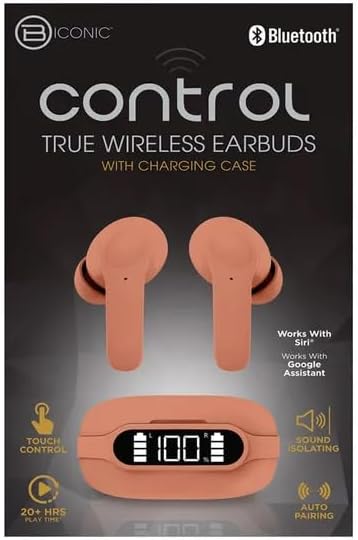
Familiarize yourself with the components of your BYTECH BICONIC True Wireless Earbuds.

Erste Schritte
Aufladen der Ohrhörer und des Gehäuses
The BYTECH BICONIC earbuds come with a rechargeable battery in both the earbuds and the charging case. Ensure both are fully charged before first use.
- Legen Sie die Ohrhörer in das Ladecase und achten Sie darauf, dass sie richtig in ihren jeweiligen Schlitzen sitzen (L für links, R für rechts).
- Connect the provided charging cable to the charging port on the case and the other end to a USB power source (e.g., computer USB port, wall adapter).
- The digital display on the charging case will show the battery level. Allow sufficient time for a full charge.
- Sobald das Gerät vollständig aufgeladen ist, trennen Sie das Ladekabel.
Bluetooth-Kopplung
Follow these steps to pair your earbuds with your Bluetooth-enabled device:
- Stellen Sie sicher, dass die Ohrhörer aufgeladen sind und sich im Ladecase befinden.
- Open the charging case. The earbuds will automatically enter pairing mode, and an indicator light on the earbuds will flash.
- Gehen Sie auf Ihrem Gerät (Smartphone, Tablet usw.) zu den Bluetooth-Einstellungen und schalten Sie Bluetooth ein.
- Suchen nach available devices. You should see "BYTECH BICONIC" or a similar name appear in the list.
- Select "BYTECH BICONIC" to connect. Once connected, a voice prompt will confirm the successful pairing, and the indicator lights on the earbuds will stop flashing.
- Die Ohrhörer verbinden sich beim Herausnehmen aus dem Ladecase automatisch wieder mit dem zuletzt gekoppelten Gerät, vorausgesetzt, Bluetooth ist auf dem Gerät aktiviert.
Bedienungsanleitung
Touch-Bedienelemente
The BYTECH BICONIC earbuds feature intuitive touch controls for easy management of your audio and calls.
| Aktion | Funktion |
|---|---|
| Einmaliges Tippen (linker/rechter Ohrhörer) | Musik abspielen/anhalten, Anruf annehmen/beenden |
| Doppeltippen (rechter Ohrhörer) | Nächster Titel |
| Doppeltippen (linker Ohrhörer) | Vorheriger Titel |
| Dreifachtippen (Linker/Rechter Ohrhörer) | Sprachassistent aktivieren (Siri/Google Assistant) |
| Langes Drücken (linker/rechter Ohrhörer) | Anruf ablehnen |
Ein- und Ausschalten
- Einschalten: Die Ohrhörer schalten sich automatisch ein, wenn sie aus dem Ladeetui entfernt werden.
- Ausschalten: Legen Sie die Ohrhörer zurück in das Ladecase und schließen Sie den Deckel. Sie schalten sich automatisch aus und beginnen mit dem Ladevorgang.
Wartung und Pflege
Proper care will extend the life of your BYTECH BICONIC True Wireless Earbuds.
- Reinigung: Reinigen Sie die Ohrhörer und das Ladecase mit einem weichen, trockenen und fusselfreien Tuch. Verwenden Sie keine Flüssigkeiten oder Sprays zur Reinigung.
- Lagerung: Bewahren Sie die Ohrhörer bei Nichtgebrauch stets im Ladecase auf, um sie zu schützen und geladen zu halten.
- Vermeiden Sie extreme Bedingungen: Do not expose the device to extreme heat, cold, or direct sunlight.
- Wasserbeständigkeit: Diese Ohrhörer sind nicht wasserdicht. Vermeiden Sie den Kontakt mit Wasser oder übermäßiger Feuchtigkeit.
Fehlerbehebung
Sollten Sie Probleme mit Ihren Ohrhörern haben, beachten Sie bitte die folgenden gängigen Lösungsansätze:
| Problem | Lösung |
|---|---|
| Ohrhörer lassen sich nicht koppeln | Stellen Sie sicher, dass Ihre Ohrhörer geladen sind. Schalten Sie Bluetooth auf Ihrem Gerät aus und wieder ein. Entkoppeln Sie das Gerät in den Bluetooth-Einstellungen und koppeln Sie es erneut. |
| Nur ein Ohrhörer funktioniert | Legen Sie beide Ohrhörer zurück in das Ladecase, schließen Sie den Deckel, warten Sie einige Sekunden und nehmen Sie sie dann wieder heraus. Stellen Sie sicher, dass beide Ohrhörer geladen sind. |
| Kein Ton | Check volume levels on both your device and the earbuds. Ensure earbuds are properly connected. Try playing different audio. |
| Ladeetui lädt nicht | Vergewissern Sie sich, dass das Ladekabel fest mit dem Gehäuse und der Stromquelle verbunden ist. Versuchen Sie es mit einem anderen USB-Anschluss oder Netzteil. |
Technische Spezifikationen
Detailed specifications for your BYTECH BICONIC True Wireless Earbuds:
| Besonderheit | Detail |
|---|---|
| Modellnummer | BC-AU-BE-144-TN |
| Konnektivitätstechnologie | Kabellos (Bluetooth) |
| Formfaktor | Im Ohr (Intraurale) |
| Farbe | Cafe |
| Besondere Merkmale | Rechargeable Battery, Touch Control, Sound Isolating, Auto Pairing |
| Im Lieferumfang enthaltene Komponenten | Kabel |
| Estimated Play Time | 20+ Hours (with charging case) |
Garantieinformationen und Kundensupport
BYTECH products are designed and manufactured to the highest quality standards. For information regarding warranty coverage, please refer to the warranty card included with your purchase or visit the official BYTECH webWebsite.
If you require further assistance or have questions not covered in this manual, please contact BYTECH customer support through their official channels. Please have your model number (BC-AU-BE-144-TN) and purchase details ready when contacting support.


